

Time property
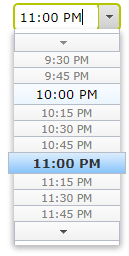
Recently we implemented a new open source add-on advanced-cms/time-property. The package contains model type, editing widget and property renderer used to store and display time between 0-24 hours. Property defined in the model is a Timespan type, so there should be no issues with time zones when saving value. It's using dijit/form/TimeTextBox as an editor in edit view.

Getting started
First install Advanced.CMS.TimeProperty package from Episerver's NuGet feed.
PM> Install-Package Advanced.CMS.TimePropertyThen add a new TimeSpan property to your content model. The property needs to be annotated with BackingType attribute.
[ContentType(GUID = "AREDS8A41-5C8C-G3PJ-8F74-320ZF3DE8227")]
public class TestPage : PageData
{
    [BackingType(typeof(AdvancedCms.TimeProperty.TimeProperty))]
    public virtual TimeSpan? Time1 { get; set; }
}
Edit view configuration
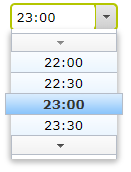
By default, the editor will be displayed using 12-hour clock time format. To change this you can use TimePropertySettings attribute added on the model. For example, to get 24-hour clock format:
[ContentType(GUID = "AREDS8A41-5C8C-G3PJ-8F74-320ZF3DE8227")]
public class TestPage : PageData
{
    [BackingType(typeof(AdvancedCms.TimeProperty.TimeProperty))]
    [TimePropertySettings(TimePattern = "HH:mm")]
    public virtual TimeSpan? Time1 { get; set; }
}
Then it will be rendered as:
View mode property renderer
The NuGet package also contains a renderer for the view mode. You need to use PropertyFor and TimeSpan tag:
@Html.PropertyFor(x => x.CurrentPage.Time1, new { Tag = "TimeSpan" })
To render time with custom format use DateFormat property:
@Html.PropertyFor(x => x.CurrentPage.Time1, new { DateFormat = "hh:mm tt", Tag = "TimeSpan" })

Hi Grzegorz, I installed this plugin but I am only able to see 12 hour time format - please see below.
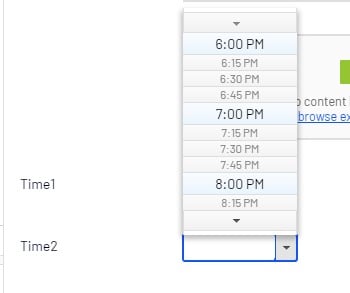
Is there any particular way so that I can see 24 hour time format too for "TimeSpan" EPiserver properties?
Regards
Hi @Abhinay
you need to decorate your property with
and rebuild project to see 24 hrs format.
The addon is now available for net5 https://nuget.optimizely.com/package/?id=Advanced.CMS.TimeProperty&v=2.0.0
This is great. One note, if you add this to a generic list property, then add the ClientEditor reference