
Håkon Nordli
Nov 25, 2015
  6873
(0 votes)

Extend Dojo's onChange event by using intermediateChanges

One of JavaScripts built-in events are 'change'. It is triggered different depending on which input type you are using. For text input it is fired when the element looses focus after its value has changed. 

Not suprisingly, onChange in Dojo works the same. However it is possible to make it fire whenever the value changes by using intermediateChanges. 

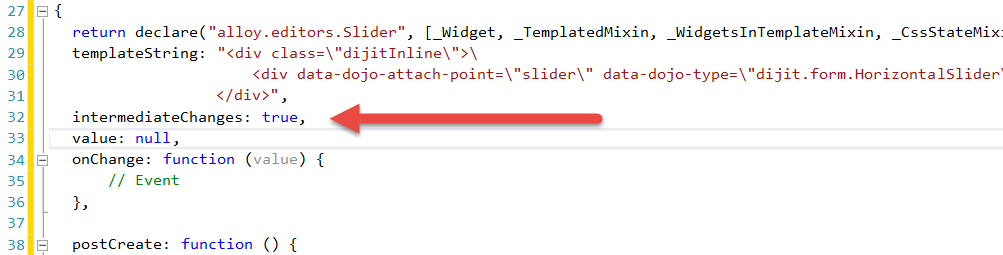
The built-in dijit property, intermediateChanges, is a part of dijit.form widgets. By default it is set to false, but when it is set to true, it fires the onChange event whenever the value of the form widget changes.  This way it is possible to trigger something while the user is editing a property and before a text input looses focus.  
 

image

Nov 25, 2015

Comments

Please login to comment.
Latest blogs
Introducing AI Assistant v4 for Optimizely CMS 12 and 13

Epicweb AI Assistant v4.0 adds full support for Optimizely CMS 13 on .NET 10 while staying compatible with CMS 12 on .NET 8, plus new AI Chat tools...

Luc Gosso (MVP) | Apr 20, 2026 |

Remote Debugging in Optimizely DXP: What Is Actually Possible?

Introduction At SYZYGY Techsolutions , we support Optimizely DXP projects at scale, so continuously  identifying  the right tools and approaches fo...

Mike | Apr 20, 2026

Removing Unused Properties in Optimizely CMS 13

Learn how to remove orphaned property definitions in Optimizely CMS 13. Explore API updates for IContentTypeRepository and how to safely use...

Stuart | Apr 17, 2026 |

How to Remove the "Paste formatting options" Dialog in Optimizely CMS 12

If you've upgraded from an older Optimizely CMS solution lately, you may have noticed a dialog popping up every time an editor pastes content from...

Henning Sjørbotten | Apr 17, 2026 |