


Accelerating Optimizely CMS and Commerce upgrades with agentic AI (Part 2 of 2)
The Real Transformation in Optimizely CMS 13: Why the Upgrade Itself Is the Easy Part.
A field-tested playbook for enterprise teams moving from Optimizely CMS 12 and Commerce 14 to CMS 13 and Commerce 15.
Niteco Engineering | Engineering Insights | 10 min read
Series note
This is Part 2 of a 2-part series on accelerating Optimizely upgrades with agentic AI.
- Part 1 : CMS 11 and Commerce 13 → CMS 12 and Commerce 14
- Part 2 (this post): CMS 12 and Commerce 14 → CMS 13 and Commerce 15, plus the adoption work that creates real business value
TL;DR
Completing the upgrade from Optimizely CMS 12 → CMS 13 and Commerce 14 → Commerce 15 is only the first step. By 2026 standards the upgrade itself is a solvable engineering exercise patterns are known, breaking changes are catalogued, and we have encoded the entire upgrade workflow into specialized AI Agent Skills that perform automated codebase analysis and large-scale modernization at speed and scale, operationalized on either advanced or open-source AI models.
The real objective is something larger: aligning the solution with Optimizely’s long-term product roadmap. That means evolving the content model from PageData / BlockData to ExperienceData / Experience Pages, embracing Visual Builder, Optimizely Graph, Content Manager, the enhanced DAM, and Opal AI, and putting in place the foundations that let an organization move workloads between PaaS and SaaS without rewriting the frontend.
The proposed direction strongly aligns with the recommended long-term architecture of CMS 13. This article describes the framework that delivers it, the accelerators that automate it, and the lessons from delivering it on a real enterprise PaaS estate.
1. Two upgrades, one architectural destination
Most enterprises arrive at CMS 13 with two parallel upgrade tracks running:
| Track | From | To | Nature |
| Content | Optimizely CMS 12 | Optimizely CMS 13 | .NET 10, Graph-first, Visual Builder, decoupled identity, Content Manager, enhanced DAM, Opal |
| Commerce | Optimizely Commerce 14 | Optimizely Commerce 15 | Aligned to the same CMS 13 / .NET 10 baseline: renewed catalog and order APIs |
Both tracks converge on the same architectural philosophy: a SaaS-grade authoring experience delivered on top of PaaS, with content delivered through Optimizely Graph, an AI-assisted editorial layer (Content Manager, Opal, enhanced DAM), and a clean separation between editor-owned layout and developer-owned components.
Treating the CMS and Commerce upgrades as separate technical tasks may get you onto the latest platform versions, but it often leaves the solution operating with legacy CMS 12 design patterns, workflows, and content models. In that scenario, the technology is upgraded, but the business value remains limited. The real return on investment comes when both upgrade streams are aligned to a shared future-state architecture one that embraces Graph-first delivery, Visual Builder, modern editorial experiences, AI-assisted operations, and a clear separation between editor-managed layouts and developer-managed components, consistent with the direction of Optimizely’s long-term product roadmap.
2. The technical upgrade is the easy part and we have automated it
A standard CMS 12 → CMS 13 / Commerce 14 → Commerce 15 upgrade is a sequence of well-defined steps:
1. Pre-upgrade analysis. Inventory .csproj files, EPiServer.* / Optimizely.* package references, deprecated API usage, and third-party add-on compatibility.
2. Project file & dependency upgrade. Move every project to .NET 10, align every CMS-aligned package to the same 13.x.y release (we use 13.0.2 as the reference baseline), and remove deprecated packages such as EPiServer.Find.*.
3. API migration. Mechanical replacements (PageReference → ContentReference, .PageLink → .ContentLink, IContentTypeRepository<T> → IContentTypeRepository, [Searchable(false)] → [IndexingType(IndexingType.Disabled)], SaveAction.Non → SaveAction.Default, ValidateArgNotNull → ArgumentNullException.ThrowIfNull) and structural ones (SiteDefinition.Current → IApplicationResolver / ISiteDefinitionResolver, ServiceLocator.Current → constructor injection, IPageRouteHelper → IContentRouteHelper).
4. Scheduled job attribute alignment. [ScheduledPlugIn] → [ScheduledJob], drop the now-invalid SortIndex argument, and avoid the runtime CustomAttributeFormatException it otherwise produces.
5. Custom property migration. Spaced DisplayName values on [PropertyDefinitionTypePlugIn] are rejected by CMS 13’s stricter name validation programmatic name must be a valid identifier; UI text moves to [Display].
6. Integration remediation. EPiServer.Find is removed entirely, surfaced as // TODO: [CMS13-MIGRATION] markers at every former call site, and migrated to Optimizely Graph (see more in §9) .
7. Forms compatibility. EPiServer.Forms 5.10.x → 6.0.0, the CMS 13–compatible line.
8. Startup / DI registration alignment. AddCms().AddContentGraph().AddContentManager() in the right order, plus AddCmsAspNetIdentity<ApplicationUser>() and AddVisitorGroups().
9. First-boot footguns. The trio that bites every project on day one of CMS 13:
o BlueprintInitialization failing because legacy SysRoot was set to Availability.Specific.
o PropertyDefinitionTypeInitialization failing on programmatic names that contain spaces.
o MissingMethodException on ContentReference.get_StartPage() when an add-on still ships CMS 12 binaries (the SiteImprove plugin and several Geta packages are typical culprits).
We have encoded all of this and the analogous Commerce 14 → 15 workflow into specialized Agent Skills. They walk through an entire solution, produce a pre-upgrade report, apply safe transformations automatically, insert review markers where human judgement is required, drive dotnet restore / dotnet build to a clean state, and emit a structured migration report. This collapses what was historically a four-to-six-week engineer-led upgrade into hours of supervised automation.
The honest framing for executives: the technical upgrade is no longer the constraint. Speed, risk, and cost are now bounded by the things automation cannot do the content-model transformation, the editorial change management, and the third-party long tail.
3. The fundamental shift: From PageData to ExperienceData
The single biggest conceptual and design-modeling change in CMS 13 is the evolution from the traditional PageData model to the modern ExperienceData / Experience Pages model. This is not a cosmetic rename or a new editing screen. It is a fundamental shift in how digital experiences are structured, composed, and managed by moving from page-centric content architecture to a modular, experience-centric design system built from Elements, Sections, Rows, Columns, Blueprints, and reusable Styles.
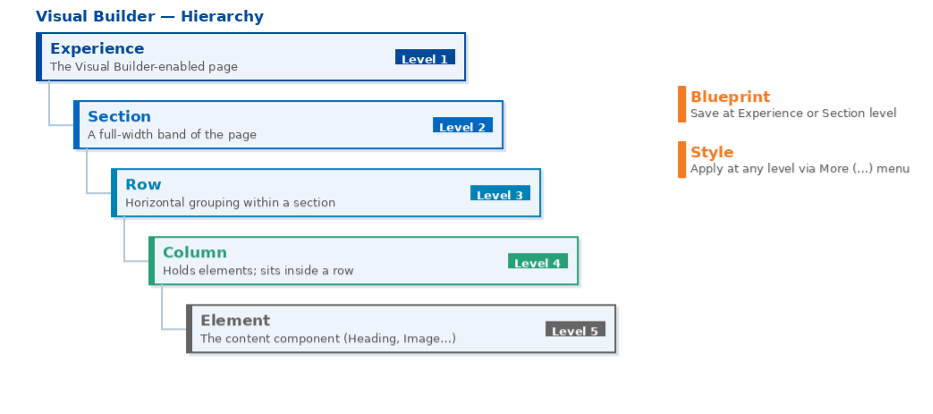 Visual Builder hierarchy: Experience → Section → Row → Column → Element, with Blueprint and Style applied across levels
The Visual Builder content hierarchy: an Experience contains Sections; each Section contains Rows; each Row contains Columns; each Column holds Elements. Blueprints save reusable layouts at the Experience or Section level; Styles are developer-defined visual options that can be applied at any level via the More (…) menu.
|
CMS 12 (page-centric) |
CMS 13 (experience-centric) |
|
PageData |
ExperienceData / Experience Page |
|
BlockData (composite, monolithic) |
Element (atomic) + Block (kept for behavior-rich, data-driven units) |
|
ContentArea (free-form blocks on a page) |
Section → Row → Column → Element (a structured grid editors compose visually) |
|
Display options on blocks |
Styles (developer-defined named options applied at Section / Row / Column / Element level) |
|
Page templates duplicated by editors |
Blueprints (saved layouts reused at Section or Experience level) |
|
Hidden tree navigation only |
Outline panel synchronised with live preview |
The shift redistributes authority across the organization:
· Editors gain control of layout. They add, reorder, and style Sections, Rows, and Columns without a developer ticket.
· Developers retain control of components. Elements, their fields, and their style options remain code-defined and code-reviewed.
· The interface creates clear responsibilities. Editors can manage and update content using approved components, while developers control how components are built and maintained. This allows editors to create page layouts freely within defined guardrails, without changing core component design or code.
This separation is the single biggest reason CMS 13 deserves the “SaaS-grade experience on PaaS” label. It is also the reason content-model transformation is hard: every block in your existing site is an implicit decision about who owns layout, and most of those decisions need to be re-made.
4. The five capabilities that make the migration worth it
CMS 13 introduces five capabilities that, together, justify the architectural cost of the transformation. Treat them as the target state, not as optional add-ons.
4.1 Visual Builder
A live-preview, Outline-driven editing surface that activates automatically for any content type inheriting from ExperienceData. Editors compose pages from Sections, Rows, Columns, and Elements; Styles and Blueprints make repeatable patterns trivial. Visual Builder replaces the legacy On-Page Editing (OPE) experience as CMS 13’s default editing surface the On Page Editing mode and the All-Properties form are consolidated into one Outline + Live Preview workspace for Experience Pages. Legacy PageData content continues to use the form-based editor until it is migrated.
4.2 Optimizely Graph integration
Graph is no longer an optional headless layer; in CMS 13 it is the primary content-delivery and indexing fabric. AddContentGraph() is part of the CMS bootstrap. Search, content federation, semantic queries, and headless delivery all travel over the same pipe the same one a SaaS instance uses.
4.3 Content Manager
A Graph-powered editorial experience that augments and in many workflows replaces the traditional page tree. AI-driven semantic search across multiple content sources turns “where did we say that” from a 10-minute hunt into a single query. Registered with AddContentManager() after AddContentGraph().
4.4 Enhanced DAM
Embedded digital asset management with direct uploads, AI-powered tagging, automatic renditions, and saved views, all inside the CMS, replacing the older EPiServer.Cms.WelcomeIntegration.UI line.
DAM adoption is itself an Agent Skill. We have encoded enhanced-DAM implementation patterns, package replacement, configuration, asset model mapping, rendition strategy, migration of legacy assets, and integration into Visual Builder Element fields into specialized Agent Skills. The AI agents accelerate DAM adoption, integration, asset mapping, and modernization tasks the same way it accelerates the platform upgrade itself.
4.5 Opal AI integration
Optimizely’s AI agent orchestration platform with pre-built agents and custom workflows, RAG-powered against your own content. The most leveraged use cases on day one are SEO assistance, content drafting, alt-text generation, editorial QA, and merchandising support on the Commerce side.
These five capabilities are interlocking. Visual Builder needs Graph for preview; Content Manager needs Graph for search; Opal needs Content Manager and DAM for grounded, content-aware suggestions. Adopting them in isolation leaves value on the table.
5. The Visual Builder adoption framework
The framework below has been pressure-tested on a live CMS 12 → CMS 13 program. It is deliberately a five-phase plan that maps cleanly to budget cycles, editorial readiness, and release windows not a 20-step process that loses sponsorship within the first two months.
Phase 1: Enable Visual Builder (Foundation + Pilot)
Goal: Make Visual Builder live in the upgraded environment with one production-quality reference Experience Page; lock the cross-cutting decisions for the rest of the program.
· Run the upgrade Agent Skill end-to-end in a sandbox copy of production.
· Stand up the Visual Builder foundation (ExperienceData, SiteExperienceData, the Element library, the _RootExperience.cshtml layout) alongside the legacy templates the Niteco CMS 13 PaaS Foundation provides this turnkey.
· Author one representative Experience Page end-to-end in Visual Builder typically a marketing landing page that exercises hero, image+text, CTA, and at least one behavior-rich block (e.g., Forms) used as a Block Element. This becomes the canonical reference for editorial training.
· Validate header / footer parity, SEO meta, Open Graph, breadcrumb, hreflang, canonical, robots, GTM and 3rd-party scripts, language switching, preview, draft / publish, scheduled publish, and rollback.
· Lock the cross-cutting decisions: hybrid Block / Element policy, cutover model (replace-in-place vs. alongside-then-swap), redirect store ownership, personalization parity strategy, Graph consumer ownership.
Editor outcome: Editors use Visual Builder as the unified editing experience. Existing PageData content can be managed in the same interface, while advanced layout capabilities such as Sections, Rows, Columns, Elements, Blueprints, and reusable Styles are available for Experience Pages.
Phase 2: Discovery & Transformation
Goal: Produce a Decomposition Spec the single source of truth that drives both content modeling (Phase 3) and the AI Migration Accelerator (Phase 4).
The Decomposition Spec is one document containing five tables, fully populated for the entire site:
1. Page-type strategy: every legacy PageType mapped to a target Experience Page, kept classic, or scheduled for retirement.
2. Block decomposition: every legacy block classified as decompose into Elements, keep as Block Element (Forms, Navigation, complex carousels, product lists), or retire. Includes the target Section/Row/Column shape and the display-option mapping. Example: ImageTextBlock → ImageElement + HeadingElement + ParagraphElement + CtaGroupElement arranged in a 2-column Row.
3. Display option mapping: every legacy display option mapped to a Section / Row / Column / Element Style, or to a brand/theme variant.
4. Personalization & A/B audit: every visitor-group rule and experiment classified as auto-migrate, manual rebuild or retire Personalization and A/B testing on CMS 13: A stronger foundation (see §7).
5. Graph consumer inventory: every external consumer of CMS content with the new query shape it requires (see §10).
Phase 3: Content modeling & Parity layer
Goal: Make the Visual Builder content model production-ready and at parity with classic templates for all cross-cutting concerns.
· Build the Element library by extending the Niteco CMS 13 Foundation, with Site-specific Elements added where required. Reuse the foundation’s semantic Tailwind architecture (primitives → brand → theme contract → components) for variants never fork the Element library per market.
· Reach full parity between SitePageData and SiteExperienceData for SEO title and description, robots, canonical, hreflang, Open Graph, JSON-LD structured data, breadcrumb, language switcher metadata, and 3rd-party script slots.
· Layout parity between _Root.cshtml and _RootExperience.cshtml for header, footer, and global scripts. Shared site fixtures (WebFooterConfigurationBlock, site settings) stay shared and are referenced by the layout they are never re-modeled per Experience Page.
· Lock AvailableContentTypes at every level of the content hierarchy (Experience Pages allow only Sections; Sections allow only Rows; Rows allow only Columns; Columns allow only whitelisted Elements + Block Elements). This is what protects editor UX from chaos at scale.
Phase 4: Content migration (powered by the AI Migration Accelerator)
Goal: Migrate production content from PageData + ContentArea into Experience Pages at the pace your editors and traffic can absorb.
The migration is executed by Niteco’s AI Migration Accelerator (§10), a migration engine driven by the Decomposition Spec.
· Migrate by market / business unit / volume smallest, lowest-risk batches first.
· Per-batch ritual: dry-run + diff report, editorial spot-check, DB snapshot, run, validate against the harness (visual diff, Lighthouse, SEO meta parity, sitemap parity, Graph parity, broken-link scan), editorial sign-off, promote.
· Cutover model per page: prefer replace-in-place (delete legacy, take its URL) for SEO cleanliness; use alongside-then-swap (publish new alongside, swap with redirect at cutover) where rollback safety dominates.
Phase 5: Cutover & Decommission
Goal: Remove legacy surface area and close the program.
· Mark legacy block & page types [Obsolete]; restrict via AvailableContentTypes to prevent any new editor usage.
· Remove unused controllers, view models, view templates, and Display Templates.
· Finalise sitemap.xml, hreflang, and robots.txt to reflect the final URL set; verify 301 coverage with a final crawl.
· Deliver editorial training on the post-migration content model and the Visual Builder style guide.
6. Hybrid rendering: The practical bridge, not a compromise
A common objection from leadership: “Why can’t we just convert everything in one release?”
Two reasons. First, multi-thousand-page estates cannot be migrated, validated, and editorially reviewed in a single window without unacceptable SEO and editorial risk. Second, CMS 13’s architecture expects coexistence, both PageData and ExperienceData are first-class citizens; Block Elements let behavior-rich blocks live inside Visual Builder Columns; both editing surfaces can run side-by-side for months.
A healthy hybrid model looks like this:
· Decompose layout-flexible composites (ImageTextBlock, HeroBannerBlock, EditorialBlock, CTAGroupBlock) into Elements arranged in Sections/Rows/Columns.
· Keep as Block Elements the behavior-rich units: FormBlock, navigation menus, complex carousels with custom JS, product listings, search facets anything with non-trivial controller logic.
· Keep shared the cross-cutting site fixtures: WebFooterConfigurationBlock, site settings, header / footer / global scripts. These live on shared content and are referenced by the layout.
· Lock the contract with AvailableContentTypes, so editors compose only valid structures.
The hybrid model is the bridge. Done well, it lets you migrate at the pace your business absorbs, not the pace your migration script can theoretically deliver and it allows gradual modernization without requiring a full rewrite replatform.
7. Personalization and A/B testing on CMS 13: A stronger foundation
Personalization and experimentation are usually the first capabilities a marketing team asks about post-upgrade and CMS 13 delivers a meaningfully better foundation for both, if the migration plan is built with them in mind.
What changes
· Personalization scope moves from blocks to Elements / Sections. In CMS 12, visitor groups were typically attached to ContentArea items. In CMS 13, the equivalent units are Elements and Sections finer-grained, more composable, and visible in the Visual Builder Outline. The blast radius of a personalization rule is now exactly what the editor can see in the preview.
· Native content variations on Experience Pages. Editors can create and publish multiple named variants of the same page for A/B testing, personalization, campaigns, or localization in Visual Builder, each with its own lifecycle. Optimizely Graph queries should explicitly use the variation field when variant delivery is needed.
· Graph becomes the personalization data layer. With AddContentGraph() in the bootstrap, audience attributes, segments, and content metadata are queryable from a single API. Real-time decisioning that previously required custom plumbing now sits naturally on top of Graph.
· Experimentation aligns with Web Experimentation. Optimizely Web Experimentation runs cleanly against Experience Pages, with a much richer test surface (Section-level variants, Element-level swaps, Style toggles) than the page-template-or-bust split-tests common on CMS 12.
· Opal closes the loop. Opal agents can propose audience segments, suggest variant content, and analyse experiment outcomes against your own content corpus, turning experimentation from an ops task into an editorial workflow.
What this means for the migration plan
· Audit personalization in Phase 2. Every visitor-group rule and active experiment goes into Decomposition Spec table 4 (§3). Each one is classified as auto-migrate, manual rebuild or retire.
· Pick the right level of granularity. A personalization rule that used to swap a whole ContentArea block can now be expressed as either a Section variant, a Style toggle, or an Element-level swap. The Decomposition Spec records the chosen granularity per rule.
· Set the experimentation baseline before cutover. Capture conversion baselines on legacy templates before migration so post-migration experiments have a credible reference. Graph parity in the validation harness (§10) ensures the data layer behaves identically across the cutover.
· Train the editors, not just the developers. The marketing win from CMS 13 is not “we can A/B test ”they could already do that. It is “we can A/B test inside the same surface where we author.” Editorial enablement decides whether that win is realised.
The strategic frame: Personalization and A/B testing on CMS 12 were typically bolted on wired through visitor groups, custom controllers, and a separate experimentation tool. On CMS 13 they are native composable inside Visual Builder, queryable through Graph, and orchestrated by Opal. The migration plan should treat this as a primary business case for the program, not a Phase 6 afterthought.
8. The PaaS Foundation: One frontend, two runtimes
One of the highest-leverage investments we have made on the PaaS side is a CMS 13 Foundation accelerator that supports four delivery modes from a single codebase:
· Headless hosting: Graph-driven content delivery to an external frontend.
· In-process rendering: classic ASP.NET Core MVC + Razor for templates, including the _RootExperience.cshtml layout and Display Templates for every Element.
· SaaS compatibility: content models, queries, and frontend conventions that are valid on both PaaS and SaaS.
· Shared frontend architecture: a single component library, design-token system, and Tailwind theme contract used by both the in-process Razor templates and the headless frontend.
The strategic insight: when PaaS runs in headless mode, content is delivered through Graph exactly the same way SaaS delivers it. The frontend cannot tell the difference.
This collapses the future cost of a SaaS migration from “replatform project” to “DNS cutover and a content sync.” Concretely, an organization on the Foundation can:
1. Start on PaaS in-process for low-risk migration off CMS 12.
2. Move selected experiences (or selected markets) to headless without changing the content model.
3. Eventually migrate to SaaS without rewriting the frontend.
It is the cheapest insurance an enterprise can buy against Optimizely’s ongoing SaaS roadmap, and it removes the replatform fear that typically blocks SaaS conversations entirely.
9. From Find to Graph: Automated by Agent Skills
EPiServer.Find is removed in CMS 13. There is no drop-in replacement; Optimizely Graph is the strategic destination for search, indexing, and content federation. If being done by hand, this is the single largest source of unscoped effort in a CMS 13 program.
In Niteco, we have encoded the migration into Find → Graph Agent Skills. They have been trained and optimized on real Find implementations and produce Graph-ready architectures with mapped schemas, translated queries, rewritten integration logic, and explicit human-review markers where business judgement is required.
Concretely, the Agent Skills:
· Inventory every Find usage in the solution: IClient, SearchClient.Instance, Find() query DSL, For<T>() projections, custom conventions, indexing pipelines, boost profiles, and synonyms.
· Map indexed content models to Graph schemas, surfacing fields that need new indexers or computed properties.
· Translate query patterns: filters, facets, term queries, and free-text search into equivalent Graph queries (OR/AND filter trees, faceted aggregations, _Fulltext searches).
· Rewrite integration logic search controllers, autosuggest endpoints, content listing components.
· Insert // TODO: [CMS13-MIGRATION] markers wherever human judgement is required (e.g., custom relevance tuning, multi-index queries with no clean Graph equivalent).
The key point: the Agent Skills do not eliminate human review relevance tuning is intrinsically content-and-business-specific. They eliminate the mechanical 80%-90% that historically dominated the migration calendar, significantly accelerating timelines while reducing manual effort, technical risk, and reimplementation cost.
10. The AI Migration Accelerator: Niteco’s content migration tooling
The hardest unsolved problem in a CMS 13 program is content migration: how to take thousands of legacy pages composed of PageData + ContentArea + Block and turn them into well-formed Experience Pages without losing URLs, language branches, versions, ACLs, personalization rules, scheduled publishes, or cross-references.
Niteco has developed a set of AI Migration Accelerators to solve exactly this. The architecture is deliberate:
· AI agents driven by the Decomposition Spec. The Decomposition Spec from Phase 2 is executable input same input, same output, every run. Determinism is non-negotiable for a migration that must be re-runnable, diffable, and rollback-able.
· Further AI assistance in narrowly scoped sub-modules. Each AI sub-module is isolated and reviewable: a RichText splitter that proposes heading/paragraph chunking, an alt-text suggester for images that lack alt, a background-variant ranker that proposes Section Style choices. Humans approve; AI proposes.
· Identity preservation by default. Every legacy ContentReference is mapped to a new ContentReference, persisted in an identity map, and used to rewrite cross-references in ContentReference, ContentArea, LinkItemCollection, and RichText fragments on other pages.
· Full preservation contract. URLs (with auto-generated 301s for moves), all language branches, draft + published versions, ACLs, categories, scheduled publish/expire, personalization rules, A/B test attachments, and EPiServer.Forms instance identity.
· Validation harness as a hard gate. Per-batch automated gates on visual diff, Lighthouse parity, SEO meta parity, sitemap parity, Graph query parity, and a broken-link scan. A batch promotes only when every gate is green.
· Per-batch rollback. DB snapshot + content export before each batch, with a defined rollback SLA.
The key point: the AI Migration Accelerator turns content migration from a bespoke heroic project into a repeatable, auditable, batch-safe workflow the only realistic way to migrate a multi-thousand-page enterprise estate inside a sensible release window.
Combined with the upgrade Agent Skills (§2) and the Find → Graph Agent Skills (§9), the AI Migration Accelerator completes the automation story end-to-end: upgrade, search migration, and content migration are all driven by AI Agents.
11. The third-party reality check
Most enterprise CMS 12 estates carry a long tail of community and vendor add-ons. CMS 13 breaks many of them, sometimes silently. The official Optimizely third-party packages breaking changes page is mandatory reading; the practical pattern we recommend is:
|
Pattern |
Implication |
|
NU1202 on .NET 10.0 |
Package not built for net10.0. Upgrade or remove. |
|
NU1608 with upper bound < 13.0.0 on EPiServer.* / Optimizely.* |
Add-on is shipping CMS 12 binaries. Restore may succeed; runtime will throw MissingMethodException / TypeLoadException. Treat as a release blocker, not a warning. |
|
Add-on capped against CMS 12 with no CMS 13 build (e.g., SiteImprove.Optimizely.Plugin, several Geta packages, Advanced.CMS.AdvancedReviews) |
Remove for now; re-add when a CMS 13 build ships. |
|
EPiServer.Forms 5.10.x |
Upgrade to 6.0.0. |
|
EPiServer.Cms.WelcomeIntegration.UI |
Replace with EPiServer.Cms.DamIntegration.UI; remove the legacy AddDAMUi(). |
|
EPiServer.Find.* |
Remove entirely; migrate to Graph (see §9). |
The two non-obvious traps that account for most go-live incidents:
1. NU1608 ignored at restore. A CMS 12 binary loaded into a CMS 13 process will compile and run for many seconds before the first content event triggers the MissingMethodException. Hard-fail the build on NU1608 across EPiServer.* and Optimizely.*.
2. SysRoot availability. Legacy databases often have SysRoot set to Availability.Specific, which blocks CMS 13’s BlueprintInitialization from creating SysContentFolder on first boot. The fix is a one-time SQL operation; the prerequisite is to know it’s coming before your first deployment window.
The upgrade Agent Skill scans for both of these in Phase 1 of the analysis and flags them in the pre-upgrade report turning what used to be go-live surprises into planning inputs.
12. What good looks like at the end
A CMS 13 program executed against this framework lands with the following properties:
· Editor experience. Marketing teams compose, preview, and publish pages in Visual Builder without developer involvement, using a code-defined Element library and pre-approved Styles. Blueprints turn repeatable patterns into one-click starts. Personalization and A/B testing live inside the same surface where authors compose.
· Architecture. A Graph-driven content layer is the single source of truth for delivery, search, and federation. Content Manager is the editorial home; Opal grounds AI assistance against your own content; the enhanced DAM is the asset of record.
· Frontend. One component library, one design-token system, one Tailwind theme contract. The same frontend renders in-process Razor on PaaS and via Graph on headless or SaaS.
· Operations. Upgrades are automated by Agent Skills; third-party add-ons are evaluated against a hard-fail NU1608 gate; Find-based search is gone, replaced by Graph; every page that moved during migration is covered by a 301 in the redirect store.
· Strategic posture. The organization is ready to move workloads to SaaS without a frontend rewrite when (and only when) the business case is right.
The technical upgrade gets you to CMS 13 running. The content-model transformation, executed against this framework with Niteco’s Agent Skills and AI Migration Accelerators, gets you to CMS 13 delivering value and strongly aligned with the recommended long-term architecture of CMS 13.
They are different programs, on different timelines, with different success criteria. Conflating them is the root cause of most underwhelming CMS 13 launches we have seen. Separating them is the root cause of most successful ones.
Closing
If you are planning the step from CMS 12 and Commerce 14 to CMS 13 and Commerce 15, treat it as two tracks: platform uplift and capability adoption. The first is solvable. The second is where the value is.
At Niteco, our agentic AI Upgrade Machine accelerates the repetitive engineering work and produces auditable outputs that delivery teams can stabilize and ship with confidence. Learn more at https://niteco.com/ or contact https://niteco.com/contact-us/ and reference “Upgrade Machine”.

Comments