


From CMS Content to AI-Ready Content: A Practical Optimizely CMS 12 Approach
How structured content can help Optimizely CMS editors prepare content for search and AI-powered experiences
Introduction
The way users discover information is changing.
Traditional search engines return a list of pages. Answer engines provide direct answers, while generative AI experiences can combine information from multiple sources to create responses.
This has led to three commonly used terms: SEO, AEO and GEO.
SEO, AEO and GEO - What's the Difference?
|
SEO |
AEO |
GEO |
|
|
Focus |
Search engines |
Answer engines |
Generative AI |
|
Goal |
Help users discover your content |
Help systems provide direct answers |
Help AI understand and use your content |
|
Editor focus |
Useful, relevant content |
Clear questions and answers |
Clear structured content |
|
Developer focus |
Technical SEO and metadata |
Semantic and structured content |
Structured content and machine-readable data |
The boundaries between these approaches aren't strict. Many of the same practices support all three.
For an Optimizely CMS developer, this leads to an important question:
How can we make content easier for machines to understand without making content editors responsible for technical implementation?
Start With the CMS Content Model
Consider a typical article in Optimizely CMS 12.
An editor may manage:
- Heading
- Introduction
- Author
- Published date
- Modified date
- Featured image
- Main content
- FAQs
These aren't just pieces of text. They have meaning.
An author is different from an article heading. A publication date has a different meaning from the main content. An FAQ question has a relationship with its answer.
This is where structured content becomes important.
Instead of asking the application to interpret everything from rich text, we can model important information explicitly through Optimizely Content Types and Block Types.
What Should the Editor See?
The editor experience should remain simple.
For example, an Article Page in Optimizely Edit Mode could expose:
Article
- Heading
- Author
- Published Date
- Modified Date
- Featured Image
- Main Content
- FAQ Blocks
The editor simply creates and publishes the content.
They shouldn't need to see a large field called "JSON-LD" or understand Schema.org syntax.
The principle is:
Editors manage content. Developers manage its technical representation.
The Architecture
A simple architecture can connect the Optimizely content model with structured data:
OPTIMIZELY CMS 12
│
▼
Content Types & Blocks
│
▼
Structured Content
│
▼
Structured Data Layer
│
┌──────────┼──────────┐
▼ ▼ ▼
Article FAQ Breadcrumb
│ │ │
└──────────┼──────────┘
▼
JSON-LD
│
┌──────┴──────┐
▼ ▼
Search AI
The important part is the separation between content management and structured-data generation.
Don't Make Editors Write JSON-LD
It can be tempting to expose a JSON-LD text field in the CMS and let editors control everything.
For most projects, this creates more problems than it solves.
Editors shouldn't have to understand:
- JSON syntax
- Schema.org types
- Schema properties
- Required relationships
- Validation rules
Instead, give editors control over the information, and let the application determine how that information should be represented.
For example:
Editor
↓
Author = Sanket Mahimkar
Published Date = 20 Aug 2026
Featured Image = Article.jpg
↓
Application
↓
Article structured data
This provides editorial flexibility while maintaining technical governance.
Let Optimizely Automate What It Already Knows
Not everything needs an editor field.
Consider breadcrumbs.
Optimizely already knows where a page sits in the content tree:
Start Page
└── Technology
└── Optimizely
└── CMS
└── Article
The application can use this hierarchy to generate breadcrumb structured data.
The editor doesn't need to maintain the same information twice.
This leads to another useful principle:
If the CMS already knows the information, don't ask the editor to enter it again.
One Source of Truth
A structured-content approach also reduces duplication.
Without it, we may end up maintaining:
CMS Content
+
SEO Fields
+
JSON-LD
These can eventually become inconsistent.
Instead:
CMS Content
│
┌─────────┼─────────┐
▼ ▼ ▼
HTML SEO JSON-LD
The same underlying content can support multiple experiences.
If an editor updates the author, date or image, the generated representations can use the updated CMS content.
What Changes with Optimizely CMS 13?
If you're working with Optimizely CMS 13, this approach becomes even more relevant.
CMS 13 introduces built-in Generative Engine Optimization (GEO) capabilities. Optimizely's current CMS 13 tooling includes AI-powered GEO analysis for evaluating content discoverability and can apply JSON-LD schema markup to content.
This means the architecture we've discussed is moving from something developers may need to build themselves toward capabilities that are increasingly part of the Optimizely platform.
The important distinction is that structured content is still the foundation.
Think of the evolution as:
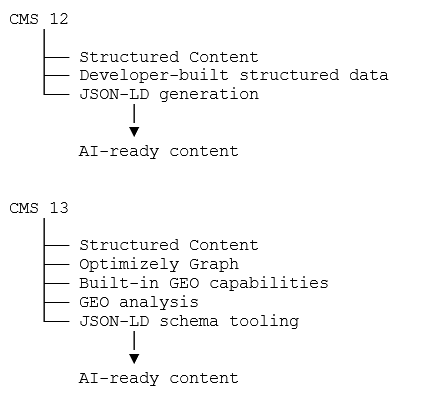
CMS 13 also introduces a more modern content and delivery architecture around Optimizely Graph, with Visual Builder and a unified editing experience.
So, if you're starting a new CMS 13 implementation, the question is no longer simply:
"How do I build JSON-LD generation?"
It becomes:
"How should I model and govern my content so Optimizely's built-in GEO capabilities can make the best use of it?"
That is an important shift for developers.
CMS 12 gives us the architectural opportunity. CMS 13 takes many of those capabilities further into the platform.
Where Does GEO Fit?
Structured data is not GEO by itself, and adding JSON-LD doesn't guarantee that an AI system will cite or recommend a website.
Instead, think of AI readiness as a combination of:
Clear Content
+
Structured CMS Content
+
Semantic HTML
+
Good Information Architecture
+
Accurate Metadata
+
Structured Data
For Optimizely developers, the opportunity is to make sure the CMS preserves not just the text, but also the meaning and relationships behind the content.
An article has an author.
An article has a publication date.
An FAQ has a question and an answer.
A page has a place in the site hierarchy.
When this information is structured in the CMS, the application has a much better foundation for creating machine-readable experiences.
Start Small
You don't need to redesign an entire Optimizely CMS 12 implementation.
Start with one content type, such as an Article Page.
Then gradually introduce structured representations for:
- Articles
- FAQs
- Breadcrumbs
- Products
- Events
- Organizations
The key is to start with content that provides clear business value.
Conclusion
Making an Optimizely CMS 12 website ready for an increasingly AI-driven web doesn't start with JSON-LD.
It starts with how we model content.
When content is structured properly in Optimizely, developers can create reusable mechanisms to expose that information to different consumers, while editors continue working with the familiar CMS experience.
The architecture is simple:
Optimizely Editor
↓
Structured Content
↓
Structured Data
↓
JSON-LD
↓
Search + AI Experiences
The principle is even simpler:
Let editors manage the meaning of the content. Let developers manage how that meaning is represented technically.
Your CMS shouldn't just store content.
It should preserve what that content means.
Comments