

John-Philip Johansson
Jun 13, 2017
visibility 6777
star star star star star star
(12 votes)

Introducing Group/Role support in Content Approvals

This feature was released in CMS UI 10.10.0.

What are Groups/Roles?

Groups, or Roles, are already commonly used in the CMS to manage access rights and other settings that should apply to a group of users instead of setting them individually. A commonly mentioned use case for Content Approvals is to add a group of users to a step instead of individual users. For example, adding the "Legal Department" group as a reviewer. This makes setting up content approval sequences easier as well as allowing the members of a group to change without having to change the sequence. So if there's a new hire in the "Legal Department" or someone leaves for another position, you just have to update the group and the new hire is included in the reviews (both ongoing and future reviews) and the removed user can no longer review content.
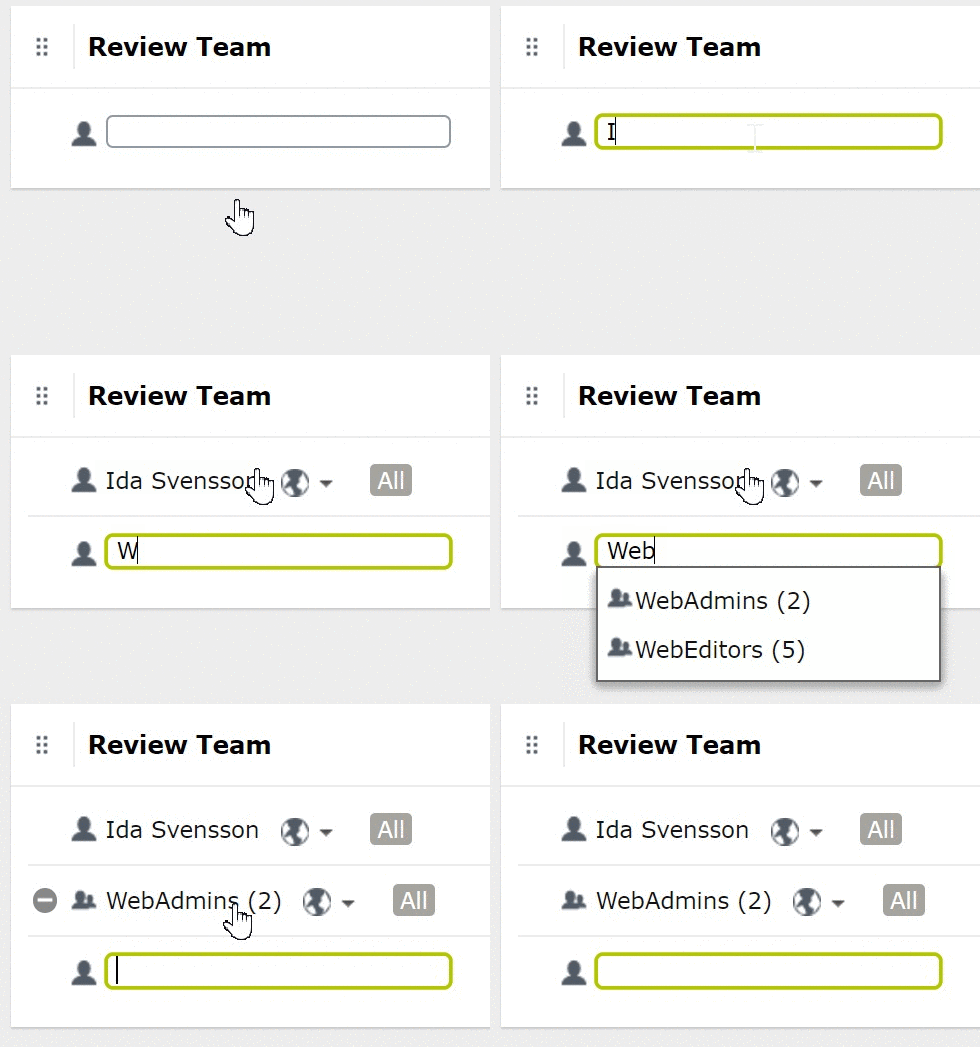
 Image blog-role-reviewer.gif

What about Notifications in large groups?

Adding a very large group will result in notifications being sent out to all the current members of the group on every step in a content approval sequence. This can have negative effects on the performance of the server, as well as probably annoy users. Therefore, we have added a new configuration setting, "ApprovalStepRoleUserLimit", that defaults to 100 users per group. Adding a group larger than this setting to a content approval sequence, triggers a validation warning, and it also limits the amount of notifications per group.

What are known limitations?

There can be limitations depending on the role provider used. See the SDK for more information.

Jun 13, 2017

Comments

error Please login to comment.
Latest blogs
Architecting an Enterprise-Grade Development Pipeline in Optimizely SaaS CMS

Most enterprise teams show up to Optimizely SaaS CMS with a clear roadmap for their release pipeline: DEV → QA → Stage → Prod. Four logical...

Vipin Banka | Jul 12, 2026

Bynder DAM Connector for Optimizely SaaS CMS: Improved Metadata Property Synchronization

While working with the Bynder DAM Connector for Optimizely SaaS CMS , one of the key areas I explored was how Bynder asset metadata is synchronized...

Vipin Banka | Jul 11, 2026

Optimizely DXP: Every Supported Culture, One Searchable Page

Quick one for anyone building multi-language sites on Optimizely DXP. I put together a reference tool listing all 806 supported cultures. More...

Adnan Zameer | Jul 10, 2026 |

A day in the life of an Optimizely OMVP: London Meetup 2026

On 2nd July 2026 the Optimizely London Developer Meetup returned to The Lightwell, and the running theme across the evening was less about individu...

Graham Carr | Jul 10, 2026

Optimizely’s Summer ’26 Roadmap: The CMS Is Starting to Look Less Like a Publishing Tool and More Like Marketing Infrastructure

Optimizely’s Summer ’26 Product Roadmap event was not just a list of product updates. At least, that is not the part I found most interesting. The...

Augusto Davalos | Jul 9, 2026

Optimizely Content JS SDK v2.1.0 — What's New and Why It Matters

  v2.1.0 of the Optimizely Content JS SDK and CLI landed on July 7, 2026. This is a substantial release bringing a wave of capabilities for...

Vipin Banka | Jul 8, 2026