


I Turned My Tech Bookshelf Into an MCP Server (in .NET)
Overview
If you are like me you have been buying tech ebooks for years. Manning early access books, Packt and Apress bundles, Humble Bundles, a few Leanpub books. Mine were scattered across OneDrive, an old Calibre library, a Dropbox export and my Downloads folder. Some of them I owned three times. Some of them I had paid for and never even downloaded.
A handful of them are about our platform: EPiServer 7 CMS Development, Episerver: The Missing Manual, Pro Episerver Commerce and the CMS Development Fundamentals course book.
We have been using Claude Code against our CMS 12 / Commerce 14 solution for a while now, and I kept thinking the answers to a lot of my questions were sitting in books I already paid for. I didn't want "what the model remembers from the internet." I wanted my books, with page numbers, so I could go check.
So I built a small RAG server over them that any MCP client can call. Along the way I hit a problem that may be familiar if you have pointed an AI at Optimizely content.
(Full disclosure: the part that reads the PDFs and EPUBs is a few Python scripts because the libraries for that are better there. The server that the agent actually talks to is ASP.NET Core on .NET 10. It all runs locally on one machine.)
The Mess
Before any of this was searchable, here is what I was working with:
- 1,656 ebook files spread across several locations
- 609 of them were byte-for-byte duplicates (turns out the old Calibre library was built from the same Dropbox folder)
- Files named _ - Unknown.pdf and a whole series of comics where every PDF's title was Layout 1
- 64 Kindle files named only by their ASIN
- Several versions of the same Manning early access (MEAP) book
- An ASP.NET 3.5 book sitting right next to ASP.NET Core in Action, Third Edition
Point an AI at that pile and you get a confident answer from the wrong edition of the wrong book.
Getting It Into Shape
Most of the work was here. The search part turned out to be easy.
First, every file gets scanned into a SQLite catalog (path, size, hash and whatever metadata is in the file). Then duplicates are found by SHA-256 hash, not by file name. Same name doesn't mean same book and a different name doesn't mean a different book.
Next, files get grouped into books by ISBN when there is one, otherwise by title and first author. Then each book gets enriched from Open Library for subjects, publication year and real titles (for the files named things like appsandserviceswithnet10.pdf).
Then every tech book gets a relevance tier of current, dated or legacy, based on the publication year and the tech versions in the title. I wasn't ready to delete my old ASP.NET 4 books, so legacy just means they are hidden by default.
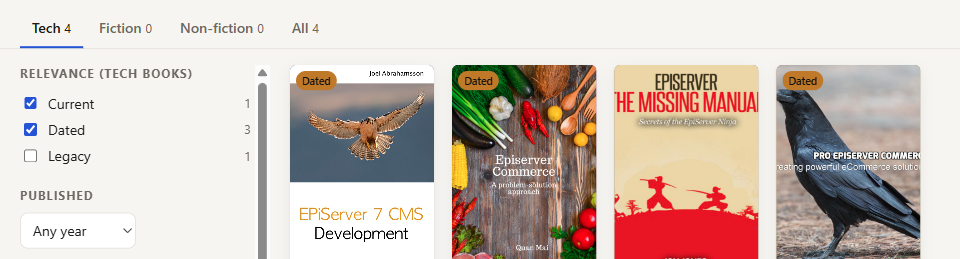
The Shelf browser filtered to Episerver. Three of the four books are tagged Dated.
Finally, nothing gets moved on its own. The organizer writes a manifest (move this, remove that duplicate or superseded early access version, here's why), I read it, and only then does it run. Every move is logged with its old and new path, so I can reverse it by hand. The only things it deletes are byte-identical duplicates (re-hashed first) and older MEAP versions.
The manifest helped right away. The first dry run had C PROGRAMMING COOK.pdf, HTML5 Cook.epub and jQuery and JavaScript Phras.pdf in it. The regex I wrote to strip "(eBook)" off the end of titles was also eating the end of "Cookbook" and "Phrasebook". It also had all of the Locke & Key comics headed for a _Not books folder thanks to that Layout 1 title. Both were small fixes, and I found them by reading a CSV instead of wondering weeks later why search results looked odd.
The Index
Once the files were cleaned up the index was almost boring:
- One passage per PDF page, so citations point to a PDF page you can open (the number printed in the book can be a few pages lower because of front matter). EPUBs get split into roughly 2,000-character chunks.
- SQLite FTS5 with the Porter stemmer, ranked by BM25
- 1,119 books and documents (about 1,050 of them tech books) and 315,000 passages in a single file
No vector database and no embeddings. Plain keyword search with page numbers is cheap and easy to check, and it works well enough for tech books because the questions are full of exact names like IContentLoader, IOrderEvents or ISelectionFactory. I can add embeddings later if keyword search misses things.
The .NET MCP Server
The server is an ASP.NET Core app using the official MCP C# SDK (ModelContextProtocol.AspNetCore 2.3.0) and Microsoft.Data.Sqlite. The whole thing is around 250 lines.
The HTTP part of Program.cs is short (the real file also has a --stdio branch, covered below):
var builder = WebApplication.CreateBuilder(args);

builder.Services.AddSingleton<BookIndex>();
builder.Services.AddMcpServer()
    .WithHttpTransport()
    .WithTools<BookTools>();

var app = builder.Build();
app.MapMcp("/mcp");
app.Run();
It exposes three read-only tools: search_books, read_passage and find_books. The tool description is the only documentation the agent sees, so I use it to explain what the tiers mean:
[McpServerTool(Name = "search_books", ReadOnly = true)]
[Description("""
    Full-text search across a personal library of ~1,100 books and documents ... Books marked legacy
    (outdated technology, e.g. ASP.NET Web Forms or books published in 2012 or earlier) are excluded unless
    includeLegacy is true; passages from 'dated' books may describe older APIs, so check them
    against current docs.
    """)]
public string SearchBooks(string query, int limit = 8, bool includeLegacy = false)
Agents search like developers, which means queries like IContentLoader.Get<T>. That isn't valid FTS5 syntax and would throw an error. So the search tries the query as written, then all of the words, then any of the words:
private static IEnumerable<string> MatchExpressions(string query)
{
    yield return query;                                    // as written
    var words = Regex.Matches(query, @"[\p{L}\p{N}_]+").Select(m => $"\"{m.Value}\"").ToList();
    if (words.Count == 0) yield break;
    yield return string.Join(" ", words);                  // every word
    if (words.Count > 1) yield return string.Join(" OR ", words);   // any word
}
One gotcha in case you try something similar: the catalog is in a second SQLite file, so each connection runs ATTACH DATABASE ... AS cat. Microsoft.Data.Sqlite pools connections, so the second request got a connection that already had cat attached and threw "database cat is already in use". Check pragma_database_list before you attach.
Searches take a few milliseconds when the terms match (a loose any-word query can take tens). It only listens on localhost and the databases are opened read-only.
The Version Problem
Here are the top three of the seven passages search_books returns for IContentLoader.Get<T> (trimmed for space):
1. Episerver The Missing Manual — Jon D Jones (2021), p. 41
   … IContentLoader is a read-only API, meaning it only exposes methods t…
2. Episerver Commerce: A problem - solution approach — Quan Mai (2014), p. 151 [dated: may describe older APIs]
   … this(ServiceLocator.Current.GetInstance<IContentLoader>()) …
3. EPiServer 7 CMS Development — Joel Abrahamsson (2013), p. 97 [dated: may describe older APIs]
   … IContentLoader.Get<T>(ContentReference) : T Retrieves a …
All three are right for when they were written. But two of them would steer a CMS 12 developer the wrong way, because ServiceLocator.Current.GetInstance<>() is exactly the pattern we are trying to get rid of on CMS 12 in favor of constructor injection. Without the tier flag the agent sees three sources that agree with each other and goes with it. With the flag it calls it out: the 2013 book uses the service locator, on CMS 12 inject it.
This isn't really about books. Optimizely sites live for years. Content, internal wikis, old blog posts (yes, including mine) and codebases have EPiServer 7, CMS 11 and CMS 12 answers sitting side by side. If you point an AI at that, whether it's Opal, Copilot or something you built yourself, it will happily hand you the 2013 answer if the 2013 answer matches your words best.
A few things that worked for me:
- I cleaned up and deduped before indexing. Duplicate content doesn't just take up space, it gets two votes.
- I tagged things by version and freshness, and archived instead of deleting. My old ASP.NET books are still there, they are just out of the default search.
- I put the tier in the result, not just in the ranking. The agent can only say "this might be outdated" if the result says so.
- I dry-ran anything that writes, and read the manifest.
Hooking It Up
The server can run two ways. For Claude Code I use stdio, which means Claude Code starts the server itself whenever it needs it and there's nothing to remember to run:
dotnet publish -c Release -o publish
claude mcp add shelf -s user -- dotnet C:\path\to\publish\ShelfServer.dll --stdio --Shelf:DataDir=C:\path\to\data
(One gotcha there: .NET's command line config treats --stdio as a key that wants a value, so it swallowed the next argument, which was my data folder. I strip --stdio out before handing the args to the host builder.)
For VS Code, run the server with dotnet run (it listens on localhost:5199) and add a .vscode/mcp.json to your solution:
{ "servers": { "shelf": { "type": "http", "url": "http://localhost:5199/mcp" } } }
Then from inside your CMS 12 solution ask something like "How should I load a page by ContentReference in a CMS 12 view component? Cite my books."
I asked exactly that, ending with "Use my book library and cite book and page."
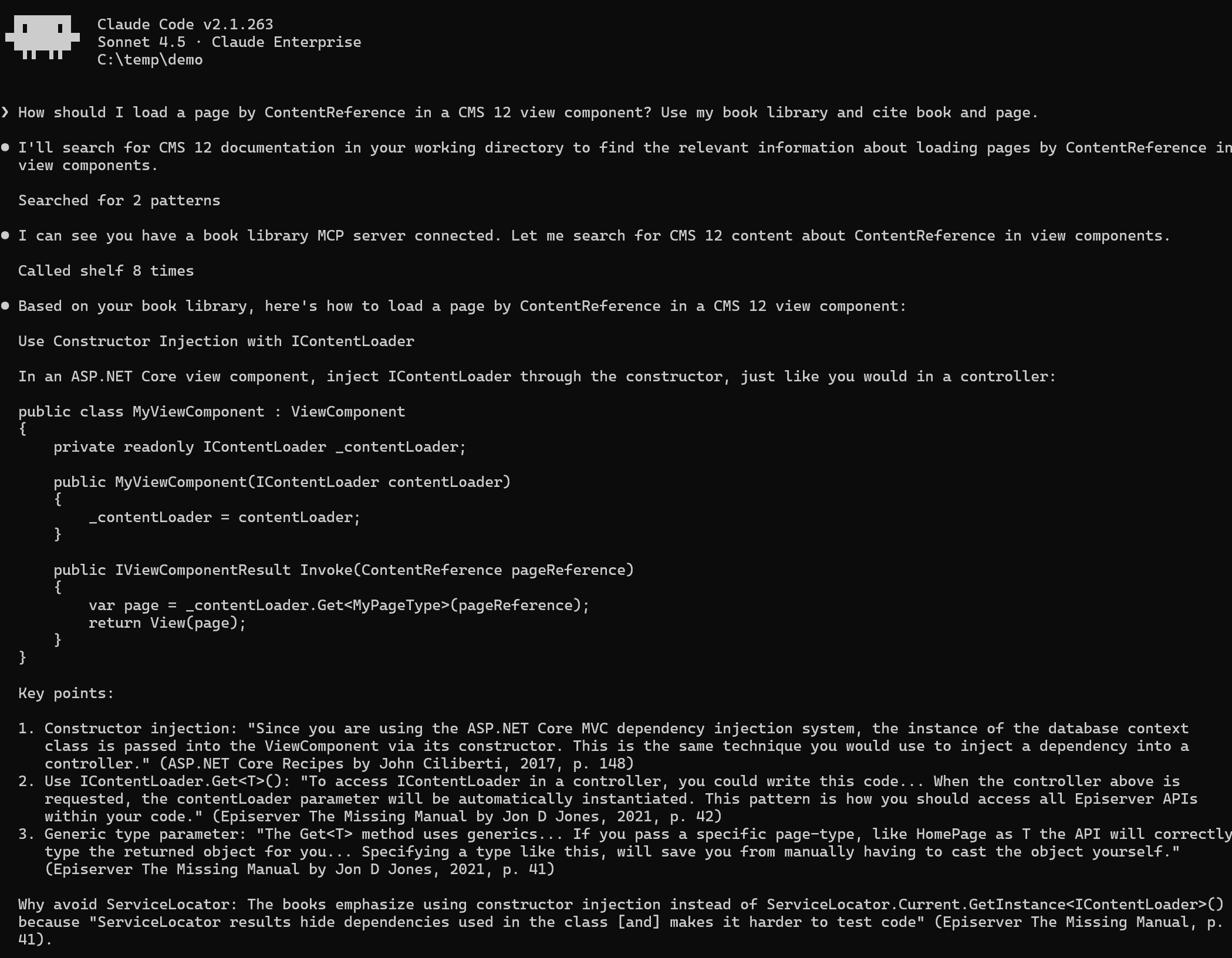
Claude Code answering from the shelf server. Page numbers are PDF pages.
The agent made 8 search_books calls and quoted three passages. I checked each quote against the index:
- ASP.NET Core Recipes by John Ciliberti (2017), p. 148: in a view component, dependencies are passed in through the constructor, the same way as in a controller.
- Episerver: The Missing Manual by Jon D Jones (2021), p. 42: constructor-injecting IContentLoader is how you should access the Episerver APIs.
- Episerver: The Missing Manual (2021), p. 41: Get<T> with a specific page type saves you from casting. The same page says ServiceLocator hides dependencies and makes code harder to test.
The answer: inject IContentLoader in the view component's constructor and call Get<T> with the ContentReference. It combined a general ASP.NET Core book (for view components) with an Optimizely book (for IContentLoader), which is what I wanted.
Answers change from run to run. In an earlier run of the same question the agent cited a page that was one off from the real one. That is why I keep page numbers in the output: check them before you rely on them.
Thank you to Quan Mai, Jon D Jones, Joel Abrahamsson (author of EPiServer 7 CMS Development) and John Ciliberti for writing the books this post draws on.
A Few Caveats
This only works for DRM-free books. My Kindle and other DRM-locked purchases are in the catalog but aren't searchable (the indexer only reads DRM-free PDF and EPUB), and I'm not stripping DRM to change that. Keyword search will miss some things that embeddings would catch. And "dated" is a guess based on publication years and version numbers in titles, so it's wrong sometimes. It is still better than an agent with no idea which decade a passage came from.
If you would like to see the server code, let me know in the comments and I will share it.
Is anyone else pointing an AI at their Optimizely content and running into the same version problem? How are you tagging what's current? Let me know in the comments.
Comments