


How to Create Custom Audience Criteria for Mobile Visitors in Optimizely CMS
Personalization is one of the most powerful features of Optimizely CMS. By tailoring content to specific audiences, you can significantly improve engagement, conversions, and user satisfaction.
One common scenario is detecting mobile visitors and delivering a more mobile-friendly experience. While Optimizely provides built-in groups (like geographic location, referral, etc.), sometimes you need to define custom audience criteria.
In this blog, I’ll walk you through how to create a Custom Audience Criterion that detects whether the user is browsing on a mobile device — and then use it in Optimizely’s personalization engine.
Why Mobile-Specific Criteria?
-
Business value: Mobile visitors may need faster-loading content, simplified layouts, or exclusive mobile offers.
-
Developer flexibility: Built-in rules may not be enough; a custom criterion lets you define exactly what “mobile” means for your site.
-
Scalability: Once built, the same rule can be reused across campaigns, promotions, and personalized content blocks.
Step 1: Create a Custom Criterion Model
Every custom audience criterion in Optimizely starts with a model class that defines its settings. For our mobile visitor detection, the model is simple (no extra configuration needed):
using EPiServer.Personalization.VisitorGroups;

namespace MySite.Business.VisitorGroups
{
    public class MobileVisitorModel : CriterionModelBase
    {
        // No custom properties needed for now
        public override ICriterionModel Copy()
        {
            return base.ShallowCopy();
        }
    }
}
Step 2: Create the Criterion Logic
Now we define the actual evaluation logic by implementing CriterionBase<T>.
Here we’ll check the User-Agent string to detect mobile devices.
using System;
using System.Web;
using EPiServer.Personalization.VisitorGroups;

namespace MySite.Business.VisitorGroups
{
    [VisitorGroupCriterion(
        Category = "Device",
        DisplayName = "Mobile Visitor",
        Description = "Checks if the visitor is using a mobile device")]
    public class MobileVisitorCriterion : CriterionBase<MobileVisitorModel>
    {
        public override bool IsMatch(IPrincipal principal, HttpContextBase httpContext)
        {
            if (httpContext?.Request?.UserAgent == null)
                return false;

            string userAgent = httpContext.Request.UserAgent.ToLower();

            // A very simplified check for mobile devices
            return userAgent.Contains("iphone") ||
                   userAgent.Contains("android") ||
                   userAgent.Contains("ipad") ||
                   userAgent.Contains("mobile");
        }
    }
}
-
VisitorGroupCriterionattribute makes it available in the Optimizely UI. -
IsMatchdecides if the visitor meets the condition (mobile browsing). -
We used a simple
User-Agentcheck, but you can extend this with a more robust device detection library.
Step 3: Create & Use in Visitor Groups
Once deployed:
-
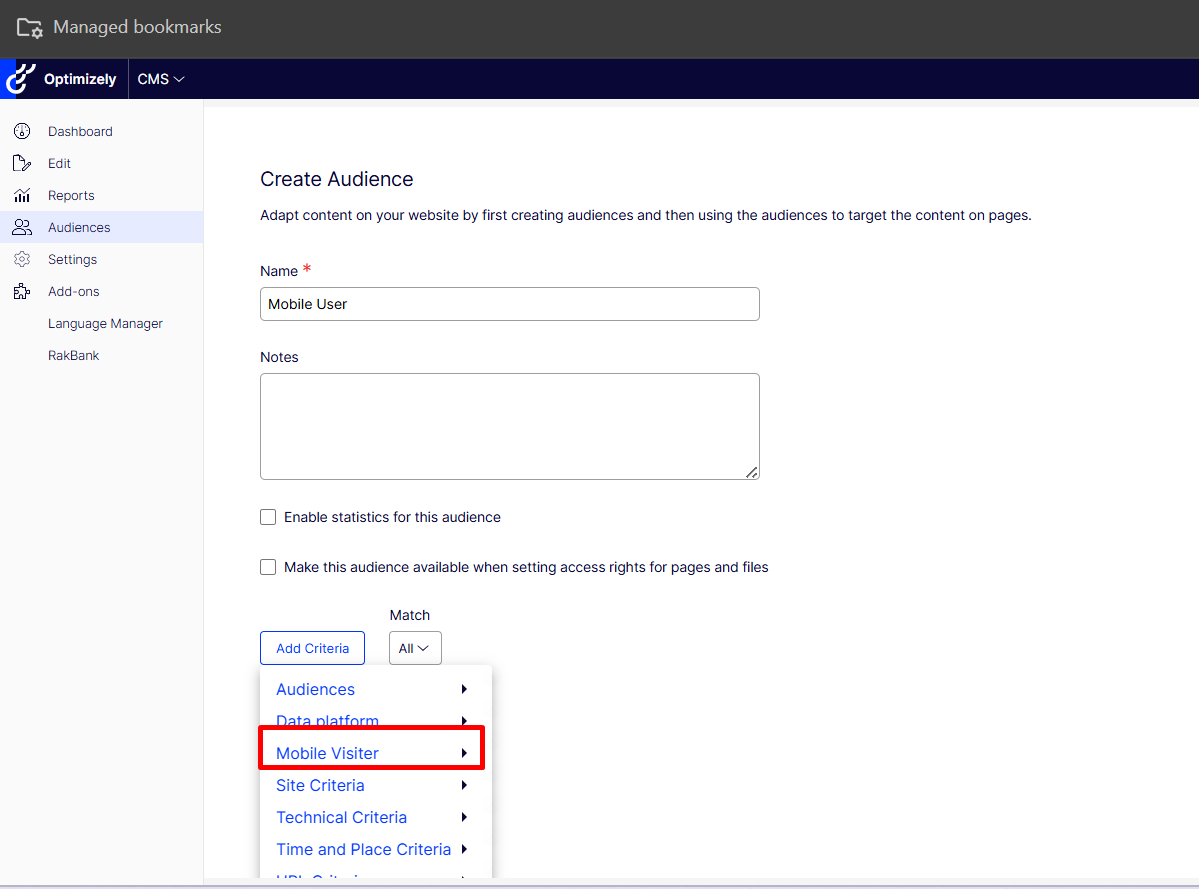
Go to CMS Admin -> Audience
-
Create Audience and choose Mobile Visitor from the criteria list.
-
Combine it with other rules (e.g. Mobile + Returning Visitor).
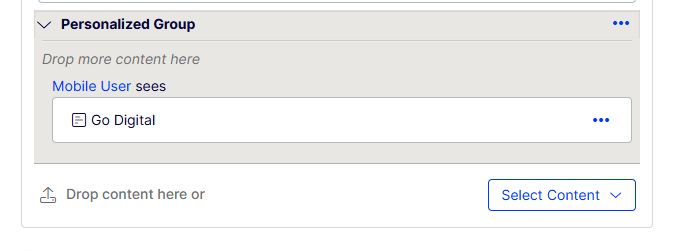
4. Assign this visitor group to personalized content blocks, banners, or promotions.
Step 4: Testing
-
Use browser dev tools to switch device mode and test different User-Agent strings.
-
Deploy to staging and validate across real devices.
-
Monitor analytics (Optimizely Experimentation + Google Analytics) to measure engagement lift.
- By creating a custom Mobile Visitor criterion, you can:
-
Deliver targeted, device-aware experiences.
-
Go beyond default visitor groups.
-
Set up scalable personalization strategies in Optimizely CMS.
Personalization in Optimizely is all about meeting users where they are. With custom audience criteria, the possibilities are endless.
:) Thanks!
Comments