


Raising and Retrieving Custom Events in Application Insights
Following on from Minesh's insight on how to extend Extending Application Insights in an Optimizely PaaS CMS Solution, I'd like to share another way you can use Application Insights to improve your offering. Application Insights has the ability to record and report on Custom Events that you raise within your application and raising an event is easy. I'm using this mechanism to track search terms without using a database and the examples below are about raising custom events during search and then retrieving the data back out and aggregating it.
Before you can get started with recording your own custom events, you need to prepare your application:
- Install the Microsoft.ApplicationInsights.AspNetCore package
- Retrieve and add the following settings from your Application Insights instance and add them to your appsettings.json:
- ApplicationInsights__ConnectionString
- ApplicationInsights__apiKey
- ApplicationInsights__AppId
Raising an Event
Raising an event is performed through the TelemetryClient which is part of the Microsoft.ApplicationInsights.AspNetCore package. The TrackEvent method takes two parameters, the name of your event and a dictionary<string, string> of custom data. The TelemetryClient will automatically add data such as the HTTP Method and Request Path along with other interesting information so you can focus on the details that matter to you. It goes without saying that you should not include PII data in your event data.
using Microsoft.ApplicationInsights;
using Microsoft.AspNetCore.Mvc;

public sealed class SearchController(ISearchService searchService, TelemetryClient telemetryClient) : Controller
{
    public async Task<IActionResult> Search(string? query)
    {
        LogTrackSearch(query);

        // Search Logic Goes Here
        var results = searchService.Search(query);

        return Json(results);
    }

    private void LogTrackSearch(string? query)
    {
        if (query is { Length: >3 })
        {
            telemetryClient.TrackEvent("TrackSearch", new Dictionary<string, string> { { "Query", query } });
        }
    }
}
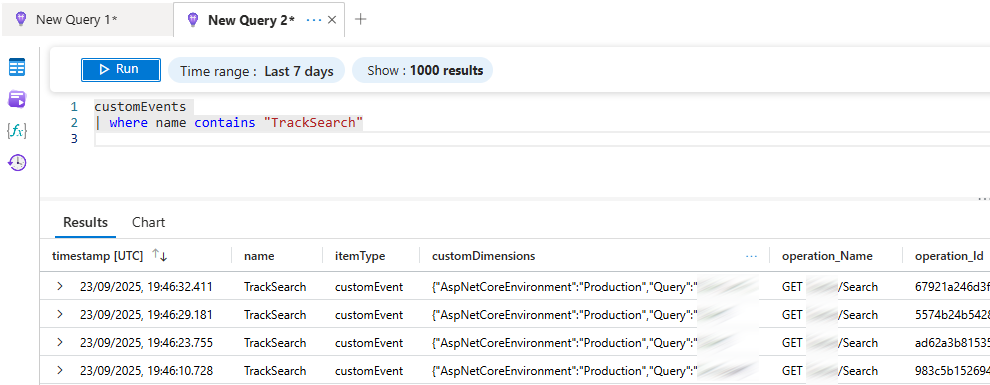
You can then search for you custom events directly in the Logs section of Application Insights:
Retrieving Events
Now you have your events logged in Application Insights, you may want to retrieve this data back out to present it to an administrator. I strongly recommend you only use this functionality on an administration screen and do not use it to power the frontend of your website.
The first thing you will want to do is design your query, I recommend you do that directly in the Logs tool in Application Inisights. For my query, I only wanted data relating to my specific event type named "TrackSearch" and I wanted to aggregate that data by unique Query value and include a count of instances as UniqueCount. As a result my query looks like this:
customEvents
| where name contains "TrackSearch"
| where timestamp > ago(7d)
| where tostring(customDimensions["Query"]) != ""
| summarize UniqueCount=count() by Query=tolower(tostring(customDimensions["Query"]))
| project Query, UniqueCount
| order by UniqueCount desc
In order to retrieve this directly in your application, you need to make a GET request to Application Insights and include an escaped version of your query. You will recieve a response which contains a collection of tables. As my query is summarizing the customEvents table, that is the only populated table I receive in my response. Now the data isn't as straight forward as you might think. I had to include the following DTOs so I could serialize out the content:
public sealed class InsightsResponse
{
    [JsonPropertyName("tables")]
    public List<InsightsTable>? Tables { get; set; }
}

public sealed class InsightsTable
{
    [JsonPropertyName("name")]
    public string? Name { get; set; }

    [JsonPropertyName("columns")]
    public List<InsightsColumn>? Columns { get; set; }

    [JsonPropertyName("rows")]
    public List<List<object>>? Rows { get; set; }
}

public sealed class InsightsColumn
{
    [JsonPropertyName("name")]
    public string? Name { get; set; }

    [JsonPropertyName("type")]
    public string? Type { get; set; }
}
Then in my controller I use a StringBuilder to recreate my query, I then make a GET request to application insights and serialize out the response. The data I then have is not very usable in it's current form, so I have additional logic which then transforms the response data into a collection of TrackSearchTerm objects which is another DTO to contain the flat data I want to present back to the user.
public sealed class InsightsController(IConfiguration configuration) : Controller
{
    public async Task<IActionResult> SearchTerms(int numberOfDays = 7)
    {
        var stringBuilder = new StringBuilder();
        stringBuilder.AppendLine("customEvents");
        stringBuilder.AppendLine("| where name contains \"TrackSearch\"");
        stringBuilder.AppendLine($"| where timestamp > ago({numberOfDays}d)");
        stringBuilder.AppendLine("| where tostring(customDimensions[\"Query\"]) != \"\"");
        stringBuilder.AppendLine("| summarize UniqueCount=count() by Query=tolower(tostring(customDimensions[\"Query\"]))");
        stringBuilder.AppendLine("| project Query, UniqueCount");
        stringBuilder.AppendLine("| order by UniqueCount desc");

        var query = stringBuilder.ToString();
        var settings = GetApplicationInsightSettings();

        // Build the request URL
        string url = $"https://api.applicationinsights.io/v1/apps/{settings.AppId}/query?query={Uri.EscapeDataString(query)}";

        using var client = new HttpClient();

        // Set up API key in the header
        client.DefaultRequestHeaders.Accept.Add(new MediaTypeWithQualityHeaderValue("application/json"));
        client.DefaultRequestHeaders.Add("x-api-key", settings.ApiKey);

        // Send the request
        var response = await client.GetAsync(url);
        if (response.IsSuccessStatusCode)
        {
            var content = await response.Content.ReadAsStringAsync();

            var data = JsonSerializer.Deserialize<InsightsResponse>(content);
            var searchTerms = GetSearchTerms(data).ToList();

            return Json(searchTerms);
        }

        return Json(Enumerable.Empty<TrackSearchTerm>());
    }

    private static IEnumerable<TrackSearchTerm> GetSearchTerms(InsightsResponse? insightsResponse)
    {
        if (insightsResponse is not { Tables.Count: >0 })
        {
            yield break;
        }

        foreach (var table in insightsResponse.Tables)
        {
            var queryIndex = -1;
            var uniqueCountIndex = -1;

            if (table is not { Columns.Count: >0, Rows.Count: >0 })
            {
                continue;
            }

            // Get the numerical index of your column
            foreach (var column in table.Columns)
            {
                queryIndex = string.Equals(column.Name, "Query", StringComparison.OrdinalIgnoreCase) ? table.Columns.IndexOf(column) : queryIndex;
                uniqueCountIndex = string.Equals(column.Name, "UniqueCount", StringComparison.OrdinalIgnoreCase) ? table.Columns.IndexOf(column) : uniqueCountIndex;
            }

            foreach (var row in table.Rows)
            {
                yield return new TrackSearchTerm
                {
                    Query = queryIndex >= 0 ? row[queryIndex]?.ToString() : string.Empty,
                    UniqueCount = uniqueCountIndex >= 0 && int.TryParse(row[uniqueCountIndex]?.ToString(), out var uniqueCount) ? uniqueCount : 1
                };
            }
        }
    }
}
You can then present this result directly to your Administor in whatever shape you want. I do recommend adding additional logic to deduplicate search terms as you may end up with multiple events being executed due to delays in user input. For example you may get a responses of "Hello W" and "Hello World" from a single user if a search request is executed during a delay in user input. I haven't included that code here, but my complete solution includes it.
You now have all the information you need to start using custom events in application insights for your own needs. Happy Coding 😊
I am an OMVP and the author and maintainer of Stott Security and Stott Robots Handler for Optimizely CMS 12. You can find all of my content collated on https://www.stott.pro/

Comments