

Climbing the Relevancy Ladder: Unlocking Vertex AI Search Tiers in Commerce Search v3
Author: Naveen Samala, Staff Software Engineering at Optimizely
What If Your Search Could Predict What Each Customer Will Buy?
Imagine a search experience that doesn’t just match keywords—it learns from every click, every purchase, and every browse to predict which products your customers are most likely to buy. That’s not science fiction; it’s the power of Optimizely Configured Commerce’s Commerce Search v3, built with Google’s Vertex AI Search for commerce.
But here’s what many B2B merchants don’t realize: this AI has multiple “gears”—performance tiers that unlock progressively smarter search capabilities. Each tier delivers measurably better product discovery, higher conversion rates, and increased revenue. The key? Better data = smarter search = higher revenue.
Understanding the Relevancy Ladder
When you implement Commerce Search v3 in Optimizely Configured Commerce, you’re leveraging Vertex AI Search’s tiered ranking system. Think of it as a ladder with four rungs, where each step up delivers increasingly intelligent search results.
There are actually two parallel ladders: one for Text Search (when shoppers type queries like “stainless steel ball valve”) and one for Browse Search (when they navigate category pages like “Valves > Ball Valves”). Both ladders have four tiers, and you can be at different levels on each.
Here’s the crucial insight: You can’t skip rungs. Each tier builds on the previous one’s data requirements. A new implementation might stay at Tier 1 for several months while building event history—that’s completely normal and expected. The goal is understanding what unlocks each tier so you can strategically climb to the top.
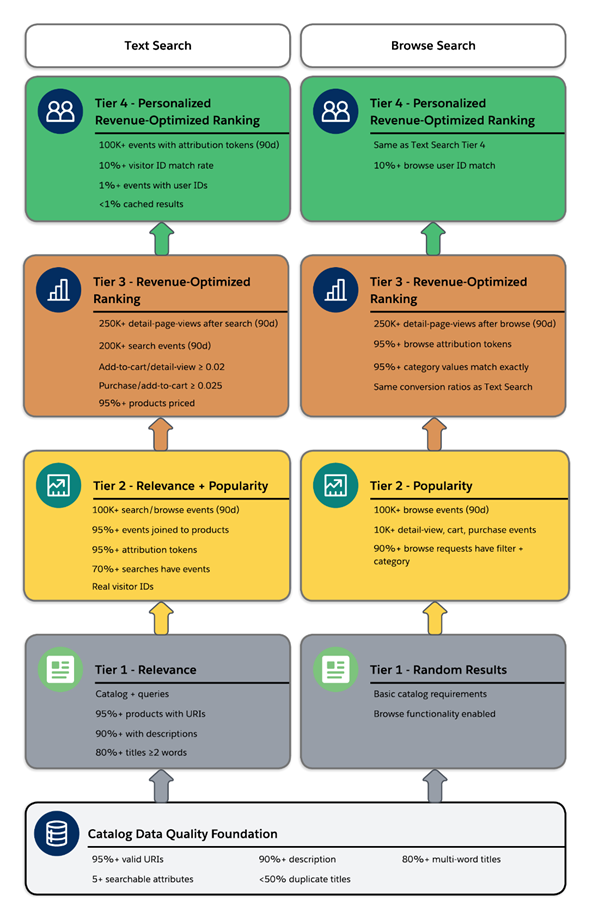
The Foundation: Catalog Data Quality
Before you can climb any ladder, you need a solid foundation. In Commerce Search v3, that foundation is catalog data quality. Poor catalog data will keep you stuck at Tier 1, no matter how many user events you collect.
What does “quality” mean? Vertex AI Search has specific standards:
- 95%+ of products must have valid, accessible URIs - The AI crawls these URIs to gather web signals that improve search quality
- 90%+ need comprehensive descriptions - Rich product information helps the AI understand context and relevance
- 80%+ of titles must contain at least 2 words - Single word titles lack the context needed for semantic matching
- Less than 50% duplicate titles - Products need unique, distinguishable titles
- At least 5 searchable attributes per product - Attributes like manufacturer part number, model number, material type etc.
- Avoid multi-value words in exact searchable attributes - This can block tier advancement. For example, including multiple parts within a model number may cause issues.
One often overlooked detail: Products should have searchable attributes that make sense for B2B queries. Think about how your customers actually search—do they use Product Numbers? Manufacturer part numbers? Material Type? Make those searchable.
Tier 1 to Tier 2: Lighting Up User Events
Tier 1: Relevance
When you first launch Commerce Search v3, you start at Tier 1. Results are ranked purely by semantic relevance to the query. If a customer searches for “black dress,” the AI understands the concept of “blackness” and returns dresses ranked by how well they match that query.
What you need: Just your catalog and queries. What you get: Results ranked by relevance, but with no understanding of what actually sells or what’s popular.
Tier 2: Relevance + Popularity
This is where search gets interesting. Tier 2 adds popularity signals to relevance. Among equally relevant products, the ones that actually get clicked and purchased rise to the top.
What unlocks Tier 2:
- 100,000+ text search or browse events in the last 90 days
- 95%+ of events must join with products - Events need to reference valid product IDs from your catalog
- 95%+ of search events need attribution tokens - More on this critical requirement below
- 70%+ of search requests should have associated events
- Real visitor IDs, not hardcoded synthetic data - If you’re using the same visitor ID across all events, the AI can’t distinguish real user behavior
Best practice: Implement attribution tokens from day one. Attribution tokens are unique identifiers that Vertex AI Search returns with each search result, allowing you to track which products were actually shown to users. When you send user events (detail-page-view, add-to-cart, purchase-complete), include these tokens. Without them, you’ll never unlock higher tiers.
Why Tier 2 matters: Imagine two ball valves that both match “stainless steel 2-inch ball valve” equally well. At Tier 1, they appear in arbitrary order. At Tier 2, the one that 50 other engineers viewed and purchased this month appears first. That’s the power of popularity signals.
Tier 2 to Tier 3: Revenue Optimization at Scale
Tier 3: Revenue-Optimized Ranking
Tier 3 is where AI truly shines. Instead of just ranking by popularity, results are ranked by purchase likelihood based on site-wide user behavior. The AI learns patterns like “users who view product A often purchase product B” and surfaces products with higher conversion probability.
What unlocks Tier 3:
- 250,000+ detail-page-view events following search events in the last 90 days
- 200,000+ search events in the last 90 days
- 250,000+ search events with at least one user interaction (detail-page-view, add-to-cart, or purchase from the same visitor)
- Key conversion ratios:
- Add-to-cart / detail-page-view ≥ 0.02 (at least 2% of product views lead to cart adds)
- Purchase / add-to-cart ≥ 0.025 (at least 2.5% of cart adds lead to purchases)
- 95%+ of products must have prices - Revenue optimization requires pricing data
- 100+ products must have at least one detail-page-view in the last 90 days
Best practice: Upload all user events, not just those attributable to searches. The AI learns from the complete customer journey, including direct navigation, SEO traffic, and category browsing.
The SEO/AEO Connection: It’s worth noting that the Vertex AI model doesn’t just learn from your events and catalog data. It also trains on web signals crawled via your product URIs—including SEO metadata, Answer Engine Optimization (AEO) structured data, and rich product schemas. This additional context plays an important role in improving search relevancy and driving optimization efficiency. Strong SEO practices don’t just help Google find your products; they help Vertex AI understand them better.
Why Tier 3 matters: You move from “popular products” to “products likely to convert.” If your data shows that engineers who search for “pressure regulator” often end up purchasing specific valve models, those models get boosted even if they’re not the most-viewed products.
Tier 3 to Tier 4: The Personalization Peak
Tier 4: Personalized Revenue-Optimized Ranking
Tier 4 is the summit: personalized search that ranks results based on the individual user’s preferences and behavior patterns. Two different engineers searching for “ball valve” see different results based on their unique browsing history, past purchases, and interaction patterns.
What unlocks Tier 4:
- 100,000+ search events with attribution tokens served by Vertex AI Search in the last 90 days
- 10%+ visitor ID matching between search requests and user events - Consistent formatting and spacing of visitor IDs
- 1%+ of events must have user IDs set for signed-in users (calculated over the last 7 days)
- 10%+ of search requests should have user IDs that match corresponding event user IDs
- Less than 1% cached search results - This is critical: caching search results kills personalization
Best practice for Tier 4: For signed-in users, provide both user IDs and visitor IDs. User IDs allow Vertex AI Search to personalize across devices—if an engineer searches on mobile during the day and desktop at night, the AI recognizes it’s the same person and personalizes accordingly.
The caching pitfall: If you cache search results and serve identical results to multiple users, Vertex AI Search automatically turns off personalization. Each user must receive fresh, personalized results. Caching might seem like a performance optimization, but it sinks your most powerful search feature.
Why Tier 4 matters: This is where Commerce Search v3 becomes genuinely intelligent. An engineer who frequently purchases Swagelok products sees Swagelok valves ranked higher. A procurement manager who typically filters by “lowest price” sees budget-friendly options first. It’s search tailored to each individual shopper.
Browse Search: A Parallel Journey
While we’ve focused on text search, browse search follows its own ladder with the same four tiers:
- Tier 1: Random Results - Products in arbitrary order when users land on category pages
- Tier 2: Popularity - Products ranked by category-specific popularity (requires 100,000+ browse events in 90 days)
- Tier 3: Revenue-Optimized Ranking - Products ranked by purchase likelihood within that category (requires 250,000+ browse detail-page-views in 90 days)
- Tier 4: Personalized Revenue-Optimized Ranking - Personalized category browsing based on individual user behavior
Key difference for browse: Browse requires that 95%+ of browse requests and events have exactly matching category and filter values.
Important: You can be at different tiers for text search vs. browse. You might reach Text Search Tier 3 but still be at Browse Tier 1 if you haven’t collected enough browse-specific events. Monitor both separately.
Getting Help: The Optimizely Partnership
Not sure which tier you’re at or what’s blocking advancement?
Climbing the relevancy ladder requires coordinated effort across catalog management, event instrumentation, and attribution setup. Many merchants struggle to identify which specific requirement is blocking their tier upgrade.
Optimizely Search SMEs can help audit your:
- Catalog data quality - Identifying missing descriptions, duplicate titles, and searchable attribute gaps
- Event pipeline and attribution setup - Verifying attribution tokens, visitor ID consistency, and event-to-product joins
- Tier-specific blockers and gap analysis - Pinpointing exactly which compliance requirements you’re missing
By analyzing your past 30-90 days of search events, user behavior analytics, and product catalog data, an Optimizely expert can map out your specific path to higher tiers—and higher revenue.
Contact your Optimizely account team to request a Commerce Search v3 tier optimization audit.
Key Takeaways
- ü Each tier builds on the previous - You can’t skip steps. Start with catalog quality, then events, then personalization.
- ü Start with catalog quality - 95%+ valid URIs, 90%+ descriptions, unique titles, and multiple searchable attributes are the foundation.
- ü Implement attribution tokens from day one - Without them, you’ll never unlock Tier 2+.
- ü Plan for months of event accumulation - You need 100K-250K+ events over 90 days. Newer implementations should expect to spend time at lower tiers.
- ü Better data = smarter search = higher revenue - Every improvement in data quality and event tracking directly translates to better product discovery and conversion.
Resources
Explore these resources to dive deeper into Commerce Search v3 and Vertex AI Search:
- Commerce Search v3 Overview - Introduction to Commerce Search v3 in Optimizely Configured Commerce
- Vertex AI Search Performance Tiers - Detailed tier requirements and data quality metrics
- User Events Implementation Guide - How to instrument and send user events

Comments