
A critical vulnerability was discovered in React Server Components (Next.js). Our systems remain protected but we advise to update packages to newest version. Learn More

Pawan Singh
Jul 20, 2025
  305
(1 votes)

Disable Report and Dashboard Menu content editors

We had a requirement where Report and Dashboard menus were needed only for specific roles/users Or Admins — but not for editors.

Below is default view for editors where  you can see these menus:
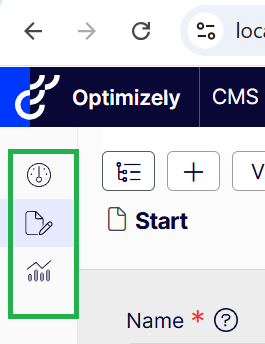
But required view is: 
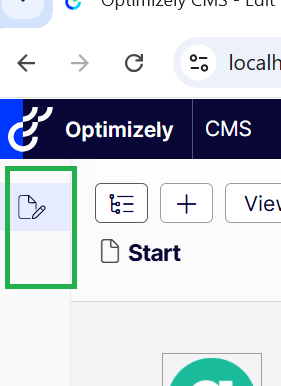


1.  To achieve above, we implemented a  custom Interceptor class that wraps another IMenuProvider and overrides the authorization logic as below.

using EPiServer.Shell.Navigation;
namespace alloy_example.Customization.Menus;

public class MenuProviderInterceptor : IMenuProvider
{
    private readonly IMenuProvider _menu;

    public MenuProviderInterceptor(IMenuProvider menu)
    {
        _menu = menu;
    }

    public IEnumerable<MenuItem> GetMenuItems()
    {
        var menuItems = _menu.GetMenuItems().ToList();
        menuItems.ForEach(item =>
        {           
            item.AuthorizationPolicy = "episerver:cmsadmin";
        });
        return menuItems;
    }
}


 2. we need to hook this interceptor only for specific providers — like ReportsMenuProvider or DashboardMenuProvider based on requirement.

services.Intercept<IMenuProvider>(interceptorFactory);

private static IMenuProvider interceptorFactory(IServiceProvider provider1, IMenuProvider provider2)
 {
     var types = new[] { typeof(ReportsMenuProvider), typeof(DashboardMenuProvider) };
     return types.Any(t => t.Equals(provider2.GetType())) ? new MenuProviderInterceptor(provider2) : provider2;
 }

This way, only ReportsMenuProvider and DashboardMenuProvider are affected — all other menus remain untouched. Hope this helps someone!

Jul 20, 2025

Comments

Please login to comment.
Latest blogs
Looking back at Optimizely in 2025

Explore Optimizely's architectural shift in 2025, which removed coordination cost through a unified execution loop. Learn how agentic Opal AI and...

Andy Blyth | Dec 17, 2025 |

Cleaning Up Content Graph Webhooks in PaaS CMS: Scheduled Job

The Problem Bit of a niche issue, but we are building a headless solution where the presentation layer is hosted on Netlify, when in a regular...

Minesh Shah (Netcel) | Dec 17, 2025

A day in the life of an Optimizely OMVP - OptiGraphExtensions v2.0: Enhanced Search Control with Language Support and Synonym Slots

Supercharge your Optimizely Graph search experience with powerful new features for multilingual sites and fine-grained search tuning. As search...

Graham Carr | Dec 16, 2025

A day in the life of an Optimizely OMVP - Optimizely Opal: Specialized Agents, Workflows, and Tools Explained

The AI landscape in digital experience platforms has shifted dramatically. At Opticon 2025, Optimizely unveiled the next evolution of Optimizely Op...

Graham Carr | Dec 16, 2025

Optimizely CMS - Learning by Doing: EP09 - Create Hero, Breadcrumb's and Integrate SEO : Demo

  Episode 9  is Live!! The latest installment of my  Learning by Doing: Build Series  on  Optimizely Episode 9 CMS 12  is now available on YouTube!...

Ratish | Dec 15, 2025 |

Building simple Opal tools for product search and content creation

Optimizely Opal tools make it easy for AI agents to call your APIs – in this post we’ll build a small ASP.NET host that exposes two of them: one fo...

Pär Wissmark | Dec 13, 2025 |