


Building Opal tools on Optimizely Connect Platform: a Mailchimp walkthrough
About the Mailchimp Opal Tool
The Mailchimp Opal Tool is an Optimizely Connect Platform app that brings Mailchimp audience operations directly into Opal workflows. It exposes developer-friendly tools for audience, contact, tag, and campaign management, with settings-driven authentication so teams can configure API access once and reuse it across automations. In addition to interactive tool calls, it includes a background sync job that can ingest Mailchimp contacts in batches and upsert them into ODP, making it useful for both real-time actions and scheduled data synchronization.
Built with TypeScript on OCP, the app follows a clear architecture: app.yml for runtime/function declarations, forms/settings.yml for secure credential inputs, Lifecycle hooks for install/settings handling, and modular @tool-decorated function classes for API operations. This structure makes the integration easy to extend, test, and maintain as Mailchimp use cases evolve.
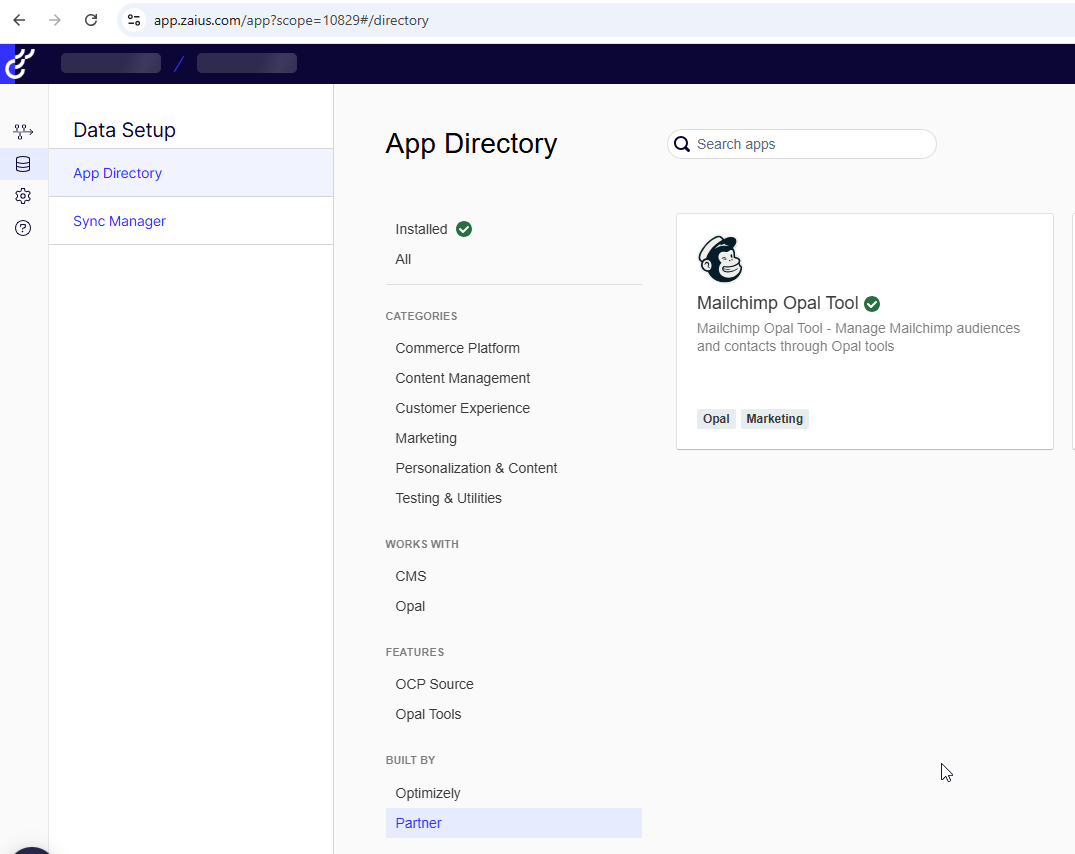
Log in to the Optimizely Connect Platform using your OptiID credentials and install the Mailchimp Opal Tool.
OCP Developer Guide
An OCP app is app.yml + a compiled Node.js bundle + optional forms/settings + assets for directory listing content.
Opal tools are typically implemented as a single exported class extending ToolFunction, with @tool-decorated methods.
Use:
- @zaiusinc/app-sdk for lifecycle, storage, jobs, and notifications
- @optimizely-opal/opal-tool-ocp-sdk for tool metadata and routing shape
Who This Is For
You already know TypeScript and REST APIs. You want a checklist + mental model for OCP and a real project layout (this repo), not abstract marketing copy.
Prerequisites
- Node.js: Align with runtime in app.yml (this project uses node22).
- Yarn 1.x: Used in package.json scripts (npm also works if you adapt commands).
- OCP CLI: Install via yarn global add @optimizely/ocp-cli and ensure the global bin is in PATH.
- OCP credentials: %USERPROFILE%\.ocp\credentials.json (Windows) or ~/.ocp/credentials.json with your API key.
- Verify CLI: ocp accounts whoami
Mental model: what runs where
Merchant installs app
    → reads app.yml (meta, runtime, functions, jobs)
    → shows forms/settings.yml
    → Lifecycle.onInstall / onSettingsForm → storage.settings.put(...)
Opal invokes a tool
    → OCP loads entry_point class (e.g. MailchimpOpalToolFunction)
    → method decorated with @tool(...) executes with authData.credentials
Job scheduler runs sync_contacts
    → Job.prepare / Job.perform loop until status.complete
Minimal project skeleton
Suggested layout (matches this repo):
mailchimp-opal-tool/
├── app.yml # OCP manifest
├── package.json
├── tsconfig.json # decorators: true (required for @tool)
├── forms/
│ └── settings.yml # merchant-facing settings schema
├── assets/
│ └── directory/ # marketplace copy, icons, etc.
└── src/
├── index.ts # export entry_point classes + Lifecycle
├── api-client.ts
├── types.ts
├── lifecycle/
│ └── Lifecycle.ts
├── functions/ # ToolFunction subclasses + @tool methods
├── jobs/ # optional Job subclasses
├── odp/ # mappers (e.g. Mailchimp → ODP)
└── data/ # types for API responses / job state
Dependencies you actually care about
From package.json:
@optimizely-opal/opal-tool-ocp-sdk ToolFunction, @tool, ParameterType.
@zaiusinc/app-sdk Lifecycle, Job, storage, logger, notifications, Request.
@zaiusinc/node-sdk ODP writes (e.g. z.customer(batch) in jobs).
axios HTTP client to the third-party API (here, Mailchimp).
app.yml: the contract with OCP
Important fields in this app:
- meta.app_id: stable identifier (here: mailchimpopaltool).
- runtime: must match your local/toolchain (here: node22).
- functions.opal_tool:
- opal_tool: true
- entry_point: must match an exported class name from your bundle (here: MailchimpOpalToolFunction).
- jobs.sync_contacts:
- entry_point: SyncContacts exported Job subclass.
If entry_point does not match an export, validation or deploy will fail in confusing ways treat exports as part of your public API.
src/index.ts: exports are the wiring
Pattern used here:
- Export the Opal tool class the manifest names.
- Export Lifecycle for install/settings/upgrade hooks.
The Opal tool class in this project is a re-export alias: MailchimpOpalToolFunction points at the leaf subclass that includes all tools (audience → tag → contact → campaign stack), so app.yml stays stable while you add layers in functions/.
Opal tools: implementation recipe
- Extend ToolFunction from @optimizely-opal/opal-tool-ocp-sdk.
- On each public tool method, add @tool({ name, description, endpoint, parameters }).
- Use ParameterType.* and required: true | false so Opal gets a proper JSON schema for the agent.
- Resolve HTTP client from authData.credentials (throw a clear error if missing).
- Return a predictable JSON object (this codebase uses { success, data } / { success: false, error }) so agents can branch without parsing stack traces.
Mailchimp-specific tip: member endpoints use the MD5 hash of lowercased email as the path segment; this repo centralizes that in a base class helper.
Jobs: SyncContacts pattern
Use a job when:
- Work exceeds a single request/response cycle.
- You need pagination, retries, and notifications on completion/failure.
Implementation notes from this job:
- prepare: initialize status.state (offset, count, retries, list id).
- perform: fetch page → map to ODP payloads → batch upsert (chunk size tuned to ODP limits) → advance offset → set status.complete when done.
- Retries: bounded retries + backoff; on exhaustion, notify and complete.
Build
yarn install
yarn build
ocp app validate
ocp dev
CLI quick reference
ocp accounts whoami
ocp app validate
yarn build
ocp dev
ocp app prepare
ocp directory publish
ocp app logs --appId <YOUR_APP_ID>
More step-by-step PowerShell setup lives in script.
Debugging checklist
- ocp app validate fails, Check entry_point strings vs src/index.ts exports; check runtime vs local Node.
- Tools fail at runtime with “credentials required”, Settings section key mismatch: ensure onSettingsForm saved the section your tool reads (credentials in this app).
- Decorators seem ignored tsconfig / wrong outDir; ensure you are running the built output OCP expects.
Job stuck or repeating Inspect status.state logging; ensure status.complete is set on all exit paths; avoid throwing without updating state if you intend to retry.
Extending this app safely
- New tool: add a method + @tool on the appropriate class in the inheritance chain, or add a new subclass and change the final export if you want a cleaner split.
- New setting: add field to forms/settings.yml, validate in Lifecycle, read in tools/jobs.
- New job: add class under src/jobs/, export if needed, add block under jobs: in app.yml.
Keep manifest, exports, and form keys in sync, that is the most common source of integration bugs.
Thanks for visting!

Comments