
A critical vulnerability was discovered in React Server Components (Next.js). Our systems remain protected but we advise to update packages to newest version. Learn More

Scott Reed
Jul 10, 2019
  2899
(5 votes)

View DXC Cache Status Easier In DevTools

When running on the DXC Episerver uses https://www.cloudflare.com/ for it's CDN caching to increase performance.

As most should know when viewing a request in DevTools you can open the request in DevTools and look at the headers and check cf-cache-status to check if a resource has been cached by checking for a HIT response.

We can then look at the cache cache-control header to see for how long e.g. public, max-age 86400 is cached for 24 hours with a HIT to say it's cached.
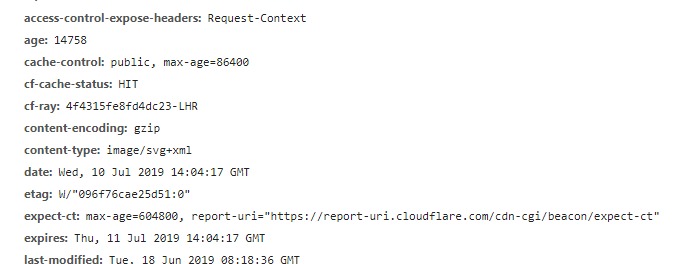
However it's a bit of a pain to have to click in to all of these, so let's use a not as well known feature of being able to add custom headers to the network requests panel.

Step 1.

In network on DevTools right click the headers area as such
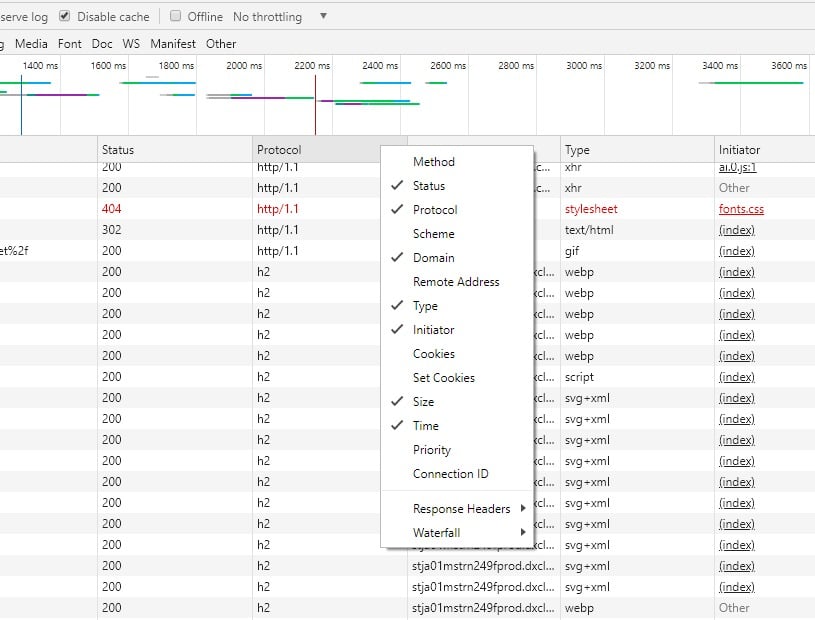
Step 2.

Navigate to Response Header -> Manage Custom Headers

Step 3.

Add in the header cf-cache-status which indicates if it's been cached

Result

Now you'll see a HIT or MISS or Empty (If not going through CloudFlare) giving a lot easier way to see if your resources are being cached.
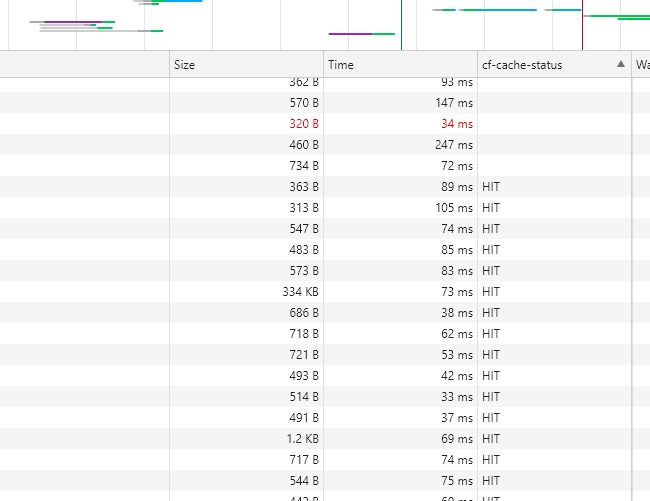
Easy :-)

Jul 10, 2019

Comments

Jul 10, 2019 02:24 PM

Nice and simple tip, Scott. 👍

Jacob Pretorius
Jacob Pretorius Jul 11, 2019 10:27 AM

That's useful thanks for the tip!

Ravindra S. Rathore
Ravindra S. Rathore Jul 15, 2019 12:29 PM

Very helpful tip 👍

Please login to comment.
Latest blogs
Looking back at Optimizely in 2025

Explore Optimizely's architectural shift in 2025, which removed coordination cost through a unified execution loop. Learn how agentic Opal AI and...

Andy Blyth | Dec 17, 2025 |

Cleaning Up Content Graph Webhooks in PaaS CMS: Scheduled Job

The Problem Bit of a niche issue, but we are building a headless solution where the presentation layer is hosted on Netlify, when in a regular...

Minesh Shah (Netcel) | Dec 17, 2025

A day in the life of an Optimizely OMVP - OptiGraphExtensions v2.0: Enhanced Search Control with Language Support and Synonym Slots

Supercharge your Optimizely Graph search experience with powerful new features for multilingual sites and fine-grained search tuning. As search...

Graham Carr | Dec 16, 2025

A day in the life of an Optimizely OMVP - Optimizely Opal: Specialized Agents, Workflows, and Tools Explained

The AI landscape in digital experience platforms has shifted dramatically. At Opticon 2025, Optimizely unveiled the next evolution of Optimizely Op...

Graham Carr | Dec 16, 2025