


Hiding Visitor Group Criteria In CMS 12
In CMS 12 the Visitor Group managment system has been moved to a client side component the same as the standard editing experience and the .NET 5/6 framework has moved away from StructureMap.
Therefore the old way we had to filter out Visitior Group Criteria we don't want such as described here https://world.optimizely.com/forum/developer-forum/CMS/Thread-Container/2019/6/hide-episerver-visitor-group-criteria/ does not work as described.
Therefore here is a solution you can implement to do the same job, configurable from appSettings.json
Stage 1: Implement A Custom Filtered Version of the IVisitorGroupsUIApiService
This class simply filters the API to return everything apart from types we want removed (from Stage 2)
using System;
using System.Collections.Generic;
using System.Linq;
using System.Linq.Expressions;
using EPiServer.Cms.UI.VisitorGroups.Api.Builders;
using EPiServer.Cms.UI.VisitorGroups.Api.Services;
using EPiServer.Cms.UI.VisitorGroups.Api.ViewModels;
using EPiServer.Framework.Localization;
using EPiServer.Personalization.VisitorGroups;
using Microsoft.Extensions.Configuration;

namespace AlloyTemplates.Business.VisitorGroups
{
    public class FilteredVisitorGroupsUIApiService : IVisitorGroupsUIApiService
    {
        private readonly IVisitorGroupRepository _visitorGroupRepository;
        private readonly IVisitorGroupCriterionRepository _visitorGroupCriterionRepository;
        private readonly VisitorGroupDtoBuilder _visitorGroupDtoBuilder;
        private readonly LocalizationService _localizationService;
        private readonly IVisitorGroupsStatisticsLoggerRegistry _visitorGroupsStatisticsLoggerRegistry;
        private readonly IConfiguration _configuration;

        public FilteredVisitorGroupsUIApiService(
          IVisitorGroupRepository visitorGroupRepository,
          IVisitorGroupCriterionRepository visitorGroupCriterionRepository,
          VisitorGroupDtoBuilder visitorGroupDtoBuilder,
          LocalizationService localizationService,
          IVisitorGroupsStatisticsLoggerRegistry visitorGroupsStatisticsLoggerRegistry,
            IConfiguration configuration
          )
        {
            this._visitorGroupRepository = visitorGroupRepository;
            this._visitorGroupCriterionRepository = visitorGroupCriterionRepository;
            this._visitorGroupDtoBuilder = visitorGroupDtoBuilder;
            this._localizationService = localizationService;
            this._visitorGroupsStatisticsLoggerRegistry = visitorGroupsStatisticsLoggerRegistry;
            _configuration = configuration;
        }

        public IEnumerable<VisitorGroupListViewItemDto> ListAllGroups() => (IEnumerable<VisitorGroupListViewItemDto>)this._visitorGroupRepository.List().Select<VisitorGroup, VisitorGroupListViewItemDto>((Func<VisitorGroup, VisitorGroupListViewItemDto>)(visitorGroup => new VisitorGroupListViewItemDto(visitorGroup))).ToList<VisitorGroupListViewItemDto>();

        public VisitorGroupDto GetGroup(Guid id) => this._visitorGroupDtoBuilder.Build(this._visitorGroupRepository.Load(id));

        public VisitorGroup SaveGroup(VisitorGroup visitorGroup)
        {
            if (visitorGroup.Id == Guid.Empty)
                visitorGroup.Id = Guid.NewGuid();
            this._visitorGroupRepository.Save(visitorGroup);
            return visitorGroup;
        }

        public VisitorGroupDto CopyGroup(Guid id) => this._visitorGroupDtoBuilder.Build(this._visitorGroupRepository.Copy(this._visitorGroupRepository.Load(id), this._localizationService.GetString("/shell/cms/visitorgroups/index/copy")));

        public void DeleteGroup(Guid id) => this._visitorGroupRepository.Delete(id);

        public IEnumerable<VisitorGroupCriterionDto> ListAllVisitorGroupCriterion()
        {
            var filteredTypes = _configuration.GetSection("FilteredVisitorGroups:ExcludedCriterionFullTypes").Get<string[]>();

            var filteredList = filteredTypes == null || !filteredTypes.Any() ? _visitorGroupCriterionRepository.List() : _visitorGroupCriterionRepository.List()
                .Where(item => !filteredTypes.Contains(item.TypeName));

            return (from criterion in filteredList select _visitorGroupDtoBuilder.Build(criterion)).ToList();
        }

        public void DeleteStatisticsForGroup(Guid id) => this._visitorGroupsStatisticsLoggerRegistry.RemoveStatistics((IEnumerable<Guid>)new Guid[1]
        {
      id
        });
    }
}
Make sure also to register this in your DI code
services.AddTransient<IVisitorGroupsUIApiService, FilteredVisitorGroupsUIApiService>();Stage 2: Add settings to appSettings.json
In this section of the root of the of the JSON file we can configure the full type name of the Criterion type we want removed.
  "FilteredVisitorGroups": {
    "ExcludedCriterionFullTypes": [
      "EPiServer.Personalization.VisitorGroups.Criteria.UserProfileCriterion, EPiServer.Cms.UI.AspNetIdentity"
    ]
  }
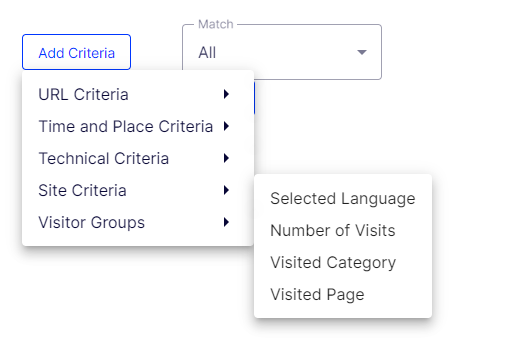
This example shows removing the UserProfileCriterion but will work with any type
Thanks all :-)

Comments