


Handling Multiple Carts in a Single Sales Agent Session in Optimizely Commerce
In assisted-commerce, call-center, and B2B scenarios, a Sales Agent often needs to work on behalf of multiple customers within a single authenticated session.
A typical requirement looks like this:
-
A Sales Agent logs in once (via OKTA)
-
Uses Select Customer to choose a customer
-
Manages a cart for that customer
-
Switches to another customer
Returns to the previous customer and continues where they left off.
Out of the box, Optimizely Commerce assumes one active cart per user, which makes this scenario non-trivial.
This blog explains a clean, scalable pattern for supporting multiple customer carts within a single Sales Agent session in Optimizely Commerce 14.
Challenges
By default, a cart in Optimizely Commerce is associated with:
-
CustomerId -
Market
-
Cart name
In assisted-sales scenarios:
-
The logged-in user is the Sales Agent
-
The actual shopper is the selected customer
-
The Sales Agent must manage multiple carts, one per customer
Design Principle (which I used)
Treat the Sales Agent as an operator, not the cart owner.
-
Sales Agent identity remains constant
-
Each customer has their own persisted cart
-
Customer context switching is explicit
-
Only one cart is active in the UI at a time
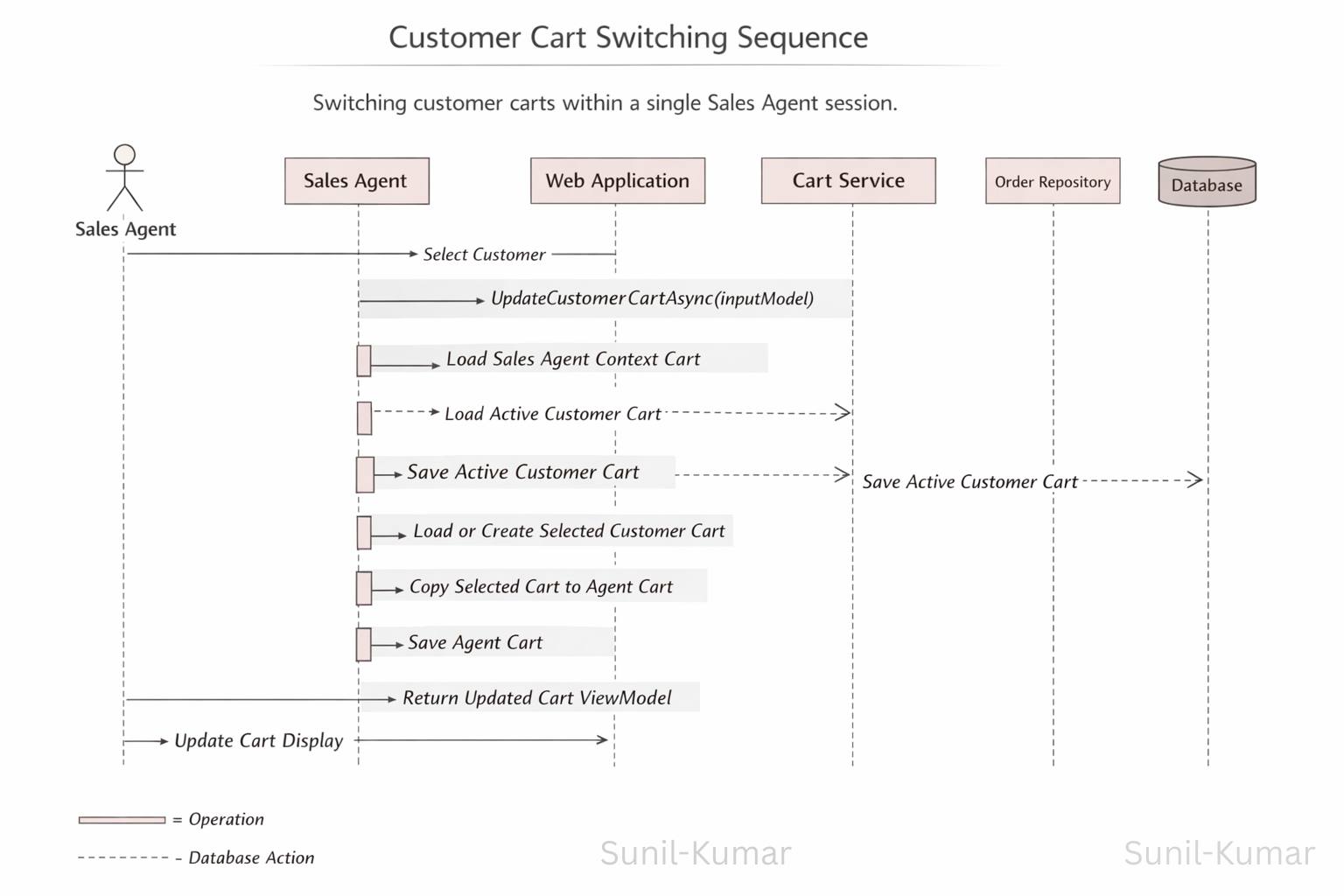
So to achive this requirement I created a Endpoint which will accepts customer Id's for Active Customer & Selected Customer, so based on the customer Id's system will switch/choose the correct cart and make that cart as primary cart.
Input Model for Customer Context Switching
Customer switching is driven by a simple and explicit input model:
public class CustomerCartDetailsInputModel
{
    [DataMember(Name = "activeCustomerId")]
    public string ActiveCustomerId { get; set; }

    [DataMember(Name = "selectedCustomerId")]
    public string SelectedCustomerId { get; set; }
}
Purpose:
-
ActiveCustomerId→ customer whose cart is currently active -
SelectedCustomerId→ customer chosen via Select Customer
This avoids implicit session behavior and keeps cart ownership clear.
Customer Cart Switching Endpoint
Whenever a Sales Agent clicks Select Customer, the frontend calls a single endpoint:
[HttpPost]
public async Task<JsonResult> Post(
    [FromBody] CustomerCartDetailsInputModel inputModel)
{
    return new JsonHttpStatusResult<CartGetViewModel>(
        await _customerCartService.UpdateCustomerCartAsync(inputModel),
        SerializerSettings.JsonDefault);
}
This endpoint acts as the single source of truth for:
-
Persisting the active customer’s cart
-
Loading or creating the selected customer’s cart
-
Switching the active cart context
High-Level Switching Flow
-
Resolve Sales Agent identity
-
Load or create the Sales Agent context cart
-
Persist the active customer’s cart
-
Load or create the selected customer’s cart
-
Copy the selected customer cart into the Sales Agent context
-
Mark the selected customer as active
Simplified Cart Switching Logic (Core Pattern)
Below is a cleaned-up version of the core logic, focused only on multi-cart handling:
public async Task<CartGetViewModel> UpdateCustomerCartAsync(
    CustomerCartDetailsInputModel inputModel)
{
    var salesAgentId = GetSalesAgentId();

    // Load or create Sales Agent context cart
    var agentCart = _orderRepository.LoadOrCreateCart<ICart>(
        salesAgentId, OrderNames.Default);

    // Ensure identifiers exist
    if (string.IsNullOrEmpty(inputModel.ActiveCustomerId))
        inputModel.ActiveCustomerId = Guid.NewGuid().ToString();

    if (string.IsNullOrEmpty(inputModel.SelectedCustomerId))
        inputModel.SelectedCustomerId = Guid.NewGuid().ToString();

    Guid.TryParse(inputModel.ActiveCustomerId, out var activeCustomerId);
    Guid.TryParse(inputModel.SelectedCustomerId, out var selectedCustomerId);

    // Persist active customer cart
    if (activeCustomerId != Guid.Empty)
    {
        var activeCustomerCart =
            _orderRepository.LoadCart<ICart>(activeCustomerId, OrderNames.Default)
            ?? _orderRepository.Create<ICart>(activeCustomerId, OrderNames.Default);

        activeCustomerCart.CopyFrom(agentCart, _orderGroupFactory);
        activeCustomerCart.CustomerId = activeCustomerId;

        _cartRepository.SaveCart(activeCustomerCart);
    }

    // Load or create selected customer cart
    var selectedCustomerCart =
        _orderRepository.LoadCart<ICart>(selectedCustomerId, OrderNames.Default)
        ?? _orderRepository.Create<ICart>(selectedCustomerId, OrderNames.Default);

    selectedCustomerCart.CustomerId = selectedCustomerId;

    // Switch active context
    agentCart.CopyFrom(selectedCustomerCart, _orderGroupFactory);
    agentCart.CustomerId = salesAgentId;

    _cartRepository.SaveCart(agentCart); // Save Cart

    return new CartGetViewModel
    {
        Cart = await BuildCartViewModel(agentCart), // Generate View Model of Cart
        CartCustomerId = selectedCustomerId.ToString()
    };
}
Understanding the CopyFrom Method
CopyFrom is a core Optimizely Commerce API used to deep-copy an entire cart structure from one order group to another.
targetCart.CopyFrom(sourceCart, _orderGroupFactory);
What CopyFrom Does
-
Copies line items, shipments, payments, and addresses
-
Copies custom properties
-
Recreates all entities using
IOrderGroupFactory
Why CopyFrom Is Essential Here
In multi-cart scenarios:
-
Customer carts must remain isolated
-
The Sales Agent context cart must fully switch state
-
Partial updates are unsafe
CopyFrom guarantees a clean cart switch without data leakage.
By separating Sales Agent identity from customer cart ownership and using an explicit Select Customer flow, you can build a scalable assisted-commerce experience on Optimizely Commerce without fighting the platform.
Below is the output of design: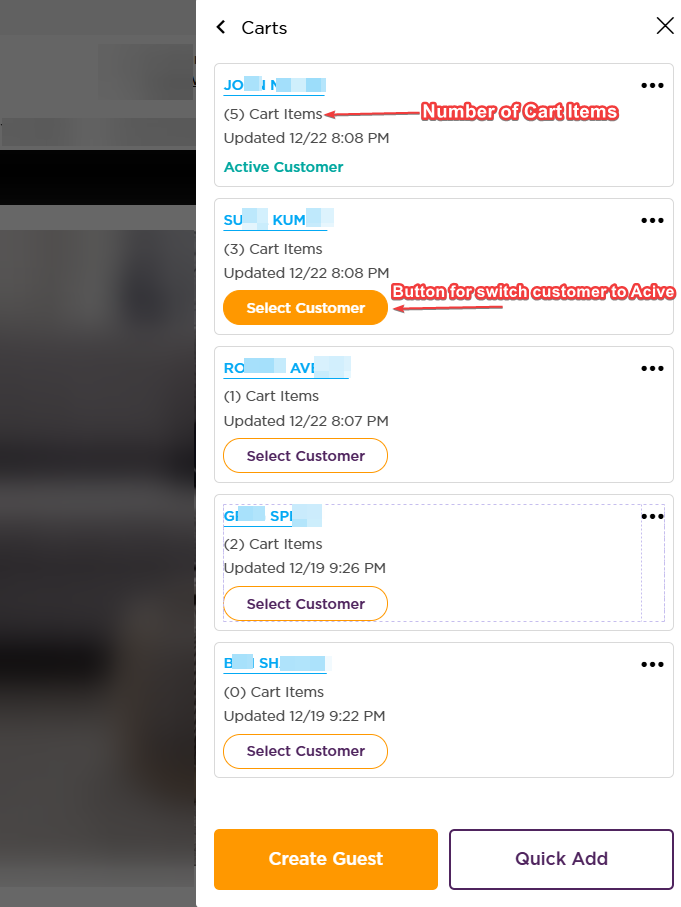

Comments