
Take experimentation velocity to the next level with Mutually Exclusive Experiments in Edge
The need for Mutually Exclusive Experiments in Edge
When they visit our customers’ sites, Edge users are likely to see more than one related experiment running simultaneously. This could cause them to behave differently from visitors who only see one of these experiments in isolation. As a result, this difference in behavior has the potential to affect our customers’ results and lead to undesirable interactions between experiments. Experiment collaborators can’t afford to make inaccurate inferences as they need reliable results to understand their customers better: they need to be empowered with the right tools to build relevant experiences and succeed faster.
Furthermore, we want our customers to have the flexibility of running as many experiments as they can, whether they wish to use Web Experimentation or Performance Edge. The development team at Optimizely has worked hard to address this pain point in our Web and Feature Experimentation products, and now we’re bringing it to Performance Edge.
Experiment collaborators need to be confident in their results: introducing Mutually Exclusive Experiments in Edge
With Mutually Exclusive Experiments available in Edge, we will make our customers’ experiments and campaigns mutually exclusive via exclusion groups. Suppose that our customers are running two experiments, but both are in an exclusion group. This means that any visitor who sees Experiment A won’t see Experiment B, and vice versa. For instance, say that Experiment A has a 50% traffic allocation and Experiment B has a 50% traffic allocation. Half of the users will only see Experiment A, and the other half will only see Experiment B.
As a result, no visitor will see both experiments because they are in the same exclusion group, which makes both experiments mutually exclusive. These experiments would be customizable in a way that traffic allocation for experiments or campaigns in an exclusion group can be changed. This prevents customers from collecting unnecessary biases from users’ difference in behaviors when being added to several experiments.
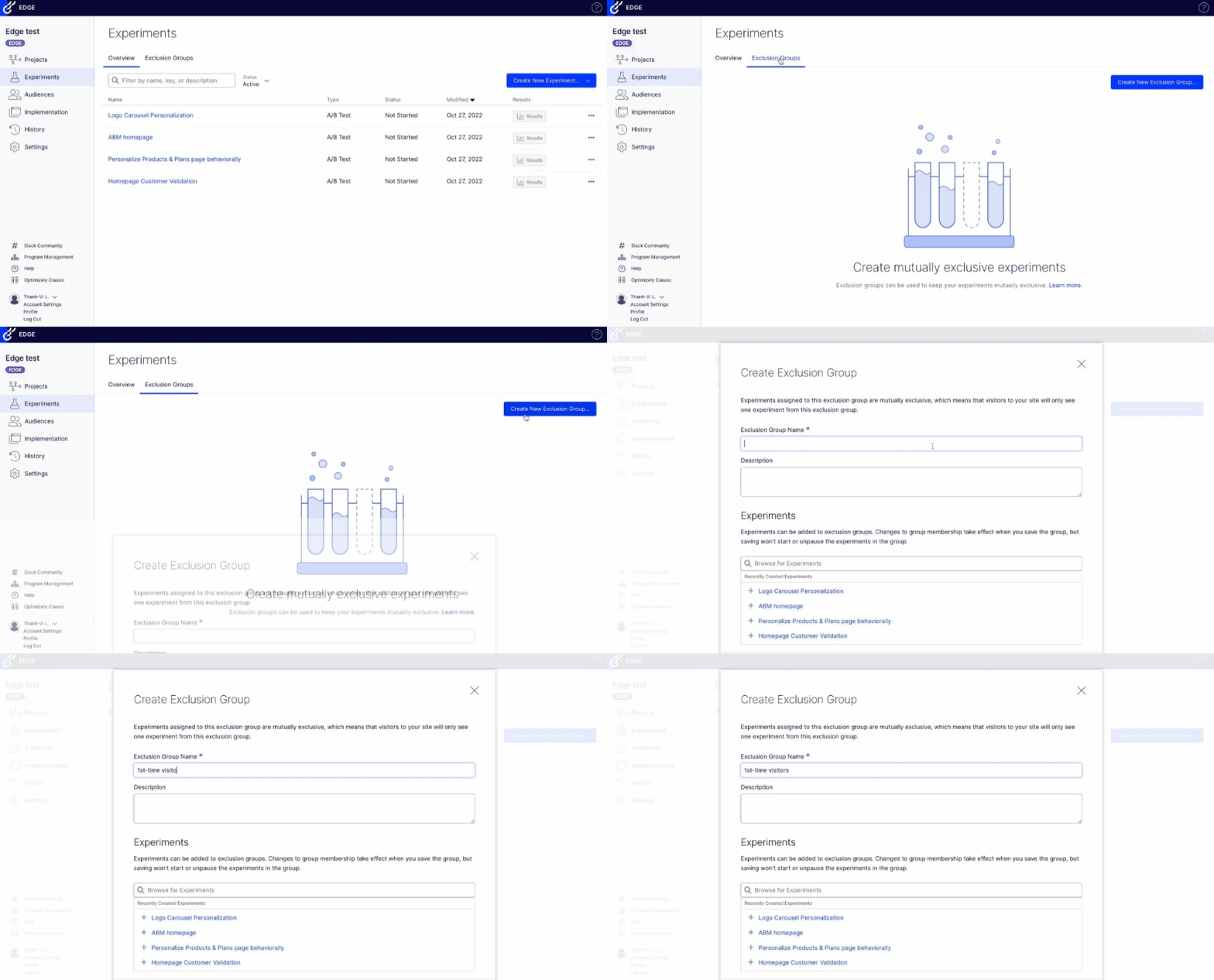
Here's how to create an exclusion group in Edge:
The takeaway
Thanks to Mutually Exclusive Experiments in Edge, avoid inaccurate results that stem from isolating related experiments. Make sure you invest in the right changes and increase experiment velocity by allowing more experiments to be run concurrently with higher confidence in results. Read more about our new Mutually Exclusive Experiments feature here and here. Note: Mutually Exclusive Experiments for Edge will be rolled out gradually over Q4, and is expected to be out 100% by early December 2022.
Questions?
Please contact support@optimizely.com if you need assistance with our Web Experimentation and/or Performance Edge products. If you’d like to follow our development updates, feel free to subscribe to our RSS feed by clicking the corresponding icon below.
Comments