AI OnAI Off
Linking to Catalog Content with added hash-value(s)


If you can, then you should update to EPiServer.CMS.UI 10.6.0 or newer, where they fixed bug CMS-6328 which added a new field "remaining url"
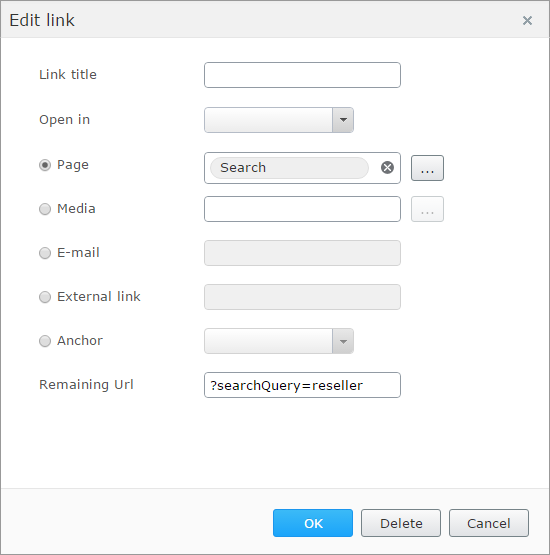
I guess that will fix your problem
Feb 21, 2017 21:46
Hi Sebastian,
Great feature, that is awesome to know!
Unfortunately upgrading is not possible at the moment, since it will require a newer server than Windows Server 2008 R2 to support WebSockets protocol. Unless I'm wrong?
Feb 22, 2017 6:49
I think you can turn off the webscockets with adding this to app.config
<add key="Epi.WebSockets.Enabled" value="false" />
But not sure if that will help as it is an old server :/
Anyway, this is something I found from an old solution that was runing episerver 7.1, unfortanly it consist of two properties and maybe not the best solution, but it may help
        [Display(Order = 6)]
        [BackingType(typeof(PropertyUrl))]
        public virtual Url Url { get; set; }

        [Display(Name = "Filter", Description = "")]
        public virtual string Filter { get; set; }

        public Uri GetUrl()
        {
            var urlHelper = ServiceLocator.Current.GetInstance<UrlHelper>();
            var url = EPiServer.Web.Mvc.Html.UrlExtensions.PageUrl(urlHelper, (Url ?? "").ToString());

            var urlBuilder = new UrlBuilder(url.ToString());

            if (!string.IsNullOrEmpty(Filter))
            {
                var filter = Filter;
                if (filter.IndexOf('?') > -1)
                    filter = filter.Substring(filter.IndexOf('?'));

                var query = HttpUtility.ParseQueryString(Url.Query);

                var filterItems = filter.Split('&');

                foreach (var item in filterItems)
                {
                    var filterparts = item.Split('=');
                    query[filterparts[0]] = filterparts[1];
                }

                urlBuilder.Query = query.ToString();
            }

            return urlBuilder.Uri;
        }
Feb 22, 2017 9:12
Thanks for the tip!
I've just tested with a basic EPiServer installation on the Windows Server 2008 R2 instance, and with that setting it seems to be running. There's no trace of errors in the console / network tab, so it seems the WebSockets is indeed disabled.
I have to mention that my original post is concerning the Create / Edit link feature within the Rich text editor.
Feb 22, 2017 10:54
This topic was created over six months ago and has been resolved. If you have a similar question, please create a new topic and refer to this one.

Hi,
I'm puzzled on I can link to content from the catalog and having a hash-value as well (as in, added to the URL).
This is the URL-scenario I'd like to have: http://www.example.com/da-dk/sport-og-idraet/fodbold/#!/480000=/Classic/
It's part of Angular's $locationService way of keeping track of values, and is this solution it corresponds to a pre-selected facet.
And here's what's possible at the moment:
As part of this UI, I would like to know how to add an extra (optional) field for adding my custom hash-value.
Best regards
Kristian