AI OnAI Off
Disable projects still leaves 'old' projects gadget



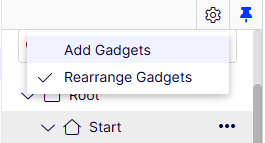
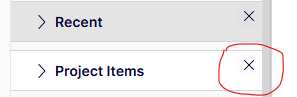
Thanks for the reply and tip. That removes the gadget from the side panel for my user, but not for anyone else. And it doesn't prevent anyone from adding it again. So it does not really solve the problem unfortunately.
Dec 18, 2025 9:20
Quan Mai
- Dec 18, 2025 9:32
The gadgets are per-user settings, so yes it can only affect current user



I believe you should be able to remove the projects gadget per from the default views using the views configuration or by customizing a view component, docs here https://docs.developers.optimizely.com/content-management-system/docs/views.
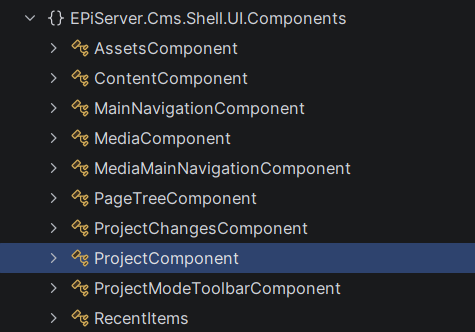
The topic Change a view through configuration states that views can be transformed, also looking at the EPiServer.Cms.Shell.UI.Components namespace we can see the ProjectsComponent
{
  "EPiServer": {
    "CmsUI": {
      "ViewOptions": {
        "Views": [{
          "Name": "/episerver/cms/home",
          "TransformationSettings": [{
            "TransformationType": "Remove",
            "PlugInArea": "/episerver/cms/assets/defaultgroup",
            "DefinitionName": "EPiServer.Cms.Shell.UI.Components.ProjectComponent",
            "Name": "RemoveProjectComponent"
          }]
        }]
      }
    }
  }
}
This will only remove the gadget from users using the default view settings. If a user have customized their gadgets etc they will most likely have to reset their views in the display options tab under "my settings".
There is a programmatic approach as well to remove components using an IViewTransformer, I have tried a bit with it be it appears as the ProjectComponent isn't loaded in the RootContainer.
Here's the code I've written so far, it works with some components but it cannot find the ProjectComponent in my installation. Try it out and go from there
// using System;
// using System.Linq;
// using System.Security.Principal;
// using EPiServer.Shell.ViewComposition;

[ViewTransformer]
public class RemoveProjectsUiViewTransformer : IViewTransformer
{
    private readonly string[] _definitionsToRemove =
    [
        "EPiServer.Cms.Shell.UI.Components.ProjectComponent", // this is missing in the container for some reason
        "EPiServer.Cms.Shell.UI.Components.MediaComponent" // this one works
    ];

    public void TransformView(ICompositeView view, IPrincipal principal)
    {
        var matchers = _definitionsToRemove
            .Select(d => (IComponentMatcher)new DefinitionNameMatcher(d))
            .ToList();

        view.RootContainer.RemoveComponentsRecursive(matchers, notifyComponentOnRemoval: false);
    }

    private sealed class DefinitionNameMatcher(string definitionName) : IComponentMatcher
    {
        public bool MatchesComponent(IComponent component) =>
            string.Equals(component.DefinitionName, definitionName, StringComparison.OrdinalIgnoreCase);

        public bool MatchesContainer(IContainer container) => true;
    }

    public int SortOrder { get; }
}
Dec 18, 2025 11:20
Thanks Eric, that pointed me in what I think is a useful direction. Just removing the gadget from the default view isn't enough, but perhaps your other suggestion with the ViewTransformer might bare fruit, I'll try a bit with that. I found another workaround, all though not too elegant: to replace the gadget with an empty pane, following https://docs.developers.optimizely.com/content-management-system/docs/replacing-a-component-globally.
Digging into this I found the ProjectUIOptions.ProjectGadgetEnabled which sounds like it would control if the Project gadget is enabled or not, but it is only used in code to toggle between creating a ProjectComponent or a ProjectChangesComponent. (Not sure what's the difference between those yet.)
Edited,
Dec 18, 2025 13:11

I'm trying to disable the the projects feature in CMS 12 (12.34.1), but it doesn't seem to disable it completely. The 'old' project gadget is still available to add, which allows the editors to still be able to create and manage projects. I've looked through the documentation: https://docs.developers.optimizely.com/content-management-system/docs/projects and it states that the only thing required is to set the "
ProjectUIOptions.ProjectModeEnabledto false". But this just disables the 'global' project bar in the side panel.I've recreated it in an Alloy installation. With the
ProjectUIOptions.ProjectModeEnabledset to false I can still add and manage projects through the 'old' projects gadget.Am I missing something or is this intended? If so - is there a way to atleast hide or restrict access to the 'old' projects gadget? I can't seem to find any info about this. Had it been a custom gadget I could have set the AllowedRoles via the Gadget declaration (IFrameCompent attribute, but I don't see a way to do this on built in gadgets.
The problem is due to that we have a large number of seldom-users as editors, who aren't always that disciplinary, and using projects can really create a hassle for themselves and other editors if used in a 'creative' way. 🤷♂️