search
AI OnAI Off
I removed all own package references to SixLabors.ImageSharp - only keeping package refs to EPiServer.ImageLibrary.ImageSharp
That solved the build pipeline error.
I still have CMS 12 and I updated EPiServer.ImageLibrary.ImageSharp to version 2.0.8, in order to get SixLabors.ImageSharp 3.2.0.
I also got the license error in the release build (warning in debug). I do not have a direct reference to SixLabors.ImageSharp package in the project.
Is the license missing from 2.0.8 version?


 workspace_premiumworkspace_premiumworkspace_premium
 workspace_premium
I had the same licensing error with SixLabors.ImageSharp 3.2.0. Debug builds worked, but Release failed with "No Six Labors license found".
Looking into SixLabors.ImageSharp.targets, I found that ValidateLicenseTask runs before compilation and uses ContinueOnError="$(Configuration.StartsWith('Debug'))", which explains why the error is tolerated in Debug but fails the Release build.
Six Labors' license allows transitive dependencies under Apache 2.0, while direct references may require a commercial license depending on usage.
I removed the direct ImageSharp reference and installed EPiServer.ImageLibrary.ImageSharp 13.4.0 instead, which brings in ImageSharp 3.2.0 as a transitive dependency. After that, the Release build succeeded without the licensing error.
Did you ever resolve this? I have just recieved the same license error. I had he packages Top-level direct referenced. But removed them all, upgraded EPiServer.ImageLibrary.ImageSharp to 2.0.8.
I can see all SixLabors.ImageSharp 3.2.0 being transitative. Yet, still get the license error.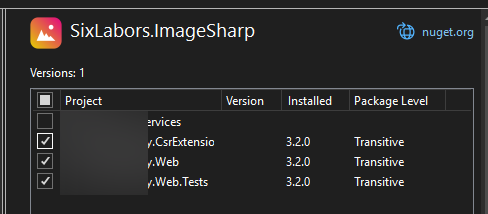
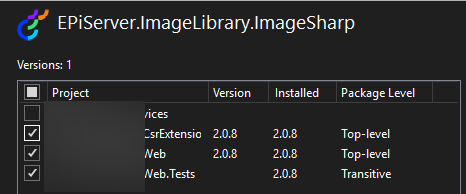
No, at least in my case the issue is not resolved yet. Same packages configuration: EPiServer.ImageLibrary.ImageSharp 2.0.8 and SixLabors.ImageSharp 3.2.0 just transitive -> license error.
So I contacted Optimizely support, and they pointed me in the right direction. Our solution is still .NET 8, and uses reference: Baaijte.Optimizely.ImageSharp.Web 3.0.1. This version has a direct reference to the SixLabor-files, triggering the license issue. (There where other known packages as well)
To get around it recommended is to upgrade Baaijte.Optimizely.ImageSharp.Web to at least: 3.1.1
However, since we are currently stuck on .NET 8, we couldn't, so they had a temporary workaround, by specifying to not bring additional build assets from this reference, adding: ExcludeAssets="build"
<PackageReference Include="Baaijte.Optimizely.ImageSharp.Web" Version="3.0.1" ExcludeAssets="build"/>
After this, do a Clean and Rebuild. This removed our license issues.
This might happen on any referencing package. So this handy command you can track which components you have that have a dependency on SixLabor.ImageSharp, upgrade or add ExcludeAssets as required:
Please note that this is a temporary workaround, so please note so, and update to .NET 10 and Baaijte.Optimizely.ImageSharp.Web to higher versions asap.
Thanks for sharing. Updating Baaijte.Optimizely.ImageSharp.Web to 3.1.1 helped in my case as there is already .net 10 in the project.




I updated packages and my Azure DevOps pipeline now stops on this error:
I have read recent blogs posts about vulnerability warnings but this seems to be something different.
How is the license key/file handled for EPiServer.ImageLibrary.ImageSharp?