A critical vulnerability was discovered in React Server Components (Next.js). Our systems remain protected but we advise to update packages to newest version. Learn More.
AI OnAI Off
A critical vulnerability was discovered in React Server Components (Next.js). Our systems remain protected but we advise to update packages to newest version. Learn More.
Hi David,
This is a fairly common issue with custom TinyMCE plugins in CMS 12, and it usually comes down to how and when the plugin is registered and loaded, rather than the plugin code itself.
A few key points to be aware of in CMS 12:
1. CMS 12 loads TinyMCE via AMD / Dojo (not global TinyMCE)
Unlike older CMS versions, CMS 12 does not expose TinyMCE globally.
If your plugin assumes tinymce is available on window, it may work locally but fail in CMS.
Your plugin must be registered through the TinyMCE configuration, not via a standalone JS include.
2. Correct way to register a custom TinyMCE plugin
You should register the plugin using TinyMceConfiguration (or TinyMceConfigurationBuilder), for example:
[ServiceConfiguration(typeof(TinyMceConfiguration))]
public class CustomTinyMceConfig : TinyMceConfiguration
{
    public CustomTinyMceConfig()
    {
        AddPlugin("myplugin", "/ClientResources/tinymce/myplugin.js");
        Default()
            .AddPlugin("myplugin")
            .Toolbar("bold italic | myplugin");
    }
}
Important checks:
The plugin name must match the name used in tinymce.PluginManager.add
The path must be accessible (check Network tab for 404s)
The plugin must be added to the toolbar, otherwise it won’t appear
3. Plugin JS must follow TinyMCE plugin pattern
Your plugin JS should look like this:
tinymce.PluginManager.add('myplugin', function (editor) {
    editor.ui.registry.addButton('myplugin', {
        text: 'My Plugin',
        onAction: function () {
            editor.insertContent('Hello world');
        }
    });
});
Common mistakes:
Plugin name mismatch
Using deprecated TinyMCE APIs
Trying to access CMS-specific globals inside the plugin
4. Clear browser + CMS UI cache
TinyMCE plugins are aggressively cached.
After changes:
Hard refresh browser (Ctrl+Shift+R)
Reset CMS UI view:
Profile => My settings => Reset views
Restart site if plugin registration changed
5. If plugin works locally but not on DXP
Check:
File included in deployment package (ClientResources)
Correct casing in file paths (DXP is case-sensitive)
No bundling/minification stripping the plugin file
6. Debugging tips
Open DevTools => Network => look for your plugin JS file
Check Console for:
Plugin not found
Cannot read property 'PluginManager'
Temporarily log inside plugin JS to confirm it loads
Hope this will helps you !





CMS 12
I'm looking to add functionality to an existing plugin we use in TinyMCE. We have a button plugin that contains an option to create a telephone number. Currently, that field only validates US based numbers. We are looking to expand that to International numbers as well.
I had found this existing library that I was trying to bring into the project. https://github.com/jackocnr/intl-tel-input
I installed the package in NPM and also copied the folders into our ClientResources/scripts folder as well. I can see the JS and CSS files being added in the page, but cannot seem to get the JS to load properly.
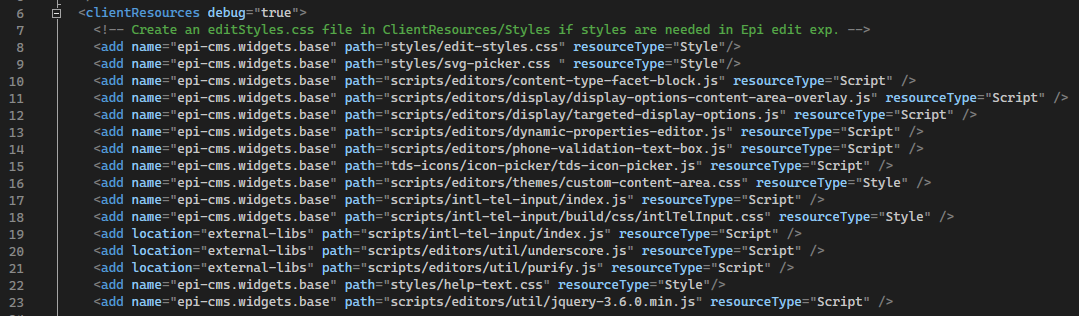
I added entries in the module.config for the JS and CSS:
Here is the line that the code is failing on (line 23):
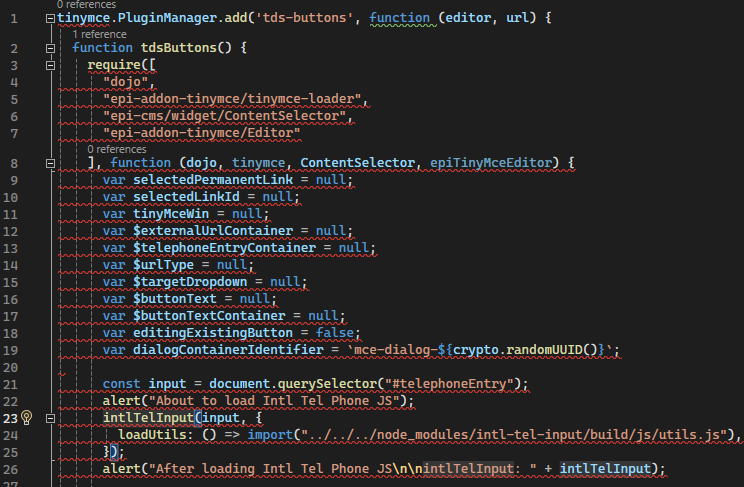
I'm not sure if I need to add another module to load in the dojo require statement or if I'm missing something else.
Any help is appreciated.
Thanks,
Dave