AI OnAI Off
IP Whitlisting calls between nextjs and backend




Hi Fahmawi,
This look like the issue lies in how the IP address is extracted from the request. Locally, traffic flows directly through the loopback interface so 127.0.0.1 is seen as expected, but in Azure all requests pass through an internal load balancer meaning the backend never sees a localhost IP. Additionally, the current code reads the leftmost value from X-Forwarded-For hich represents the client's unverified claimed IP rather than the rightmost value which is the actual trusted Azure infrastructure hop.
X-Forwarded-For reads the LEFTMOST IP `.FirstOrDefault()` on a comma-separated XFF string like: X-Forwarded-For : 203.0.113.5, 10.0.0.1, 40.112.72.205
You can try the below fix and change it according to your needs.
private static IPAddress? GetRemoteIPAddress(HttpContext context)
{
    // 1st — X-Client-IP is Azure App Service's own verified header
    string? header = context.Request.Headers["X-Client-IP"].FirstOrDefault();

    // 2nd — If behind Cloudflare, use CF headers (keep if applicable)
    header ??= context.Request.Headers["CF-Connecting-IP"].FirstOrDefault();
    header ??= context.Request.Headers["True-Client-IP"].FirstOrDefault();

    // 3rd — XFF but take RIGHTMOST (last trusted hop), not leftmost
    if (string.IsNullOrWhiteSpace(header))
    {
        var xff = context.Request.Headers["X-Forwarded-For"].FirstOrDefault();
        if (!string.IsNullOrWhiteSpace(xff))
        {
            // Last entry = added by Azure infrastructure (trusted)
            // First entry = claimed by client (spoofable)
            header = xff.Split(',').Last().Trim();
        }
    }

    // 4th — fallback to direct connection
    if (!string.IsNullOrWhiteSpace(header) && IPAddress.TryParse(header, out IPAddress? ip))
    {
        return ip;
    }

    return context.Connection.RemoteIpAddress;
}
Thanks
Wiselin Jaya Jos K
Edited,
Mar 21, 2026 13:34

Hi Everyone,
Our Opti application is hosted by Optimizely azure. We are following headless architecture where we have Nextjs and opti backend on same app service
We are deploying a whitelisting feature and its working fine locally but when deploying it it doesn't. We found out through appinsight that the calls from nextjs is being blocked and not whitlisted so we
add the following to the IP whitlist:
::1
:::1
127.0.0.1
Unfortunately it still not working, though everythign working fine locally. Now surely we cannot use internal IP because we sure have more than instance/node on the production.
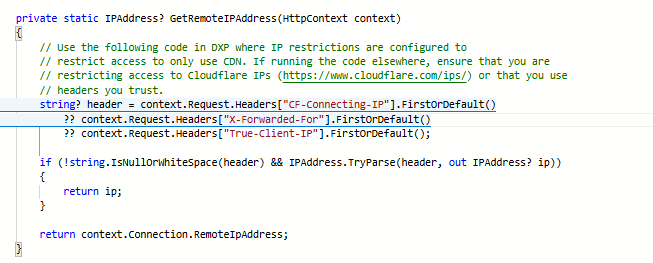
Below screenshot of how we are getting the IP address
Anyone faced this or can help please.