
Multiplexing providers
Sometimes you want to use more than one security provider. And that's what the EPiServer multiplex provider can help us. You can add one or more providers in the MultiplexingMembershipProvider section and the same numbers of items in the MultiplexingRoleProvider for the roles.
But if one provider allows search for emails, and another doesn't it throws an error. Bit annoying, but is easy to fix. you can add your own multiplexing provider like this:(only added try catch from the underline code)
- public class MultiplexingMembershipProvider : EPiServer.Security.MultiplexingMembershipProvider
- {
- public override string GetUserNameByEmail(string email)
- {
- foreach (MembershipProvider provider in this.Providers)
- {
- try
- {
- string userNameByEmail = provider.GetUserNameByEmail(email);
- if (userNameByEmail != null)
- {
- this.CurrentUsername = userNameByEmail;
- return userNameByEmail;
- }
- }
- catch { }
- }
- return null;
- }
- }
But there are also times when you want to have 2 user providers and only one role provider. When you have made a page based user provider, and want them to share the same roles. Then its a bit hassle, since if you add 2 of the same role providers, all roles are duplicated.
<add name="MultiplexingRoleProvider" type="Itera.Security.MultiplexingRoleProvider, Itera.Security"
     provider1="SqlServerRoleProvider"
     provider2="WindowsRoleProvider"
     provider3="SqlServerRoleProvider"
     providerMap1="SqlServerMembershipProvider"
     providerMap2="WindowsMembershipProvider"
     providerMap3="EPiServerMembershipProvider"/>
The trick is to create your own MultiplexingRoleProvider. At the first glance it is pretty straight forward, but there are stuff inside the AdminGroup page that detects if your role provider inherits form MultiplexingRoleProvider, and gets all the users from the Providers from the role provider. And that is not virtual and is not possible to override.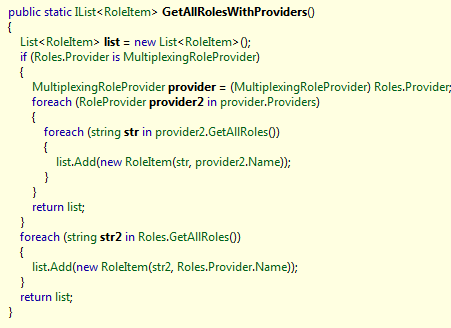
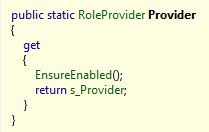
So to have 2 user providers and only one role provider you have to make your own. And as most of the time you need to copy the code from reflector, and make your modifications.
My modification was that I created a DisitinctProvider list and replaced all references that needed to use that one instead of the Providers.
- public IList<RoleProvider> Providers
- {
- get
- {
- if (this._providers == null)
- {
- this.InitProviders();
- }
- return this._providers;
- }
- }
- public IList<RoleProvider> DistinctProviders
- {
- get
- {
- if (this._distinctProviders == null)
- {
- this.InitProviders();
- }
- return this._distinctProviders;
- }
- }
The only trouble then is that in the admin group page you don’t get provider behind the role

This is what i would like to call a mistake by the code team that created the AdminGroup page. They should have checked for an interface instead of hardcode in the MultiPlexRoleProvider. or at least made all the properties there virtual.
Itera.Security.MultiplexingMembershipProvider
and
Itera.Security.MultiplexingRoleProvider
Not my best blog, but rate it 1 was a bit harse:)
Wow, got 2 fives :) thx
We ran into this issue with one customer wanting to authenticate against double AD nodes. Unfortunately that was before this post so had to solve it haphazardly :) great 'fix' to the builtin functionality.