

Visual Studio Extension – Error When Creating a New Site
Based on EPiServer 7, Windows Server 2008 SP2 Web Edition, and IIS Express 7.5
EPiServer provided the Visual Studio Extension along with the EPiServer 7 release. Using this extension in its entirety requires installation of IIS Express. A couple of us in the US office, all using Window Server 2008, have seen an error when attempting to create a new project. The error seems to be more of a Microsoft issue than an EPiServer one, and related to various versions of operating systems or software, as most people will never see the problem at all. While I have my own theories, rather than troubleshooting every detail I’ve decided to provide the background and workaround. I welcome comments from others who wish to share their expertise.
The error:
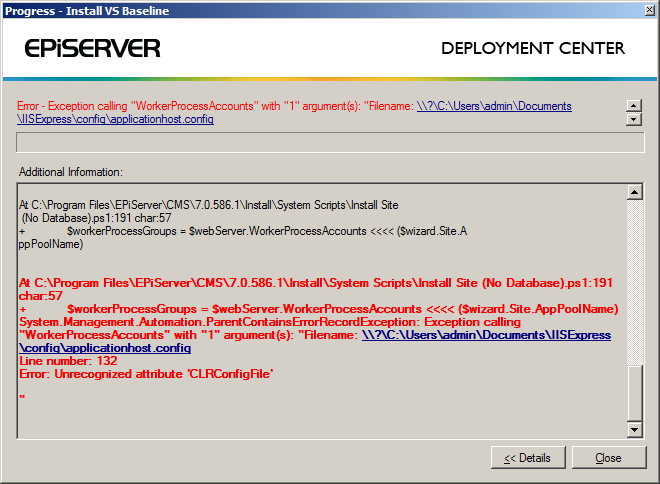
If you open up the applicationhost.config file mentioned in the error you will find an applicationPools section that looks something like what follows, with a few lines referencing the CLRConfigFile attribute.
1: <system.applicationHost>
2: <applicationPools>
3: <add name="Clr4IntegratedAppPool" managedRuntimeVersion="v4.0" managedPipelineMode="Integrated" CLRConfigFile="%IIS_USER_HOME%\config\aspnet.config" autoStart="true" />
4: <add name="Clr4ClassicAppPool" managedRuntimeVersion="v4.0" managedPipelineMode="Classic" CLRConfigFile="%IIS_USER_HOME%\config\aspnet.config" autoStart="true" />
5: <add name="Clr2IntegratedAppPool" managedRuntimeVersion="v2.0" managedPipelineMode="Integrated" CLRConfigFile="%IIS_USER_HOME%\config\aspnet.config" autoStart="true" />
6: <add name="Clr2ClassicAppPool" managedRuntimeVersion="v2.0" managedPipelineMode="Classic" CLRConfigFile="%IIS_USER_HOME%\config\aspnet.config" autoStart="true" />
7: <add name="UnmanagedClassicAppPool" managedRuntimeVersion="" managedPipelineMode="Classic" autoStart="true" />
8: <applicationPoolDefaults managedRuntimeLoader="v4.0" >
9: <processModel/>
10: </applicationPoolDefaults>
11: </applicationPools>
12:
13: ...
14:
15: </system.applicationHost>
You can find more information on the CLRConfigFile attribute in various MSDN doc. I also found a blog from Scott Forsyth which has a pretty good summary:
“In Windows Server 2008 R2 (IIS 7.5) support was added to allow different settings per application pool. Where previously the settings had to be applied to the whole framework version, now they can be specific to each app pool. It does this by allowing you to create a custom aspnet.config file per app pool. You can save them wherever you want on disk and IIS will pick them up when the app pool starts.
This is supported by a new attribute for the IIS app pool called CLRConfigFile mentioned in this MSDN article. There is no default value which means that if you don’t set it, it will read the framework’s aspnet.config file and not look for additional files.”
What does this mean for you and I? Well, personally I don’t need different settings per application pool so to fix the error mentioned I simply removed the references to it in my applicationHost.config. For example, for each line that referenced CLRConfigFile I deleted the parts that looked like the following yellow highlighted area.
<add name="Clr4IntegratedAppPool" managedRuntimeVersion="v4.0" managedPipelineMode="Integrated" CLRConfigFile="%IIS_USER_HOME%\config\aspnet.config" autoStart="true" />
That’s it! Error fixed. The VS Integration will now rely on default application pool settings. Should you need to use custom ones, please review the MSDN documentation on getting this set up properly.
Special thanks to Eddy Dugan for doing some investigation as well and being the first to hit delete on that yellow blob. 
You can also fix this problem by applying the hotfix for this Microsoft KB article:
http://support.microsoft.com/kb/2290617
The hotfix adds support for the IIS 7.5 interfaces so you can use IIS Express 7.5 on Windows versions that only have IIS 7.
Thanks for sharing Magnus! I knew some additional feedback would come quickly for the benefit of the community. :) I'll test this out when I restore my VM.