
Change page properties caption and help text when using PageTypeBuilder
I have some web administrators that would like to change the caption and help text for the page properties. This could be done using the xml files in lang/ folder. But since it’s a one language site and the actually editing in these xml files is a bit hassle I have wrote a admin plugin that do this for me.
The concept is that I change the EditCaption and HelpText for the property after PageTypeBuilder have set those to the default values.
This can be done by using the ModuleDependency attribute on the start up class like this.
- [EPiServer.Framework.ModuleDependency(typeof(PageTypeBuilder.Initializer))]
- public class AttachEvent : IInitializableModule
- {
- #region IInitializableModule Members
- static EPiServer.PageEventHandler DefaultHandler = new EPiServer.PageEventHandler(Instance_LoadedDefaultPageData);
- public void Initialize(EPiServer.Framework.Initialization.InitializationEngine context)
- {
- PageTypeDefinitionsData.UpdatePageDefinition();
- EPiServer.DataFactory.Instance.LoadedDefaultPageData += DefaultHandler;
- }
I have therefore a DSS store
- [EPiServerDataStore(AutomaticallyRemapStore = true, AutomaticallyCreateStore = true)]
- public class PageTypeDefinitionsData : IDynamicData
- {
- public EPiServer.Data.Identity Id { get; set; }
- public int PageDefinitionID { get; set; }
- public string Name { get; set; }
- public string EditCaption { get; set; }
- public string HelpText { get; set; }
- public string Old_EditCaption { get; set; }
- public string Old_HelpText { get; set; }
where I save the old caption and help text right after PageTypeBuilder have set them. I can therefore if my administrators remove the caption use the old value instead. I then store the new caption and help text in the DSS using this admin interface
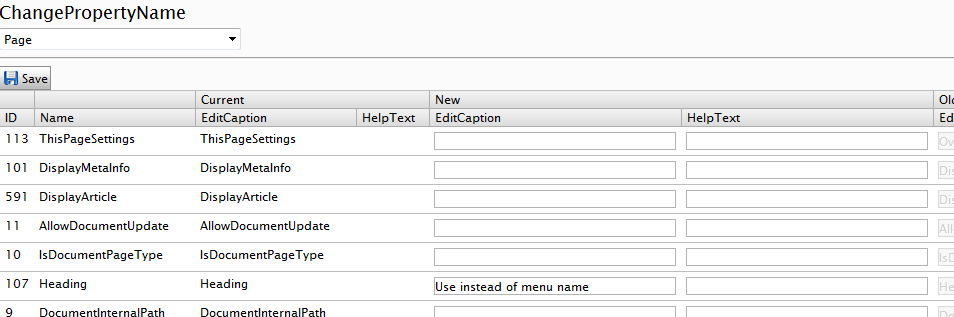
So when I change the EditCaption like this

The property caption will change, and the caption will be remembered.

Joel wrote that 1.9.3 of PageTypeBuilder don’t override any settings not set in code, but edit caption is always set I think. The help text is not always set thou. But I like to write in a help text, but that text sure need some finishing.
What is this "DSS" store you keep using? ;-)
Lol :) guess my spell checker is a bit off:)
Great post! Thanks for sharing Anders.