
It’s too good damn hard
I’m struggling to make more advanced properties but I keep hitting my head against a wall. I have downloaded the source code for the dojo javascript stuff, but as far as I have seen I need to copy a lot to make my necessary modifications. I tried to add some options to the new content area display attribute based on the type, or make my own menu item. (the missing text is mine  )
)
I know that you can add options here form the factory, but I wanted options based on the type, and to add a text box with override title and intro.
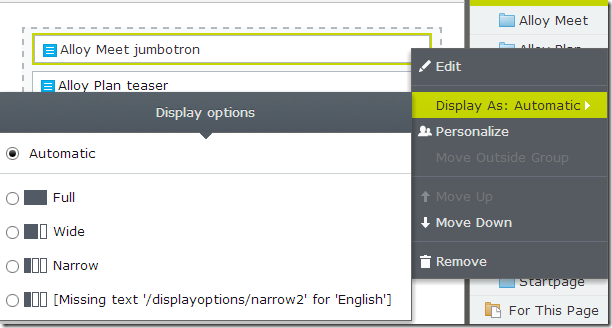
But the process is a bit to much. The steps you have to do is to override the script to use your own class
- Override epi-cms/widget/overlay/ContentArea.js to use
- own epi-cms/widget/overlay/Block where we override to use
- own epi-cms/contentediting/command/ContentAreaCommands where we override to use
- own epi-cms/contentediting/command/SelectDisplayOption where we override to use
- own epi-cms/widget/DisplayOptionSelector
here we can do changes to the Display option dialog. Then there is the issue with saving. You need to make your own View Model. If you just want to add a menu (Display as: Automatic) one could hope that one could use the SelectDisplayOption with a different kind of choses, but the DisplayOptionSelector is hardwired to the displayOption set value. This is a bit strange I think. widgets shouldn't be aware of the context they are added in.
The problem with this approach is that we change a lot, and it’s difficult to be sure the changes we do will not break anything.
The best way of doing this should maybe be that in ContentArea.js all the underline classes are define and is sent down to the underline widgets. this could have been done in the EditorDescription and the classes added to metadata.AdditionalValue. Then we could override the classes we want.
Should it be so hard?, or is there something I’m missing?
Do any of you have any pointers in where to add custom values to the content in content areas?
Then I looked at the new LinkCollection, and that it looked promising,.
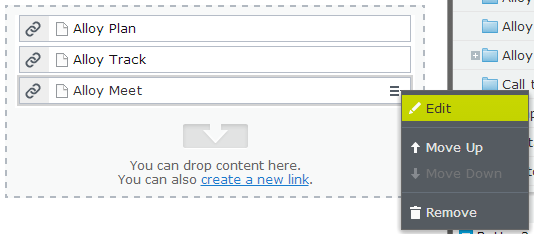
But it’s lack the Display as: option
and the edit mode is like this

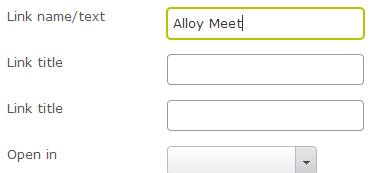
here we could have change this dialog to add a dropdown with display as options, and a override intro text field.
The ItemCollectionEditor.js is a bit easier to read, and it also add the buttons, so we don't need to override so much to do stuff.
And it also seems after some heavy reading in js files, and reflector that the items displayed is based on the modeltype we insert in the EditorDescription
[EditorDescriptorRegistration(TargetType = typeof(LinkItemCollection),UIHint="Options")]
public class LinkCollectionEditorDescriptor : ItemCollectionEditorDescriptor
{
    public LinkCollectionEditorDescriptor(System.Collections.Generic.IEnumerable<IContentRepositoryDescriptor> contentRepositoryDescriptors)
    {
        base.AllowedTypesFormatSuffix = "link";
        base.AllowedTypes = (
            from d in contentRepositoryDescriptors
            where d.LinkableTypes != null && d.LinkableTypes.Any<System.Type>()
            select d).SelectMany((IContentRepositoryDescriptor d) => d.LinkableTypes).Distinct<System.Type>().ToArray<System.Type>();
    }
    public override void ModifyMetadata(ExtendedMetadata metadata, System.Collections.Generic.IEnumerable<System.Attribute> attributes)
    {
        base.ClientEditingClass = "alloy/editors/ItemCollectionEditor";
        base.ModifyMetadata(metadata, attributes);
        var f__AnonymousType = new
        {
            ItemModelType = "epi-cms/contentediting/viewmodel/LinkItemModel",
            CustomTypeIdentifier = typeof(LinkItem).FullName.ToLower()
        };
        var value = new
        {
            DialogContentParams = new
            {
                ModelType = typeof(LinkModel2).FullName.ToLower()
            }
        };
        metadata.OverlayConfiguration["modelParams"] = f__AnonymousType;
        metadata.EditorConfiguration["itemModelType"] = f__AnonymousType.ItemModelType;
        metadata.EditorConfiguration["customTypeIdentifier"] = f__AnonymousType.CustomTypeIdentifier;
        metadata.EditorConfiguration["commandOptions"] = value;
    }
}
So when I changed LinkModel to my own LinkModel2 and added a property it got displayed.
public class LinkModel2
{
    private readonly IContentRepository _contentRepository;
    private readonly UIDescriptorRegistry _uiDescriptors;
    private string _typeIdentifier;
    [Required, DisplayName("/episerver/cms/widget/editlink/linkname")]
    public string Text
    {
        get;
        set;
    }
    [DisplayName("/episerver/cms/widget/editlink/linktitle")]
    public string Title
    {
        get;
        set;
    }
    [DisplayName("/episerver/cms/widget/editlink/linktitle")]
    public string Intro
    {
        get;
        set;
    }
This is good news. So I will work more on this way of doing thing.
So if you want something similar to a contentarea don’t use contentarea but LinkCollection

Hmmm... I registered an option in the Global.asax file:
();
Full
Wide
Narrow
Icon
var options = ServiceLocator.Current.GetInstance
options
.Add("full", "/displayoptions/full", ContentAreaTags.FullWidth, "", "epi-icon__layout--full")
.Add("wide", "/displayoptions/wide", ContentAreaTags.TwoThirdsWidth, "", "epi-icon__layout--two-thirds")
.Add("narrow", "/displayoptions/narrow", ContentAreaTags.OneThirdWidth, "", "epi-icon__layout--one-third")
.Add("icon", "/displayoptions/icon", ContentAreaTags.Icon, "", "epi-icon__layout--icon");
A new definition in the ContentAreaTags:
public const string Icon = "icon";
And a setting in the Display.xml lang file:
That seemed to me to be all I needed, but maybe I missed something important?
As I wrote I wanted options based on what type the content is, and wanted also to add a text box there
I have banged my head here as well, but my problem resolves around disabling DisplayOptions for certain ContentAreas using an EditorDescriptor for example. Impossible! :)
Hey guys,
If you've been dealing with dojo stuff as well, perhaps you know the answer to this:
http://world.episerver.com/Modules/Forum/Pages/Thread.aspx?id=86086&epslanguage=en
Hi!
I know this is an old thread, but did you guys find a solution to this? I'm also trying to remove certain display options for a specific content type in the block context menu.