

Using contenteditable for editing
Introducing contenteditable
The contenteditable attribute has been around since the good old days of Internet Explorer 5.5 and has finally been introduced into the HTML5 standards and is supported by pretty much every browser (http://caniuse.com/#feat=contenteditable). It allows us to edit text directly on an HTML page.
EDIT ME!
With the release of EPiServer 7 we've added a lot of functionality to the editing experience but unfortunately contenteditable didn't make the cut. However with a little spare time after the release I did a little hacking and have created an add-on that can be easily plugged into a site to add contenteditable editing for plain text!
Editor Wrapper
In EPiServer 7 properties are associated with a particular editor based on their type. These editors are wrapped by an editor wrapper which generically handles the updating of the content model when a change event occurs in the editor and is also responsible for how the editor appears on screen (e.g. forms mode, floating dialog, or inline textbox).
However, in the contenteditable case, the browser is going to be the editor so there is no need to create a custom editor. Which means that since all the built-in editor wrappers require an editor to be available we need to create a new custom editor wrapper that will start editing when an overlay is clicked and cause changes to be passed to the content model when editing is stopped.
Here's one I prepared earlier:
define([
'dojo/_base/declare',
// General application modules
'dojo/_base/array', 'dojo/dom-attr', 'dojo/dom-style', 'dojo/_base/event', 'dojo/keys', 'dojo/_base/lang', 'dojo/on', 'dijit/Tooltip',
// Parent classes
'epi/cms/contentediting/_EditorWrapperBase'
], function(declare, array, domAttr, domStyle, event, keys, lang, on, Tooltip, _EditorWrapperBase) {
// module:
// addon/wrapper/ContentEditable
// summary:
// Adds content editable editing functionality for properties marked up with the "contenteditable" wrapper type.
// This editor wrapper doesn't require or support having an editor widget since editing is done directly on
// the DOM node and is handled by the browser.
return declare([_EditorWrapperBase], {
// regExp: [public] String
// Regular expression string used to validate the input.
regExp: '.*',
constructor: function(parameters) {
this._handlers = [];
// HACK: Since this editor wrapper doesn't have an editor widget, mix the editorParams into this.
lang.mixin(this, parameters.editorParams);
delete parameters.editorParams;
},
uninitialize: function() {
// summary:
// Ensure the editing features have been removed during destroy.
// tags:
// protected
this._removeEditingFeatures();
},
startEdit: function() {
// summary:
// Enable "contenteditable" for the DOM node, connect event listens, and give the editable node focus.
// tags:
// protected
var node = this.blockDisplayNode;
this.inherited(arguments);
this._handlers.push(
on(node, 'blur', lang.hitch(this, 'tryToStopEditing')),
on(node, 'keydown', lang.hitch(this, '_processKeyEvent'))
);
domStyle.set(this.overlayItem.domNode, 'visibility', 'hidden');
domAttr.set(node, 'contenteditable', 'true');
this._focusContentEditable();
},
getEditorValue: function() {
// summary:
// Gets the text content of the DOM node.
// tags:
// public
return this.blockDisplayNode.textContent;
},
setEditorValue: function(value) {
// summary:
// Sets the given value as the text content of the DOM node.
// tags:
// public
this.blockDisplayNode.textContent = value;
},
isValid: function() {
// summary:
// Tests if the value is valid.
// tags:
// public
var value = this.getEditorValue(),
regex = new RegExp('^(?:' + this.regExp + ')' + (this.required ? '' : '?') + '$');
return regex.test(value) && (!this.required || !this._isEmpty(value));
},
_onTryToStopWithInvalidValue: function() {
// summary:
// Display a validation error when the user tries to stop editing in an invalid state.
// tags:
// protected
Tooltip.show(this.missingMessage, this.overlayItem.domNode, ["before-centered", "after-centered"]);
},
_removeEditingFeatures: function() {
// summary:
// Remove the contenteditable attribute from the DOM node and change back to a non-editing state.
// tags:
// protected
domStyle.set(this.overlayItem.domNode, 'visibility', 'visible');
domAttr.remove(this.blockDisplayNode, 'contenteditable');
this.blockDisplayNode.blur();
Tooltip.hide(this.overlayItem.domNode);
array.forEach(this._handlers, function(handler) {
handler.remove();
});
},
_focusContentEditable: function() {
// summary:
// Focuses the editable node, setting the caret to the end of the text.
// tags:
// private
var doc = this._getDocument(),
range = doc.createRange(),
selection = doc.getSelection();
// Set the range to the entire contents of the node, then collapse the caret to the end.
range.selectNodeContents(this.blockDisplayNode);
range.collapse(false);
// Remove any existing ranges, then make our new range visible.
selection.removeAllRanges();
selection.addRange(range);
this.blockDisplayNode.focus();
},
_getDocument: function() {
// summary:
// Gets the document for the editable node.
// tags:
// private
return this.blockDisplayNode.ownerDocument;
},
_isEmpty: function(value) {
// summary:
// Checks if the value is empty or whitespace.
// tags:
// private
return (/^\s*$/).test(value);
},
_processKeyEvent: function(e) {
// summary:
// Handles keypress events inside the content editable and invokes the relevant action.
// tags:
// private
switch(e.keyCode) {
case keys.ESCAPE:
this.cancel();
break;
case keys.ENTER:
case keys.TAB:
event.stop(e);
this.tryToStopEditing();
break;
default:
this.isModified = true;
break;
}
}
});
});
Editor Descriptor
Now, in order to make sure that our new editor wrapper is used instead of the default one for a string typed property we need to create an editor descriptor. An editor descriptor allows us to add custom information to the metadata for properties which will then be evaluated by the client side code at runtime. In this case it is as simple as specifying the uiWrapperType. Since we have a custom editor wrapper we’ll give it our own value of “contenteditable”.
[EditorDescriptorRegistration(TargetType = typeof(string), UIHint = "contenteditable")]
public class ContentEditableEditorDescriptor : EditorDescriptor
{
public override void ModifyMetadata(ExtendedMetadata metadata, IEnumerable<Attribute> attributes)
{
base.ModifyMetadata(metadata, attributes);
metadata.CustomEditorSettings["uiWrapperType"] = "contenteditable";
}
}
You’ll also notice that I’ve given it a UIHint. This allows us to maintain the default functionality for strings and only use contenteditable where we specify. For example, in the Alloy templates I could change the UIHint for MetaDescription in SitePageData to be "contenteditable".
[Display(GroupName = Global.GroupNames.MetaData, Order = 300)]
[CultureSpecific]
[UIHint("contenteditable")]
public virtual string MetaDescription { get; set; }
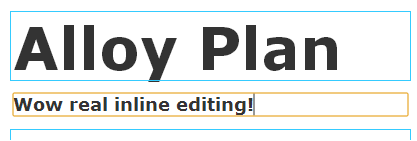
Which means that MetaDescription will appear like this in on page edit.
Initialization
Now in order to map the “contenteditable” key that we’ve specified as our uiWrapperType to our actual editor wrapper we need to register a new editor wrapper in the editor factory. Unfortunately this is easier said than done. I have a fairly simple solution (*cough* hack *cough*) that will wire everything up nicely and efficiently. It a bit advanced in terms of dojo concepts but it basically listen on the register method of dependency and when the editor factory is registered we add our custom editor wrapper then unhook ourselves.
require(['dojo/aspect', 'epi/dependency'], function(aspect, dependency) {
// summary:
// Initialize the addon by registering the contenteditable wrapper in the editor factory.
var handle,
key = 'epi.cms.contentediting.EditorFactory',
register = function(identifier) {
if (identifier !== key) {
return;
}
// When the EditorFactory is registered add our additional editor wrapper.
var editorFactory = dependency.resolve(key);
editorFactory.registerEditorWrapper('contenteditable', 'addon.wrapper.ContentEditable');
// Remove the aspect handle.
handle.remove();
};
// Listen for when the EditorFactory is registered in the dependency manager.
handle = aspect.after(dependency, "register", register, true);
});
Adding the following to your module.config will ensure that this script is run when the CMS module is started.
<clientResources>
<add name="epi.cms.widgets.base" path="ClientResources/addon/initialize.js" resourceType="Script" />
</clientResources>
Installing the ContentEditable add-on
To make your life easier, I’ve packaged this as an add-on which you can manually upload and install on your site if you want to try it out.
After installing the add-on just set the UIHint for any of your string typed properties to “contenteditable” then build. After refreshing the site those properties will now use contenteditable.
Comments