

CRP Stats
There is no such thing as too much statistics and there is also no limit on the number of ways in which you can display the same base data. To rejoice in this fact we added two controls to the “My Settings”-page that shows a little more info on CRP-progress and what you did to get there.
The first control is a progress bar that displays how far you’ve come in the current level. Since I assume most of us have played more than our share of games where you level up a character, an “experience bar” feels just right.
Looking at my progress bar (which suddenly makes me feel like I should spend more time contributing, but little did I know that I would be flaunting my inactivity in a post like this any day soon) we can see the following:
I have a total of 155 points, the current level ends at 375 points. If I would have had 380 points, my “Total progress” would have been 380 and my “Current level” would have shown 5 / 375 (since the second level also has 375 points, I think). And I would, of course, have been a Contributing citizen.

The second control consists of two pie charts (using google charts):
Count: The number of contributions made of each type.
Score: How big part of your total points that where generated by a certain contribution category.
Let’s check a live example. If we look at my charts:
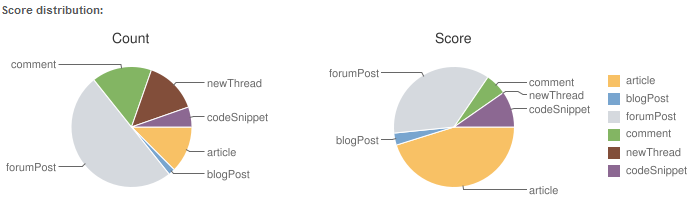
We can see that about half of my contributions are forum posts, but the articles I wrote generated more points in total. The names of the contribution are ripped from property names, but we will change those to more presentable names in the future.
P.S
This data is from our test server and when I checked the production data my scores where even more embarrassing, but let’s not dwell on that shall we.
D.S

Awesome!
Oh, I thought I would only see my own stats, but you see everone elses! I see an arms race coming...
nice
There's something strange with the pie charts though. Look at Frederik Vig's score pie chart for example, the ECD (500p) should be a third, right? Not a fourth, even though it makes his chart beautifully symmetrical at the moment :)
Cool stuff. I'm only 15 points away from the next level and only several hundred points away from Magnus!
Probably going to be a race :) but you the world team should check double posting for blogs before or? ;)
@Magnus: I'll check it out. At the moment I'm simply trusting Gregers CRP-data which could be a fatal mistake ;-) Jokes aside, I'll look into that.
Think I need to take my ECD exam again - thats a big chunk of points :)!
@Magnus: Greger was innocent. Seems we needed a max and min value for the values in the pie chart. Problem is solved and new dll's will be on the site on monday.
@David: I was thinking the same, and it would save me from writing a ton of blog posts just to shape up my embarrassing stats =)
Nice feature!