

Jeff Wallace
Aug 18, 2009
  4413
(0 votes)

Username Field Empty During Document Check In – Office Integration

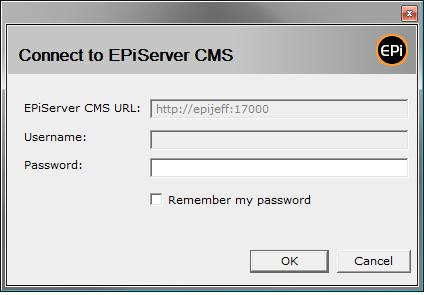
Today I was attempting to check out, edit, and check in a document using the Microsoft Office Integration in CMS 5 SP1.  Upon check in I found the dialog to connect to CMS did not contain my user name.
image

To fix this problem I performed the following steps:

1) Entered Edit Mode

2) Selected the Root folder in the tree

3) Selected the Microsoft Office Add-In tab

4) Selected the Activate tab

5) Selected the Deactivate button

5) Selected the Activate button

Magic. Problem solved! I had been having problems late last week with CMS partially behaving as if I was logged in even though I hadn’t logged in and in the system indicated “You are logged in as: “ with no user name.  I suspect this was related.  Now, with that previous issue resolved and a proper logged in state in CMS deactivate + activate resolved my issue.

Aug 18, 2009

Comments

Please login to comment.
Latest blogs
Optimizely Opal: How to Build Effective Workflow Agents

If you're building workflow agents in Optimizely Opal, this post covers how specialized agents pass context to each other, why keeping agents small...

Andre | May 20, 2026

ReviewPR: An Azure Function That Reviews Your Azure DevOps Pull Requests With Claude

A while back I wrote about an  Azure Function App for PDF creation that we use to offload PDF rendering from our Optimizely DXP site. That same...

KennyG | May 19, 2026

Accelerating Optimizely CMS and Commerce upgrades with agentic AI (Part 2 of 2)

The Real Transformation in Optimizely CMS 13: Why the Upgrade Itself Is the Easy Part. A field-tested playbook for enterprise teams moving from...

Hung Le Hoang | May 18, 2026

Is the most powerful AI model really the best value?

Artificial Intelligence is already becoming part of everyday software development. Developers now use AI tools to generate code, write documentatio...

K Khan | May 16, 2026