

An Overview of EPiServer Multilingual Capabilities
EPiServer CMS provides robust multilingual support that facilitates automatically rendering pages based on the URL, the language specified by the user, or the language detected from the user's browser settings.
With EPiServer CMS, multiple sites do not need to be created as multiple language variations can easily be managed on a single site. Authors can easily create or access all of the language variations of a page from any variation of the page.
Supported Languages for Web Site Visitors
The language support for your web site visitors is virtually unlimited. Any language can be supported as long as the language packs are installed on the web servers as part of the operating system. Language packs are included as part of the Windows operating system so there is no additional cost to add additional language support. EPiServer CMS is fully Unicode compliant.
Supported Languages for CMS Users
The EPiServer CMS interface (for content contributors and administrators) supports the following 12 languages out of the box:
- English
- Swedish
- Danish
- German
- Spanish
- French
- Dutch
- Norwegian
- Portuguese
- Finish
- Chinese
- Japanese
Additional language files can be created to support more languages. The text elements of the EPiServer CMS user interface are stored in XML language files.
Language support for your sites can be configured by administrators in “Manage Website Languages” and each CMS user can select their language in the “My Settings” section of EPiServer CMS as pictured below.

Figure 1 – Language Support for Visitors and CMS Users
Language Settings
Administrators can specify which language variations can be created by content contributors, fallback languages that are to be displayed if the requested language variation does not exist, and replacement languages that are to override a specific language variation.
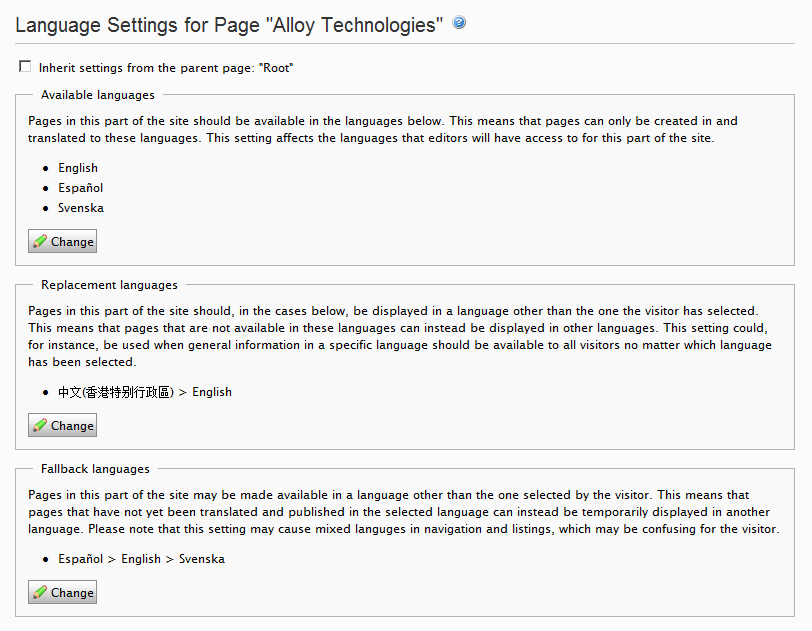
Figure 2 - Language Settings
Side by Side Viewing and Editing
Content contributors can view and edit language variations of page side-by-side.
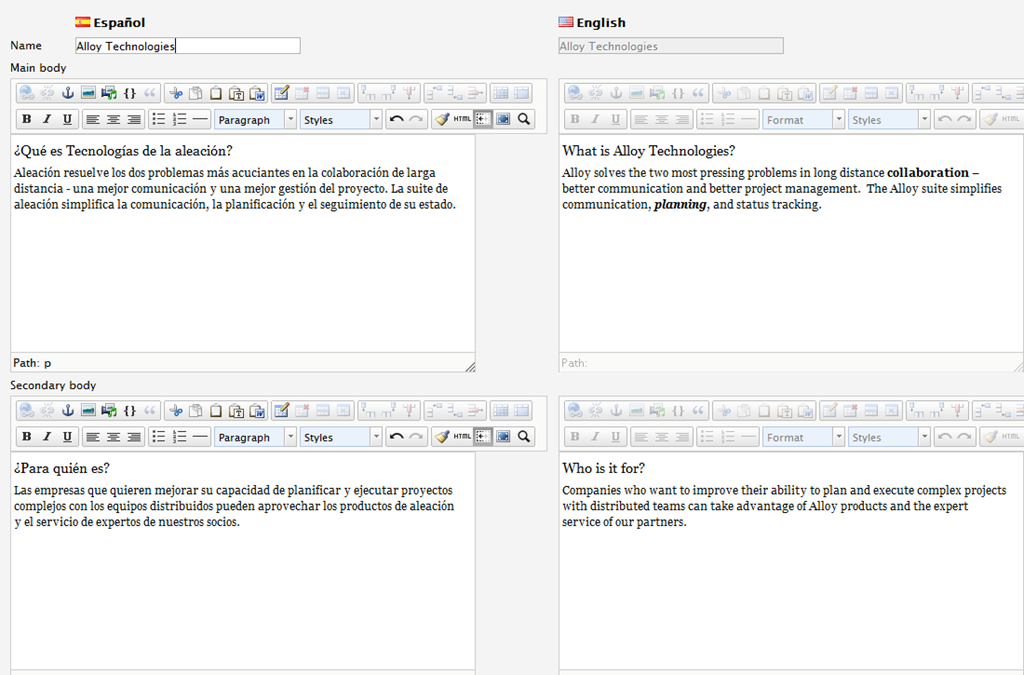
Figure 3 - Editing Language Variations Side by Side
Notifications and Workflow
The "Ready for Translation" workflow reminds workflow participants to perform translations after a configurable interval and sends a final alert after a configurable interval to inform persons/groups if a page was not fully translated. This workflow can be configured to automatically start when the default language variation is changed and to assign translation activities to a unique translator for each variation.

Figure 4 - Translation Workflow Configuration
Working with Translation Services
EPiServer TranslateX is an open source a module which enables you to export your entire site or a subset of pages to the XLIFF format, send it to a translation agency, and import the translations back EPiServer. TranslateX has two parts:
- A core module that exports/imports pages from/to EPiServer CMS and activates the proper connector to start communication with the translation agency.
- A connector module that handles communication between EPiServer CMS and the translation agency service. The default connector is XLIFF, where the translation tasks are created as XLIFF files
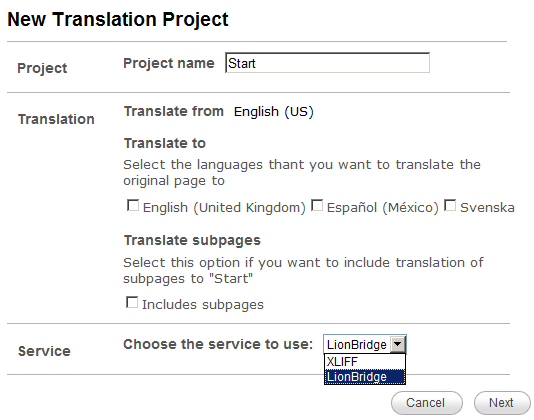
Figure 5 - Creating a New Translation Project with TranslateX

Has anyone compiled a version of TranslateX for CMS version 7 yet?
Jonathan, I have not seen this yet.
Hi,
Can you let me know how you can do side by side editing in Episerver 6 R2 using Composer?
Many thanks
Jon