


Take EPi Forms data outside of the EPi Database
You might not want to store EPiForms data in EPi Database due to GDPR or any other reason.
I got the help of Azure Logic Apps in my POC for this purpose, where I want to generate a CSV file and upload it on blob storage.
Step 1: Change serialization format in /modules/_protected/EPiServer.Forms/Forms.config
From version 4.3, you can set up the kind of data format used before sending data to a webhook receiver by using serializingObjectUsingNameValueFormat as true or false
set to true (default) will serialize object to {name:"Foo",email:"foo@example.com"}
set to false will serialize object to [{key:"name",value:"Foo"},{key:"email", value: "foo@example.com"}, ...]
I used serializingObjectUsingNameValueFormat="false" as I want to generate a csv file and upload it on blob storage.
Step 2: Design your logic app
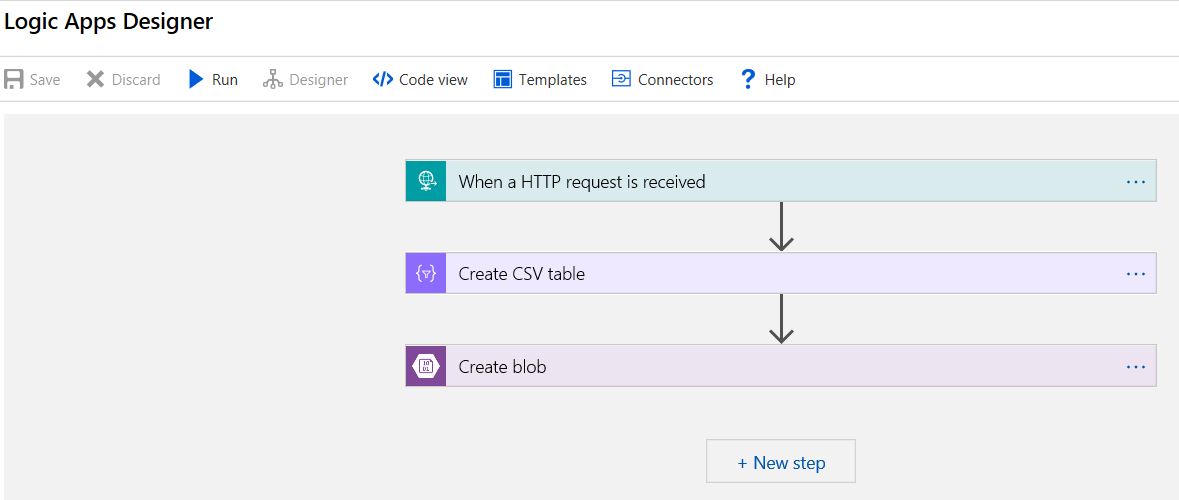
- When an HTTP request is received: Creates a webhook where we can post forms data.
- Create CSV Table: I am receiving data in Key/Value format that I want to change into CSV format first.
- Create blob: Generate CSV file for further processing
Step 3: Setup Webhook actor and turn Off "Store form submissions"
Go to your Form Settings and Turn Off "Store Form submissions" option. Set up a webhook url that was obtained in the previous step.
Sorry developers! no coding is required.
Comments