


Building a Lightweight Optimizely SaaS CMS Solution with 11ty
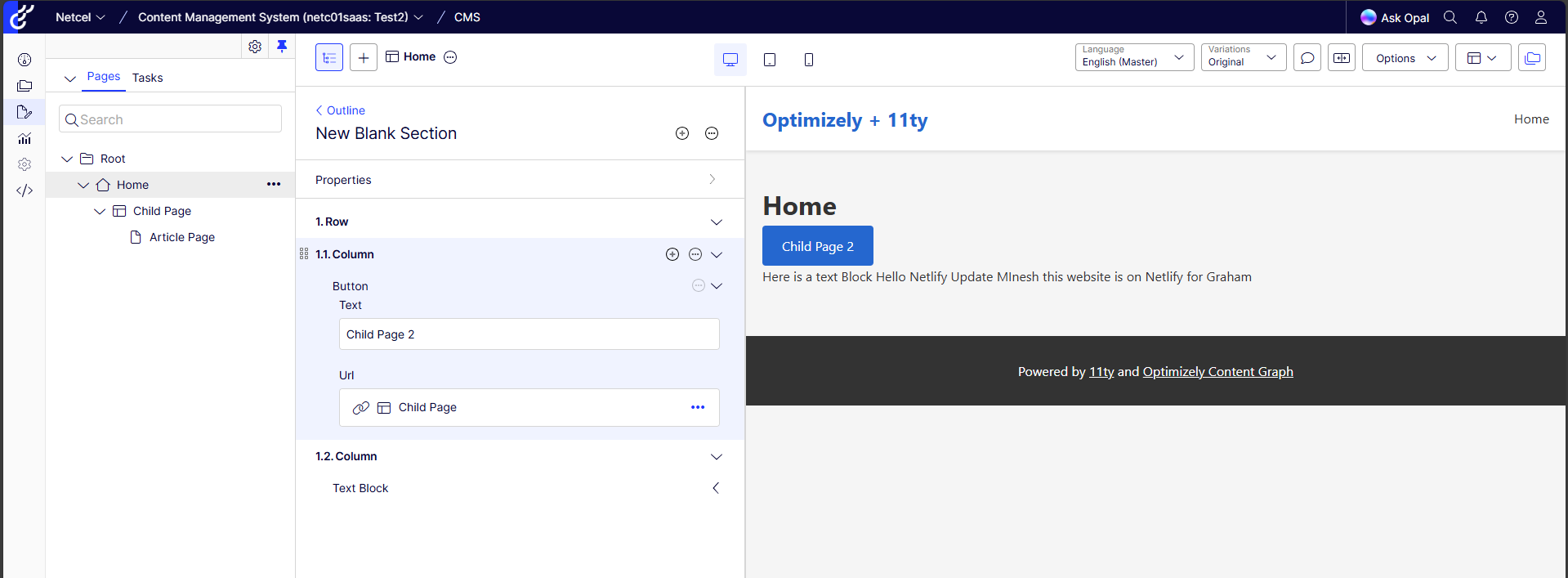
Modern web development often requires striking a difficult balance between site performance and the flexibility needed by content editors. To address this, myself and fellow Optimizely OMVP Graham Carr embarked on a Proof of Concept (POC) to build a solution that prioritises speed and simplicity, while fully leveraging the powerful capabilities of the Optimizely SaaS CMS.
The Challenge: Performance vs. Preview
Our Frontend Architect / Lead, Allyn Thomas, set a clear challenge: find a solution with minimal bloat that is statically generated but still fully compatible with the CMS's live preview capabilities. While frameworks like Next.js are popular, they often come with a significant amount of client-side JavaScript (hydration) that isn't always necessary for content-heavy sites. We wanted something leaner.
The goal was to build a site that is:
- Statically Generated: For blazing-fast load times and security.
- Lightweight: Avoiding the "hydration tax" of heavier frameworks.
- Editor-Friendly: Allowing editors to see live previews of their content in the Optimizely Visual Builder before publishing.
The Solution: 11ty Meets Optimizely SaaS CMS
We chose 11ty (Eleventy) as our Static Site Generator (SSG). 11ty is renowned for its simplicity and flexibility. Unlike other frameworks that force you into a specific client-side architecture, 11ty gives you full control over the output. It generates pure HTML, which is exactly what we needed to keep the bloat to a minimum.
To connect 11ty with Optimizely, we utilised the Optimizely SaaS CMS and the Content JS SDK.
Optimizely SaaS CMS & Content Graph
Our solution centers on the Optimizely SaaS CMS as the headless content repository. We use Optimizely Content Graph, a high-performance GraphQL API, to fetch content. This lets us query exactly what we need, when we need it, keeping our build process efficient.
The Content JS SDK
The Content JS SDK was essential to our architecture. It allowed us to define our content models directly in code using a type-safe builder pattern.
For example, defining a "Button Block" becomes a straightforward TypeScript definition:
import { contentType } from '@optimizely/cms-sdk';

export const ButtonBlock = contentType({
  key: 'ButtonBlock',
  baseType: '_block',
  displayName: 'Button Block',
  properties: {
    Text: { type: 'string', displayName: 'Text' },
    Url: { type: 'url', displayName: 'Url' },
  },
});
This approach ensures that our codebase stays in sync with our content models, providing excellent developer ergonomics and reducing runtime errors.
Structured for Scalability
To maintain sanity as the project grows, we adopted a strict directory structure that mirrors both our content strategy and modern component design principles.
The Models Folder
Our src/models directory is the source of truth for all content definitions. We organized it to reflect the different types of content in the CMS:
- src/models/pages/: Definitions for full pages (e.g., ArticlePage, LandingPage).
- src/models/experiences/: Composition-based content types used in the Visual Builder.
- src/models/components/: Reusable content blocks (e.g., ButtonBlock, TextBlock).
Atomic Component Library
For the frontend implementation, we embraced Atomic Design. This methodology breaks the UI down into its smallest fundamental units, ensuring consistency and reusability across the site.
Our src/components directory is structured as follows:
- atoms/: Basic building blocks like buttons, inputs, and text blocks.
- molecules/: Groups of atoms working together (e.g., a search form).
- organisms/: Complex UI sections like headers, footers, and hero banners.
- templates/: Page-level layouts that stitch everything together.
This clear separation of concerns allows developers to work on individual components in isolation while ensuring they fit perfectly into the larger system. It also naturally encourages adherence to the Single Responsibility Principle, as each atom, molecule, or organism has a distinct and focused purpose.
Dynamic Routing with 11ty Pagination
One of the challenges with a static site generator is mapping dynamic content from a CMS to static routes. 11ty handles this elegantly through its pagination feature. We treat our entire content repository as a single "paginated" data set, where each item becomes a page.
First, we fetch all routable content in a global data file, src/_data/routes.js:
// src/_data/routes.js

module.exports = async function () {
  // ... client setup ...

  // Fetch all content items that have a URL
  const query = getRoutePagesQuery(blockFragments);
  const data = await client.request(query);

  // Filter out items without a default URL
  const pages = data._Content.items.filter(item =>
    item._metadata &&
    item._metadata.url &&
    item._metadata.url.default
  );

  return pages;
};
Then, we create a single template, src/pages.11ty.ts, that iterates over this data. By setting size: 1, 11ty generates a separate HTML file for each item in the routes array. The permalink function ensures the file is saved to the correct path as defined in the CMS.
// src/pages.11ty.ts

export const data = {
  pagination: {
    data: 'routes',
    size: 1,
    alias: 'contentItem',
    addAllPagesToCollections: true,
  },
  layout: 'base.11ty.ts',
  permalink: (data: any) => {
    const item = data.pagination.items[0];
    return item._metadata.url.default;
  },
  // ...
};

export function render(data: any): string {
  const item = data.pagination.items[0];
  return ComponentFactory(item);
}
This pattern is incredibly powerful. It means we don't need to manually configure routes or create separate templates for every page type. As editors add new pages in Optimizely, 11ty automatically discovers them and builds the corresponding static pages.
The Component Factory
To handle the diverse range of content types returned by the CMS, we implemented a Component Factory. This function acts as a dispatcher, inspecting the __typename or content type of each item and rendering the appropriate component.
// src/components/ComponentFactory.ts

export function ComponentFactory(content: ContentItem): string {
  // Handle CompositionComponentNode wrapper
  if (content.component) {
    return ComponentFactory(content.component);
  }

  const types = content._metadata?.types || [];
  const typename = content.__typename || '';

  // Dynamic component lookup from registry
  const ComponentView = getView(typename);
  if (ComponentView) {
    return ComponentView(content);
  }

  // Fallback for unknown types
  return `
    <div class="unknown-component" data-epi-block-id="${content._metadata?.key}">
      <h3>${content.Title || content._metadata?.displayName || 'Unknown'}</h3>
      <p>Unknown component type: ${typename}</p>
    </div>
  `;
}
This architecture adheres to the Open/Closed Principle. We can add new component types to our registry without modifying the core routing or rendering logic.
Enabling Live Previews
The most critical part of this POC was ensuring that 11ty's static nature didn't hinder the editing experience. We implemented a dedicated Express Preview Server that runs alongside our 11ty build.
This server acts as a dynamic bridge between the Optimizely Visual Builder and our static templates.
The Express Server Implementation
We chose Express for its robustness and ease of use. The server handles several key responsibilities:
- HMAC Authentication: Securely fetches draft content using preview tokens.
- Context Awareness: Toggles between "Edit Mode" (injecting data-epi-* attributes) and "Preview Mode".
- Real-time Updates: Listens for webhooks to trigger 11ty rebuilds when content is published.
Here is a glimpse of how we handle preview requests in src/preview/server.ts:
// src/preview/server.ts

app.get('/preview/:contentKey', async (req: Request, res: Response) => {
  const { contentKey } = req.params;
  const { preview_token, ctx } = req.query;

  try {
    // 1. Set context mode for Visual Builder (edit vs preview)
    const contextMode =
      ctx === 'edit' ? 'edit' :
      ctx === 'preview' ? 'preview' :
      null;
    setContextMode(contextMode);

    // 2. Set preview token to enable access to draft content
    if (preview_token && typeof preview_token === 'string') {
      previewClient.setPreviewToken(preview_token);
    }

    // 3. Fetch content dynamically
    const content = await previewClient.getContentByKey(contentKey);

    if (!content) {
      return res.status(404).send(renderNotFound(contentKey));
    }

    // 4. Render using the same shared templates as 11ty
    const html = renderContent(content);
    res.send(html);
  } catch (error) {
    res.status(500).send(renderError('Server Error', String(error)));
  }
});
Handling Webhooks
To keep the static site in sync with published content, we also exposed a webhook endpoint. When an editor publishes a page, Optimizely notifies our server, which triggers a debounced rebuild of the 11ty site.
// src/preview/server.ts

app.post('/webhook/content-published', (req: Request, res: Response) => {
  // ... validation ...

  // Debounce rebuilds to handle rapid updates efficiently
  if (rebuildTimeout) {
    clearTimeout(rebuildTimeout);
  }

  rebuildTimeout = setTimeout(() => {
    triggerRebuild();
  }, REBUILD_DEBOUNCE_MS);

  res.json({ status: 'ok', message: 'Rebuild scheduled' });
});
This dual approach gives us the best of both worlds: a static site for production visitors and a dynamic, interactive preview for editors.
Why 11ty Over Next.js?
While Next.js is a fantastic framework, for this specific use case, 11ty offered distinct advantages:
- Zero Client-Side JS by Default: 11ty doesn't assume you want a Single Page Application (SPA). It serves HTML. If you want JavaScript, you add it. This results in significantly smaller bundle sizes and faster Time to Interactive (TTI).
- Build Speed: 11ty is incredibly fast at building static pages, which is crucial when scaling to thousands of pages.
- Simplicity: The learning curve is gentler, and the architecture is easier to reason about. There is no complex hydration logic to debug.
Conclusion
This POC has demonstrated that you don't need a heavy JavaScript framework to build a modern, dynamic, and editor-friendly website with Optimizely SaaS CMS. By combining the raw power and simplicity of 11ty with the robust APIs of Optimizely, we have delivered a solution that delights both developers and content editors.
We have achieved the best of both worlds: the performance of a static site with the dynamic editing capabilities of a CMS-driven application.
You can view the final result here: 11ty-netcel-saas.netlify.app
The full source code is available on GitHub: github.com/MineshS/11ty (Currently a private repo but please do reach out with Git Username so can add)

Thanks for sharing. It's always interesting to see different approaches when it comes to headless solutions. In case of a rebuild, is the entire site rebuilt or does it have support for incremental builds? For example, if a block is used in multiple pages how are the updates handled? If the entire site is rebuilt from scratch, how long does it take for, let's say, 1000 pages?
Excellent question and our next area of reasearch was on benchmarking the build and deploy times. We do need to add loads more content to accuratly curate these figures but can give for the small number of Pages / Components we have so far.
Build
Deploy (In this instance their were 0 updates so nothing to deploy Netlify skips unchanged files)
Build time: 9s. Total deploy time: 9s
Build started at 10:47:28 AM and ended at 10:47:37 AM.
Just to note currently we are doing a full build on Publish, I still need to investigate if 11ty supports incremental builds although if we find can manage 1000s of pages in less than 2 minutes, It might not be needed.
On an enterprise scale NextJS app we are doing with part Static / Part Dynamic the builds are taking around 4 minutes
Its not only about speed. Its very much an important thing since the cost of using the graph is dependent on number of queries. And if you are running queries for content that doesnt need updating then it can be very costly.
For small pages this is not an issue but incremental builds are a must if you are running a static site in production
Will 100% continue looking into this, via CMS when we publish content Graph sends a Payload of the Content IDs which have been updated so as part of the npm build it could be we only look up these and query on them.
In regards of "Cost if using graph is dependent on number of queries" this is news to me and will need to follow up with Optimizely, I have never known it to be like this. Considering all the Graph Queries are Cached and Stored at the Edge, performance has not been an issue.
Will update on all findings.
Johan, I have ran a rudimentry test I uploaded 100 articles to the CMS
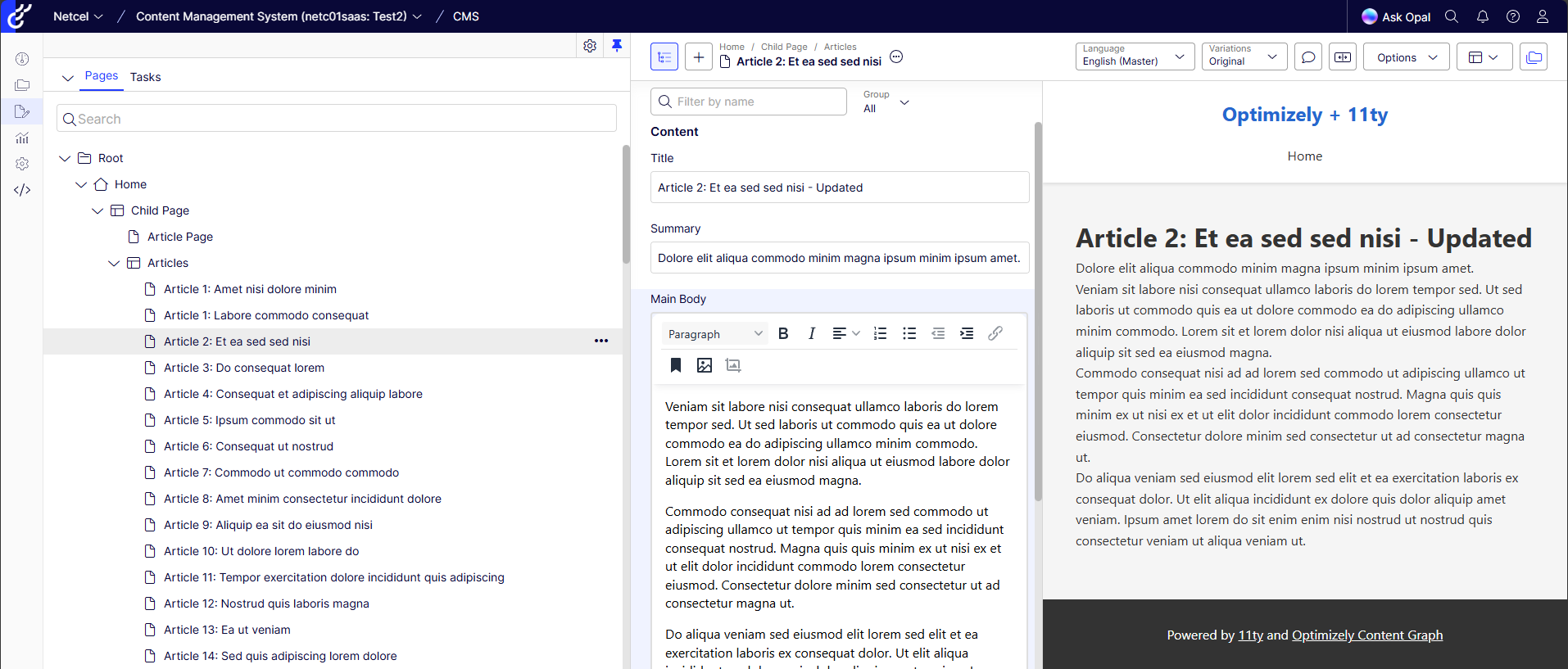
Netlify Built all of these inside of 1 second
Total Build Times can be seein here
Example Page:
Article 1: Labore commodo consequat