
A critical vulnerability was discovered in React Server Components (Next.js). Our systems remain protected but we advise to update packages to newest version. Learn More

Per Nergård (MVP)
Apr 3, 2011
  3911
(0 votes)

Non allowed characters for files and folders in EPiServer

A couple of days ago I had a customer that reported that the thumbnails option in the Filemanager didn’t work and neither displaying the image’s an a rendered page.

The uploading worked fine and also the preview when selecting an image through the editor.

It took a while before I saw the obvious there was an “&” sign in the folder names.

Strange I couldn’t remember that that had caused any problems before. But after some emailing with the Episerver support (real fast answsers. Thanks!) I got a list of not allowed characters in CMS 6 file and foldernames. These should also be avoided in CMS5. Since I got a picture with the characters it  looks like there’s a validator for this in CMS 6 which but which CMS 5 lacks.

The max number of characters for both file and folder names are 255, both for CMS 5 and CMS 6.

Could be a good thing to inform the editors for all those CMS 5 sites out there.

So here they are:
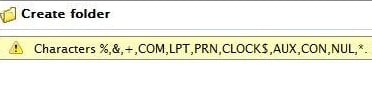
IllegalCharacters

Apr 03, 2011

Comments

Apr 4, 2011 09:58 AM

Thanx Per! Just what Im looking for.

Please login to comment.
Latest blogs
ScheduledJob for getting overview of site content usage

In one of my current project which we are going to upgrade from Optimizely 11 I needed to get an overview of the content and which content types we...

Per Nergård (MVP) | Jan 27, 2026

A day in the life of an Optimizely OMVP: Migrating an Optimizely CMS Extension from CMS 12 to CMS 13: A Developer's Guide

With Optimizely CMS 13 now available in preview, extension developers need to understand what changes are required to make their packages compatibl...

Graham Carr | Jan 26, 2026

An “empty” Optimizely CMS 13 (preview) site on .NET 10

Optimizely CMS 13 is currently available as a preview. If you want a clean sandbox on .NET 10, the fastest path today is to scaffold a CMS 12 “empt...

Pär Wissmark | Jan 26, 2026 |

Building AI-Powered Tools with Optimizely Opal - A Step-by-Step Guide

Learn how to build and integrate custom tools with Optimizely Opal using the Opal Tools SDK. This tutorial walks through creating tools, handling...

Michał Mitas | Jan 26, 2026 |