
A critical vulnerability was discovered in React Server Components (Next.js). Our systems remain protected but we advise to update packages to newest version. Learn More

Per Nergård (MVP)
Mar 9, 2015
  1938
(1 votes)

Tool for simplifying viewing of form data

I have always thought it to be a bit cumbersome to view and manage xform-data.

My big problem is finding the correct form page,form block or any form page/block for that matter, to be able to click the view data button.

To simplify the process I have made a small tool.

It displays a list of the authenticated users forms. If an unauthenticated user browses the page it redirects to the start page.

The tool is very ugly but I find it useful. It looks like this:
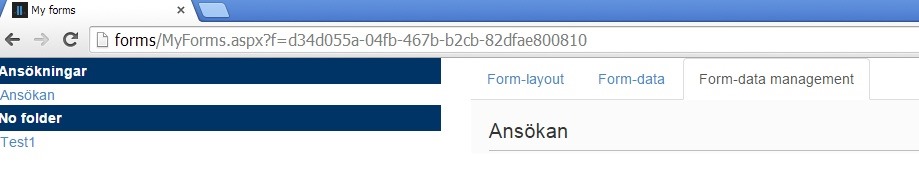
myforms overview

In the left you have a menu where your forms are displayed sorted by folders. Forms that doesn’t have a folder is placed under “No folder” headline.

First tab just displays the form so you can get a quick visual check if you have been sloppy with the form names.

Second tab displays the form data. You can drag and drop columns, if you want to compare them in a different order, search for values etc.

The third tab displays the built in form UI in an Iframe where you can export, delete etc.

You can get the source over at Bitbucket.

Feedback is always appreciated. I’m happy to accept pull-requests.

Mar 09, 2015

Comments

Please login to comment.
Latest blogs
ScheduledJob for getting overview of site content usage

In one of my current project which we are going to upgrade from Optimizely 11 I needed to get an overview of the content and which content types we...

Per Nergård (MVP) | Jan 27, 2026

A day in the life of an Optimizely OMVP: Migrating an Optimizely CMS Extension from CMS 12 to CMS 13: A Developer's Guide

With Optimizely CMS 13 now available in preview, extension developers need to understand what changes are required to make their packages compatibl...

Graham Carr | Jan 26, 2026

An “empty” Optimizely CMS 13 (preview) site on .NET 10

Optimizely CMS 13 is currently available as a preview. If you want a clean sandbox on .NET 10, the fastest path today is to scaffold a CMS 12 “empt...

Pär Wissmark | Jan 26, 2026 |

Building AI-Powered Tools with Optimizely Opal - A Step-by-Step Guide

Learn how to build and integrate custom tools with Optimizely Opal using the Opal Tools SDK. This tutorial walks through creating tools, handling...

Michał Mitas | Jan 26, 2026 |