
How to avoid RaiseEvent error on cache invalidation
It´s been a little over six months since I left Episerver and my job as Web Applications Engineer in the group Web Operations in Managed Services. During my time there I just couldn´t find the time to blog about some stuff that I learnt about recurring issues of many different applications written by many different partners.
I´d thought that I would write some blog posts now instead about the most frequent issues that we handled in Managed Services. This first one will cover errors occuring upon cache invalidation in load balanced environments.
Episerver CMS event system
It´s well known that Episerver has an event system that sends out messages when a page have been published so the built-in cache gets invalidated and the new content is fetched from the database. This event system is mainly used in load balanced environments or when a separate admin server has been setup.
I´m not going to dig deep into how it works since there´s a lot of blog posts and help about that, but I´ll cover the basics before addressing the issue we often saw.
The event system can use UDP or TCP but UDP is the default one and is usually the one that works best without modification. An event system is setup in the web.config.
Add this code inside the system.serviceModel tag:
<serviceHostingEnvironment multipleSiteBindingsEnabled="true" aspNetCompatibilityEnabled="true"/>
<extensions>
    <bindingElementExtensions>
        <add name="udpTransportCustom" type="Microsoft.ServiceModel.Samples.UdpTransportElement, EPiServer.Events"/>
    </bindingElementExtensions>
</extensions>
<services>
   <service name="EPiServer.Events.Remote.EventReplication">
        <endpoint name="RemoteEventServiceEndPoint" contract="EPiServer.Events.ServiceModel.IEventReplication" binding="customBinding" bindingConfiguration="RemoteEventsBinding" address="soap.udp://239.255.255.19:5000/RemoteEventService" />
    </service>
</services>
<client>
    <endpoint name="RemoteEventServiceClientEndPoint" address="soap.udp://239.255.255.19:5000/RemoteEventService" binding="customBinding" bindingConfiguration="RemoteEventsBinding" contract="EPiServer.Events.ServiceModel.IEventReplication" />
</client>
<behaviors>
    <serviceBehaviors>
        <behavior name="DebugServiceBehaviour">
            <serviceDebug includeExceptionDetailInFaults="true"/>
        </behavior>
    </serviceBehaviors>
</behaviors>
Then add this inside the bindings tag:
<customBinding>
    <binding name="RemoteEventsBinding">
        <binaryMessageEncoding/>
        <udpTransportCustom multicast="True"/>
    </binding>
</customBinding>
RaiseEvent error thrown upon cache invalidation
Now to the issue and the purpose of this blog post:
The IP number with a port assigned, 239.255.255.19:5000, is a default UDP broadcast IP and can be left as is for both service and client. The only exception is if the server is hosting multiple EPiServer CMS versions, like CMS 6 R2 and CMS 7.5, then you´ll have to change the port number to 5001 (for example, it can be whatever you want) for either the CMS 6 R2 version or the 7.5 version. This is because from version 7.5 and above the broadcast messages are handled different and if both CMS versions listens to the same port number you´ll get a lot of errors thrown and the cache invalidation isn´t working properly.
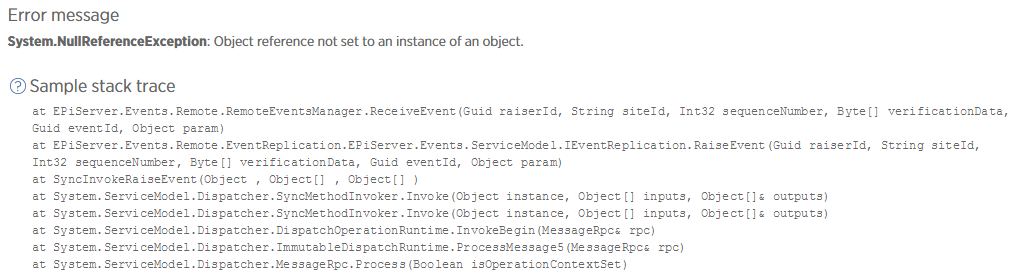
These errors looks like this in New Relic and we saw up to several thousands of these errors in just a couple of hours in some applications.
Same validation key in databases
One thing that is also really important to know is that if the production database is created from a backup of the stage database they will invalidate each other’s cache since they will share the same key used for validation when a broadcast message arrives. It might not be a major issue that the stage environment for example gets its cache invalidated alongside production, but it´s good to know that it will happen and why. The only way around this is to setup a completly new database for production (or staging if you´d rather work the other way around) and do some migrating of content.
Nice post.
One thing in that area that I have had a lot of problems with is that if you are using TCP instead of UDP the IIS often are still holding open connections to the port it is using after a xcopy-deployment.
It releases it after a minute or so but otherwise the only thing to do is to restart the site in IIS.
Did you see that when you were at hosting?
Thanks!
No, can´t say that it´s something that I came across unfortunately. It was most common to use UDP, didn´t really see that many TCP configurations actually.
Ok. UDP is much better, for us we had never any problem when we were running UDP but then the company who were responsible for the hosting changed the environment so it did not support UDP and we had to change to TCP and with that the problems come.... ;-(
Awesome post Petra!