

EPiServer CMS 7.5 Cloud Developer License
I hope most of you have already observed a new license type added under EPiServer 7 when creating a developer license on license center.
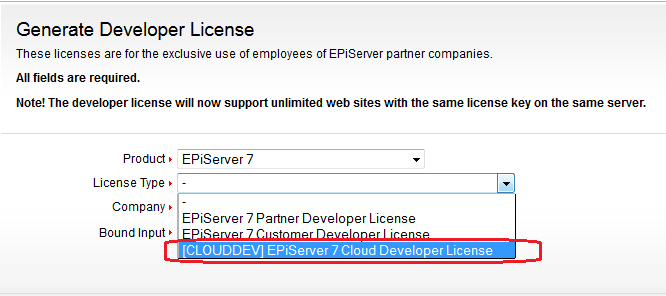
Well, this license type (Cloud Developer License) allows you to generate/download a developer license which is NOT tied to IP/MAC. You can use this license when deploying on amazon/azure and by default it allows you to scale up to10 sites and 3 instances.
How it works:
Just place the file on your instances and activate your site(s) in the backend. Once you install the license file on a instance (and site in question is not activated yet), you will see a warning message on the site like:
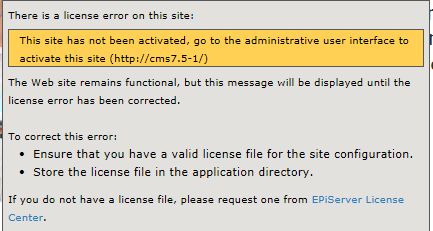
As stated in the warning message that you have to activate the “site” from administrative menu. When you logon to edit UI, you’ll see another warning banner like :
![clip_image001[8]](/globalassets/globals/xmlrpc/44805/2014/01/31/clip_image0018.png "clip_image001[8]")
In admin mode under config->Manage Web sites, you will see a new tab visible called “Cloud License”. Here you can activate/deactivate all the sites on the fly.
![clip_image001[10]](/globalassets/globals/xmlrpc/44805/2014/01/31/clip_image00110.png "clip_image001[10]")
The license system will regularly validate that you do not exceed the total number of sites/instances using this cloud license. You can read more about deploying on Amazon and Azure here:
Note: EPiServer Commercial Cloud for Amazon and Azure is currently in beta release for version 7.5 and up. Cloud developer license ONLY supports EPiServer CMS 7.5 for now.

Sweet!
So skynet comming next? ;)
Cool!