
A critical vulnerability was discovered in React Server Components (Next.js). Our systems remain protected but we advise to update packages to newest version. Learn More


Aug 3, 2011
  5253
(1 votes)

A restore page plugin

Hi everyone!

I recently created a plugin that borrows it's functionality from the Windows wastebasket. In Windows you can restore a file you have deleted, i.e. moved to the wastebasket. I wanted to replicate this behavior for EPiServer CMS. And with further ado:

Retore Page Plugin

Like I said it will give you the possibility to restore the page back to its previous owner (parent). So let's say that you deleted a page and now you want it back in the site tree, but you can't remember under which root is was located.Page restore to the rescue!
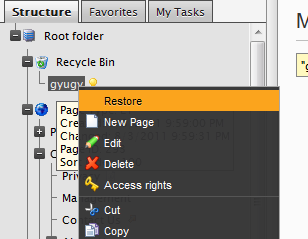
 

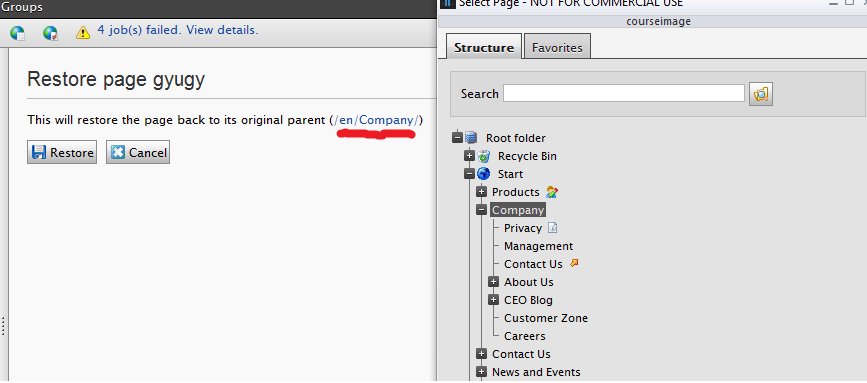
Now you can right click the page and select "Restore", it wil then bring you to a confirmation page where you can see where in the site tree it will be relocated before actually doing anything. And that's about it!
This is in no way tested or tried thoroughly. I was hoping you guys could be my lab monkies and test it out ;).

But if you do find anything strange, report it to me and I'll see if I can be bothered to do anything about it.


DOWNLOAD

The package has been updated as I forgot to include the part of the code that was responsible for setting up the menu button, but also the part which added and deleted restore points when you moved pages. Sorry for that ;)

Aug 03, 2011

Comments

Joshua Folkerts
Joshua Folkerts Aug 11, 2011 04:54 PM

Very nice. Works like a charm. Nice work Tobias

Please login to comment.
Latest blogs
A day in the life of an Optimizely OMVP: Learning Optimizely Just Got Easier: Introducing the Optimizely Learning Centre

On the back of my last post about the Opti Graph Learning Centre, I am now happy to announce a revamped interactive learning platform that makes...

Graham Carr | Jan 31, 2026

Scheduled job for deleting content types and all related content

In my previous blog post which was about getting an overview of your sites content https://world.optimizely.com/blogs/Per-Nergard/Dates/2026/1/sche...

Per Nergård (MVP) | Jan 30, 2026

Working With Applications in Optimizely CMS 13

💡 Note:  The following content has been written based on Optimizely CMS 13 Preview 2 and may not accurately reflect the final release version. As...

Mark Stott | Jan 30, 2026

Experimentation at Speed Using Optimizely Opal and Web Experimentation

If you are working in experimentation, you will know that speed matters. The quicker you can go from idea to implementation, the faster you can...

Minesh Shah (Netcel) | Jan 30, 2026