


A day in the life of an Optimizely OMVP - Introducing the beta of Opti Graph Extensions add-on
Introducing Opti Graph Extensions: Enhanced Search Management for Optimizely CMS
I am excited to announce the beta release of **Opti Graph Extensions**, a powerful new AddOn package for Optimizely CMS 12 that brings advanced Graph management capabilities directly into your CMS administration interface.
What is Opti Graph Extensions?
Opti Graph Extensions is an open-source AddOn that seamlessly integrates with Optimizely Graph to provide comprehensive management of search synonyms and pinned results. Built specifically for Optimizely CMS 12+, this package empowers content editors and administrators to fine-tune search experiences without leaving the familiar CMS environment.
Key Features
🔍 Synonym Management
Create and manage search synonyms to ensure users find what they're looking for, regardless of the terminology they use. Whether it's industry jargon, product variations, or common misspellings, synonym management helps bridge the gap between user intent and content discovery.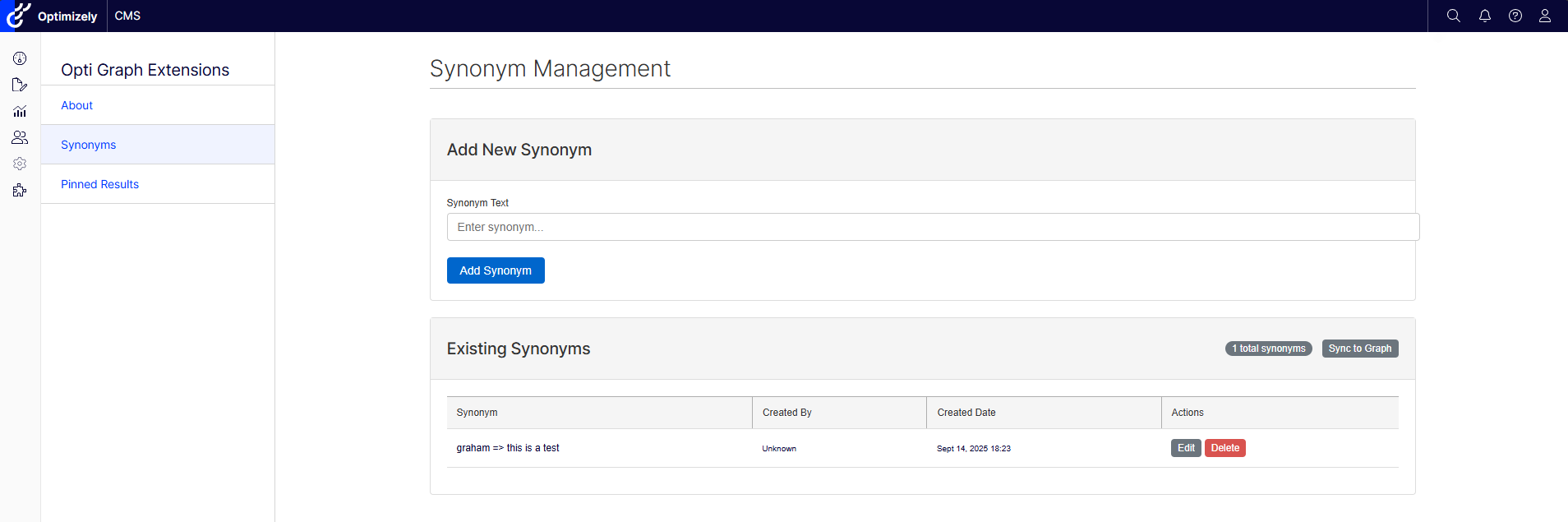
📌 Pinned Results
Take control of search result rankings by pinning specific content to the top of search results for particular queries. Perfect for promoting important content, seasonal campaigns, or ensuring critical information is always easily discoverable.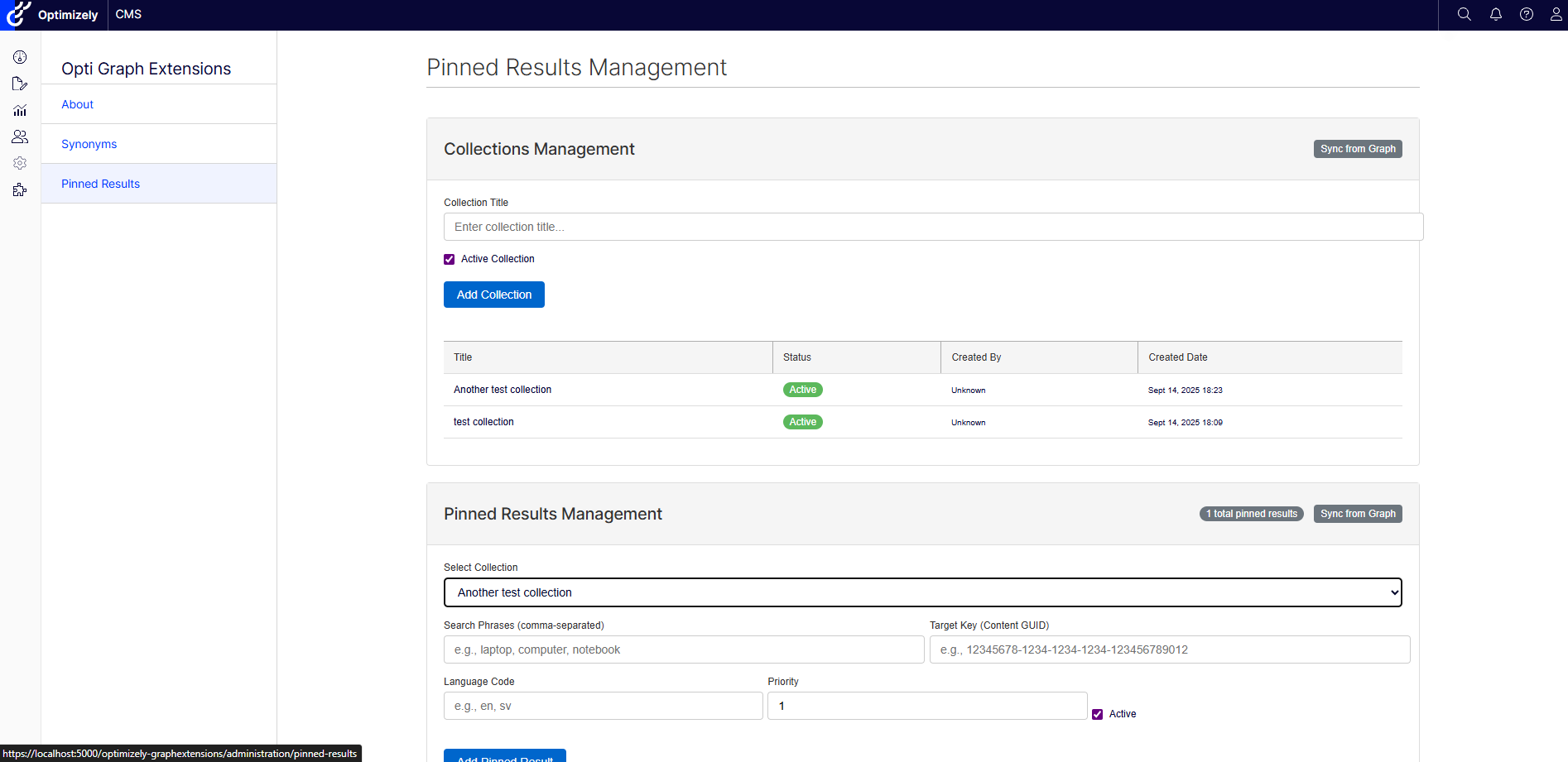
🔄 Automatic Graph Synchronization
All changes are automatically synchronized with Optimizely Graph, ensuring your search enhancements are immediately reflected in your site's search functionality. The bi-directional sync keeps your local data and Graph data perfectly aligned.
🎨 Modern Administration Interface
Built with Blazor components for a responsive, interactive experience, the administration interface integrates seamlessly with the Optimizely CMS admin panel. The clean, intuitive design makes managing search configurations effortless.
Built for .NET6.0 and .NET 8.0 and Optimizely CMS 12+
dotnet add package OptiGraphExtensions --version 0.1.2-betaservices.AddOptiGraphExtensions(options =>
{
options.ConnectionStringName = "EPiServerDB";
});
app.UseOptiGraphExtensions();3. As this is a Blazor-based admin interface, ensure that Blazor server-side is set up in your Optimizely CMS project.
// Add Blazor services
services.AddServerSideBlazor();

// Map Blazor hub
app.UseEndpoints(endpoints =>
{
    endpoints.MapContent();
    endpoints.MapBlazorHub();
    endpoints.MapControllers();
});
4. Add your Graph instance configuration to appsettings.json, this information can be found within PaaSPortal for a PaaS instance of Optimizely CMS12 and within the dashboard of a SaaS instance of Optimizely CMS 12
  "Optimizely": {
    "ContentGraph": {
      "GatewayAddress": "<your graph instance gateway address>",
      "AppKey": "<your graph instance key>",
      "Secret": "<your graph instance secret>"
    }
  }
5. Navigate to the Optimizely admin interface where you'll find the new "Opti Graph Extensions" menu item.
Open Source and Community Driven
Opti Graph Extensions is open source and I welcome contributions from the community. Whether it's bug reports, feature requests, or pull requests, your input helps make this tool better for everyone in the Optimizely ecosystem.
Visit my GitHub repository (https://github.com/adayinthelifeofapro/OptiGraphExtensions) to:
- View the source code
- Report issues
- Contribute improvements
- Access detailed documentation
Beta Release Notes
As this is a beta release, I am actively seeking feedback from the community. While the core functionality is stable and thoroughly tested, I am particularly interested in hearing about:
- Integration experiences with different Optimizely CMS configurations
- Performance with large volumes of synonyms and pinned results
- Additional features that would enhance your search management workflows
- Any edge cases or scenarios we should consider
Get Involved
I believe great tools are built through collaboration. Try Opti Graph Extensions in your development environment and let me know what you think. Your feedback during this beta phase is invaluable in shaping the final release.
Download the beta today and take your Optimizely search experience to the next level!
---
Opti Graph Extensions is an independent open-source project designed to enhance the Optimizely CMS platform. For questions, support, or contributions, please visit my GitHub repository.
Congratulations on launching the Beta of your first Optimizely Add-On. I look forward to seeing how this evolves in future.
Thanks for the lovely comment Mark, I am also excited to see how I can evolve it in the future as well!
Congrats on your launch Graham!
This is exactly what the Optimizely Community is all about, love it!