


A day in the life of an Optimizely OMVP: Managing Graph search: the native portal and the community plugin
Optimizely Graph has quietly become the search engine sitting underneath most new Optimizely builds. It ships with CMS 13, it's the answer to "what replaces Find?", and it's increasingly the integration backbone people reach for when they need unified search across more than one site. What it has historically lacked is a decent way to manage the search experience without a developer in the loop every time a marketer wants to fix a bad result.
That gap is now being filled from two directions at once. Optimizely has shipped a native Search Management portal (currently in beta), and the community — specifically the OptiGraphExtensions package — has been doing the same job for a while, and arguably doing more of it. Both let you manage synonyms and pinned results against a Graph instance. They are not the same tool, and the right one depends on what you're building and who has to live with it afterwards.
Here are your two options, laid out honestly.
Option one: the native Search Management portal
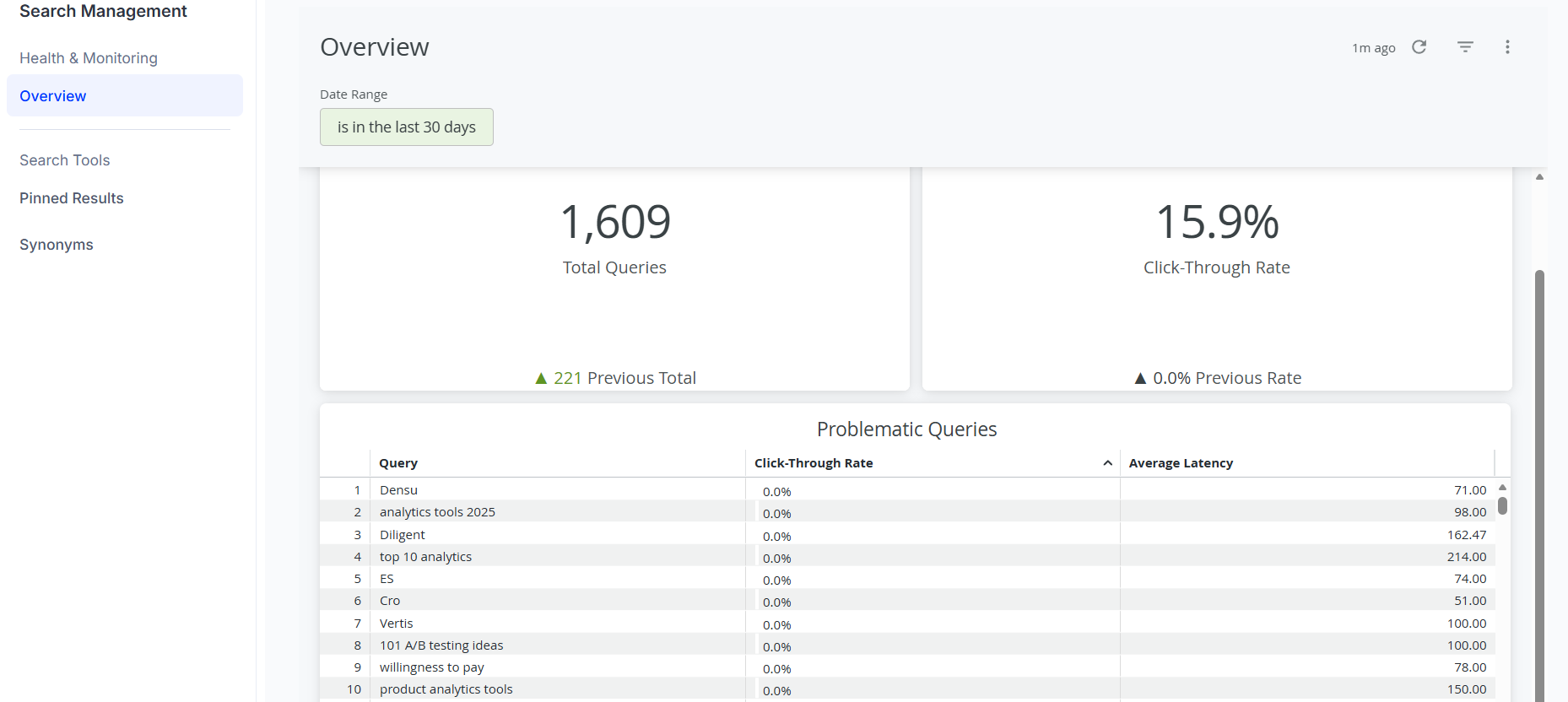
This is the platform-level answer. You reach it from the Optimizely global navigation, it requires Opti ID and access to your Graph instance, and it organises itself into two areas: Health & Monitoring and Search Tools.
The Health & Monitoring side is the bit I'd not underestimate. The Overview dashboard gives you total queries, click-through rate, and — usefully — a Problematic Queries table that surfaces searches with low or no CTR. That's the closest thing Graph has had to a "where is search letting us down?" view out of the box. The caveat is that you have to enable search hit tracking first, or the dashboard has nothing to show you.
Search Tools is where the curation happens. Pinned results (the rebrand of best bets) let you lock content to the top of results for specific phrases. Synonyms support both one-way (H2O => water) and two-way (sofa, couch) relationships, with language scoping. Marketers can create, edit and delete both from the portal once it's set up.
And "once it's set up" is the practitioner caveat. This is not a no-code tool. Before a content editor can touch a pinned result, a developer has to create the pinned results collection in Graph and wire the collection ID into the search query. Before anyone can manage synonyms, a developer has to add synonym support to the query. The portal is a management surface over plumbing you still have to build. Worth being clear about that in scoping conversations, because "marketers can self-serve search" comes with an asterisk.
The two things genuinely in its favour: it works at the platform level, so it's agnostic to how you've built — SaaS CMS, CMS 13 on PaaS, fully headless, it's all just Graph. And it centralises across multiple Graph instances, which is a real advantage if you're running a multi-brand or multi-tenant estate. The thing to weigh against that: it's beta. I wouldn't hang a production launch off it without a conversation about support expectations.
Option two: OptiGraphExtensions
This is the community package from adayinthelifeofapro, and the honest summary is that it does everything the portal does, plus a good deal more — but it lives in a different place and comes with a different support model.
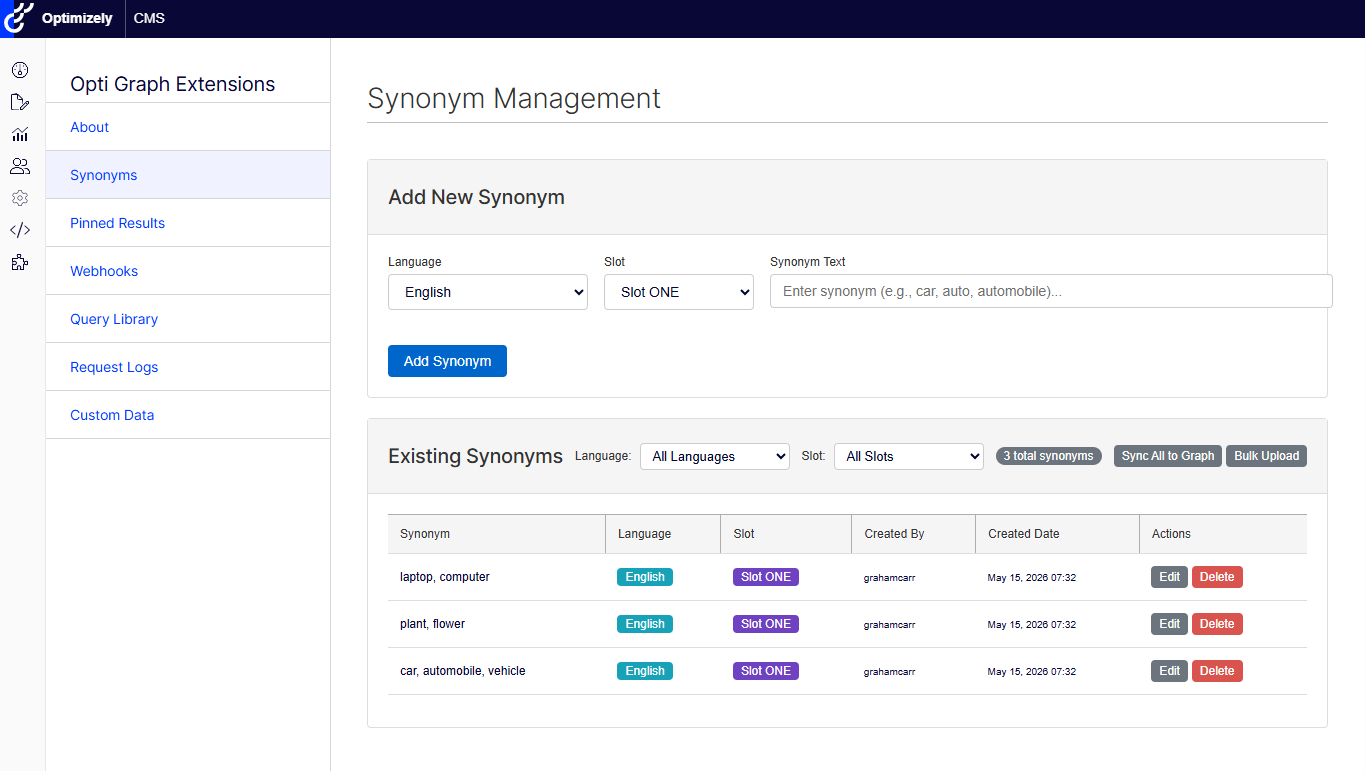
It's an installable AddOn. You pull it from NuGet, wire it up in Program.cs, and you get a Blazor admin interface inside CMS. Version 7.x targets CMS 13 and .NET 10; if you're still on CMS 12, 6.x has you covered. It plays nicely with Opti ID auth if that's how you're signing people in.
On the core ground it matches the portal — synonyms (with the nice addition of language routing and synonym "slots" for running more than one set per language) and pinned results (with content autocomplete and human-readable names in the table, rather than wrangling GUIDs). Where it pulls ahead is the surrounding kit:
- Webhook management — register and manage Graph webhooks, subscribe to doc.created/doc.updated/etc. with filters.
- A Query Library — a visual GraphQL builder and a raw mode, with saved queries and CSV export. This is a genuinely handy thing to have when you're developing against Graph.
- Request logs — visibility into the API traffic between CMS and Graph, with filtering and export. Useful for debugging.
- Custom data management — define schemas and sync external data into Graph, including scheduled imports from REST APIs.
That's a lot of capability for a free, MIT-licensed package. The trade-off is supportability. It's an open-source project with a single primary maintainer and a small footprint on GitHub. The codebase is clean — SOLID, 145-plus tests, sensible architecture — so this isn't a quality concern, it's a bus-factor concern. You're taking a dependency on a community project. For a lot of builds that's a perfectly reasonable call; for a risk-averse client you'd want to name it explicitly.
So which one?
The decision is less "which is better" and more "what are you optimising for."
Reach for the native portal if you're on SaaS CMS or a headless setup where there's no CMS solution to install an AddOn into, if you're managing several Graph instances and want one place to do it, or if the search analytics are the thing you actually care about — that Problematic Queries view has no equivalent in the plugin.
Reach for OptiGraphExtensions if you're on CMS 13 (or 12) with a .NET solution you control, if you want the wider toolset — particularly the query library and request logs during development — and if you're comfortable taking a community dependency. It's the more capable tool today, and it's available now rather than in beta.
For what it's worth, on a CMS 13 build I'd likely run both: the plugin for day-to-day management and developer tooling inside the solution, and the portal for the cross-instance analytics view. They're not mutually exclusive, and the overlap is narrower than it first looks.
Either way, the underlying message is the good one: managing Graph search is finally becoming something you configure rather than something you code from scratch every time. About time.

Comments