
Bynder DAM Connector for Optimizely SaaS CMS: Improved Metadata Property Synchronization
While working with the Bynder DAM Connector for Optimizely SaaS CMS, one of the key areas I explored was how Bynder asset metadata is synchronized into Optimizely Graph.
The connector already makes it possible to synchronize Bynder assets into Optimizely and expose them through Graph. However, during implementation validation, we came across an important limitation around metadata property synchronization.
The Previous Limitation
Earlier, when configuring the synchronization between Bynder and Optimizely, only Bynder date-type metadata properties were available for syncing into the Optimizely Graph schema.
This created a challenge because real-world DAM implementations rarely depend only on date fields.
Most enterprise DAM metadata models use a combination of:
- Text fields
- Date fields
- Single-select fields
- Multi-select fields
- Taxonomy-like option fields
- Classification fields
- Asset usage fields
- Product/category metadata
For a website implementation, this metadata is often required by the frontend application for rendering, filtering, searching, or making delivery decisions.
For example, teams may need metadata such as:
- Asset type
- Product family
- Language
- Region
- Usage rights
- Document category
- Video category
- Public/private status
- Website readiness
If only date fields are available during synchronization, then the DAM metadata model cannot be fully represented in Optimizely Graph.
What Has Improved
The Optimizely team has now improved the Bynder connector metadata synchronization behavior.
Metadata properties from Bynder can now be selected across multiple field types, including:
- Date
- Text
- Single select
- Multiple select
How Different Property Types Behave
1) Date Properties
Date properties synchronize the date value from Bynder. In Optimizely content type the type will become a string type.
2) Text Properties
Text properties synchronize the value entered by the author or DAM user in Bynder.
3) Single Select and Multiple Select Properties
Single-select and multiple-select properties behave differently.
For these fields, the synchronized values represent the database names for the selected options, not the display labels shown to users in the Bynder interface.
For example,
Bynder option label: Case Study
Synchronized value: Case_Study
This can be useful for backend logic, integrations, filtering, or stable system-level matching.
However, these values may not always be ideal for direct frontend rendering, especially if the frontend needs human-readable labels or multilingual labels
Important Note on Labels
For single-select and multiple-select metadata properties, if the frontend application needs the actual option labels, those labels should be retrieved separately using the Bynder API.
This is especially important when labels are maintained in multiple languages.
This label-resolution topic deserves its own separate discussion because it involves option IDs, database names, display labels, multilingual labels, and frontend rendering decisions.
What About Option IDs?
The connector also provides a standard property called:
- PropertyOptions
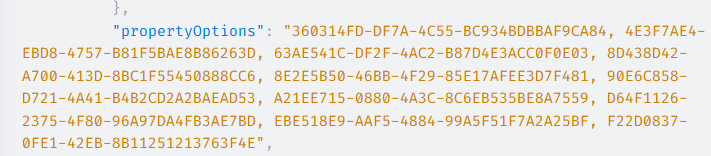
This property returns a consolidated list of option IDs selected across available single-select and multi-select metadata fields.
Following screenshot shows how Grpah stores the data in propertyOptions field.
Why This Fix Matters
This improvement makes the Bynder DAM Connector more practical for real-world Optimizely SaaS CMS implementations.
It allows teams to bring more useful metadata into Optimizely Graph without being limited only to date fields.
This helps with:
- Better asset classification
- Cleaner frontend logic
- Improved filtering
- Better integration support
- More flexible content delivery
- Reduced custom workarounds
You Do Not Need to Sync Everything
Another important point is that metadata synchronization does not need to be all-or-nothing.
Implementation teams can choose which Bynder metadata properties should be synchronized into Optimizely.
This is important because not every DAM metadata field is useful for website rendering or content delivery.
For example, a DAM may contain metadata for:
- Internal workflows
- Asset production
- Legal approval
- Agency ownership
- Archive management
- Regional campaigns
- Website delivery
Only a subset of those fields may be needed in Optimizely Graph.
The better approach is to intentionally select the metadata fields that are required for:
- Frontend rendering
- Content authoring
- Filtering
- Search
- Asset classification
- Delivery rules
- Public/restricted asset decisions
- Video or document handling
This avoids unnecessary metadata noise and keeps the Graph schema cleaner.
Application User Interface for field Mapping
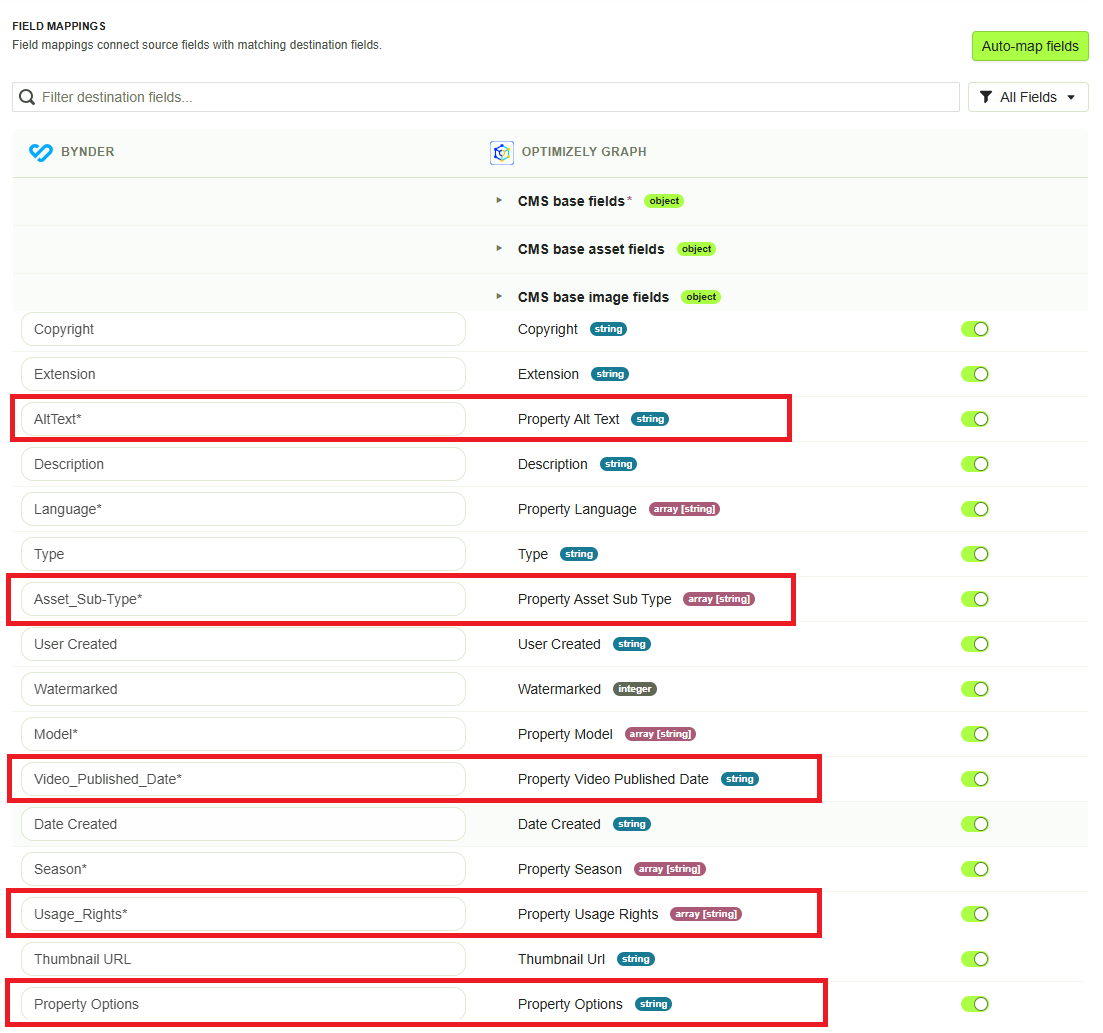
Here is a screenshot form the application for field mapping step which shows the simple user intrface to select what metadata properties from Bynder needs to be synced in Optimizely Graph.
In below screenshot:
- All custom metadata fields are indicated with an asterisk (*) at the end of the metadata property name e.g. AltText*
- You can choose which property you want to keep into your schema or not so that sync will only store the relevant data in Optimizely Graph.
- You can not enter the property names. Application will automatcially generate that for you based on your property name and prepending that with "property_".
- As you can see in below screenshot the PropertyOptions is standard Bynder asset property, there is no asterisk (*) with it.
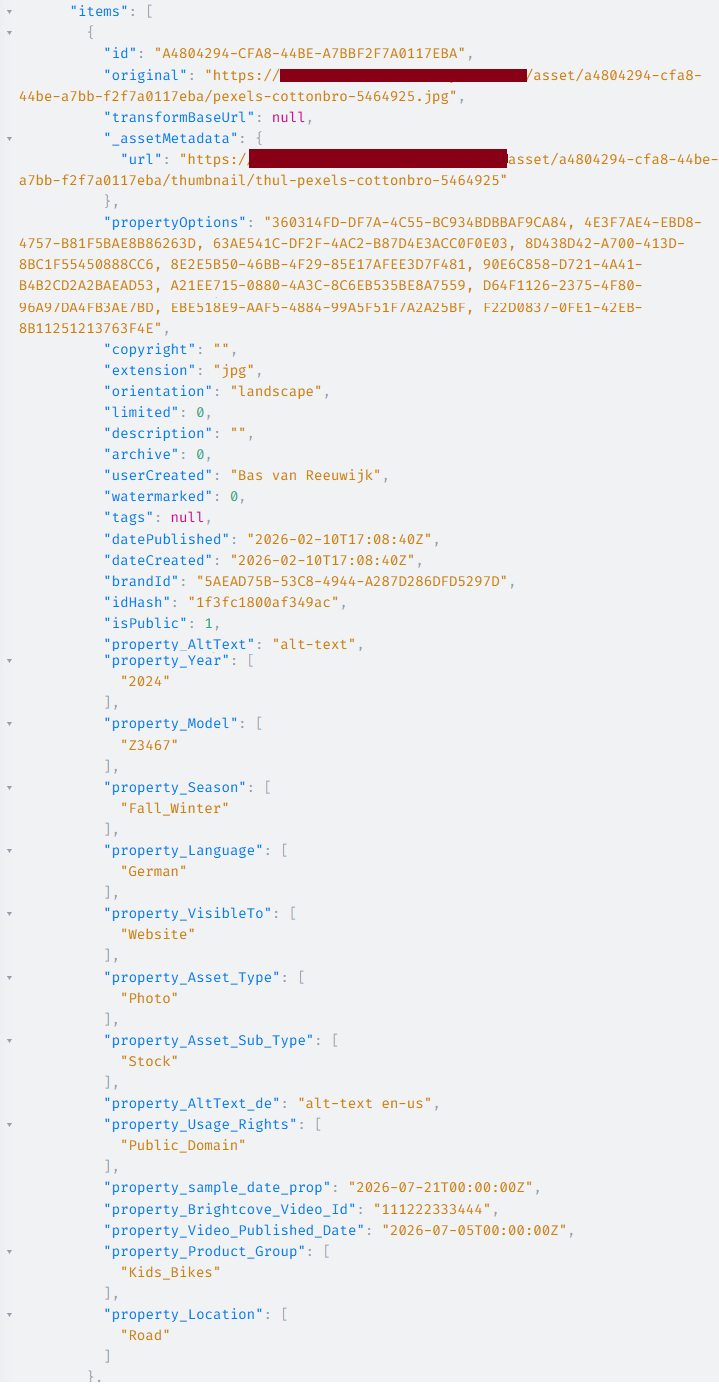
Asset data synced in Grpah (including the standard and the custom properties)
*This screenshot is added just for illustration purpose only
Recommended Implementation Approach
Before enabling broad metadata synchronization, teams should define a simple metadata sync strategy.
Recommended steps:
- Review available Bynder metadata properties.
- Identify which fields are required by Optimizely CMS, Optimizely Graph, or the frontend application.
- Decide which fields should be synchronized.
- Confirm how each field type appears in Optimizely Graph.
- For single-select and multiple-select fields, decide whether database values are sufficient.
- If frontend labels are required, plan label resolution using Bynder API.
Example Metadata Sync Strategy
For a website implementation, the team may decide to sync fields such as:
- Asset title
- Asset description
- Asset type
- Language
- Region
- Public/private classification
- Website-ready flag
- Video ID
- Document category
- Product association
- Application association
But avoid syncing fields that are only relevant to internal DAM operations.
Why This Is a Good Improvement
This connector update improves the practical usability of Bynder DAM metadata inside Optimizely SaaS CMS implementations.
It helps teams:
- Use richer metadata in Optimizely Graph
- Avoid custom mapping workarounds
- Keep frontend logic cleaner
- Use business-readable labels where needed
- Still access option IDs through "propertyOptions"
- Select only the metadata fields that matter
- Better support real enterprise DAM models
Final Thought
This connector improvement is a valuable step forward for teams integrating Bynder DAM with Optimizely SaaS CMS.
Being able to synchronize more metadata property types into Optimizely Graph gives implementation teams more flexibility and reduces the need for custom workarounds.
The key takeaway is simple:
The Bynder DAM Connector can now synchronize more metadata property types into Optimizely Graph, but teams should still be intentional about which metadata they sync and how those values will be used.
For single-select and multiple-select fields, the synchronized values are useful for system logic, but frontend-friendly labels may still require a separate lookup through the Bynder API.
Comments