


A day in the life of an Optimizely OMVP: OptiA11y: accessibility help for Optimizely editors that refuses to lie to them
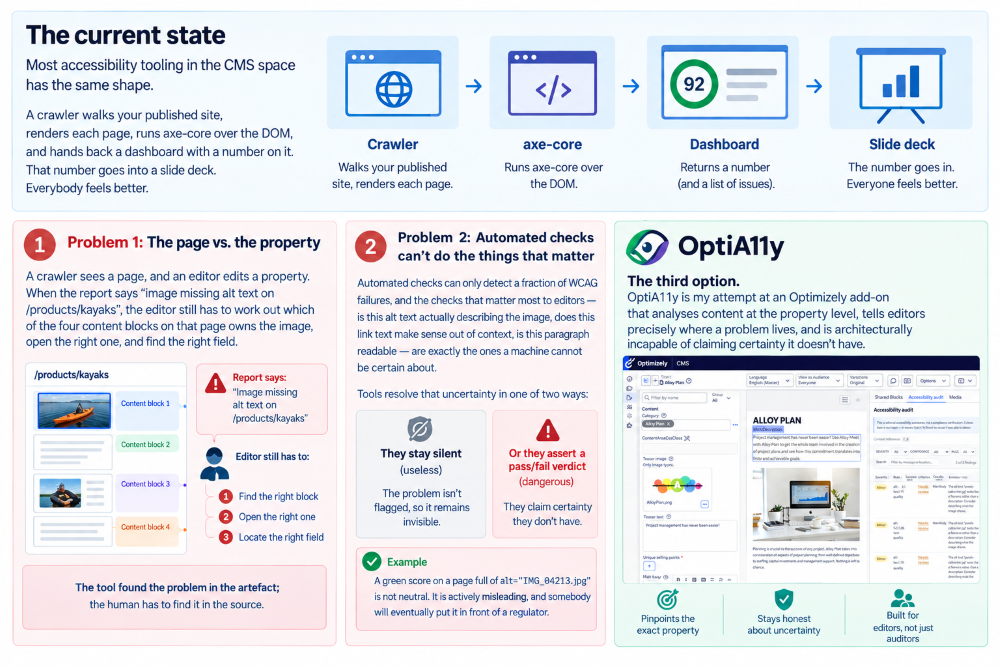
Most accessibility tooling in the CMS space has the same shape. A crawler walks your published site, renders each page, runs axe-core over the DOM, and hands back a dashboard with a number on it. That number goes into a slide deck. Everybody feels better.
There are two problems with this.
The first is that a crawler sees a page, and an editor edits a property. When the report says "image missing alt text on /products/kayaks", the editor still has to work out which of the four content blocks on that page owns the image, open the right one, and find the right field. The tool found the problem in the artefact; the human has to find it in the source.
The second problem is worse. Automated checks can only detect a fraction of WCAG failures, and the checks that matter most to editors, is this alt text actually describing the image, does this link text make sense out of context, is this paragraph readable, are exactly the ones a machine cannot be certain about. Tools resolve that uncertainty in one of two ways: they stay silent (useless), or they assert a pass/fail verdict they have no business asserting (dangerous). A green score on a page full of alt="IMG_04213.jpg" is not neutral. It is actively misleading, and somebody will eventually put it in front of a regulator.
OptiA11y is my attempt at the third option: an Optimizely add-on that analyses content at the property level, tells editors precisely where a problem lives, and is architecturally incapable of claiming certainty it doesn't have.
The Confidence invariant
Everything else in the codebase is downstream of one design decision, so let's start there.
Every finding OptiA11y produces carries a Confidence:
public enum Confidence
{
    Pass,

    /// <summary>
    /// A heuristic judgement flagged something worth an editor's attention, but it is not
    /// a certain violation. This is the default for anything involving natural-language quality.
    /// </summary>
    NeedsReview,

    /// <summary>A deterministic, unambiguous violation of the success criterion.</summary>
    Fail
}
The rule is simple and absolute: a rule whose judgement depends on natural-language quality or editorial intent must never emit Fail. Fail is reserved for deterministic structural facts, a missing alt attribute, a skipped heading level, a contrast ratio mathematically below 4.5:1, an <iframe> with no title. Everything else, whether alt text is good, whether link text is descriptive, whether that manually bulleted paragraph is really a list, is NeedsReview.
Severity is a completely separate axis. Severity is impact; confidence is certainty. A NeedsReview finding can be Critical, and a Fail can be Info. Conflating the two is how you end up with a score that means nothing.
You can see both axes in one rule. Here is the alt-text rule, interesting precisely because it straddles the line:
private Finding? EvaluateImage(ImageFragment image)
{
    // Attribute entirely absent is a deterministic, unambiguous violation.
    if (image.AltText is null)
    {
        return Fail(image, "This image has no alt attribute at all. Add one, or mark it decorative if it conveys no information.");
    }

    // An empty alt is a valid, deliberate way to mark an image as decorative — but only
    // when the surrounding context supports that. We cannot be certain, so this is a review.
    if (image.AltText.Length == 0)
    {
        return image.IsDecorativeCandidate
            ? null
            : NeedsReview(image, "This image has empty alt text but doesn't look decorative. Confirm it truly conveys no information, or add a description.");
    }

    var altText = image.AltText.Trim();

    if (FilenamePattern.IsMatch(altText))
    {
        return NeedsReview(image, $"The alt text \"{image.AltText}\" looks like a filename rather than a description. Consider describing what the image shows.");
    }

    // ... redundant "image of" prefixes, excessive length — all NeedsReview
}
A missing alt is a fact. alt="IMG_04213.jpg" is a very strong hint, and still only a hint, there is a vanishingly small world in which that filename is the correct description. So the tool says so, in those words, and lets a human decide.
A design principle only counts if something enforces it. Here that something is a test file called HeuristicRulesNeverFailTests, which feeds every heuristic rule inputs designed to trip its judgement branches and asserts nothing comes back as a Fail:
[Fact]
public void ReadingLevelRule_NeverReportsFail()
{
    var rule = new ReadingLevelRule();
    const string difficultPassage =
        "Notwithstanding the aforementioned considerations, the organizational infrastructure " +
        "necessitates a comprehensive reevaluation of preexisting methodological frameworks ...";

    var findings = rule.Evaluate(new AuditDocument("content-1",
        new ContentFragment[] { new TextFragment(TestLocations.OnMainBody(0), difficultPassage, null) })).ToList();

    Assert.NotEmpty(findings);
    Assert.DoesNotContain(findings, f => f.Confidence == Confidence.Fail);
}
The Assert.NotEmpty matters as much as the DoesNotContain. It stops a future refactor from satisfying the invariant by accidentally making the rule silent.
The file also documents the deliberate exceptions, which is the part I'd encourage you to steal if you take nothing else from this post. HeadingStructureRule may fail, a skip from H1 to H3 is a structural fact, but its missing-H1 check is a judgement call, because in a CMS the H1 very often comes from the page template rather than the property being audited. So that rule gets two tests: one asserting the structural branch does fail, and one isolating the heuristic branch and asserting it doesn't. The exceptions are as tested as the rule.
ColorContrastRule has the same shape. Contrast is arithmetic, so it fails, unless the background came from rendered CSS and turned out to be an image or a gradient:
if (fragment.BackgroundIsImage)
{
    yield return new Finding(..., Confidence.NeedsReview, fragment.Location,
        $"Text \"{fragment.SampleText}\" sits over an image or gradient background rather than a flat color. " +
        $"Its computed contrast ratio ({fragment.ContrastRatio:F2}:1) isn't reliable - check contrast manually " +
        "against the busiest part of the image behind it.");
    continue;
}
The sampled colour there is whatever solid colour happens to sit behind the image, not what a user actually sees. The arithmetic is still perfectly valid arithmetic over the wrong input, and a rule that can't tell the difference will confidently fail text that is fine, or pass text that isn't. Downgrading to NeedsReview is the honest answer.
Ports and adapters, because the CMS is the least interesting part
The data flow for every audit is one line:
host content source → adapter → AuditDocument (ContentFragment[]) → RuleEngine → Finding[]
OptiA11y.Core holds the engine, the model, and all 36 rules. Its only dependency is HtmlAgilityPack. It has no Optimizely/EPiServer reference, and that isn't tidiness for its own sake, it's what makes the entire rule set unit-testable with no CMS present, no host, no database, and no initialization pipeline. The core test project references Core alone and runs in seconds. That's the difference between a rule set people extend and one they're afraid to touch.
Rules never see HTML, a DOM, or a CMS API. They see typed fragments:
public sealed class AuditDocument
{
    public string ContentReference { get; }
    public IReadOnlyList<ContentFragment> Fragments { get; }

    public IEnumerable<T> Get<T>() where T : ContentFragment => Fragments.OfType<T>();
}
…and a rule is therefore about as small as a rule can be:
public interface IContentRule
{
    string RuleId { get; }            // "alt-text-quality"
    string SuccessCriterion { get; }  // "1.1.1"
    WcagLevel Level { get; }

    IEnumerable<Finding> Evaluate(AuditDocument document);
}
One contract is worth calling out from the XML doc on Evaluate: rules must not throw for content that is merely unusual. Editors produce genuinely strange markup, pasted from Word, half-migrated, hand-edited in a source view at 5pm on a Friday. An unexpected shape means "nothing to flag", never an exception. An audit that dies on one weird table is worth less than one that quietly skips it.
Every fragment carries a SourceLocation, and this is what solves the "which block was it in?" problem from the top of this post:
public sealed record SourceLocation(
    string ContentReference,
    string PropertyName,
    IReadOnlyList<string> BlockPath,   // ["MainContentArea/Block:abc123", "NestedArea/Block:def456"]
    int Ordinal);
Content reference, property name, the full path of nested blocks leading to the fragment, and an ordinal to disambiguate the third image in a rich-text property from the first. That's enough to reconstruct an editor URL, but Core deliberately doesn't reconstruct one. URL shapes differ between PaaS edit views and SaaS deep links, so Core exposes IEditorLinkResolver as a port and leaves it unimplemented. The payload lives in the model; the resolution lives in the host.
RuleEngine is then almost trivially boring, which is the point:
return findings
    .OrderBy(f => f.Location.ContentReference, StringComparer.Ordinal)
    .ThenBy(f => f.Location.PropertyName, StringComparer.Ordinal)
    .ThenBy(f => f.Location.ToPathString(), StringComparer.Ordinal)
    .ThenBy(f => f.Location.Ordinal)
    .ThenBy(f => f.RuleId, StringComparer.Ordinal)
    .ToList();
Sorting by location rather than rule order means results are stable across runs regardless of how DI happened to enumerate the rule set, which matters the moment you start diffing audit output between two versions of a page.
One parser, or the guarantee evaporates
HtmlFragmentParser (~900 lines, in Core/Parsing) is the single HTML→ fragment entry point. PaaS content, SaaS content and rendered-style enrichment all funnel through it. That's what makes rule behaviour identical regardless of where content came from, and there's a test standing over it:
[Fact]
public async Task PaasAndSaasAdapters_ProduceEquivalentFragmentCounts_ForEquivalentInput()
{
    // same HTML, one via PaasContentAdapter, one via SaasContentAdapter
    Assert.Equal(paasDocument!.Get<HeadingFragment>().Count(), saasDocument!.Get<HeadingFragment>().Count());
    Assert.Equal(paasDocument.Get<ImageFragment>().Count(), saasDocument.Get<ImageFragment>().Count());
    Assert.Equal(paasDocument.Get<LinkFragment>().Count(), saasDocument.Get<LinkFragment>().Count());

    var paasHeading = paasDocument.Get<HeadingFragment>().Single();
    var saasHeading = saasDocument.Get<HeadingFragment>().Single();
    Assert.Equal(paasHeading.Text, saasHeading.Text);
    Assert.Equal(paasHeading.Location.PropertyName, saasHeading.Location.PropertyName);
}
Add parsing anywhere else and that guarantee is gone — silently, and you won't notice until a customer on SaaS reports findings a customer on PaaS doesn't get.
The rule catalogue
36 rules today, spanning WCAG A, AA and a few AAA criteria. Grouped roughly:
- Text alternatives - alt text quality; accessible names for inline SVG, image-map <area>, <object>/<embed>.
- Structure - heading levels, faux headings (a short bold paragraph doing a heading's job), fake lists (manually bulleted text), table headers, table complexity, deprecated presentational tags.
- Links - accessible name, link purpose, document links that don't say they're a PDF.
- Forms - labels, fieldset/legend, input purpose (autocomplete), button names.
- ARIA and interaction - invalid roles and aria-* names, broken aria-labelledby references, nested interactive controls, aria-hidden on focusable elements, positive tabindex, duplicate accesskey, title misuse.
- Media - captions, transcripts, audio description, unmuted autoplay.
- Language - lang declarations, and inline passages in another writing system with no override.
- Readability and presentation - colour contrast, justified text, sub-12px fonts, ALL CAPS runs, Flesch reading ease, sensory-characteristic instructions ("click the green button on the right"), page titling.
Each is registered individually in DI (ServiceCollectionExtensions.AddOptiA11y), so a host can drop the ones it doesn't want. RuleEngine takes IEnumerable<IContentRule>, so adding your own is a class and one registration.
Adding a rule to the project itself is five steps: emit (or reuse) a fragment from the parser, write the rule, register it, add a row to the README catalogue table, it's the user-facing contract, and, if it's heuristic, extend HeuristicRulesNeverFailTests.
Installing as a CMS 12/13 add-on: zero host code
The whole point of shipping this as an add-on is that a developer shouldn't have to wire anything up. Install the package and it self-registers through EPiServer's own extension points:
[InitializableModule]
[ModuleDependency(typeof(EPiServer.Web.InitializationModule))]
public sealed class OptiA11yCmsModule : IConfigurableModule
{
    public void ConfigureContainer(ServiceConfigurationContext context)
    {
        context.Services.AddOptiA11y();
        context.Services.AddScoped<IPaasContentLoader, EPiServerPaasContentLoader>();
        context.Services.AddTransient<IStartupFilter, OptiA11yStartupFilter>();
        context.Services.AddControllersWithViews();
    }
}
That IStartupFilter is the piece I like most, because it removes the last line of host code:
internal sealed class OptiA11yStartupFilter : IStartupFilter
{
    public Action<IApplicationBuilder> Configure(Action<IApplicationBuilder> next) => app =>
    {
        next(app);
        app.UseEndpoints(endpoints =>
        {
            endpoints.MapRunAuditEndpoint();
            endpoints.MapRunAuditPanelEndpoint();
        });
    };
}
No MapRunAuditEndpoint() in the host's Program.cs. Two more attributes do the UI: a [MenuProvider] the shell discovers automatically for the "Accessibility audit" menu entry, and an iframe component plugin that puts a findings panel in the assets pane of the edit view, so an editor sees issues for the page they're on without leaving it. (The shell appends the current editor context as an id query parameter and reloads the iframe on context change — which is why the panel endpoint reads id, falling back to contentLink.)
The report view renders through IRazorViewEngine directly rather than requiring the host to register MVC controllers, is styled to sit inside the Optimizely admin chrome, and supports client-side filtering and sorting, including by confidence, so an editor can take the certain fails first and the judgement calls when they have time.
The EPiServer types are confined to exactly one file, EPiServerPaasContentLoader, which maps IContent / XhtmlString / ContentArea (recursing into nested blocks) onto the CMS-agnostic PaasContentNode / PaasProperty records. Everything below that line, PaasContentAdapter, the parser, the engine, the rules, stays CMS-free.
The optional browser slice
By default OptiA11y runs no browser at all, which is the right default: audits are fast, deterministic, and run anywhere. But it means contrast and readability rules only see inline style="" attributes. Anything from a stylesheet, a class, or a theme is invisible, and five checks have no static signal to work from whatsoever, because they're about a rendered page.
OptiA11y.Rendering is a separately packaged, opt-in slice that drives headless Chromium via Playwright and, for a content item's preview URL:
- reads computed CSS for every visible text node (colour, background, size, weight, alignment, and whether the background is an image or gradient);
- measures the bounding box of every interactive element, and whether its appearance changes at all on focus - target size (2.5.8) and focus indicator (2.4.7);
- scans for automatically-starting, infinitely-repeating CSS animations (2.2.2);
- resizes to a 320px-equivalent viewport and checks for horizontal overflow (1.4.10);
- injects the WCAG 1.4.12 reference text-spacing overrides and checks which text clips (1.4.12).
The important part is how it plugs into the rules. It doesn't. RunAuditHandler appends the results as the same fragment shapes the static parser produces, before the engine runs:
var diagnostics = await _renderedStyleProvider.CaptureAsync(previewUrl, cancellationToken);
if (diagnostics.IsEmpty)
{
    return document;
}

var renderedFragments = RenderedStyleFragmentBuilder.Build(diagnostics, location);
return new AuditDocument(document.ContentReference, document.Fragments.Concat(renderedFragments).ToList());
ColorContrastRule and TextReadabilityRule need no knowledge that any of this happened. The five rendered-only rules simply find no fragments and produce nothing when the slice isn't installed.
And the provider fails soft, without exception:
catch
{
    // Rendering is a best-effort enrichment; any failure (browser unavailable,
    // navigation timeout, unreachable URL) should not fail the whole audit.
    return RenderedPageDiagnostics.Empty;
}
A bare catch is usually a smell. Here it's the contract. A missing Chromium binary on a build agent, a preview URL behind auth, a page that never reaches network-idle, none of those are reasons an editor should see an error instead of the findings the static path already computed. Enrichment that can break the audit isn't enrichment.
Opting in is two registrations, and the second is mandatory by design:
services.AddOptiA11y();                 // unaffected
services.AddOptiA11yRenderedStyles();   // opt-in

// Required: the default resolver returns null, which skips enrichment entirely.
services.AddSingleton<IContentPreviewUrlResolver, MyContentPreviewUrlResolver>();
Only the host knows how to build a preview URL for a content item, so the default resolver returns null and the whole slice no-ops rather than guessing.
What it deliberately does not do
The non-goals list is short and I intend to keep it:
- No crawler. Property-level analysis of content an editor owns, not site-wide scanning.
- No accessibility score. A number invites optimising the number.
- No automated fixing. Every heuristic finding is a judgement call; auto-fixing judgement calls at scale is how you get ten thousand images described as "image".
- No publish blocking. A warning on publish is on the roadmap (warn-only, severity configurable). A gate is not.
And the headline commitment, stated in the README and worth repeating: a clean OptiA11y result means OptiA11y found no issues it was able to detect. It is not a legal position and should never be shown to a client, auditor, or regulator as proof of WCAG or ADA conformance. It's a second pair of eyes for editors, not a substitute for a professional audit.
Where it is, and what's next
Version 0.3.1, targeting .NET 8 and .NET 10. Four packages (OptiA11y.Core, OptiA11y.Rendering, OptiA11y.Cms, OptiA11y.Cms12) versioned and shipped together, 220 test methods across four test projects, and a sample host seeded with deliberately broken content, including a nested block — so you can dotnet run and hit GET /optia11y/audit/page-home without a CMS anywhere in sight.
Four slices are done: single-item audit with deep linking, the self-registering CMS 12/13 add-on, the rule expansion, and the optional rendering slice. Next up:
- Issue register - persisted findings across content, filterable, with status. EF Core, following the Stott Security pattern rather than DDS, for fewer host assumptions and a cleaner uninstall. Until then, RunAuditHandler holds no persistence at all, deliberately.
- Dismissal with a recorded reason - who, when, why. If the tool is going to flag judgement calls, dismissing one has to be a first-class, auditable act rather than a checkbox.
- Publish warning - content event handler, warn only, severity configurable.
- SaaS adapter - scaffolded and covered by the equivalence suite, not yet wired to a real tenant.
Three things I'm still honestly unsure about, all listed in the repo: whether the Razor Class Library plus menu provider add-on pattern holds across future CMS 12/13 minors; whether DDS remains available (moot until persistence lands, but it decides whether the EF Core choice is a preference or a necessity); and correlating rendered DOM text nodes back to a specific SourceLocation, which is currently matched on trimmed visible text and will be ambiguous on a page with repeated identical strings.
The code is at github.com/adayinthelifeofapro/OptiA11y. If you take one idea from it, make it the confidence split, most tools in this space would be more useful if they were more willing to say "I'm not sure, look at this."

Comments