


Lock and Unlock account using AspNet Identity
You are using AspNet Identity for authentication and want to configure to block user if he/she inputs wrong password over a certainly allowed login attempts. I have had an experience to implement this function in EpiServer version 11 and Microsoft.AspNet.Identity 2.2
Here are steps:
1. Configure user lockout in your ApplicationUserManager as mentioned in https://world.episerver.com/documentation/developer-guides/CMS/security/episerver-aspnetidentity/
// Configure user lockout defaults
manager.UserLockoutEnabledByDefault = true; //This flag is true it means will enable lockout when users are created. Noticed that a user is locked if LockEnable flag is true and LockoutEndDateUtc is set and greater than now
manager.DefaultAccountLockoutTimeSpan = TimeSpan.FromMinutes(60); //User will be locked in 60 minutes
manager.MaxFailedAccessAttemptsBeforeLockout = 5; //User will be locked after 5 continuesly failed attempts
2. Pass shouldLockout is true when you call to validate user for login
var signInStatus = await _signInManager.PasswordSignInAsync(username, password, isPersistent, shouldLockout:true);3. If there are a lot of existed users that created before turning on user lockout functionality then you should migrate all existed user to enable lockout for them if you want to apply user lockout for all existed users too. You can create an Episerver migration step to do that like this:
    [ServiceConfiguration(typeof(IMigrationStep))]
    public class EnableUserLockOutMigrationStep : IMigrationStep
    {
        private readonly IConnectionStringHandler _connectionHandler;

        public EnableUserLockOutMigrationStep(IConnectionStringHandler connectionHandler)
        {
            this._connectionHandler = connectionHandler;
        }

        public bool Execute(IProgressMessenger progressMessenger)
        {
            progressMessenger.AddProgressMessageText("Enabling user lockout...", false, 0);
            try
            {

                using (SqlConnection connection = new SqlConnection(this._connectionHandler.Commerce.ConnectionString))
                {
                    connection.Open();
                    using (SqlTransaction transaction = connection.BeginTransaction())
                    {
                        try
                        {
                            this.CreateCommand(transaction, @"UPDATE [dbo].[AspNetUsers] SET [LockoutEnabled] = 1", 300).ExecuteNonQuery();
                            transaction.Commit();
                        }
                        catch (Exception ex)
                        {
                            transaction.Rollback();
                            connection.Close();

                            throw new Exception((string)null, ex);
                        }
                    }
                    connection.Close();
                }
                return true;
            }
            catch (Exception ex)
            {
                progressMessenger.AddProgressMessageText(string.Format((IFormatProvider)CultureInfo.InvariantCulture, "Enable user lockout has failed with exception '{0}'.", (object)ex), true, 0);
            }
            return false;
        }

        public int Order => 1000;
        public string Name => "Enable User Lockout";
        public string Description => "This is used to turn on Enable User Lockout for existed users";

        private SqlCommand CreateCommand(
            SqlTransaction transaction,
            string query,
            int timeout = 30)
        {
            return new SqlCommand
            {
                Connection = transaction.Connection,
                Transaction = transaction,
                CommandType = CommandType.Text,
                CommandText = query,
                CommandTimeout = timeout
            };
        }
    }
Tada, it is not too complicated to enable lockout account, right? So what about if you want to unblock account somewhere? I see that we can do that in editing user view in admin mode like that:
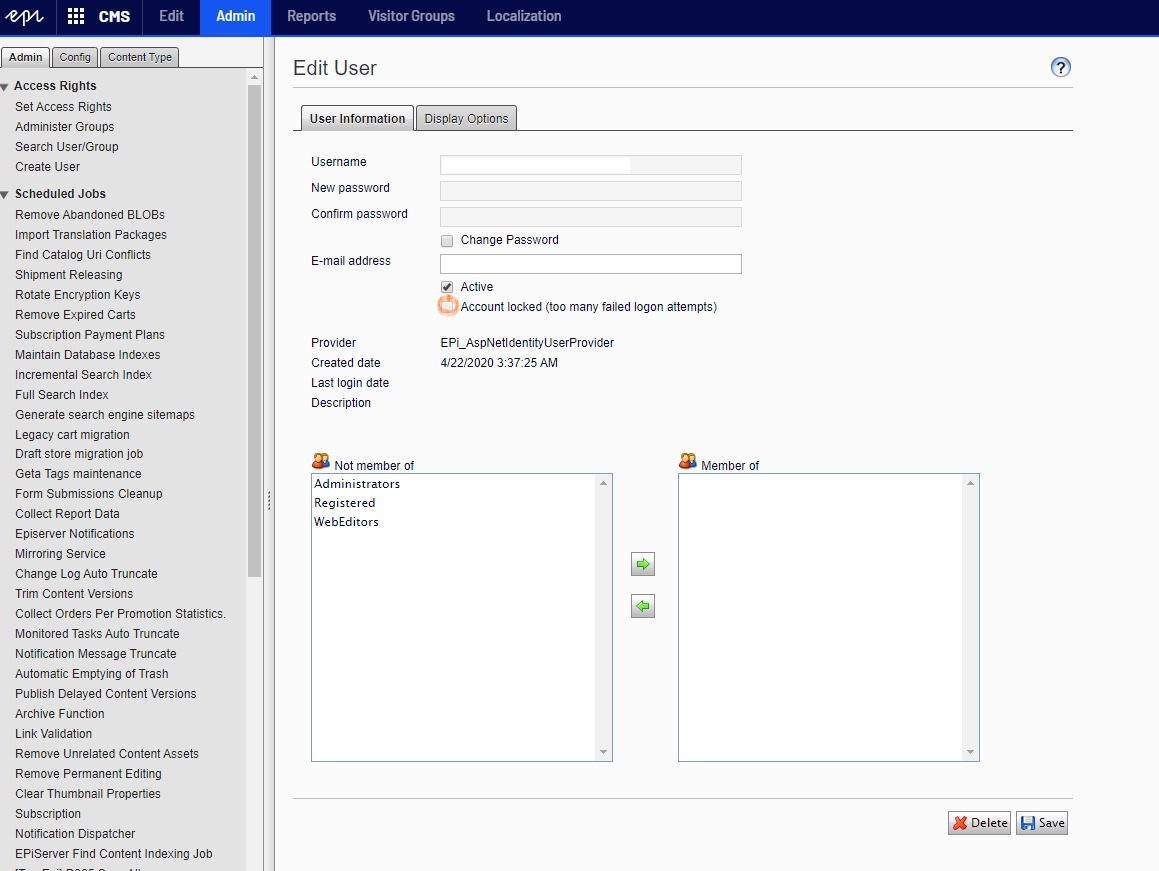
But it seems this function works well if we use Membership Provider for authentication. It does not works if I use Aspnet Identity.
I found that the episerver is using IsLockedOut to check lockout status and unblock user by changing IsLockedOut to false. But currently Aspnet Identity uses the LockEnable flag and LockoutEndDateUtc to check lockout status. So the solution that I use to unblock user in Aspnet Identity is creating a custom user that inherited from Application and over IsLockedOut property like this:
        public override bool IsLockedOut
        {
            get => LockoutEnabled && LockoutEndDateUtc != null && LockoutEndDateUtc >= DateTime.UtcNow;
            set
            {
                if (!LockoutEnabled || value) return;

                if (LockoutEndDateUtc != null && LockoutEndDateUtc > DateTime.UtcNow)
                {
                    LastLockoutDate = LockoutEndDateUtc = DateTime.UtcNow;
                }
                AccessFailedCount = 0;
            }
        }
That is all. Now you can unblock account in Episerver admin mode as usual.

Comments