
A critical vulnerability was discovered in React Server Components (Next.js). Our systems remain protected but we advise to update packages to newest version. Learn More


Nov 29, 2009
  8409
(10 votes)

System Monitor Gadget

Here’s our contribution to the Gadget Contest. This gadget is developed by me (Björn Sållarp) and Erland Ranvinge, both working at Avantime.

The gadget enables you to read performance counter values from the machine running the web application. The counter values are updated in real time and visualized in a graph using the Awesome flot plotting plugin for jQuery.

The plugin is intended to give system administrators a quick and easy way to check the server status without having to remote to the server and start PerfMon.
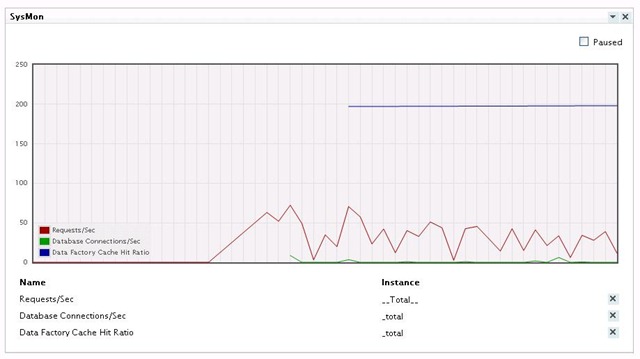
graph

Counters are visualized in this fancy chart.
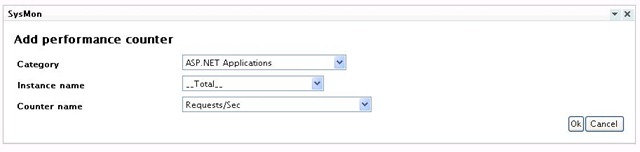
 

Add perfcounter

You can choose from all the available counters on the machine and the settings are stored uniquely for each gadget instance in the new dynamic data store available in EPiServer 6.


Download the gadget here:

Download the source here:

Nov 29, 2009

Comments

Sep 21, 2010 10:32 AM

To bad someone already have made this gadget:
http://world.episerver.com/Blogs/David-Knipe/Dates/2009/11/Local-and-remote-system-monitor-gadget/

;-)

Sep 21, 2010 10:32 AM

I don't mind having different ways of doing the same thing. Now you can choose the best option for your need. For example this uses jQuery so you dont need the external reference to google charts and such. Its just for the judges to decide which is found the best from the competition point of view. I have not looked that deep on the 2 options so I have no opinion yet on which is best, just no problem with 2 of the "same" gadget I would say. =)

Please login to comment.
Latest blogs
A day in the life of an Optimizely OMVP - OptiGraphExtensions v2.0: Enhanced Search Control with Language Support, Synonym Slots, and Stop Words

Supercharge your Optimizely Graph search experience with powerful new features for multilingual sites and fine-grained search tuning. As search...

Graham Carr | Dec 16, 2025

A day in the life of an Optimizely OMVP - Optimizely Opal: Specialized Agents, Workflows, and Tools Explained

The AI landscape in digital experience platforms has shifted dramatically. At Opticon 2025, Optimizely unveiled the next evolution of Optimizely Op...

Graham Carr | Dec 16, 2025

Optimizely CMS - Learning by Doing: EP09 - Create Hero, Breadcrumb's and Integrate SEO : Demo

  Episode 9  is Live!! The latest installment of my  Learning by Doing: Build Series  on  Optimizely Episode 9 CMS 12  is now available on YouTube!...

Ratish | Dec 15, 2025 |

Building simple Opal tools for product search and content creation

Optimizely Opal tools make it easy for AI agents to call your APIs – in this post we’ll build a small ASP.NET host that exposes two of them: one fo...

Pär Wissmark | Dec 13, 2025 |

CMS Audiences - check all usage

Sometimes you want to check if an Audience from your CMS (former Visitor Group) has been used by which page(and which version of that page) Then yo...

Tuan Anh Hoang | Dec 12, 2025

Data Imports in Optimizely: Part 2 - Query data efficiently

One of the more time consuming parts of an import is looking up data to update. Naively, it is possible to use the PageCriteriaQueryService to quer...

Matt FitzGerald-Chamberlain | Dec 11, 2025 |