


Search & Navigation - Click Tracking
If you are implementing Search & Navigation (a.k.a. FIND) but cannot use the ‘Unified Search’, you will need to implement your own server-side tracking. There’s a number of blogs out there that touch on the subject but many are outdated and none seem to capture 100% of the requirements.
If you don’t get everything correct, it’s likely you’ll be seeing all zeros for ‘Click-through rate’ in the CMS:
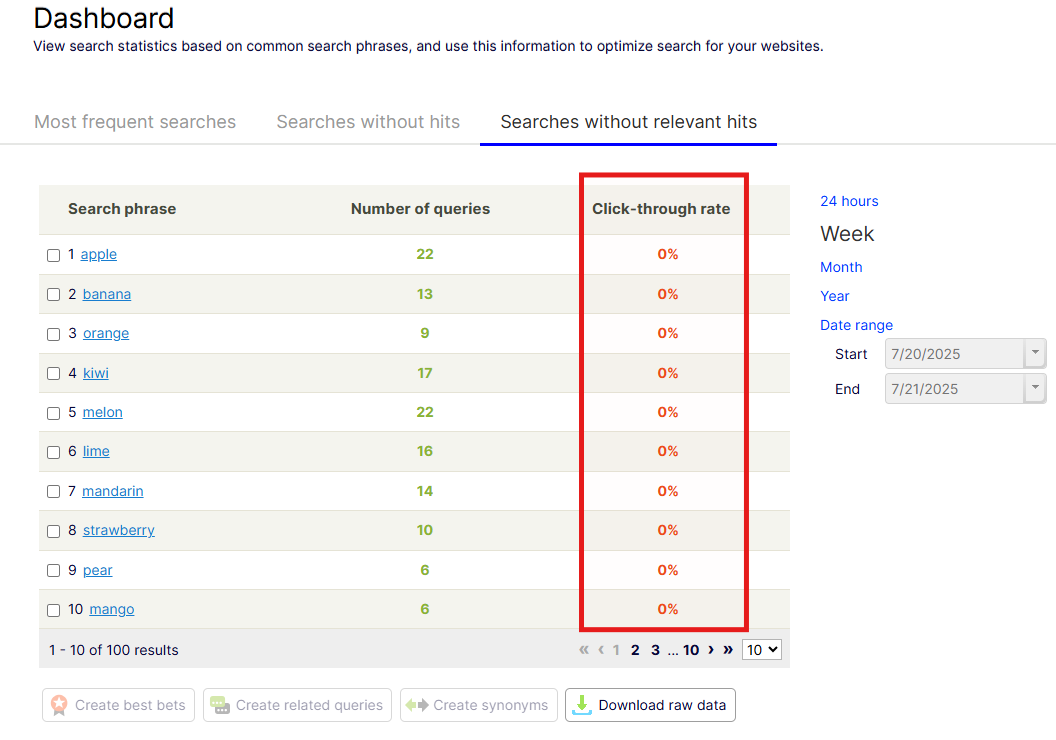
The following will help anyone that needs to cater for:
-
Multisite setups
-
Accurate reporting on ‘Most frequent searches’
-
Accurate reporting on ‘Searches without hits’
-
Accurate reporting on ‘Searches without relevant hits’
-
Accurate reporting ‘People who searched for 'foo' also searched for…’
Note, I understand that Search & Navigation is kinda' on the way out (in favor of Graph) but hopefully this will still be of some use.
Overview
This approach:
-
Captures and submits the search query
-
Fires a ‘track event' for the query
-
Appends the tracking info (from the track event) to each search result URL
-
When a search result is clicked, this fires an event to a tracking route – /go .
-
Tracking info is read from the query parameters
-
Tracking event is fired for the click event passing the query parameters
-
The request is redirected to the search result page
Get the Search Result
var searchResult = await ServiceLocator.Current.GetInstance<IClient>()
            .Search<T>(“en”)
            .For(“foo”)
            .Take(20)
            .GetResultAsync();
Track the Query
var tags = _tagsHelper.GetTags(false).ToList();
var trackResult = await ServiceLocator.Current.GetInstance<IClient>().Statistics().TrackQueryAsync(query.Query.ToLower(), c =>
                {
                    c.Id = new TrackContext().Id;
                    c.Query.Hits = searchResult.TotalMatching;
                    // c.Tags = _tagsHelper.GetTags(false).ToList();   -- don't do this here!
                    c.Tags = tags;
                }));
Things to note:
-
tags will capture the current site, language and categories
-
Do not evaluate the tags within the command action of TrackQueryAsync. This is a problem in multi-site instances. Somehow, when you evaluate the tags from within the command action, the site id is always resolved to the website with the wildcard domain. Consider this if you have multiple sites sharing the same search code.
-
c.Id = new TrackContext().Id; – this is used to set an id for the user – it’s needed to determine what similar users also searched for and what they clicked on – this can be exposed via _searchClient.Statistics()?.GetDidYouMeanAsync()
Add Tracking Info to the Result URLs
var trackedUrls = new List<string>();
var resultList = searchResult.Hits.ToList();
for (int x = 0; x < resultList.Count; x ++)
{
    var trackedUrl = $"https://www.mysite.com/" +
                     $"?query={System.Web.HttpUtility.UrlEncode(query)}" +
                     $"&trackid={trackResult.TrackId}" +
                     $"&hitid={resultList[x].Id}" +
                     $"&hittype={resultList[x].Type}" +
                     $"&trackuuid={trackResult.TrackUUId}" +
                     $"&trackhitpos={x +1}" +
                     $"&page="{resultList[x].Document.LinkURL};
    trackedUrls.Add(trackedUrl);
}Example:
Things to Note:
-
URL Encode the search term when adding to the query parameters
Track Clicks / Hits
  [HttpGet]
  [Route("go")]
  public async Task<RedirectResult> Go(
      [FromQuery] string query,
      [FromQuery] string trackid,
      [FromQuery] string hitid,
      [FromQuery] string hittype,
      [FromQuery] string trackuuid,
      [FromQuery] string trackhitpos,
      [FromQuery] string page)
  {
      Task.Run(async () =>
      {
          var locator = ServiceLocator.Current;
          var hitIdFormatted = $"{hittype}/{hitid}";
          var tags = locator.GetInstance<IStatisticTagsHelper>().GetTags(false).ToList();

          await locator.GetInstance<IClient>().Statistics().TrackHitAsync(
              queryString: query,
              hitId: hitIdFormatted,
              command =>
              {
                  command.Id = trackid;
                  command.Hit.Id = hitIdFormatted;
                  command.Tags = tags;
                  command.Hit.QueryString = System.Web.HttpUtility.UrlDecode(query ?? string.Empty);
                  command.Hit.Position = int.TryParse(trackhitpos ?? "0", out var pos) ? pos : 0;
                  command.AdditionalParameters = new AttributeDictionary() { { Uuid, trackuuid } };
              });
      });

      return this.Redirect(page);
  }
Things to note:
-
By utilizing ‘Task.Run’ here we are implementing a ‘fire-and-forget' strategy; we do not wait for the tracking to succeed before redirecting the user – this improves the performance / user-experience. Other/better ways to tackle this issue could be via a background service or queue. Some error handling and logging would also be a good idea.
With all this in place, you should now see the correct statistics starting to roll-in.
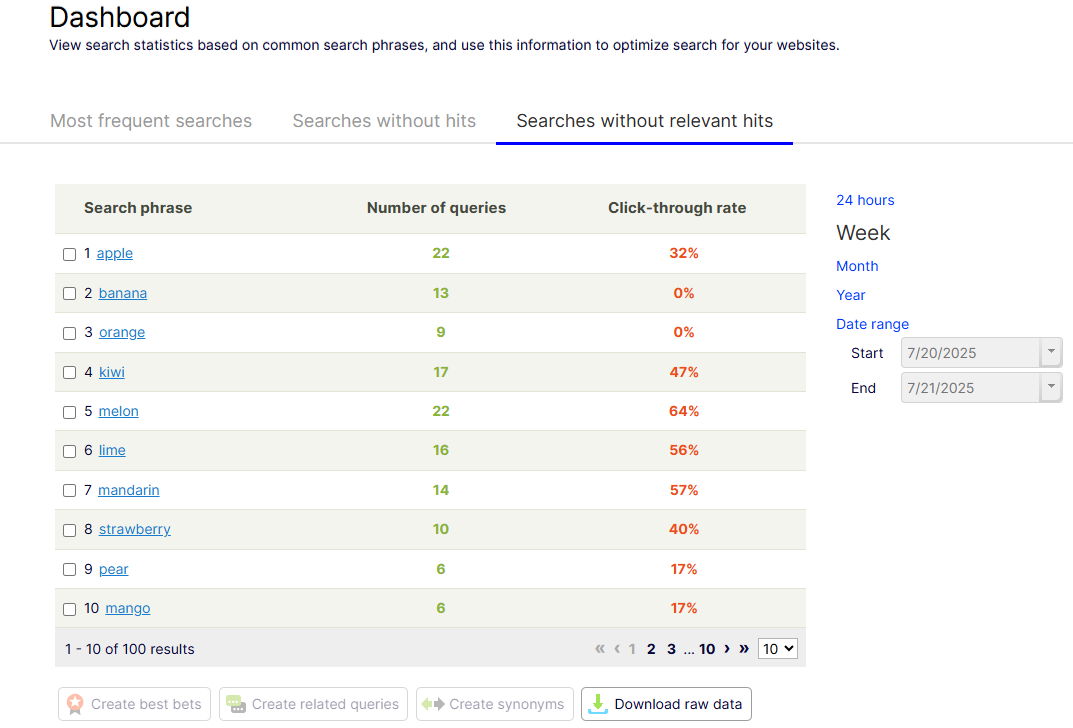
Gotchas:
-
Trim and lowercase the search term to prevent tracking different queries and clicks for effectively the same thing
-
Chromium-based browsers may prerender links on your page via the Speculation Rules API. This may lead to click tracking being fired even if the user does not click a result – suggest you disable this on your search results page.
-
Bots may also crawl your page and register searches without clicks. One way around this could be to only track requests where the referrer domain is your own site.
-
Users who click ‘back’ via the browser will trigger a second query, and skew the result – to get around this you can cache the result for the query based on a unique key for the request and user -
var cacheKey = new TrackContext().Id + Request.QueryString + Request.Host; - If you support pagination and/or sorting options for the user, these calls will trigger new queries in the FIND API and skew the statistics. You may want to consider disabling tracking on these subsequent calls.

Hi Daniel,
Thank you for the share.
When it comes to using Search & Navigation, I've always preferred TypeSearch rather than UnifiedSearch just because it allow us to retrieve data that is otherwise not available through UnifiedSearch. Especially where rich search result cards are concerned. You can still get the performance of UnifiedSearch if you use projections instead.
In terms of tracking hits and thinking about SEO. The query string and redirect approach does add a lot of noise and could create issues in terms of SEO and Data Analytics. Another way to look at this is to look at applying the information as data attributes on the links you generate and adding a UID event that fires off the tracking event instead.
Hi Mark, thanks for the comment!
Using javascript and data-attributes to collect the tracking info is another great approach. One thing to watch out for there is that the request can get cancelled by the browser (because the page is unloading while navigating away) or it can get cutoff before reaching the server.
There's probably a few ways to get around appending the query params if needed.... but I guess the main thing I wanted to get across was to list the paramaters that need to be captured in the 'track query' response and how they need to be passed back to the 'track click' request.
Hello! We have implemented tracking for product searches in the way this blog post describes but still ends up with a lot of searches marked with 0% click-through rate which does not correlate with reality.
At the same time there are a few other searches with non-zero values so it's not zero for 100% of all search hits.
Chatting with GPT about the issue I got the following advice:
✅ The Correct Behavior (Per Search ID)
Optimizely Find expects a unique “search session” ID per search, which is then reused only for that search’s clicks.
In other words:
Each new search → new random ID
Clicks from that result → reuse that ID
Next search → new ID again
That’s exactly what the
TraceId(the GUID) was meant to provide.So your production configuration is too “coarse-grained” for Find analytics.
So, is the click-through statistics really working when using the global ID: TrackContext().Id which would be the same during a visitor's whole site journey or should it instead be a unique Id per actual search operation?
Hi Peter,
Sorry to hear you're not getting the expected results.
You are correct in that the TrackContext().Id remains the same throughoug the user's journey/session. However, each unique click also captures the original 'query' (search term). So the query + the TrackId should establish uniqueness for actual search operation.
This seems to be working for me without needing to set the Trace Id. If I search and click multiple queries in the same session (same machine + browser), I am seeing each query's click-through rate updating.
You could try manually setting the TraceID. I can see this gets set automatically to a random GUID from the constructor of the Command class - used in the TrackHit and TrackQuery calls - it would have a different value in each call. Maybe you could set it manually and then save to a new query param, following the same approach as the other parameters already discussed above - that would alloy you to use the same TraceId in both calls.... but from my observations it's not needed.
If you try that out and it works for you, please let me know :)
It turned out that we indeed could use TraceContext().Id after all and after struggling with this on a daily basis we have found the following issues that skewed our statistics:
* Query tracking was made for every paginated page and switching between sort modes
* Searches and query tracking were triggered by bot traffic (without any clicks)
* Visitors searching and directly adding to the cart from the search results did not increment click-through rate
Solving these issues resulted in more realistic statistics but we are still surprised by the low average of 22% click-through rate across the board for the last 24 hours. Maybe the numbers will increase after more days of incoming data.
Hi Peter,
Thanks for sharing your findings!
Few notes/questions for you:
1 - You say that you could use TraceContext().Id? Does that mean that it improved the statistics for you? Or were your issues more related to the other points you raised?
2 - The point you make about sorting and pagination is a good one. I don't have a solve for that to be honest. I'd love to hear if you have a work around.
3 - Bot traffic is also a consideration for sure. I mentioned that earlier in the 'Gotchas' section. Siilarly, try and prevent browsers from 'prefectching' any links that go to your search results page.
4 - Adding to cart - that's another good tip to look out for.
I'll do my own investigation on #2 but if you or anyone else has a suggestion, please let us know so I can update the guide.
I will publish a new version to the Production environment today with DeviceDetector.Net and check for any filters which was missed earlier. I'm eager to see if this will increase the average click statistics figures.
Just and update on #2. I've discussed this further with Opti support, and sadly there is no feature in the FIND API's to prevent paginated and sorted calls logging a new query in the statistics. You need some sort of custom code to ensure you don't track the same query every time :( I'll add that to the 'Gotchas' section above