

The old Gadget framework is deprecated
There are two ways of creating components. You can either use ComponentAttribute or GadgetAttribute. The ComponentAttribute is the recommended solution. From EPiServer.CMS.UI 10.6.0 the GadgetAttribute is marked as obsolete and will be removed in an upcoming major version release. Also all jQuery-based libraries are now marked as deprecated and should not be referenced because they will be removed in the future.
Server-side changes
On the server side, we have now obsoleted the following types:
In EPiServer.Shell
All gadget framework-related classes from EPiServer.Shell.Gadgets namespace:
- gadget definitions and providers: GadgetComponent, ReflectingGadgetDefinitionProvider, GadgetDefinition, GadgetComponentProvider, GadgetComponentDefinition
- interfaces : IGadgetNotify, IGadgetFactory, IGadgetDefinitionProvider
- attributes: GadgetAttribute, GadgetActionAttribute, GadgetDefinitionProviderAttribute, VerifyGadgetOwnerAttribute
- exceptions: DuplicateGadgetNameException and UnknownGadgetException
- event arguments: GadgetTemplatesEventArgs, GadgetDefinitionEventArgs
Gadget definition configuration classes: EPiServer.Shell.Configuration.DisabledGadgetElement and EPiServer.Shell.Configuration.DisableGadgetsCollection.
In EPiServer.Cms.Shell.UI
All Dashboard gadget controllers from EPiServer.Cms.Shell.UI.Controller and EPiServer.Shell.UI.Controllers namespaces:
- EPiExternalLinksController,
- EPiNotesController,
- EPiRSSReaderController,
- EPiXFormsViewerController,
- VisitorGroupsStatisticsController
Client-side changes
On the client side, we've marked the following types as deprecated:
- client-side gadgets framework located in EPiServer.Shell.UI/UI/ClientResources/EPi/Widgets/Gadget (Gadget.js, Gadget.css)
- all dashboard gadgets-related files located in EPiServer.Cms.Shell.UI/UI/ClientResources (/ExternalLinks/ExternalLinks.js, /Notes/Notes.js, /RSSReader/RSSReader.js, /XFormsViewer/XFormsViewer.js)
- all other jQuery and jQuery.UI-based javascripts and styles files from EPiServer.Shell.UI/UI/ClientResources/EPi (Widgets/Autoupdate/Autoupdate.js, Widgets/CollapsiblePanel/CollapsiblePanel.js, EPi/Widgets/ContextMenu/ContextMenu.js, EPi/Widgets/DatePicker/ui.datepicker.js, Widgets/DateRange/ui.daterange.js, EPi/Widgets/Dialog/Dialog.js, Widgets/DropDownMenu/dropdownmenu.js, Widgets/FoldOutPanel/FoldOutPanel.js, Widgets/GlobalNavigation/GlobalNavigation.js, Widgets/ItemList/ItemList.js, Widgets/Pager/Pager.js, Widgets/TabView/TabView.js, Widgets/Toolbar/Toolbar.js, Widgets/Validate/jquery.validate.custom.js, /Error/Error.js)
Using Components
Detailed documentation about implementing components with ComponentAttribute can be found here. Below you will find some brief steps that should be taken.
You should create a new class with the "Component" attribute. In the component attribute you can set
- Title - display name for the component
- Categories - category used by component selector. In edit view it can be "content" or "cms". On dashboard it's "dashboard"
- WidgetType - client side component widget class
[Component(
     Title = "Sample Component",
     Categories = "cms",
     WidgetType = "alloy/SampleComponent"
 )]
public class SampleComponent
{
}
The client component is a regular widget. The widget that displays plain text would look like:
define([
    "dojo/_base/declare",

    "dijit/_Widget",
    "dijit/_TemplatedMixin",
    "dijit/_WidgetsInTemplateMixin"
],
function (
    declare,

    _Widget,
    _TemplatedMixin,
    _WidgetsInTemplateMixin
) {

    return declare([_Widget, _TemplatedMixin, _WidgetsInTemplateMixin], {
        templateString: "<div>Sample Component</div>"
    });
});
The "Sample Component" is available under the "CMS" category.
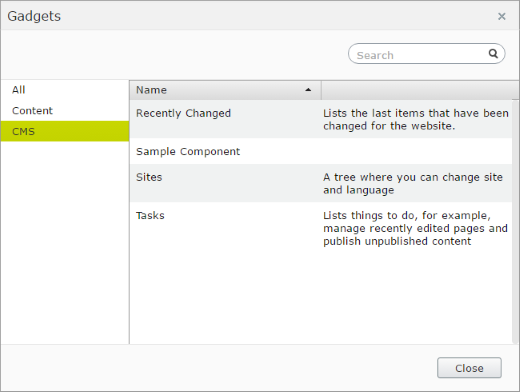
Additionaly you can set:
- Description - displayed in Component Selector
- AllowedRoles - list of roles that are allowed to use this component. They can be set from code or defined in web.config ViewSettings
- IsAvailableForUserSelection - when set to true, the component can be added in the ui by a user. By default it's set to true.
- LanguagePath - used to localize Title and Description
- PlugInAreas - defines where the component should be automatically plugged in. Some target areas are defined in the EPiServer.Shell.PlugInArea class.
For example, for definition like:
[Component(
    Title = "Sample Component",
    Categories = "cms",
    WidgetType = "alloy/SampleComponent",
    Description = "Lorem ipsum dolor sit amet, consectetur adipiscing elit",
    PlugInAreas = EPiServer.Shell.PlugInArea.AssetsDefaultGroup
)]
public class SampleComponent
{
}
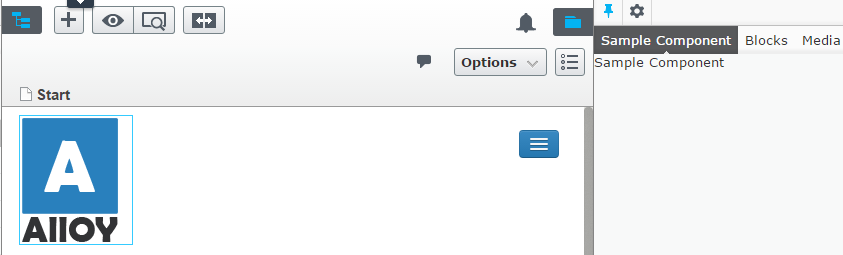
Now the Component Selector shows the description for "Sample Component", and the component is also added to the Assets pane by default.
Hi,
I tried adding this code to an new Alloy project. I got the sample component up on the dashboard, but it is not available in the "Add gadget" menu. Also there is no cms category in this menu (only "All" and "Dashboard").
Once I remove the sample component from the dashboard (by selecting "remove gadget") there is no way to get it back.
Any ideas?
It looks like they may be some clarification needed in the documentation about the format necessary for widgettype
Your example here has the Widget type being defined as 'Path' ie with forward slashes. In the linked documentation it still shows as 'dot' type. I'm pretty sure that 'path' type is correct and will resolve dojo modules as the documentation states
I'm also interested in knowing how to convert a gadget to component. It would be quite cumbersome to rewrite the whole gadget and be forced to implement dojo.
It sure looks like you'll need som DOJO skills, you could use IFrameComponent in many cases: http://devblog.gosso.se/2017/06/convert-deprecated-gadgets-to-components-in-episerver/
Great. I get this working. By this tutorial i am able to create a widget (looks stable) with test html . I tweaked it to appear in Dashboard Menu instead by changing categories from "cms" to "dashboard".
The hardest part is the naming convention for writing WidgetType that i cracked as follows: I dont know how i will use in my real project that doesnt have "alloy" but its working in test alloy project.
[Component(Title = "Karma Gadget", Description = "Karma widget description",
Categories = "dashboard",
WidgetType = "alloy/widgets/KarmaWidget")]
public class KarmaWidget
{
}
I have created KarmaWidget.js under my project name AlloyEpi11 => ClientResources/Scripts/widgets and with this structure my widgettype is working.
Good luck