
Jacob Pretorius
Apr 29, 2025
  2007
(6 votes)

Notes on Optimizely Self-Optimizing Block

While the free A/B Testing might be dead, the Self-Optimizing Block is still alive and kicking. Here's some notes for those debugging it.


Installation

You can install the self-optimising block with the non-obvious package name `EPiServer.Cms.AddOns.Blocks` from https://nuget.optimizely.com/package/?id=EPiServer.Cms.AddOns.Blocks 

Ensure you have `app.UseSessions()` in your `Startup.cs` (thanks Arjan!)

You will then be able to create instances of "Self Optimizing Block" using the CMS.


Missing renderer

If for some reason you have a block called "OptimizingBlock" in your CMS it likely means the "Self Optimizing Block" package is no longer installed. You can verify this by going to the CMS admin > Content Types and searching for it to see if it is From code: No
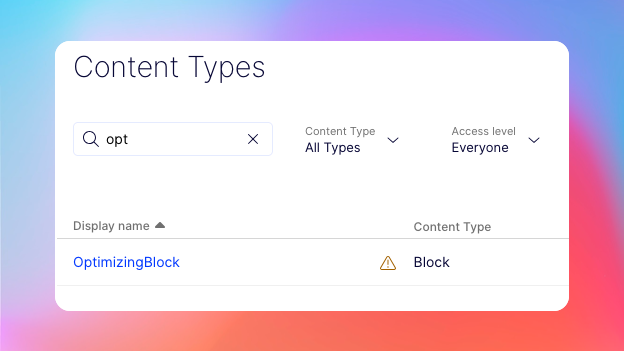
If you install the package it should spring back to action and restore itself as "Self Optimizing Block".


Apr 29, 2025

Comments

Please login to comment.
Latest blogs
Integrating Searchspring with Optimizely – Part 1: Architecture & Setup

Integrating Searchspring with Optimizely – Part 1: Architecture & Setup

Wiselin Jaya Jos | Mar 20, 2026 |

CMS 13 Preview 4 — Upgrading from Preview 3

This is the third post in a series where I use the Alloy template as a reference to walk through each CMS 13 preview. The first post covered...

Robert Svallin | Mar 20, 2026

The move to CMS 13: Upgrade Notes for Technical Teams

A technical walkthrough of CMS 13 preview3 and headless work: what is changing, where the risks are, and how an upgrade and what to expect

Hristo Bakalov | Mar 20, 2026 |

Customizing Product Data Sent to Optimizely Product Recommendations in Optimizely Commerce

A practical guide to customizing IEntryAttributeService in Optimizely Commerce so you can override product titles, add custom feed attributes, and...

Wojciech Seweryn | Mar 20, 2026 |