

Pushing content to Optimizely CMS
If you want to integrate external content sources into Optimizely CMS you are spoilt for choice, in fact it can be hard to figure out which approach to take. You could build a content provider, which provides the deepest integration, but is also the most complicated option. You could also use the import / export UI to handhold content packages between systems, and the service API has an endpoint for importing product content. You could of course also build your own controller or scheduled job to push or pull content using the .Net content repository or dynamic data store for simple objects you don’t need to interact with through the edit UI.
You could also take a look at the content management API which provides a handy REST API for basic content management tasks:
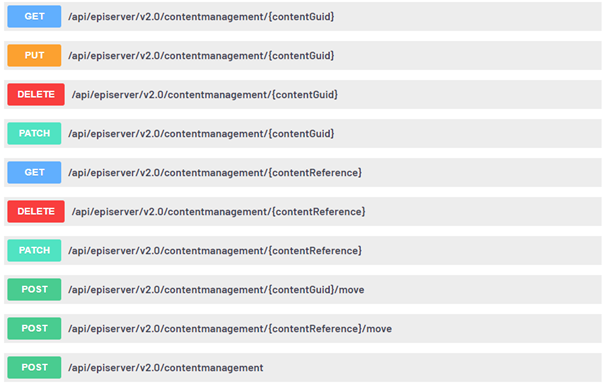
Want to create a new content object? Either PUT or POST the whole thing as JSON. Using PUT will upsert the object, replacing any existing object with matching id in one go.
{
  "name": "Alloy Track",
  "language": { "name": "sv" },
  "contentType": ["ProductPage"],
  "parentLink": { "id": 5 },
  "status": "CheckedOut",
  "metaTitle":  "Alloy track",
  "pageImage": {
    "id": 152,
    "workId": 0,
    "guidValue": "59e22d5b-b238-4185-85f8-338f4f29c93d",
    "providerName": null,
    "url": "/globalassets/alloy-track/alloytrack.png"
   }
}
The PATCH endpoints let you specify only the properties you care to change, and leaves the remaining properties as they are, which is e.g., useful for publishing a draft object:
{
  "language": { "name": "en" },
  "status": "Published"
}
You could of course just publish an object immediately by setting “status”: “Published” while creating or upserting and object using POST or PUT.
If this has piqued your interest, there are more capabilities and usage examples to be found in the API fundamentals section, and a downloadable swagger specification in the REST API reference.
You may need to install or update the nuget package first and maybe check out the getting started section on world.
Nice post. I loved the new api and features included by the Optimizely.
Great post. I haven't had the oportunity to use these apis yet, but it's nice to know more about the options available.