

Pushing Content Between Optimizely DXP Environments
We've been working with a client who has been on Optimizely 11 for a long time - self-hosted, on their own server infrastructure, with a content workflow that for various reasons sees their editorial team creating and getting internal sign off in staging, then manually recreating it on production. Because the editors don't have the admin access required to export and import content packages, every approved piece of content has to be rebuilt field by field in the production environment. It's time-consuming, it's error-prone, and it's the kind of friction that quietly chips away at a team's confidence in their CMS.
Recently we convinced them to upgrade to Optimizely 12 (13 is a bit too shiny new and a reach too far for them for the time being) and move into the DXP, and we've had a genuinely “interesting” time migrating them and ensuring that their hundreds of pieces of functionality, page types and blocks survived the transition intact. I’d been most excited about showing the performance gains from moving off the client's server farm and into the DXP - they are significant with substantial Lighthouse score improvements to back up the perception.
The client was seemingly pleased.
And then they asked: "Does moving to the DXP mean we can push content between environments?"
It was a requirement that nobody had mentioned before, and yet something that their editorial team desperately wanted.
Let’s face it, it's a completely reasonable question. The DXP is a managed cloud platform - surely it should handle that kind of thing? As we know, the answer is no, that's not what the DXP is built for. Content promotion between environments isn't part of the offering. Watching that land wasn't the highlight of my day.
So, I built something.
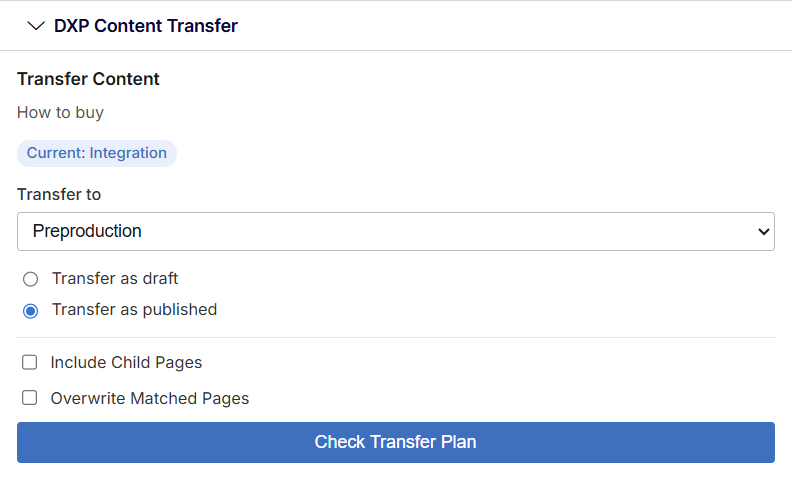
Using the Content Delivery API and Content Management API, I developed a gadget that sits inside the CMS and does exactly what the client needed.
You choose a page, pick the target environment, decide what publication state you want it to arrive in, choose whether to include child pages, and decide whether to overwrite anything that already exists at the destination. Hit Transfer, and within seconds the content you approved in Preproduction is live in Production. It does pages, images and blocks, and respects local and global assets.
It's a straightforward tool, but it solves a real problem - and for a team that has been manually duplicating content across environments for years, it should make a meaningful difference to their day. If you're on the DXP and this workflow sounds familiar, it's something worth exploring.
And it also potentially gets around circumstances where an export is just too huge to be reimported – one of my own bug bears – although it’s only been tested on trees of 20 pages or so, there’s no reason it shouldn’t be able to handle hundreds or thousands of pages.
Have a look over at https://nuget.optimizely.com/packages/mp.dxpcontenttransfer/
This sounds great, but a few questions on it. You say it does local and global assets, so it's supporting things other than images, as the assets area could have other file types like PDFs or whatever extensions you're supporting.
I know you mentioned it's only been tested with trees of 20 pages or so, but I'd be reluctant to use it unless I know that it's been tried with something a bit bigger. Are you able to test it with something a bit more like a real site, say at least 200 or 300 pages, and post some of the stats on how long it takes and if it works?
Thanks Scott.
The "hundred page trees" use case is really a potential added extra thrown in for added pazzaz, not the primary reason I put it together - but that said, if you're happy to leave it then it's happy to run through sections, pages, blocks, etc. - though admittedly, it's not the fastest thing in the world.
As it says above, it transfers pretty much any asset you have in-situ, be that blocks, page references, images, videos, audio, documents ... the list goes on.
But back to my intended usecase, it's really been put together to stop content editors having to re-create pages again in high up environments when they've already spent hours making things perfect in preproduction. And I very much hope it answers that need.
Matt this looks really good we currently have a client who pushes the whole database including assets from Prep to Prod via their CICD process
As you can imagine this is time consuming (Moving Database and Blobs) and post processing needs to be done to re-synch the Application Settings (Host Names etc)
With your tool does it sit in the CMS as a Gadget / Add-on, would it be possible to build something but execute via powershell (Ultimately we would still want to control this via DevOps YML/CICD)
Hi Minesh, yes, it's a gadget - but see no reason why the underlying logic and calls couldn't be torn out and put into Powershell; I think the issues would be around page/block dependency - this could probably be substantial trouble if you wanted to do more than a single branch of the tree at the same time.