

Scheduler Delegation: Using Optimizely DXP Infrastructure for Queued Processing
At SYZYGY Techsolutions, we support Optimizely DXP projects at scale, so continuously identifying unique ways to optimize the application is an essential part of how we work. One pattern that has paid off repeatedly is scheduler delegation: moving expensive, recurring or bursty background work off user-facing instances and onto the dedicated scheduler instance, using infrastructure that DXP already provides.
This post walks through the problem, the architecture, the reasoning behind it, and the code needed to apply it in your own solution.
The problem: expensive work triggered from the request path
Imagine thousands of visitors performing a similar action at the same time, spread across several instances of your application. They might be clicking through a car configurator, where every choice of model, colour or engine asks which options can still be combined and which are available. Or they might simply be opening pages, each of which needs the website's translated texts in their language.Resolving that action takes time. The answer depends on several data sources, each with its own rules: product rules, production planning and supplier stock for the configurator; the CMS, a translation management system and other applications for the texts. Yet the number of distinct questions is limited, and the answer does not need to be exact to the second. The final order confirms availability anyway, and a text that is a minute old is harmless.
So you cache the result. That solves the speed, but introduces new problems:
1. Cold starts. After a deployment, a restart or an expiry, the cache is empty and the first visitors get nothing or wait.
2. Repeated work. Many visitors hit the same empty entry at once, and each request calculates the same answer, overloading the underlying systems.
3. Instances out of sync. Every web instance has its own cache, recalculates on its own schedule, and may show a different answer than its neighbour.
Together these produce a cache stampede: the same heavy work done many times over, competing with visitor traffic for CPU, memory and connections to the source systems. Making visitors wait for the calculation only moves the problem onto them. The goal is to keep the request path fast, whatever the state of the cache.
Optimizely's built-in ISynchronizedObjectInstanceCache is a great fit for data that changes infrequently. Under high load in a multi-instance setup, however, we observed clear limits of its caching model for this kind of workload. Each instance keeps its own in-memory copy, and only invalidations travel between instances. Every instance that recalculates an entry and stores it sends an invalidation to all the others, which drop their copies and recalculate in turn. The result is a stream of cache-update events from every side, the same stampede repeated on every instance, and moments when instances serve different values or overwrite each other's results.
What DXP gives you: a scheduler instance
On Preproduction and Production, Optimizely DXP customers can request a dedicated scheduler instance, one per environment, next to the web instances that serve visitors. This instance:
- does not receive user-facing requests;
- is intended for backend work: scheduled jobs, background tasks and back-office operations performed by content editors;
- is part of the same deployment, so it runs your code, your configuration and your initialization modules.
In other words, DXP already hands you a place where heavy work runs away from visitor traffic. Most teams use it only for classic scheduled jobs on a fixed timetable. Scheduler delegation extends it to event-driven, queued work: user-facing instances report that something is needed, and the scheduler instance does it.
The rest of the pattern relies on platform features that every DXP project already has:
| Capability | Provided by | Role in the pattern |
| Cross-instance messaging | The CMS event system (IEventRegistry), which uses Azure Service Bus on DXP | Carries a small "something is missing" message from any instance to all instances |
| Scheduler awareness | SchedulerOptions.Enabled (EPiServer.Scheduler), which is only true on the scheduler instance | Lets a handler decide whether it should act on a message |
| Scheduled jobs | The CMS scheduled job engine (ScheduledJobBase, [ScheduledPlugIn]) | Provides a recurring, restartable execution loop for batch processing |
| Shared state | Blob storage (IBlobFactory), the CMS/Commerce databases, or a persisted synchronized cache | Carries the finished result back to user-facing instances |
Because all of this ships with DXP, the pattern runs entirely on infrastructure you already have.
Architecture overview
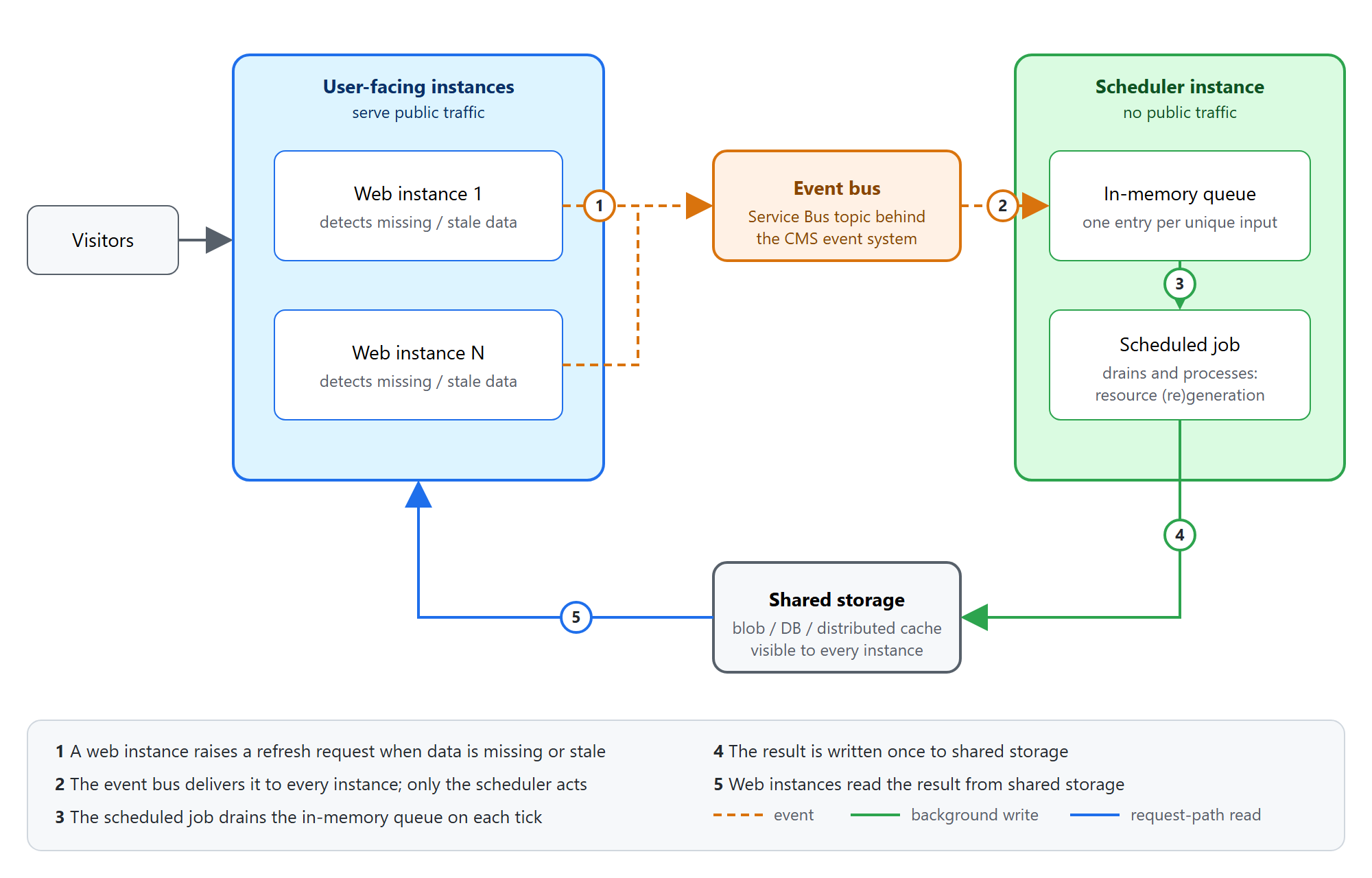
The flow, step by step:
1. Raise. A user-facing instance reads the calculated result from shared storage. If it is missing or stale, it returns what it has (stale data or a fallback) and raises an event that identifies what is needed. Raising is fire-and-forget and must never throw into the request.
2. Deliver. The event travels over the platform's event bus and reaches every instance.
3. Enqueue. Every instance receives the event, but only the scheduler instance acts on it: it places the item into an in-memory queue that keeps one entry per unique input.
4. Batch. A scheduled job runs at a fixed interval (for example every minute), drains the queue, and processes each unique input once.
5. Write back. The result is written to shared storage.
6. Read. User-facing instances pick up the result on their next read, with no direct communication between the scheduler and the web instances.
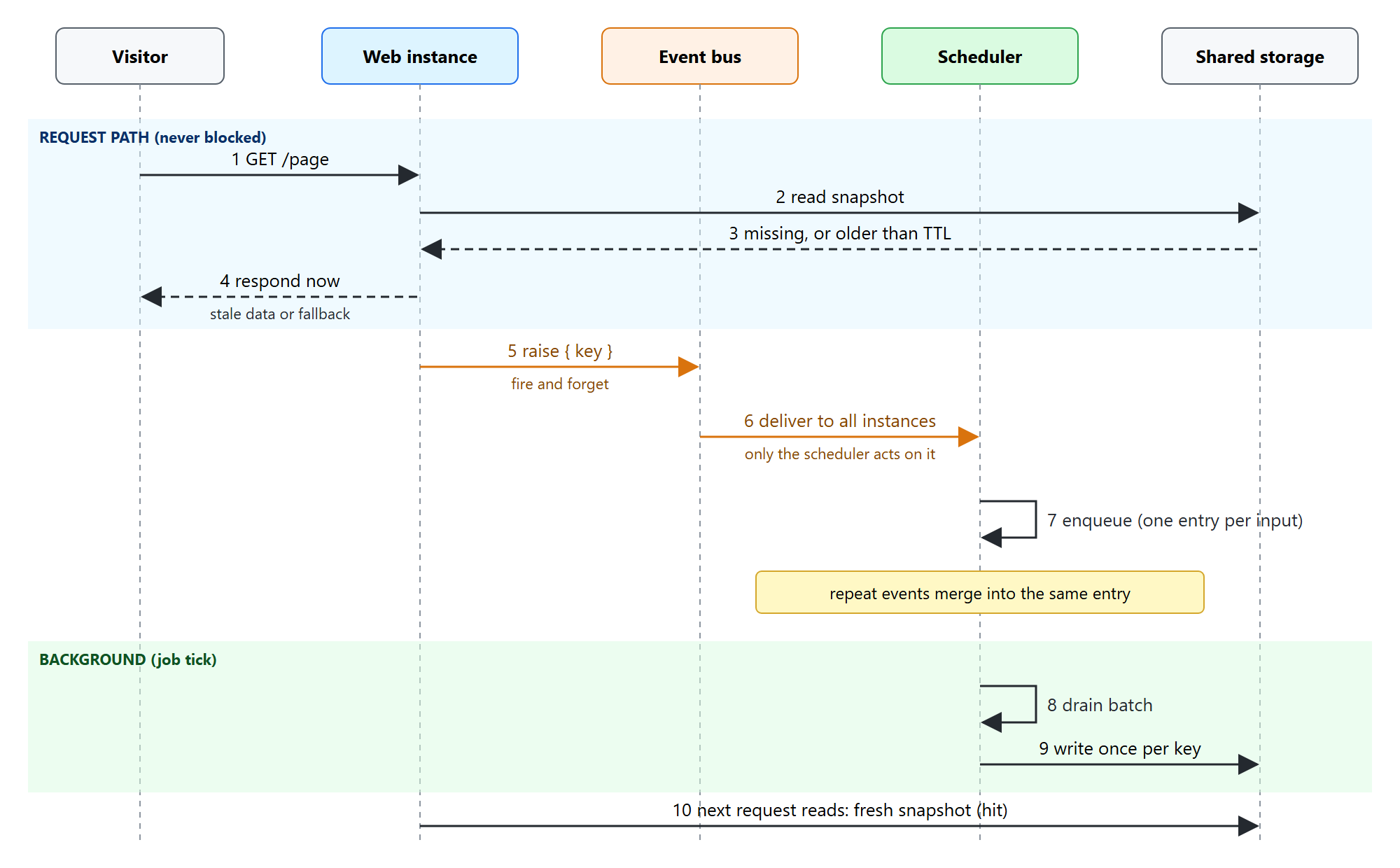
From the visitor's perspective, every request is answered immediately. The expensive work runs later on the scheduler instance, once per unique input.
Design decisions and the reasoning behind them
The code samples below are simplified C# against the Optimizely CMS 12 APIs. Logging, null checks and dependency injection details are trimmed for readability.
1. Events carry intent; data stays at the source
The event payload is only an identifier (for example { model, options }). It is small, cheap to serialize and well within message size limits. The scheduler fetches whatever data it needs from the source of truth when it processes the item. This avoids stale payloads and keeps the bus lightweight.
The payload must be serializable by the event system, and its type must be registered as a known event type:
using System.Runtime.Serialization;
using EPiServer.Events;

[DataContract]
[EventsServiceKnownType]
public class RecalculationRequest
{
    [DataMember] public string Model { get; set; } = "";
    [DataMember] public string Options { get; set; } = "";
}
2. An in-memory queue on the scheduler is enough
A durable queue (a dedicated Service Bus queue, a database table) is the obvious place for pending work. Here the work is idempotent and re-calculable, so a simple in-memory queue on the scheduler instance does the job:
- If the scheduler restarts and loses its queue, the next request that sees a missing or stale result raises the event again.
- Duplicate events are harmless because the queue keeps one entry per input.
Self-healing through the request path replaces durability. That removes persistence, retries, dead-lettering and cleanup from the design. This only holds if the work really is idempotent; for non-recoverable work, use a durable queue instead.
3. Batching and de-duplication give you load control
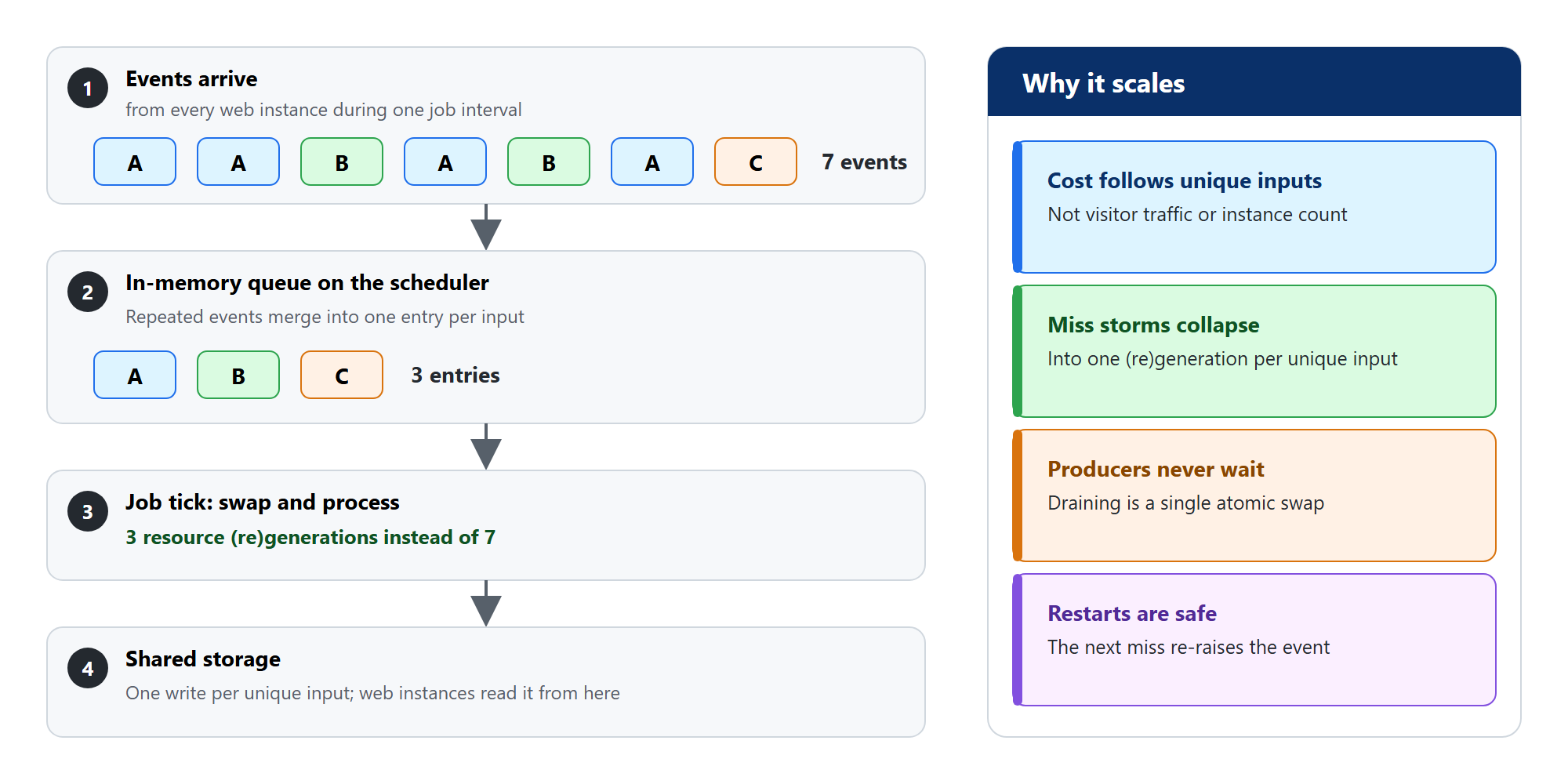
Because events are queued and drained on a timer, the cost of the system depends only on the number of unique inputs. Request volume and instance count drop out of the equation: a burst of thousands of misses collapses into a handful of resource (re)generations. The job interval becomes a single dial that trades refresh latency against background load.
4. A de-duplicating queue keeps producers fast and memory bounded
The queue is written by event handler threads (producers) and drained by the job thread (consumer). Keying it by the inputs means a burst of identical events occupies a single entry, so memory stays bounded during a miss storm. Draining swaps in a fresh dictionary atomically, so producers never wait for the batch. The queue is registered as a singleton, so the event handler and the scheduled job share the same instance:
using System.Collections.Concurrent;
using EPiServer.ServiceLocation;

[ServiceConfiguration(Lifecycle = ServiceInstanceScope.Singleton)]
public class RecalculationQueue
{
    private ConcurrentDictionary<(string Model, string Options), RecalculationRequest> _pending = new();

    public void Add(RecalculationRequest request) =>
        _pending.TryAdd((request.Model, request.Options), request);

    public IReadOnlyCollection<RecalculationRequest> Drain()
    {
        // A write racing the swap can be lost; the next miss raises it again.
        var drained = Interlocked.Exchange(ref _pending, new());
        return drained.Values.ToList();
    }

    public bool IsEmpty => _pending.IsEmpty;
}
5. One event rail, two routing modes
Local development, CI and single-node environments usually run without a scheduler instance. A configuration flag routes the same event differently, so one code path covers both setups:
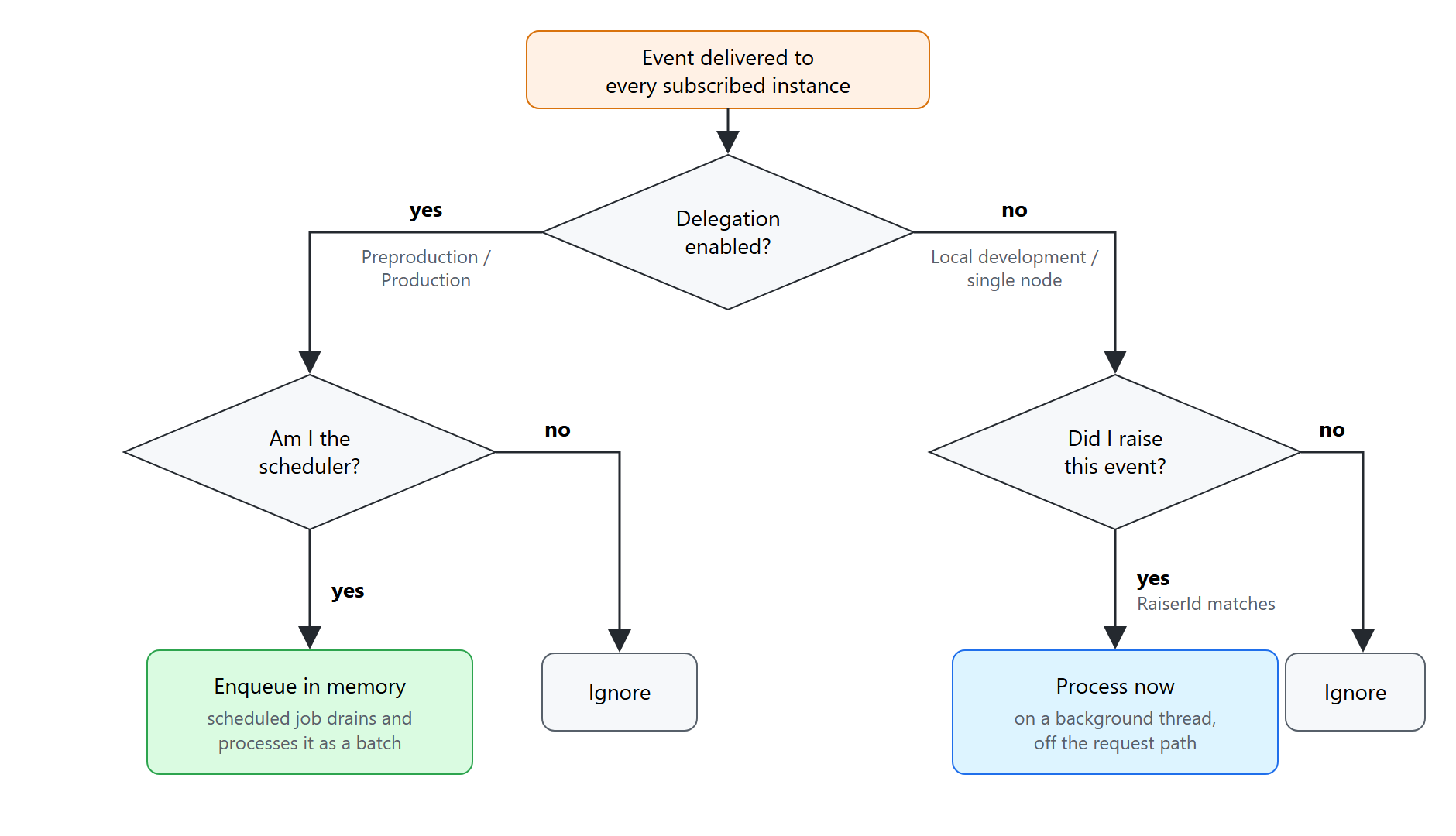
- Delegation on (Preproduction, Production): only the scheduler instance reacts, and it queues the item.
- Delegation off (local, simple setups): only the instance that raised the event reacts, and it processes the item immediately on a background thread.
Both modes share the same read path and the same processing logic. Only the "who handles it, and when" decision changes, and that sits behind a configuration flag. This keeps the pattern easy to test locally and makes it safe to switch off.
The routing is encapsulated in an abstract initialization module. Concrete features only supply the event identity and the processing logic (template method pattern):
using EPiServer.Events;
using EPiServer.Events.Clients;
using EPiServer.Framework;
using EPiServer.Framework.Initialization;
using EPiServer.Scheduler;
using EPiServer.ServiceLocation;
using Microsoft.Extensions.Options;

public abstract class DelegatingEventModule<TRequest> : IInitializableModule
    where TRequest : class
{
    protected abstract Guid EventId { get; }
    protected abstract Guid RaiserId { get; }
    protected abstract void HandleOnScheduler(TRequest request);
    protected abstract void HandleLocally(TRequest request);

    private bool DelegateToScheduler =>
        ServiceLocator.Current.GetInstance<IOptions<DelegationOptions>>().Value.Enabled;

    private static bool IsScheduler =>
        ServiceLocator.Current.GetInstance<IOptions<SchedulerOptions>>().Value.Enabled;

    public void Initialize(InitializationEngine context)
    {
        var evt = ServiceLocator.Current.GetInstance<IEventRegistry>().Get(EventId);
        evt.Raised += DelegateToScheduler ? OnSchedulerRoute : OnLocalRoute;
    }

    public void Uninitialize(InitializationEngine context)
    {
        var evt = ServiceLocator.Current.GetInstance<IEventRegistry>().Get(EventId);
        evt.Raised -= DelegateToScheduler ? OnSchedulerRoute : OnLocalRoute;
    }

    private void OnSchedulerRoute(object sender, EventNotificationEventArgs e)
    {
        if (!IsScheduler) return;                  // web instances ignore it
        if (e.Param is not TRequest request) return;
        HandleOnScheduler(request);                // typically: queue.Add(request)
    }

    private void OnLocalRoute(object sender, EventNotificationEventArgs e)
    {
        if (e.RaiserId != RaiserId) return;        // only handle what this instance raised
        if (e.Param is not TRequest request) return;
        Task.Run(() => HandleLocally(request));
    }
}
A concrete module is discovered by the initialization engine through [ModuleDependency]:
[ModuleDependency(typeof(EPiServer.Web.InitializationModule))]
public class ConfiguratorRecalculationModule : DelegatingEventModule<RecalculationRequest>
{
    internal static readonly Guid Id = new("00000000-0000-0000-0000-000000000001");
    internal static readonly Guid Raiser = Guid.NewGuid();

    protected override Guid EventId => Id;
    protected override Guid RaiserId => Raiser;

    protected override void HandleOnScheduler(RecalculationRequest request) =>
        ServiceLocator.Current.GetInstance<RecalculationQueue>().Add(request);

    protected override void HandleLocally(RecalculationRequest request) =>
        ServiceLocator.Current.GetInstance<ConfiguratorCalculator>().Recalculate(request);
}
Four details matter here:
- IsScheduler reads SchedulerOptions.Enabled, which the platform sets per instance. On DXP the scheduler is enabled only on the scheduler instance, so the check follows the real topology.
- DelegationOptions is your own options class, bound from appsettings.json. It is the configuration flag that switches between the two routing modes.
- RaiserId is generated once per process (Guid.NewGuid() in a static field). It lets an instance recognize its own events when delegation is off.
- EventId is a fixed GUID. Every instance must use the same value to subscribe to the same event.
6. The read path is defensive
Reading the result and requesting a recalculation live in one service on the web instances. It follows a simple rule, stale data beats no data, and a failure to raise the event never reaches the visitor:
using EPiServer.Events.Clients;

public class ConfiguratorResultService(
    IEventRegistry eventRegistry,
    IResultStorage storage,
    ILogger<ConfiguratorResultService> logger)
{
    private static readonly TimeSpan Ttl = TimeSpan.FromMinutes(2);

    public ConfiguratorResult GetResult(RecalculationRequest request)
    {
        var entry = storage.TryRead(request);

        if (entry is null || entry.CalculatedAt < DateTime.UtcNow - Ttl)
        {
            RequestRecalculation(request);
        }

        return entry?.Value ?? ConfiguratorResult.Fallback;
    }

    private void RequestRecalculation(RecalculationRequest request)
    {
        try
        {
            eventRegistry.Get(ConfiguratorRecalculationModule.Id)
                ?.Raise(ConfiguratorRecalculationModule.Raiser, request);
        }
        catch (Exception ex)
        {
            // A failed raise only delays the refresh; the visitor still gets an answer.
            logger.LogWarning(ex, "Recalculation request for {Model} could not be raised", request.Model);
        }
    }
}
7. The scheduled job is the batch processor
using EPiServer.PlugIn;
using EPiServer.Scheduler;

[ScheduledPlugIn(
    DisplayName = "Recalculate configurator results on demand",
    GUID = "00000000-0000-0000-0000-000000000002",
    IntervalType = ScheduledIntervalType.Minutes,
    IntervalLength = 1,
    DefaultEnabled = true,
    Restartable = true)]
public class RecalculateOnDemandJob : ScheduledJobBase
{
    private readonly RecalculationQueue _queue;
    private readonly ConfiguratorCalculator _calculator;
    private readonly ILogger<RecalculateOnDemandJob> _logger;
    private bool _stopRequested;

    public RecalculateOnDemandJob(
        RecalculationQueue queue,
        ConfiguratorCalculator calculator,
        ILogger<RecalculateOnDemandJob> logger)
    {
        _queue = queue;
        _calculator = calculator;
        _logger = logger;
        IsStoppable = true;
    }

    public override void Stop() => _stopRequested = true;

    public override string Execute()
    {
        if (_queue.IsEmpty) return "Nothing to recalculate";

        var batch = _queue.Drain();

        var done = 0;
        foreach (var request in batch)
        {
            if (_stopRequested) break;
            try
            {
                _calculator.Recalculate(request);   // calculate and write to shared storage
                done++;
            }
            catch (Exception ex)
            {
                // One failing item must not abandon the batch; the next miss re-raises it.
                _logger.LogError(ex, "Recalculation failed for {Model}", request.Model);
            }
        }

        return $"Recalculated {done} of {batch.Count} items";
    }
}
Restartable = true makes the scheduler start the job again if the instance shuts down while it is running, and IsStoppable together with Stop() lets an operator end a long batch from the admin interface. Items dropped by a stop are simply requested again by the next miss.
Results in production
In one production implementation, the read path serves about 1,022,000 requests per day (absolute figures are scaled for confidentiality; the ratios are real):
- 1,000,000 hits (about 98%), answered from a fresh entry;
- 22,000 stale reads (about 2%), answered immediately with the previous result while the scheduler refreshes the entry;
- 0 misses. Misses only occur before the storage is first populated. After that, visitors receive the previous value of an expired entry until it is refreshed.
Before the pattern, each of those 22,000 stale reads would have been a miss: a visitor waiting for a synchronous recalculation, with several instances often recalculating the same entry at once. Stale reads now absorb that work, and the recalculation runs once per unique input on the scheduler instance. The exact numbers depend on traffic, the feature and the chosen TTL, but the shape stays the same: misses disappear and stale reads take their place.
What enables this architecture
The building blocks are the platform capabilities listed earlier. Three properties make them fit together:
- Every instance runs the same deployment. Initialization modules subscribe to the event on all instances, and a single platform setting decides which one acts.
- The control path and the data path are separate. Events travel over the bus, results travel through shared storage, and the scheduler and web instances never call each other. Either path can be replaced independently.
- There is a single writer. Only the scheduler instance calculates and stores results, so every web instance reads the same value. Eventual consistency is confined to one place: the time until the next job tick.
The return path is a free choice
Any storage that every instance can read works as the return path. Blob storage is the simplest starting point and handles large results well. The CMS or Commerce database suits small structured results but adds load to a shared database. A synchronized cache gives the lowest read latency, provided the scheduler instance stays its only writer; an eviction then simply raises a new recalculation request. Whichever you choose, keep a short-lived local cache on the web instances so that shared storage is read once per interval rather than on every request.
Trade-offs and failure modes
Restarts, duplicate events, failing items and environments without a scheduler are covered by the design decisions above. Three trade-offs remain:
| Concern | Behavior | Mitigation |
| Eventual consistency | A first-time miss is answered with a fallback until the next job tick | Choose an interval that matches business tolerance; pre-warm after deployments |
| Event delivery is best-effort | A message may be missed in rare cases | The next miss or stale read raises it again; the TTL bounds the impact |
| Shared scheduler capacity | The scheduler instance also runs every other scheduled job and the editors' back-office work, so a long batch competes with them | Keep per-item work bounded, watch batch duration, and move truly heavy work to a dedicated service |
Observability is worth building from day one: log every miss, every raise, and the batch size per tick. The ratio between events received and unique inputs processed is a direct measure of how much work the pattern is saving.
When to use it
The problem section already describes the shape that fits: a limited set of repeated questions, slow answers from several sources, tolerance for slightly outdated results, and work that can be recalculated at any time. Besides configurators and translated texts, the same shape appears in accessory compatibility per model, dealer and store details per region, and filter options per product category.
Two further conditions are easy to overlook:
- The answer contains no financial values, personal data or access decisions. Such data must be accurate and current on every request.
- Visitors ask only a fraction of all possible questions. If every answer is needed anyway, a plain scheduled job that calculates everything is simpler.
Cases that look similar but fail one of these conditions:
| Business case | Why it does NOT fit |
| Prices, discounts, taxes, delivery costs | Financial values shown to customers must be accurate at all times. An outdated value creates legal and reputational risk. |
| Stock or slot reservation at checkout | Visitors compete for the same item, which needs a synchronous, locked check. |
| Personal recommendations or account data | Inputs are unique per visitor, so de-duplication has nothing to merge, and personal data should stay out of shared storage. |
| Navigation or content filtered by permissions | Access decisions must be current. A stale answer can expose content. |
| Sitemaps and product feeds | Every answer is needed and read by machines on a timetable. A plain scheduled job is simpler. |
| Image renditions | Serving the original as a fallback defeats the purpose, and the number of variants is large. Resize on demand at the CDN. |
Getting started checklist
1. Request a scheduler instance for Preproduction and Production through Optimizely support.
2. Identify one expensive, re-calculable operation currently done on the request path.
3. Define a small event payload and a stable event identifier.
4. Implement the read path: raise on miss or stale, never throw, always return something.
5. Implement the delegating module with both routing modes behind a configuration flag.
6. Add the de-duplicating queue and the scheduled batch job.
7. Pick the return path and a TTL that match your consistency needs.
8. Add logging and metrics for misses, raises and batch size.
9. Disable delegation locally; enable it in Preproduction and Production.
Conclusion
Scheduler delegation turns an under-used part of DXP into a small background processing system. Web instances report what they need over the event bus, the scheduler instance collects those requests and processes them in batches, and shared storage hands the results back. The request path stays fast, each heavy calculation runs once per unique input, and everything runs on infrastructure DXP already provides.
Oct 06, 2026
Comments