


Optimizely Agent Platform - October 2026 State of Play
Overview
A month ago I wrote up my takeaways from Opticon New York (Opticon New York & The Strategy on Upgrading to CMS 13 & Commerce 15). The headline was that Opal has grown up: the platform as a whole is now the Optimizely Agent Platform, and the AI chat you work with day to day is now Mark.
The trouble is that the pace of delivery has been relentless. The 2026 release notes alone run to well over an hour of reading, with something shipping almost every week, and features have been renamed, moved, merged and superseded along the way. If you are a solution architect or technical lead trying to answer the simple question "what does the platform actually do today, and how is it put together?", it is genuinely hard to get a clean picture.
So this post is my attempt at a state-of-play roundup as of early October 2026, broken down by the core building blocks of the platform, with a focus on the architecture, configuration and governance details that matter when you are designing real solutions. Wherever I can, I call out what changed and when using the official release notes, and I flag the places where the documentation is still catching up.
FYI, I know this is quite a long document, and it is mostly AI-generated, with my review added in. It should be a really good update for anyone who's used the platform, trying to keep up with all the changes. I'll probably do one of these every 6 months.
A note on sources. Everything here is based on the Agent Platform documentation, the 2026 and 2025 release notes, and Optimizely's Opticon announcements, as they stood on 5 October 2026. Screenshots marked as from the documentation are reproduced with permission. Things move fast, so always double-check the docs before you commit to a design.
Also https://drive.google.com/file/d/1VLziEiYH4mSGEkiC3VrGJOTP_pSIwF0-/view?usp=sharing is a version of this document as a nice infographic for easier digestion
TL;DR for architects
| Area | Where we are today |
|---|---|
| Naming | Opal → Optimizely Agent Platform (effective 1 September 2026). Mark is the personified AI; Mark-1 / Mark AI is the post-trained model family; Mark-IQ is the context layer; Mark-Bench is the open-source benchmark. The docs still say "Opal" almost everywhere. |
| Models | Six inference levels (Quick → Code) mapped to Gemini or Claude models. Admins pick a default model provider per instance; specialised agents can override both provider and level. Mark's own post-trained models are announced as "coming soon". |
| Orchestration | Chat automatically delegates to sub-agents (Mini / Fast / Deep tiers) in isolated contexts, with parallel fan-out, no recursion and a per-turn dispatch budget. |
| Context | Skills (formerly Instructions), Brands, Memory, Personal files and RAG (CMP, Graph, and now your own artifacts). |
| Tools | System tools, connector tools, remote MCP servers (bring your own as of July) and custom tools via SDKs for TypeScript, Python and C#. A large CMS 13 (PaaS) tool set landed from May onwards. |
| Agents | Agent Directory (70+ prebuilt), Agent Library (curated launcher), specialised agents, workflow agents (now with Code steps, parallel loops, nested workflows, trigger priority and version history). |
| Autonomy | Virtual Teammates with their own Opti ID, memory and scheduled jobs, plus Team Messages as the collaboration layer. |
| Governance | Input guardrails, the Quality tab (Output Evaluation, Execution Guardrails, Execution Advisor), Safe URL Browsing, agent sharing/visibility, custom roles, exportable audit logs and version history. |
| Commercials | Credits pooled across products, fixed complexity bands since March 2026, 200 complimentary credits per instance per month until the end of 2026. |
1. What's in a name? Opal, Agent Platform and Mark
Let's get the naming sorted first, because it is the single biggest source of confusion right now.
Optimizely's support centre now labels the category as "Agent Platform (previously Opal)" and states that the rename to Optimizely Agent Platform took effect on 1 September 2026, with Mark (for Marketing) as the personification of the platform. At Opticon the brand was split into four parts:
| Name | What it is |
|---|---|
| Optimizely Agent Platform | The overall platform: agents, workflows, tools, skills, governance and the admin app. |
| Mark | The personified AI you talk to. In practice, this is what we used to call Opal Chat and the in-product assistant. |
| Mark AI / Mark-1 | A family of post-trained, open-weight-based models built specifically for marketing tasks. Optimizely positions these as roughly 10x more cost-efficient than frontier models on the same marketing work. The press release states they are coming soon to all Agent Platform customers, so treat these as announced rather than generally available. |
| Mark-IQ | The data and context layer the models draw on, including your experimentation history and web analytics. |
| Mark-Bench | An open-source benchmark of 285 tasks across 15 marketing functions with more than 6,000 grading criteria. |
On Mark-Bench, it is worth being precise about the numbers, because two sets are in circulation. The Opticon press release reports Agent Platform at a 67% all-pass rate against 60% for Claude Code, at half the cost, on default configurations. Optimizely's own Camp Opticon write-up quotes 58% versus 52% at 2.1x cheaper. Both come from Optimizely running its own benchmark, so if you are using them in a business case, cite which figure and the configuration behind it.
The docs are mid-migration
As of today (early October 2026) the documentation still uses "Optimizely Opal" in nearly every page title, the release notes are still called "Optimizely Opal release notes", and the product UI in the doc screenshots still says Opal. So you will see three names for the same thing depending on where you look. In this post I use Agent Platform for the platform and Mark (Opal Chat) for the chat experience, and I keep the documentation's feature names where they have not changed.
Other renames and retirements in 2026
The platform rename is not the only one. These are the changes I have seen trip people up:
| When | What changed | Impact |
|---|---|---|
| 14 Jan 2026 | The Connections tab moved into Settings → Product Connections. | Old guides point to the wrong place. |
| 14 Jan 2026 | New tools and registries are disabled by default; admins must enable them. | New system tools will not appear in agents until switched on. |
| 5 Feb 2026 | Skills (then "Instructions") became inactive by default on creation. | You must toggle Active on. |
| 24 Feb 2026 | "Threads" and "conversations" standardised to chats. | Cosmetic, but affects training material. |
| 18 Mar 2026 | The creativity (temperature) setting was removed from specialised agents because newer models no longer support it. | Existing values are ignored, not errors. |
| 7 May 2026 | Instructions renamed to Skills. Existing instructions now live under Context → Skills, with no behaviour change. | The biggest terminology change before the rebrand. |
| 7 May 2026 | The 128-tool cap on dynamic tool lookups was removed. | Bigger tool catalogues are now practical. |
| 4 Jun 2026 | cms_geo_apply and cms_geo_analysis (CMS SaaS) were decommissioned, replaced by the general CMS content tools. | Update any agents or workflows that reference them. |
2. How the platform processes a request
Before going into features, it helps to understand the runtime model, because almost every feature plugs into one of its stages. Each prompt goes through roughly the following pipeline:
- Prompt and intent extraction. Mark works out what you are actually asking for.
- Skills. Relevant skills are selected and injected into the system prompt.
- Contextual intelligence. Product data, content knowledge and workspace context are added.
- Tool selection. The right tools and agents are chosen for the job.
- Input generation and validation. Parameters are built and checked. If they are invalid, Mark asks you for clarification instead of calling the model, which saves credits.
- LLM interaction. Foundation models are called through business accounts, and your data is not used for training.
- Execute and refine. Tools and agents run, and the output is re-evaluated and iterated on.
- Response. The result comes back, often as a canvas or an action card.
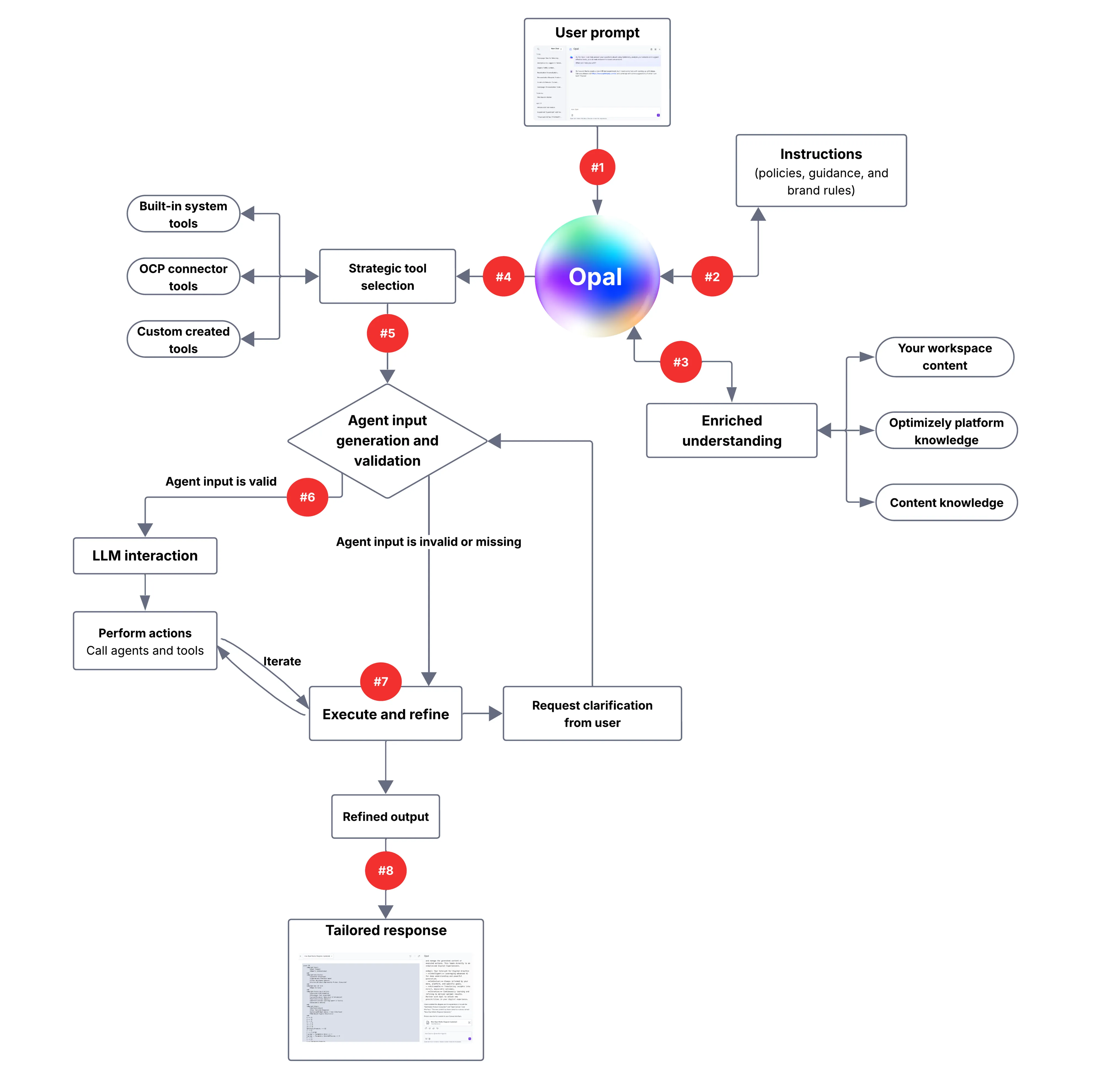 Source: Optimizely Agent Platform documentation
The way the docs describe the relationship between the building blocks is still the best mental model:
- Skills define how the AI behaves and uses tools.
- Tools provide capabilities, such as reading data or taking action.
- Specialised agents package tools and skills into one well-defined task.
- Workflow agents chain agents together behind a trigger.
- Virtual Teammates (new in August) sit on top as persistent, autonomous roles that own jobs over time.
3. Models and inference
This is the area that has changed most under the bonnet in 2026, and it has direct cost and quality implications.
Multi-model by design
The Agent Platform launched on Google Gemini and from 15 March 2026 Anthropic's Claude models (accessed via Google Vertex AI) joined the line-up, with Anthropic becoming a sub-processor under the Optimizely DPA. If you are working with a client's legal or procurement team, that is the notice to point them to. Optimizely also states that the choice of model does not change how credits are consumed.
On 24 June 2026 model provider selection arrived at both the instance level and the specialised-agent level. Admins now choose a Default Model Provider in Settings → Chat. The docs position Gemini as fast, cost-effective and good for creative writing, and Claude as stronger for complex tool orchestration and code generation. Specialised agents can override the instance default.
Inference levels
The inference level controls both the model and how much "thinking" it does before responding. Balanced is the default.
| Inference level | Best for | Google model | Claude model |
|---|---|---|---|
| Quick | Simple, fast tasks | gemini-3.5-flash-lite (medium thinking) | claude-haiku-4-5 (medium thinking) |
| Standard | Everyday tasks without deep reasoning | gemini-3.8-flash (low thinking) | claude-sonnet-5 (no thinking) |
| Balanced (default) | Everyday tasks that benefit from reasoning | gemini-3.8-flash (medium thinking) | claude-sonnet-5 (high thinking) |
| Complex | Multi-step planning and analysis | gemini-3.8-flash (high thinking) | claude-sonnet-5 (x-high thinking) |
| Pro | Nuanced evaluation and strategy | gemini-3.1-pro (medium thinking) | claude-opus-5 (high thinking) |
| Code | Code, plus anything needing maximum reasoning | gemini-3.1-pro (high thinking) | claude-opus-5 (x-high thinking) |
Model mapping as published in the Inference level documentation (updated 2 October 2026).
The mapping is managed by Optimizely and changes without any action on your side. Two recent examples: on 14 August the Complex and Code levels were upgraded to claude-opus-5, and on 13 September the Standard, Balanced and Complex levels moved to Gemini 3.8 Flash. Note that the current table shows Complex on claude-sonnet-5 with x-high thinking rather than Opus, so the August note appears to have been superseded. Treat the inference-level page as the source of truth, not the release notes.
Admins set the organisation-wide default for chat; agent creators set a level per specialised agent that overrides it.
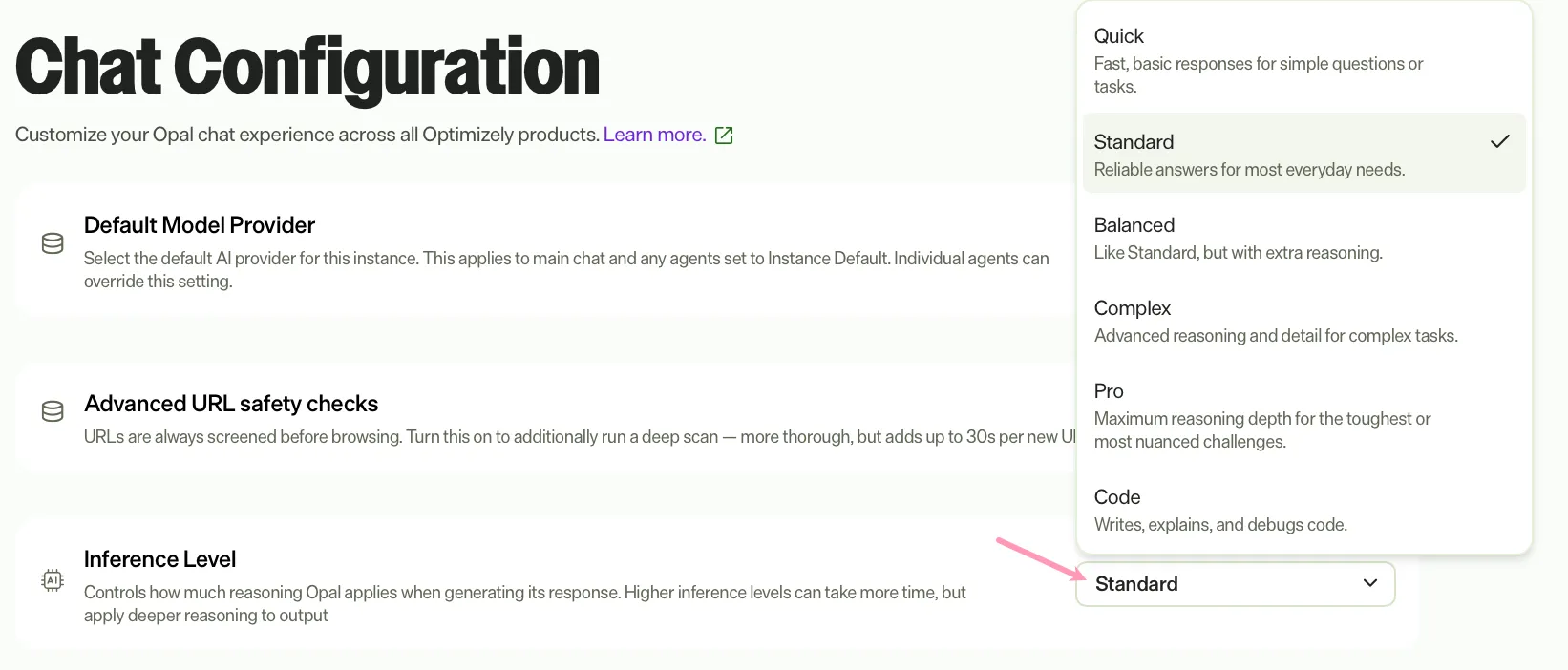
Source: Optimizely Agent Platform documentation
Sub-agents (released 17 September)
This is one of the most architecturally interesting releases of the year, and it has gone a bit under the radar. When chat (or a specialised agent) hits a self-contained sub-task, it now hands it off to a sub-agent that runs in its own isolated context and returns only the final result. Intermediate tool calls and documents never enter your conversation.
The motivation is classic context engineering: avoiding context bloat (re-reading huge tool outputs every turn) and split attention (one model juggling unrelated objectives).
| Tier | Inference level | Extended thinking | Typical use |
|---|---|---|---|
| Mini | Quick | No | Extraction, classification, reformatting |
| Fast (default) | Balanced | Yes | General delegation needing judgement |
| Deep | Pro | Yes, with a higher token budget | Sustained multi-step reasoning |
The key technical behaviours:
- Parallel fan-out. Independent sub-tasks are dispatched concurrently; dependent ones run in sequence.
- Multi-turn continuation. A sub-agent can be resumed with its context intact.
- No recursion. Delegation tools are stripped from sub-agents, so there are no unbounded chains.
- Per-turn dispatch budget. Individual calls and fan-out slots share one cap per turn.
- Instance default provider. Sub-agents never override the configured model provider.
- Zero configuration. They are installed and managed by Optimizely, cannot be edited or deleted, and do not appear in the Agent Directory.
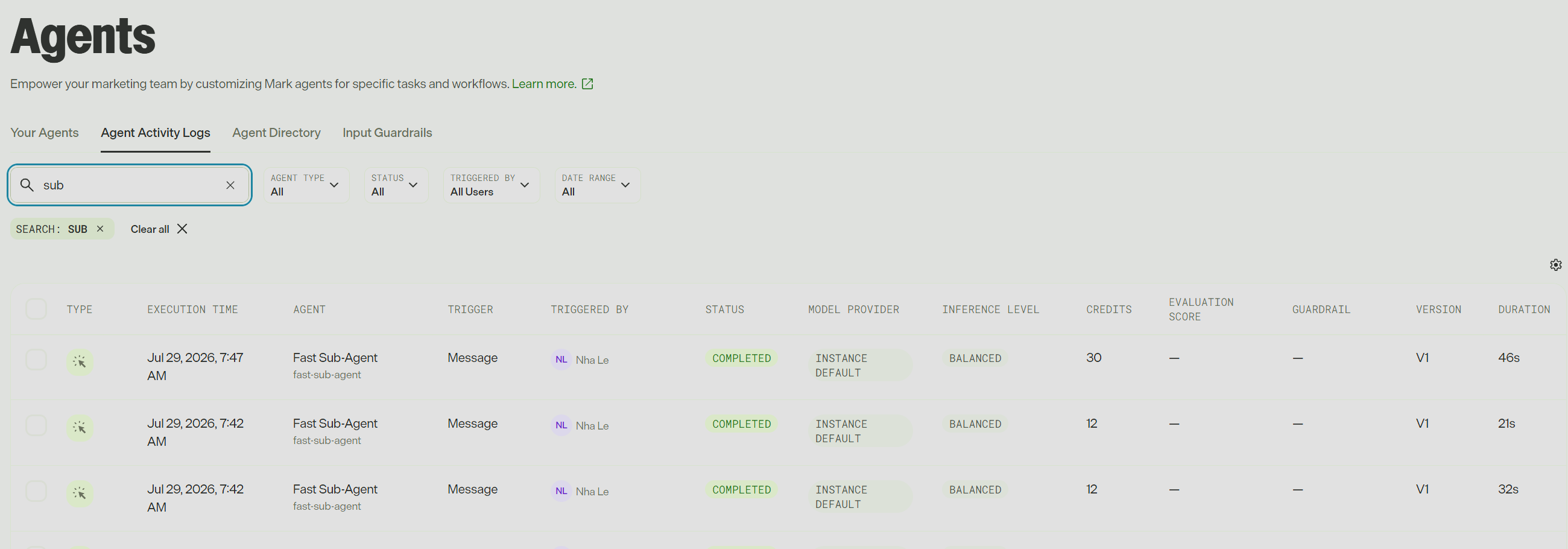
The practical gotcha is in your logs. One chat message can now produce several rows in Agent Activity Logs (search for "sub"), each with its own credit total, attributed to the user who started the chat, with the model provider shown as Instance Default. Rows sharing the same execution time indicate fan-out. If a client asks why one question produced five log entries, this is why, and Optimizely's position is that it is the same work routed more cheaply rather than extra work.
4. The chat experience (Mark / Opal Chat)
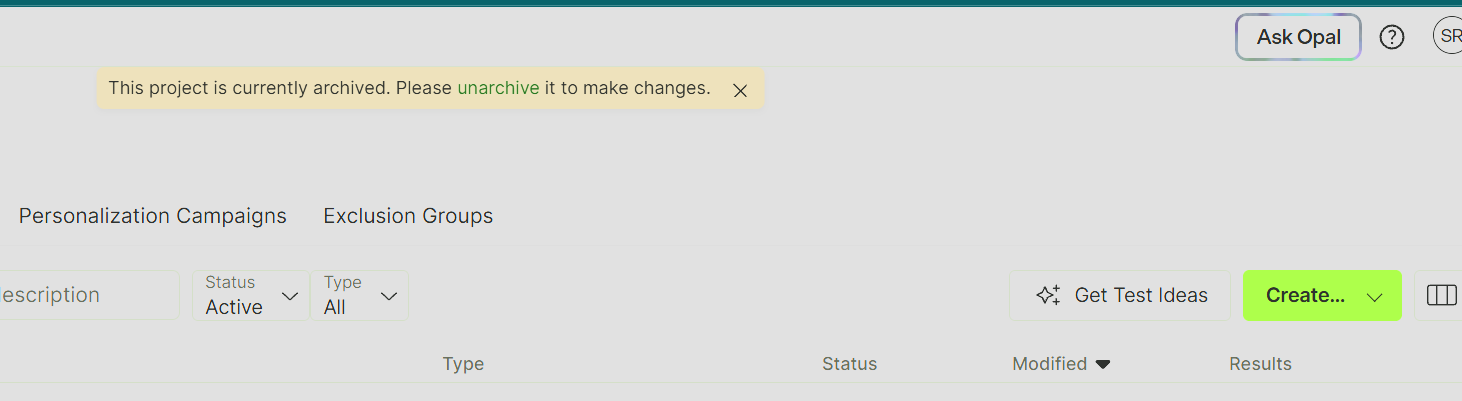
Chat is still where most users meet the platform. It is available in the global navigation across Optimizely One and at opal.optimizely.com. (likely to be changed soon)
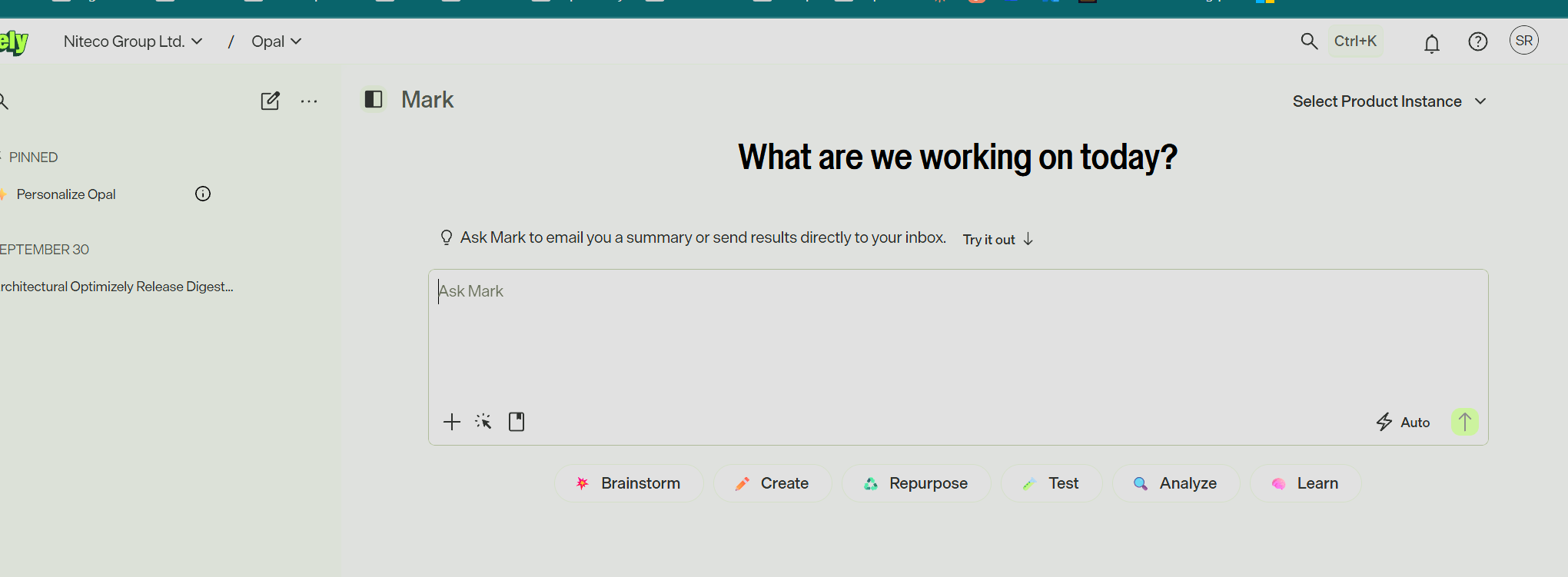
What's new in chat in 2026
The chat has matured from a simple prompt box into a proper agent console. In rough chronological order:
- January. CSV uploads, Markdown in the input box, a toggle for the history panel, and dark mode and font-size settings.
- February. Upload of .xlsx and .docx files, and an immediate "thinking…" indicator.
- March. Skill mentions (type / to apply a skill) and "save this as a skill" directly from a conversation.
- April. Message queuing (keep typing while Mark works), pinned conversations, recency-sorted history and undo for pasted content.
- May. Chat modes to match output depth to the task, action cards (rich, interactive inline components instead of plain text), chat pills (one-click starter prompts), memory, and multi-turn mode for specialised agents.
- June. A live activity stream with inline tool status and "context pickup pills" showing what context was pulled in, Escape to stop a response, PowerPoint and Word generation (via the code_execution tool) and an image editor.
- June 30. The Agent Library on the chat homepage and Personalize Opal, a pinned onboarding agent that walks new users through connecting tools and building skills.
- July. Conversation compaction (automatic and manual checkpoints for long chats), editing sent messages, rotating contextual tips, Agent Builder and Skill Builder inside chat, and Safe URL Browsing.
- September. RAG for artifacts, so chat can draw on your own canvases.
For architects, compaction and sub-agents together are the important pair: they are Optimizely's answer to long-running, tool-heavy conversations getting slower, dumber and more expensive over time.
Chat everywhere: in-product and third-party surfaces
Chat is embedded across the stack, and that list keeps growing:
- CMS 13. The Optimizely.Cms.OpalChat adds Opal to the platform under verson 13.2.0 but 13.2.0 and onwards have Mark chat is built directly in to the CMS (requires DXP and Opti ID)
- CMS 12 (since October 2025, requires DXP and Opti ID), CMS SaaS, Commerce Connect (since September 2025), Configured Commerce, PIM (January 2026), CMP, Web and Feature Experimentation, Personalization, Analytics, ODP and Product Recommendations (beta from May 2026).
- Slack. Now a verified app in the Slack Marketplace (February 2026).
- Microsoft Copilot and Google Agentspace / Gemini Enterprise, the latter using the Agent-to-Agent (A2A) protocol for cross-vendor agent collaboration (both since September 2025).
5. The context layer: Skills, Brands, Memory, Personal files and RAG
If tools are what the platform can do, this layer is what it knows. It is also the part that has evolved the most conceptually this year, and it effectively forms the user-facing side of what Optimizely now calls Mark-IQ.
Skills (formerly Instructions)
Skills are the reusable rules, context and behavioural guidelines that shape output, such as brand voice, product taxonomies, personas, compliance language or output formats. They come in two scopes: organisation skills (admin-managed) and personal skills (user-managed, since 30 March).
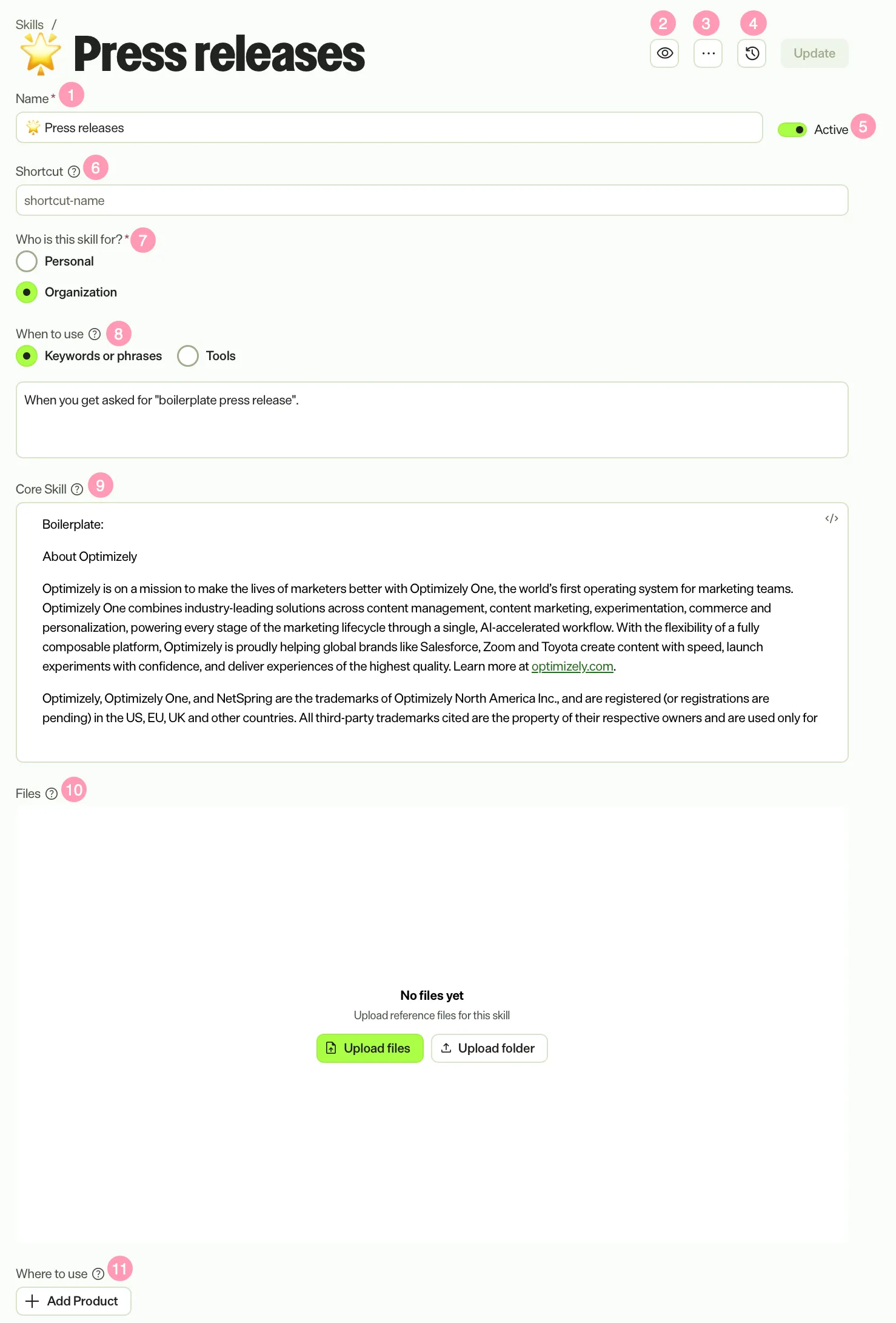
Source: Optimizely Agent Platform documentation
Each skill has a name, watchers, version history, an active flag, a /shortcut, a scope, a When to use activation trigger, the core skill body (rich text or Markdown), attached reference files, and a Where to use setting to scope it to a specific product instance.
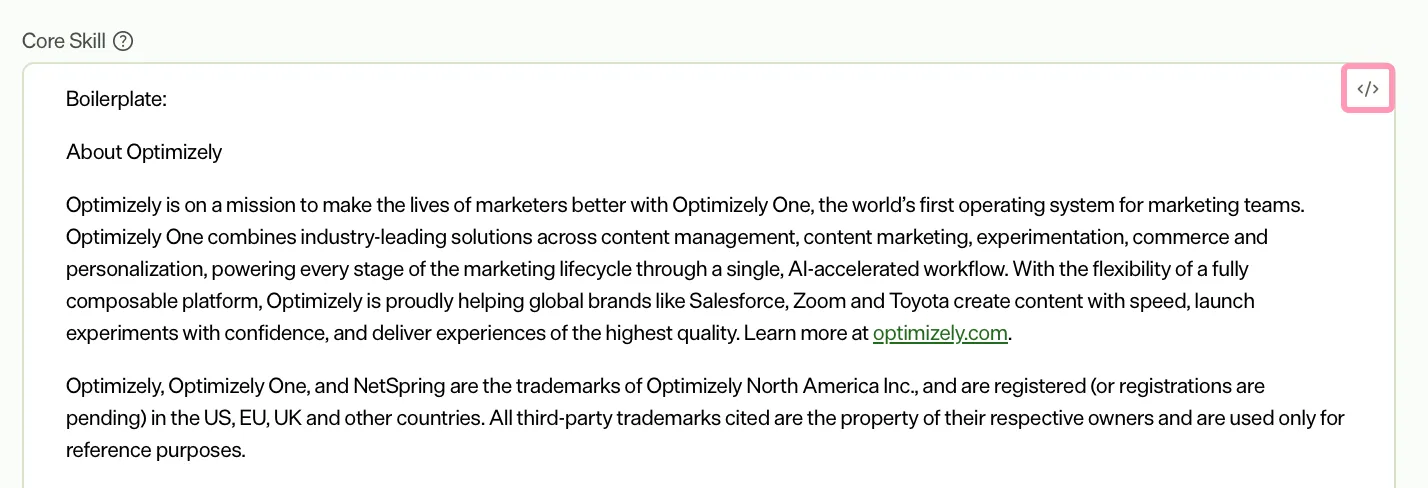 Source: Optimizely Agent Platform documentation
How selection actually works matters a lot when you are designing a skills library:
- All active skills available to the user are gathered.
- Tool-triggered skills are applied automatically whenever their tools are in play, with no further evaluation.
- The remaining skills are judged by a relevancy model that reads your latest message, the conversation history and each skill's Keywords or phrases field.
- Matched skills are added to the system prompt.
Two consequences are easy to miss. First, the relevancy model looks only at the When to use field and ignores the skill's name and body during selection. Second, it is deliberately inclusive: it would rather include a borderline skill than miss a relevant one, and it matches semantically. A skill about "marketing promotions" can fire for a prompt about strawberries on sale. The fix is to write tight activation criteria, using "ONLY use for…", explicit "Do NOT use for…" exclusions, synonyms for narrow concepts, and mutually exclusive boundaries between related skills. Leaving When to use blank makes a skill shortcut-only.
 Source: Optimizely Agent Platform documentation
The skills toolchain has also grown up considerably:
| When | Change |
|---|---|
| 5 Feb | Status column added; skills inactive by default |
| 30 Mar | Personal skills; create skills from a chat; / skill mentions |
| 14 Apr | Redesigned Activation Trigger section; better disambiguation when editing from chat |
| 7 May | Instructions → Skills rename |
| 26 May | File-explorer UI for skill files; PPTX/DOCX support in skills (with code execution) |
| 27 May | Skills section in specialised agents, with a Choose skills picker to insert skills at exact points in a prompt |
| 24 Jun | Skill watching; import/export across instances; scope switcher between personal and organisation; skill preview in the agent editor |
| 30 Jun / 29 Jul | Skills builder GA, then Skill Builder inside chat |
Brands (25 August) - Not fully out yet
Brands are a structured record of a brand's assets, colours, typefaces and usage rules, managed under Context → Brand. The clever bit architecturally is that publishing a brand turns it into a skill, so you get a single source of truth that image generation, decks, documents and social images all read from, instead of each feature holding its own copy. Brands move through Draft, Published and Default states, and an organisation can hold several brands with one default. Marketers can also bootstrap a brand on the fly when none exists.
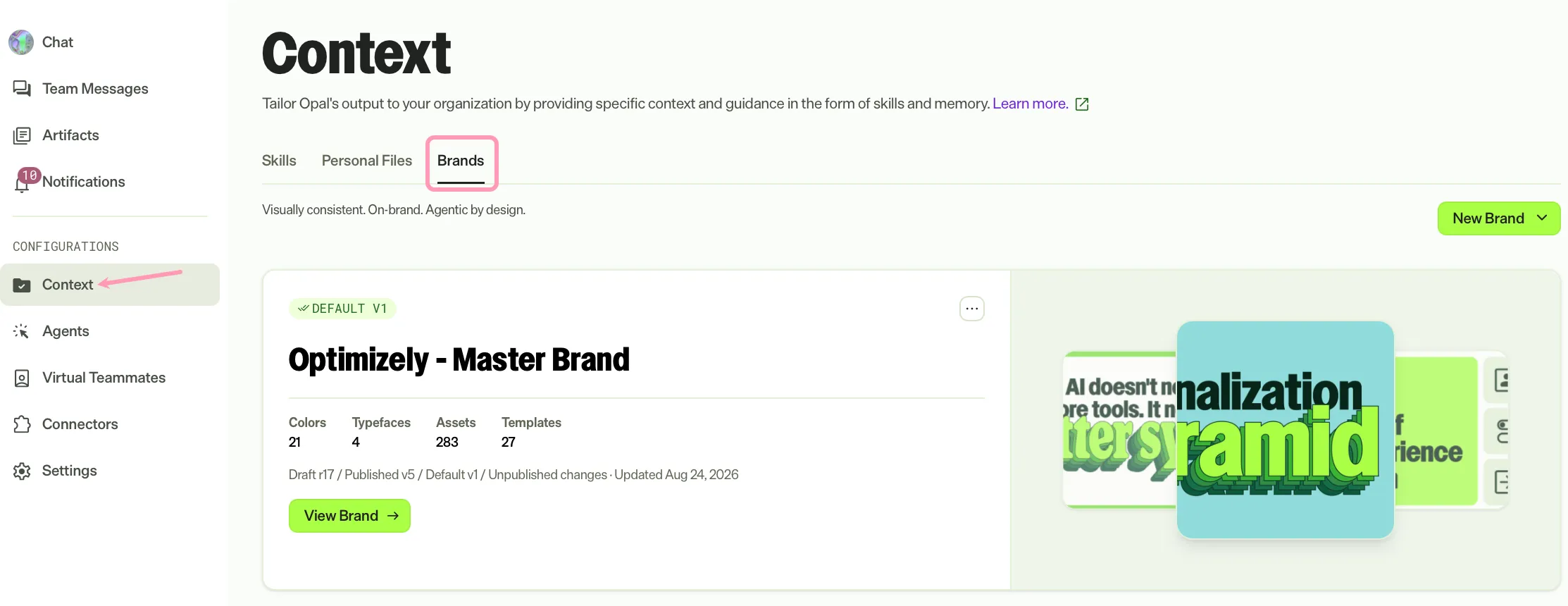 Source: Optimizely Agent Platform documentation
For multi-brand clients this is a significant change. Previously you had to emulate this with a pile of brand-voice skills.
Memory (7 May) and Personal files (21 September)
Memory and personal files are now one system, and the implementation will look very familiar to anyone who has worked with coding agents: it is file-based.
- Personal files are a persistent, per-user document store under Context → Personal Files, with a browser-based editor for text and Markdown files.
- Memory lives in that same store. FACTS.md holds short durable facts, named notes files hold broader context, and RECENTS.md is a running summary of recent conversations and agent activity that Mark maintains. MEMORY.md is generated by Mark and is read-only.
- Memories are captured either automatically or on request ("remember that…").
- When Enable personal context is turned on for a specialised agent, context files such as AGENTS.md and MEMORY.md are made available to the agent before it starts. You can restrict the agent to a working directory (for example /context/agents/support) rather than exposing the whole store.
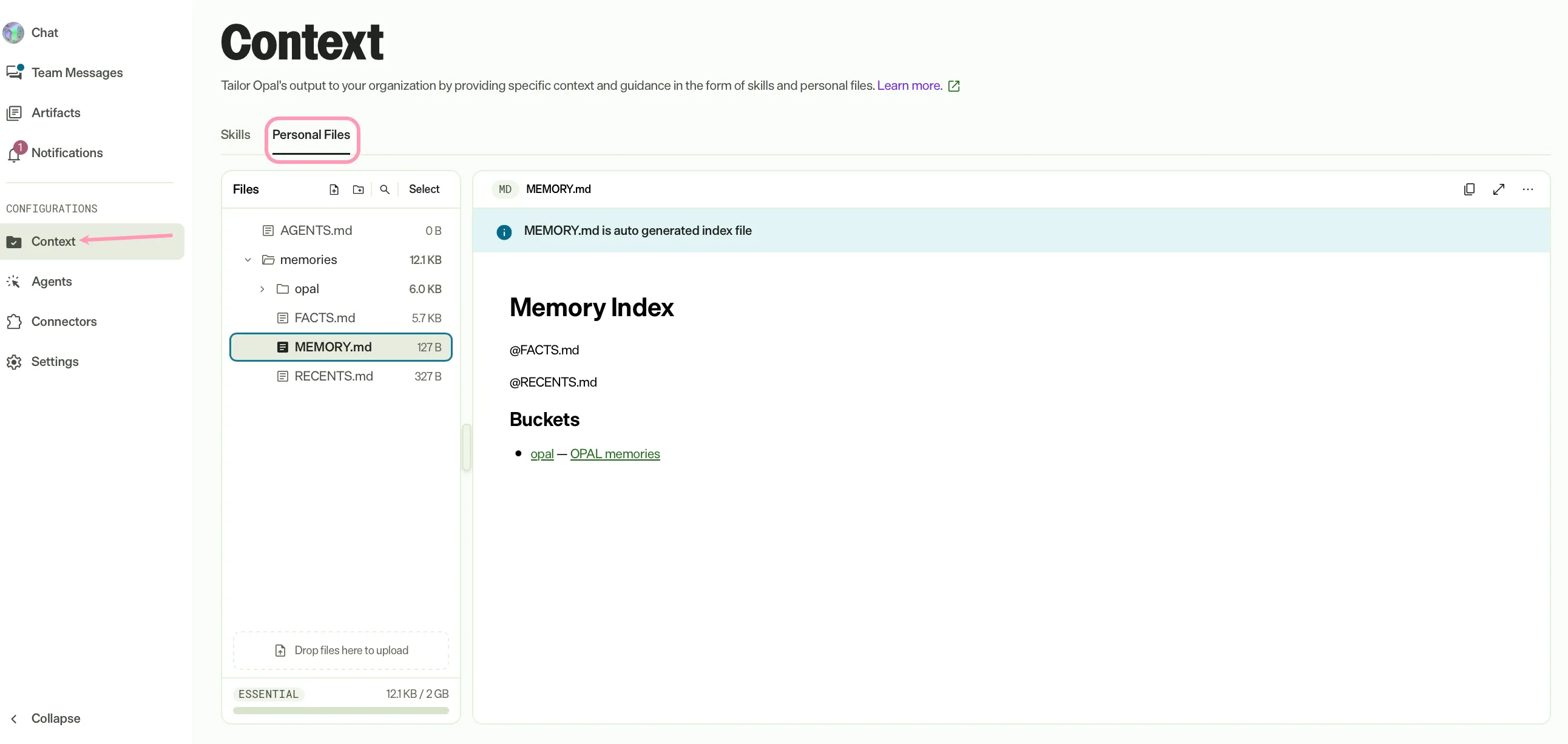 Source: Optimizely Agent Platform documentation
 Source: Optimizely Agent Platform documentation
The distinction the docs draw is useful when you explain it to clients: skills capture how work gets done; memory captures who you are and what you are working on.
Retrieval-augmented generation (RAG)
RAG has expanded in three steps this year:
- 7 May. RAG for CMP. Permission-aware semantic and keyword retrieval across campaigns, tasks, assets, work requests and briefs, exposed as rag_retrieve_from_cmp (structured) and rag_retrieve_from_cmp_as_csv (tabular). Alongside it came rag_retrieve_from_optimizely_graph for CMS and CMP content via Optimizely Graph.
- 24 June. Folder and path filtering for CMP assets, relevancy explanations for suggested assets, and EU-region RAG.
- 17 September. RAG for artifacts. Chat can now search your own canvases, respecting artifact permissions and including artifacts shared with you.
Retrieval, embedding and indexing all happen inside Optimizely's infrastructure, and every query respects the user's roles and permissions. Admins can turn RAG on or off for direct chat under Settings → RAG Configuration, but note that agents can use RAG regardless of that setting, which is important if you are relying on the toggle for governance.
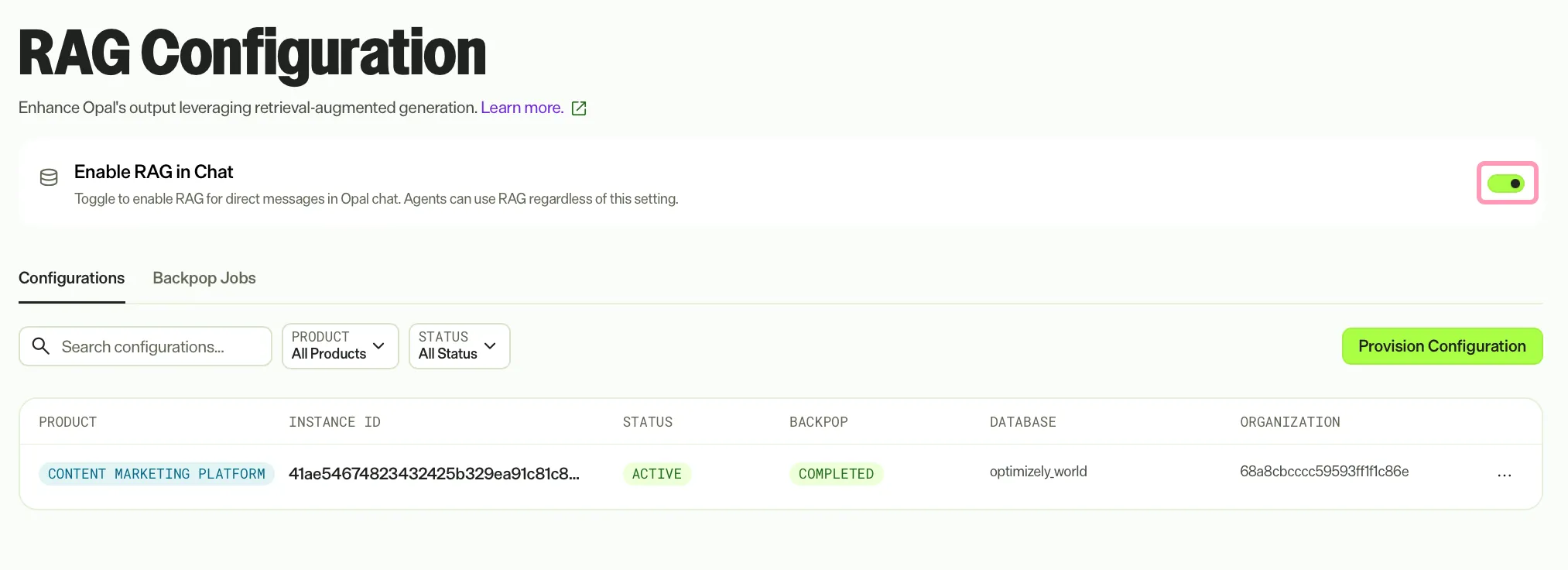 Source: Optimizely Agent Platform documentation
This is exactly where the CMS 13 upgrade story from my last post comes back in: Graph is the bridge that gets CMS and Commerce content into the agent platform's retrieval layer.
6. Tools: system, connector, remote MCP and custom
Tools are the actions. There are three families, and the year's big story is the arrival of MCP as a first-class citizen.
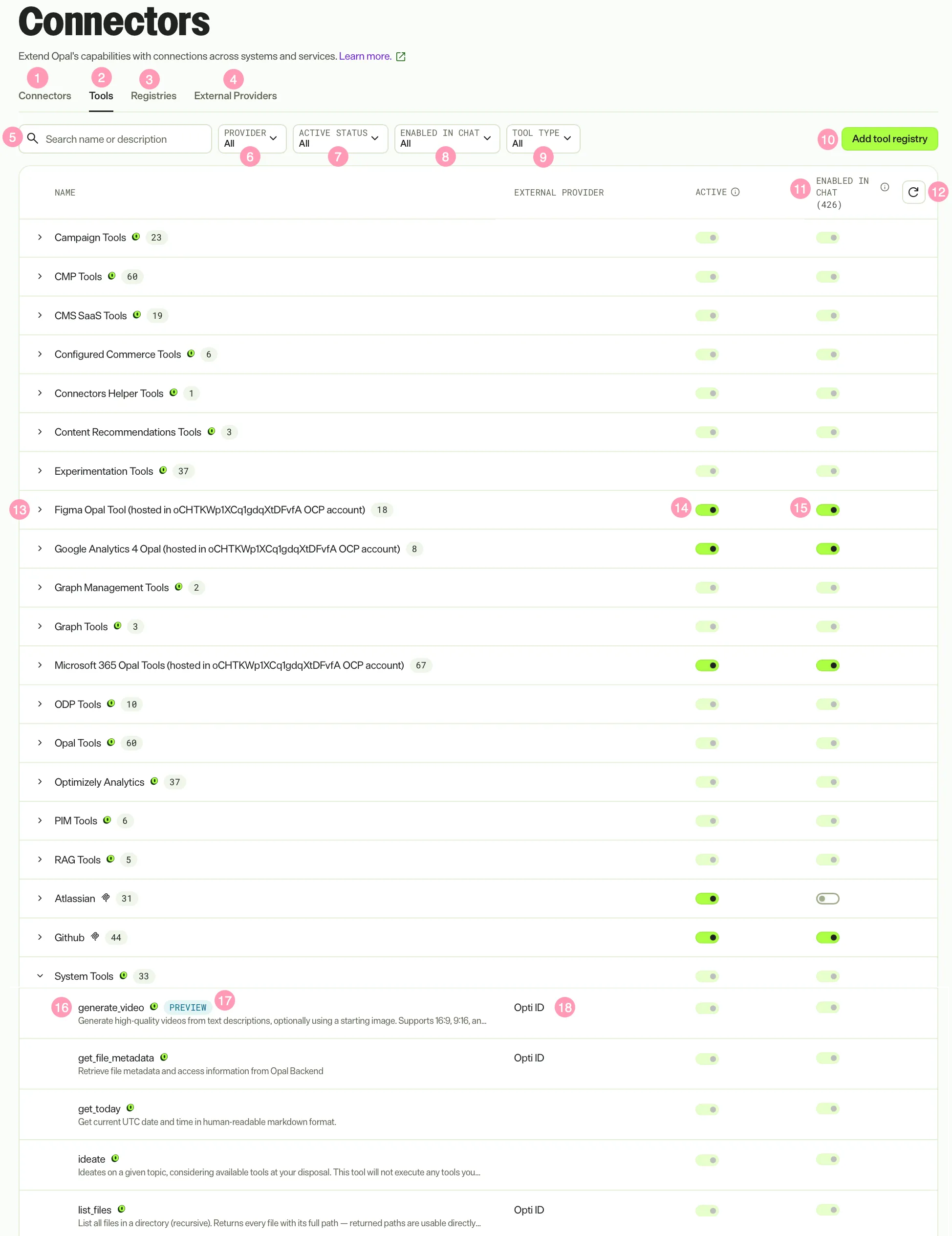 Source: Optimizely Agent Platform documentation
The Tools area is now split into four tabs: Connectors (each user links their own third-party accounts), Tools, Registries and External Providers (remote MCP servers and auth providers). You can filter tools by type (Remote MCP or Opal Tools), control per registry whether tools are active and whether they are enabled in chat, and restore chat defaults. Note that agents started from chat can use a registry's tools even when that registry is disabled for chat.
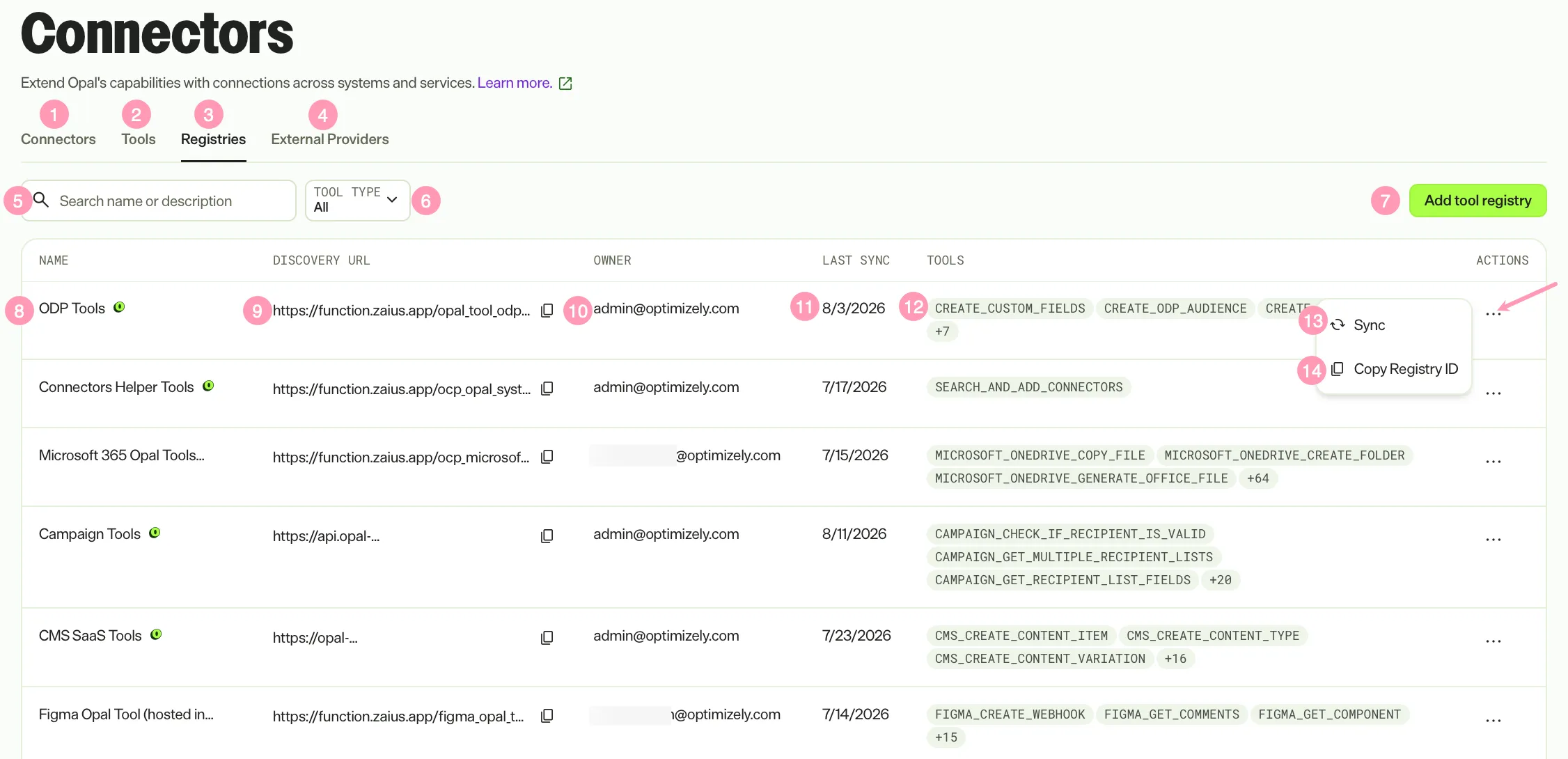 Source: Optimizely Agent Platform documentation
System tools for Optimizely products
Optimizely-maintained tools now cover practically every product. The ones that matter most for CMS and Commerce architects:
CMS 13 (PaaS), which arrived from 22 May:
- Content types: paas_cms_list_content_types, paas_cms_get_content_type_details, paas_cms_create_content_type, paas_cms_update_content_type, paas_cms_delete_content_type
- Property groups: paas_cms_list_property_groups, paas_cms_create_property_group
- Content: paas_cms_get_content_data, paas_cms_update_content_item (creates a draft if no key is given), paas_cms_delete_content_item (moves to the waste basket), paas_cms_publish_content_item (immediate or scheduled), paas_cms_create_content_variation (locale variations)
- Preview: paas_cms_get_content_preview_url, which lets the agent fetch and analyse rendered HTML
- SEO and GEO: paas_cms_seo_analysis, paas_cms_seo_edit, paas_cms_geo_analysis, paas_cms_geo_apply (writes JSON-LD into a JsonLdTemplates property as a draft)
- Display templates and media (29 July): paas_cms_list_display_templates, paas_cms_get_display_template, paas_cms_create_display_template, paas_cms_update_display_template, and paas_cms_upload_media (pulls a file from a public URL into CMS media)
Note that the GEO tools were removed from CMS SaaS in June but exist for CMS 13 PaaS. Do not assume parity between the two tool sets.
Optimizely Graph (CMS SaaS, CMS 12 and CMS 13): graph_content_type_schema, graph_content_graphql_executor and graph_content_search_tool (January), plus graph_pinned_result and graph_synonyms (14 August), so agents can now tune search relevance, not just query it.
Commerce: Commerce Connect became a product connection on 13 March, alongside the Product Promotion agent for Commerce Connect; Configured Commerce has system tools and a Restriction Group Creation agent; and Product Recommendations has a growing pr_* tool set for category, search, trend and algorithm performance reports and page management.
Beyond that there are tool sets for CMP (work requests, campaigns, milestones, structured content, asset updates), Experimentation and Personalization (including ten exp_ve_* Visual Editor DOM tools that power the AI variation development agent), Analytics, ODP, Campaign, PIM and Content Recommendations.
Connector tools and remote MCP
The connector catalogue exploded this year. Highlights include Microsoft 365 (Teams, Outlook, and from 18 September OneNote and sensitivity labels on OneDrive and SharePoint), Google Workspace (Docs, Sheets, Slides, Calendar and Gmail), Google Ads, Google Search Console, GA4, LinkedIn Ads, OpenAI Ads, Adobe Analytics, Salesforce CRM, Amplitude, Mixpanel, WordPress, Zoom, Crunchbase and Figma.
Remote MCP arrived in stages:
- 30 March. Remote MCP connector tools (starting with Atlassian and Conductor), with user-level authentication: the admin enables the server for the organisation, and each user authenticates their own account so actions carry their own identity and permissions.
- 7 May. Notion, Contentsquare, Contentful, Gamma, GitHub, Sanity and ClickUp.
- 29 July. Bring your own remote MCP server, plus HubSpot and ZoomInfo.
- 18 September. Braze and Fullstory, and Contentful Global and EU endpoints for data residency.
User-level authentication is the most important architectural point here. It gives you proper action attribution and per-user data scoping for third-party systems, rather than a single shared service account.
Custom tools
When nothing off the shelf fits, you build a custom tool. The contract is straightforward:
- A tool manifest describing name, description, typed parameters, the execution endpoint and auth requirements.
- A discovery endpoint (typically /discovery) that returns the manifest. If it is unreachable or malformed, the tools simply will not appear.
- An execution endpoint, typically a POST with a JSON body returning JSON.
- Authentication. Notably, the docs state that only Opti ID is supported for tool authentication at the moment, with other providers in the works.
Since 1 April, parameters support nested schemas (objects within objects, arrays of objects and enums), which makes richer integrations far less awkward. Tools are hosted either on Optimizely Connect Platform (OCP) or anywhere publicly reachable, and they are registered as a registry with a discovery URL that you can re-sync.
Official SDKs:
| Language | Install | Notes |
|---|---|---|
| TypeScript / JavaScript | npm install @optimizely-opal/opal-tools-sdk | Express middleware, @tool() decorators, parameter validation, auth helpers |
| Python | pip install optimizely-opal.opal-tools-sdk (import as opal_tools_sdk) | FastAPI integration, auto /discovery |
| C# / .NET | See note below | ASP.NET Core integration, [Tool] and [RequiresAuth] attributes, DI support |
A small but real gotcha for .NET teams: the docs currently show the install command as Install-Package OptimizelyOpal.OpalToolsSDK, but link to a NuGet listing named Optimizely.Opal.Tools. Check NuGet for the current package ID before you pin it in a project.
7. Agents
The four kinds of agent
| Type | Who builds it | What it is |
|---|---|---|
| Agent Directory agents | Optimizely | Prebuilt, installable agents. There are now 70+ listed in the credits reference alone. Since 25 August they auto-update when Optimizely publishes a new version (on by default). |
| Agent Library | Optimizely (curated) | A browsable launcher on the chat homepage with more than 45 agents runnable in one click, without installation (30 June). |
| Specialised agents | You | One well-defined task, with your prompt template, tools, skills, variables, model provider and inference level. |
| Workflow agents | You | Multi-step automations of triggers, logic and agents. Still described in the docs as private GA and not available on all instances. |
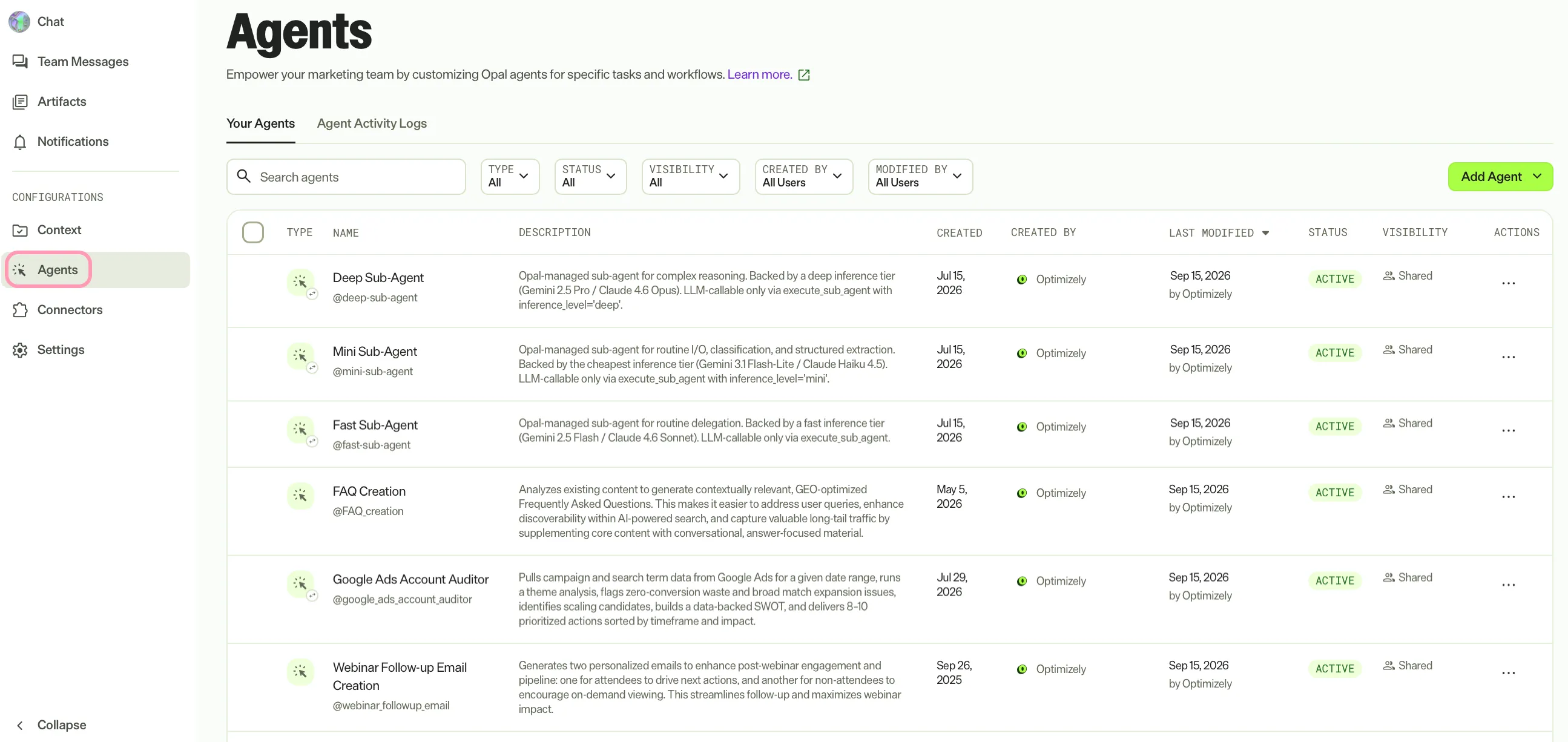 Source: Optimizely Agent Platform documentation
Directory agents worth knowing as a CMS or Commerce architect
The Directory has shifted from generic content helpers towards agents that act directly on the platform:
- CMS 13 (PaaS): Content Model Creation, Page Builder, Content Analysis, GEO Schema Optimization and SEO Metadata Implementation. The Content Analysis agent produces a Markdown instruction set for a content type that the Page Builder agent then uses, which is a neat pattern for on-model content generation.
- CMS SaaS equivalents, plus Content Refresh Analysis and FAQ Creation.
- Commerce: Product Promotion (Commerce Connect) and Restriction Group Creation (Configured Commerce).
- Experimentation: Experiment Conflict Checker, Backlog Prioritization (PIE scoring), Value Estimator, Program Overview, Program Health Review, Feature Experimentation Governance, and the Feature Flag Implementation agent, which outputs a portable SKILL.md for implementing a flag in your codebase. That is a nice nod towards developer agent tooling.
- AI search and AEO: GEO Auditor, the Conductor AEO Gap Finder, AI Brand Visibility and Competitive Share of Voice agents, Profound Citation Gap Analysis, and Agent Visibility Analytics Insights.
Specialised agents: what's new
The agent editor has quietly become quite sophisticated over 2026:
- Versioning with view, restore and branch-from-version (January).
- Prompt template shortcuts for inserting variables, tools and skills inline; case-insensitive, unique variables; array/list inputs (May).
- Example shots in the prompt template (February) and preferred output examples.
- JSON export and import for moving agents between instances (April).
- Multi-turn interaction mode in chat (May). Note that specialised agents always run single-turn inside workflows.
- Model provider and inference level per agent (June).
- Sharing and visibility (30 June): private, named people or the whole organisation, with view, run, edit and delete permission levels. New agents default to private where the feature is enabled, and it is not available on all tiers.
- Agent Builder in chat (29 July), so agents can be created and iterated on conversationally.
- Personal context and working directory settings (September).
- A 60-minute timeout (since November 2025) to stop runaway executions burning credits.
Workflow agents: what's new
Workflow agents are made up of triggers (chat, schedule, webhook and email), logic (conditions, loops and code) and agents.
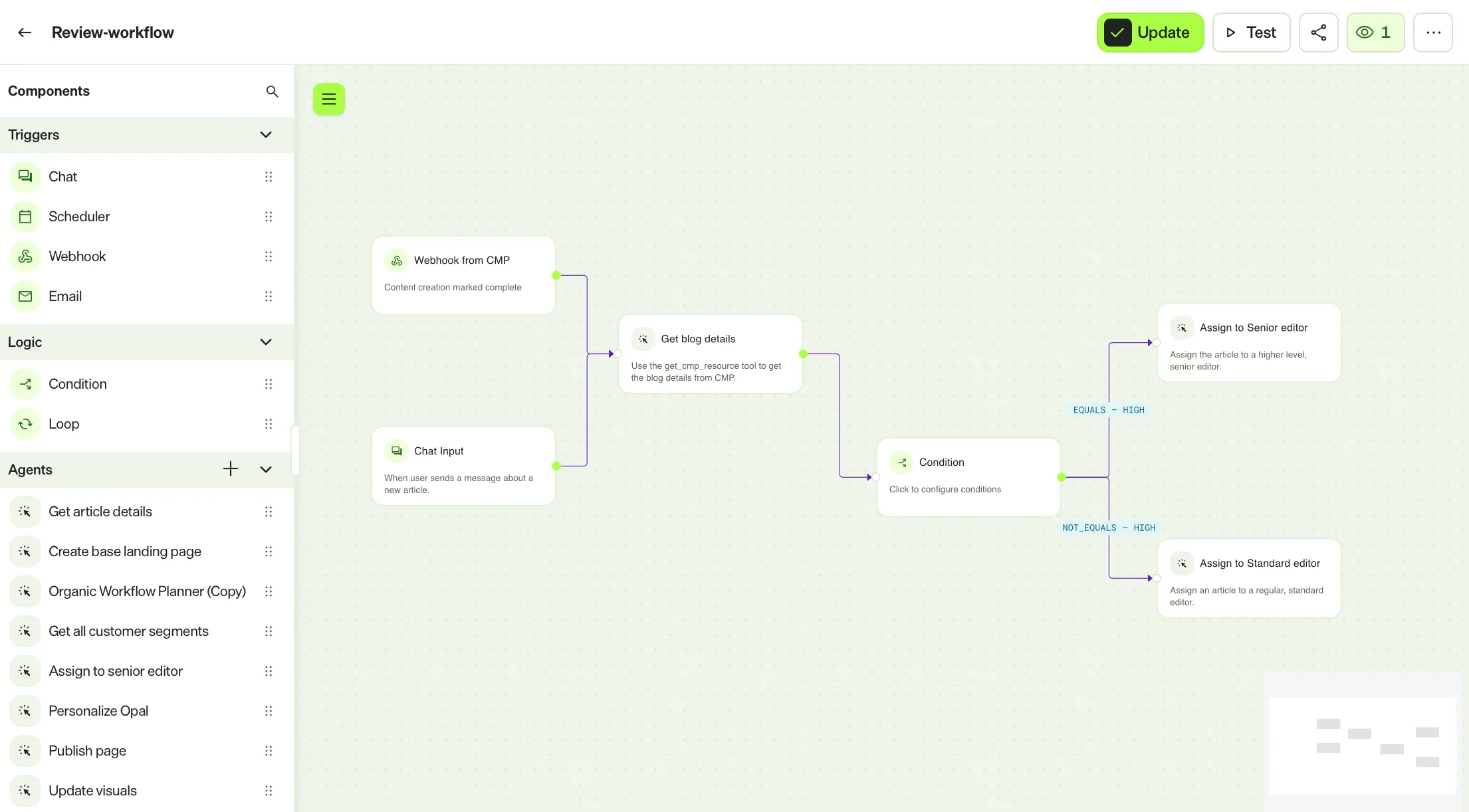 Source: Optimizely Agent Platform documentation
This has been the busiest area for releases:
| When | Change |
|---|---|
| Jan | Add a trigger first when building |
| Mar | Builder-first creation flow; multi-branch conditions in a single node; email trigger improvements |
| Apr | Webhook trigger redesign with product instance selection and default CMP auth headers; parameter generation logs; helper messages for chat triggers; JSON download and copy; case-sensitive conditions |
| May | Workflow import/export; loop validation; schedule start time and no end date |
| Jun | Execution-log export to CSV/Excel with date ranges |
| 29 Jul | Nested workflows; static versus predicted parameters (lock a variable or let the LLM fill it); Agent Update Warning before editing an agent used by a workflow; Version History for workflows; a new Execution Status Taxonomy |
| 17 Sep | Code step (Python, JavaScript or Bash, with no external service needed); Run iterations in parallel on loops; trigger priority (Standard versus Background) so batch runs do not delay interactive ones |
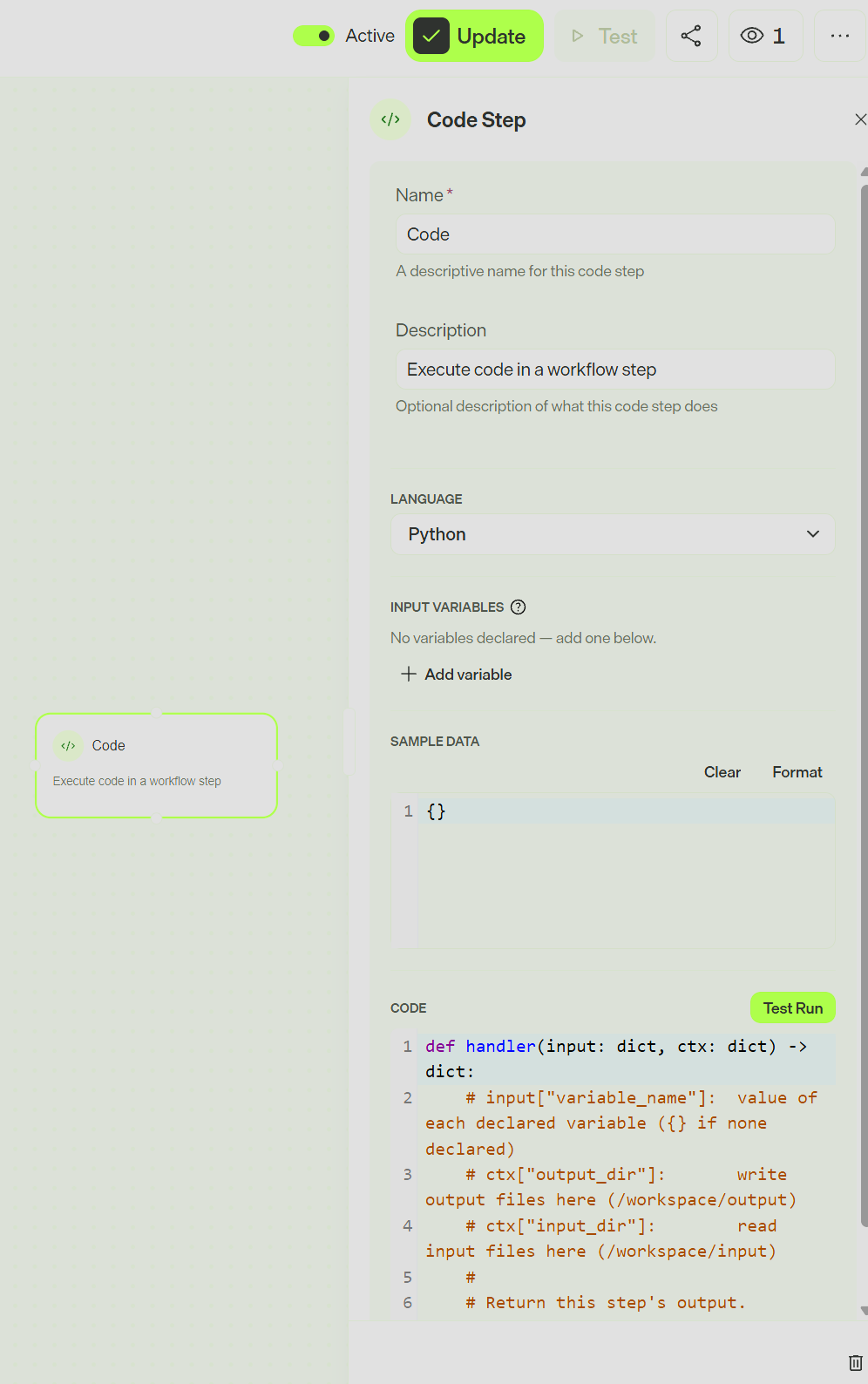
The Code step is a big deal. Previously, any deterministic transformation, such as parsing, maths or reshaping JSON between agents, meant either burning an LLM call or standing up a custom tool. Now it can live inline in the workflow. Together with nested workflows and static parameters, workflow agents are becoming a reasonable low-code orchestration layer rather than just a chain of prompts.
A credit note: a workflow's cost is the sum of the specialised agents it invokes, with no overhead for the workflow itself.
8. Virtual Teammates and Team Messages
This was the headline Opticon launch, released on 25 August (Not availible to everyone yet, especially partners)
What a Virtual Teammate is
A Virtual Teammate is a persistent AI worker built from the same components you already have, namely tools, agents and workflows, and jobs (workflows it runs on its own, on a schedule or on events), wrapped in a persistent identity with memory, a persona and a defined role. The distinction from an agent is continuity: an agent runs when you invoke it, whereas a teammate keeps working, holds context, improves from feedback and collaborates with other teammates.
The launch roster:
- Chief of Staff: daily and weekly briefs, meeting prep and recaps, and competitive intelligence.
- Marketing Analyst: scheduled, decision-ready GA4 reports.
- SEO & AI Search Analyst: reasons across Search Console, GA4, Conductor and AI Visibility Analytics.
- CRO Manager: monitors behaviour, analyses competitor UX and stages experiment configurations in Optimizely.
- Personalization Strategist: builds and runs personalisation campaigns end to end.
Identity and access: the architect's checklist
This is the bit to get right in any implementation:
- Each teammate gets its own Opti ID account (its own login and email, flagged as a virtual user). It shows up alongside people and fits into existing access and audit processes, and its usage is tracked separately from human usage.
- It does not consume a product seat.
- It gets only the access you grant it, with nothing inherited automatically from the person who hired it.
- Inside Optimizely products it acts as itself. Outside Optimizely it acts through accounts a human connects on its behalf, usually the person who hired it. It cannot authorise third-party connections on its own.
- For CMS 13 and CMS SaaS there is an extra step: after granting the teammate a role in the Opti ID Admin Center, you must also add it to the relevant content under Settings → Set Access Rights in CMS, with only the rights its jobs need.
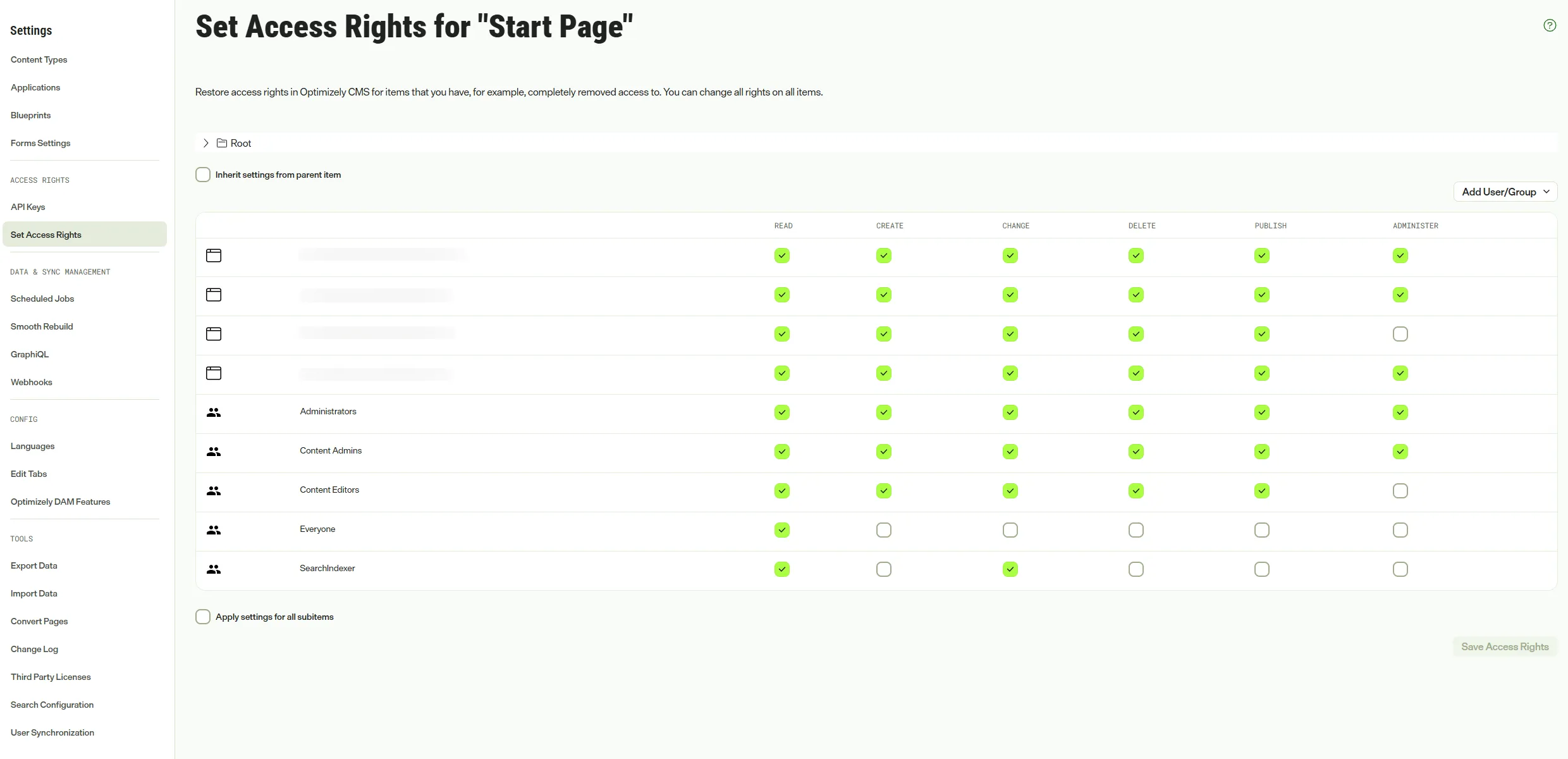 Source: Optimizely Agent Platform documentation
That last point is another reason Opti ID is non-negotiable in CMS 13: Virtual Teammates are first-class principals in the identity layer, so the same governance you apply to people applies to them.
Autonomy controls
By default a teammate drafts and proposes, and a human approves via Team Messages. As confidence builds you can allow specific actions to run automatically within boundaries you set, and you configure its persona, values, who it may talk to, and which tools it can read, write or run. Admins enable teammates for the organisation and can pause or deactivate them; users and agent builders hire and configure their own. You can even switch identity to work in the platform as the teammate.
Team Messages
Team Messages is the real-time collaboration layer for people, teammates and agents, offering direct messages, group chats and channels, with sharing of files, agents and artifacts, mentions and persistent history. It follows you across products (an unread badge appears on the IM icon in CMP, Experimentation and elsewhere), and teammates also join meetings and share transcript summaries in Teams and Slack.
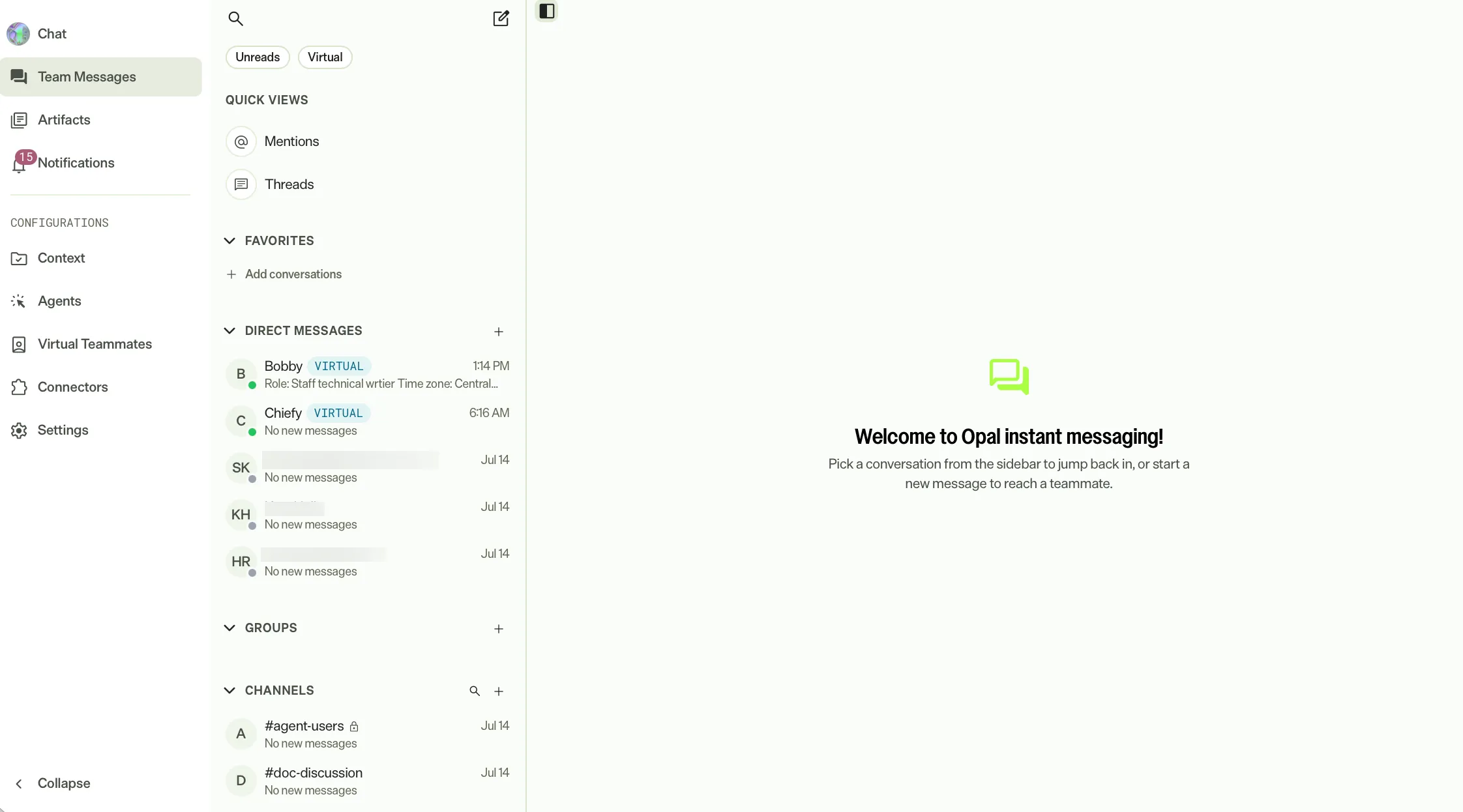 Source: Optimizely Agent Platform documentation
Alongside it sit the Tracker and Notifications (in-app tray, Notification Center, browser notifications since May, and skill-update and guardrail notification categories since June).
9. Quality, safety and governance
If Virtual Teammates are the accelerator, this is the brake, and it is what makes autonomous operation defensible to a client's risk team.
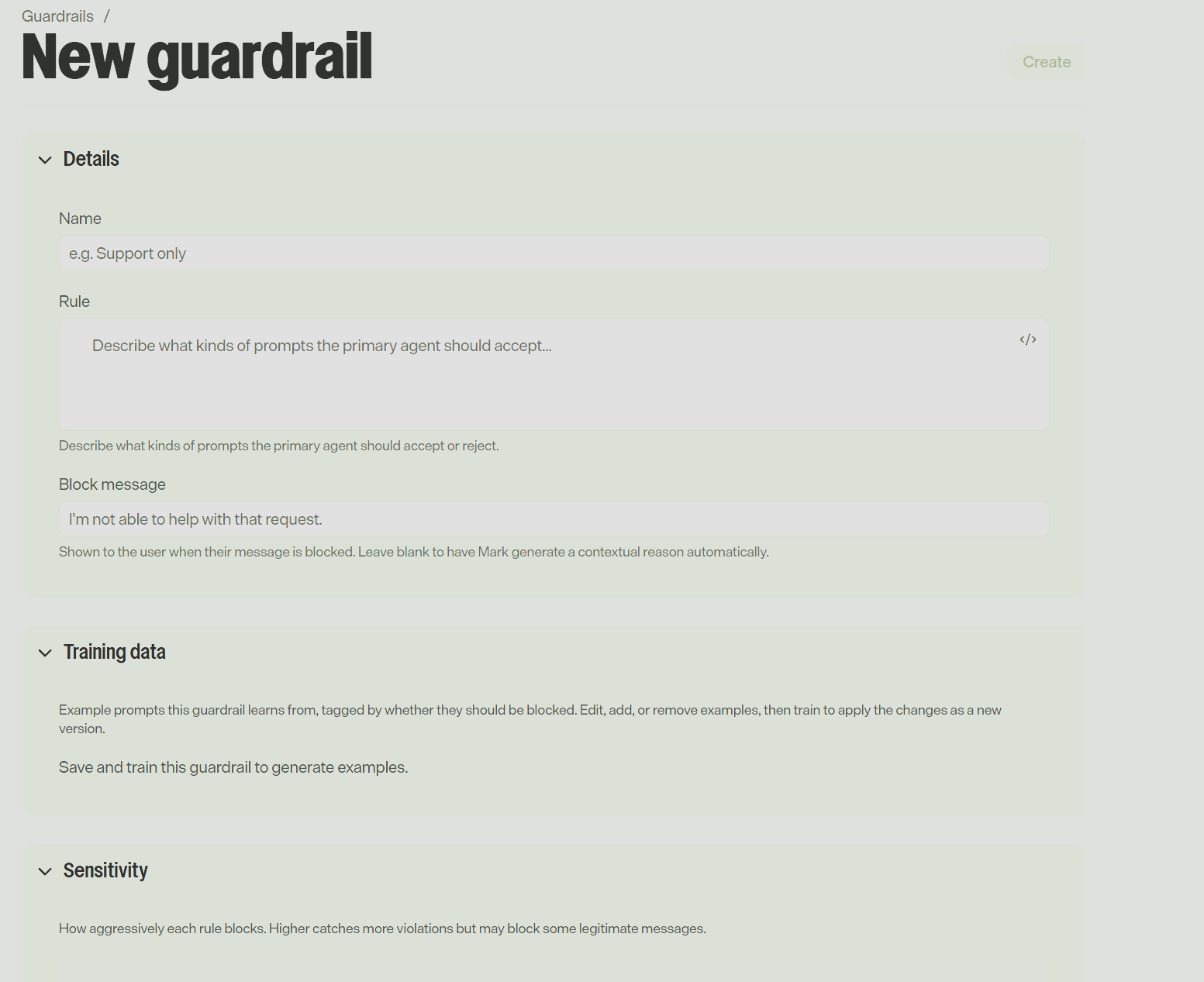
Input guardrails (29 July)
You define rules in plain language about what users may ask, and the platform trains a classifier to enforce them. This is useful for keeping usage on-topic and compliant without hand-maintaining block lists.
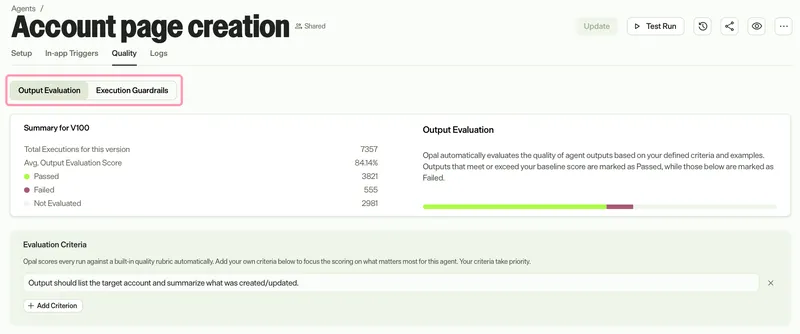
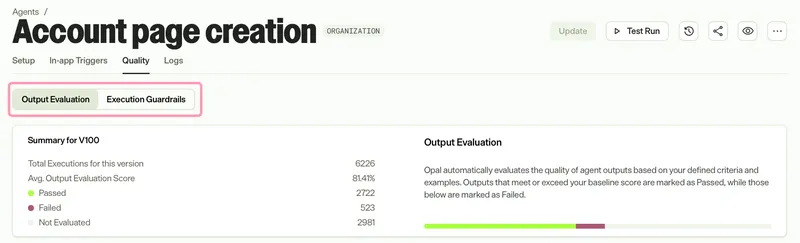
The Quality tab for specialised agents (1 June)
Source: Optimizely Agent Platform documentation
The Quality tab gives you three mechanisms:
- Output Evaluation. An AI judge scores every run against up to 10 criteria, a baseline score between 75% and 95% (in 5% steps) and up to five examples. This builds on the preferred-output examples from December 2025 and the ability (January 2026) to promote past runs to evals.
- Execution Guardrails. These learn what "normal" looks like for an agent and progress through Learning → Watching → Enforcing as successful runs accumulate. You control sensitivity and whether flagged runs are stopped automatically.
- Execution Advisor. This has no configuration screen; it acts on what the other two detect. It recovers flagged runs with corrective guidance, retries failed tool calls with adjusted input, and reviews sensitive tool calls (email, publish, delete) with inline Approved or Blocked verdicts.
Each run therefore carries two independent verdicts, an Evaluation Score and a Guardrail Status, and a run can pass one and fail the other. The docs suggest starting with Output Evaluation and adding guardrails once behaviour has stabilised, which matches how I would roll it out.
 Source: Optimizely Agent Platform documentation
Safe URL Browsing (29 July)
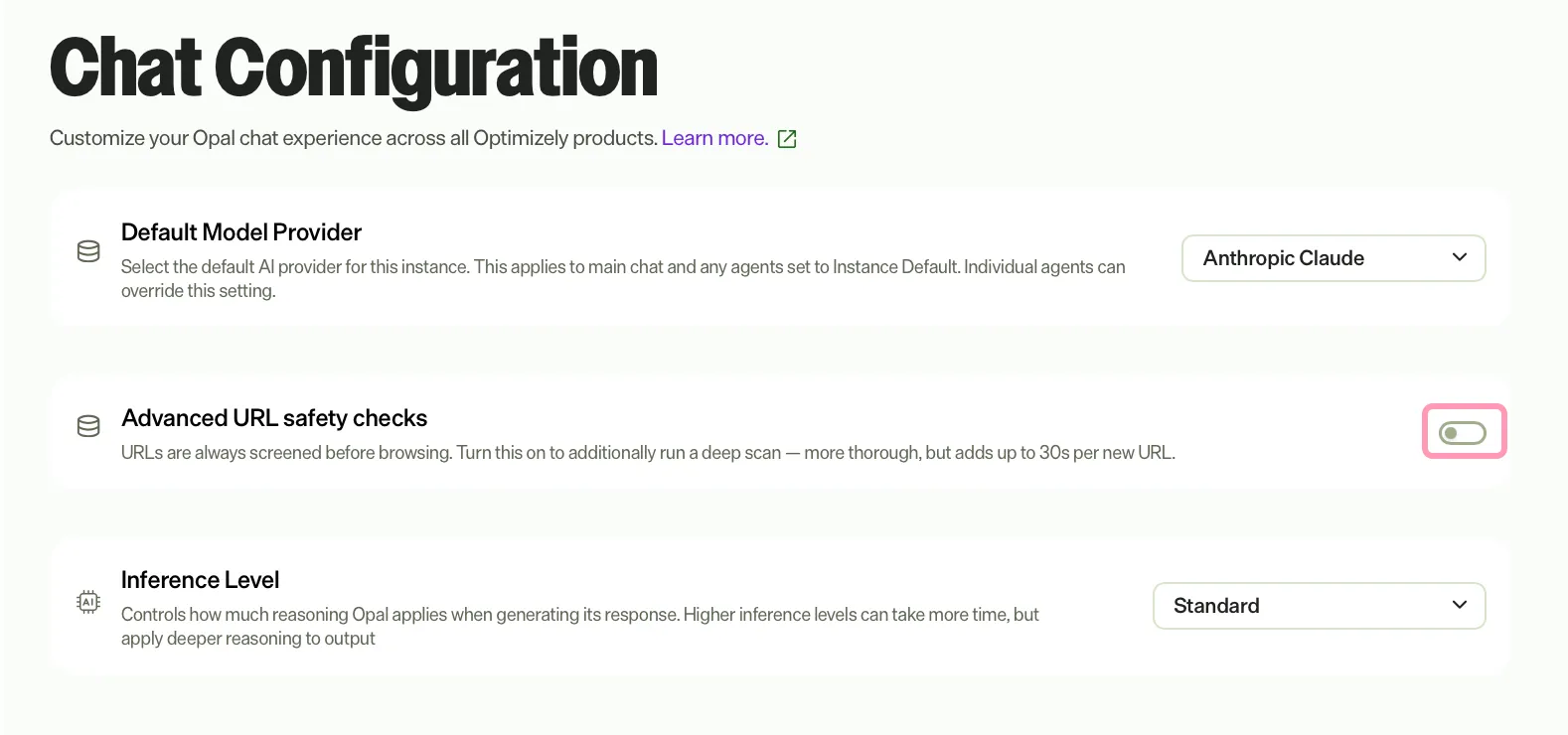
Every URL is screened before the platform browses it. Standard (always on) checks Google Web Risk for malware, social engineering and unwanted software. Advanced (opt-in per instance under Settings → Chat) adds a Cloudflare Radar deep scan in parallel, which can add up to 30 seconds of latency for URLs Cloudflare has not seen recently. Only http and https are accepted, redirect targets are screened too (which closes the open-redirect bypass), and links in emails processed by email triggers are also checked. Blocked requests return no partial content, only the threat category.
 Source: Optimizely Agent Platform documentation
If a client's firewall blocks the platform from scanning their sites, there is a published allowlist of separate non-EU and EU egress IPs, last updated on 22 July. Check the admin guide for the current list rather than copying it from old project documentation.
Roles, auditability and change control
- Roles: Opal Administrator, Agent Builder (new on 24 February, for people who build agents without being admins) and Opal User, plus custom roles in the Opti ID Admin Center.
- Audit: Created By, Triggered By and Modified By on agents and skills; credit usage per run in logs; execution-log export with date ranges for specialised and workflow agents; and the Execution Status Taxonomy (July).
- Change control: version history for specialised agents, skills and workflows; watchers on skills and agents; and the Agent Update Warning before editing an agent a workflow depends on.
- Human in the loop for side effects: for example, send_email shows a confirmation "island" in chat (since December 2025), and Execution Advisor can gate sensitive tool calls.
- Kill switch: generative AI can be turned off for an organisation in the Opti ID Admin Center. Be aware that turning it off means contacting Optimizely Support to re-enable it.
10. Artifacts and canvases
Outputs have also grown well beyond chat text:
- Canvas (December 2025) is the working surface for documents, HTML, React/Next.js, CSV and PowerPoint content, with downloads in the relevant formats (February), an "Edit in canvas" button, a raw Markdown mode (May) and space-level sharing permissions with view, edit and manage access (June).
- The Artifacts page (May) is a single searchable home for everything you have created, with sharing and, since September, RAG over artifacts.
- PowerPoint and Word creation and editing (June), when the code_execution tool is enabled, now on-brand by default thanks to Brands.
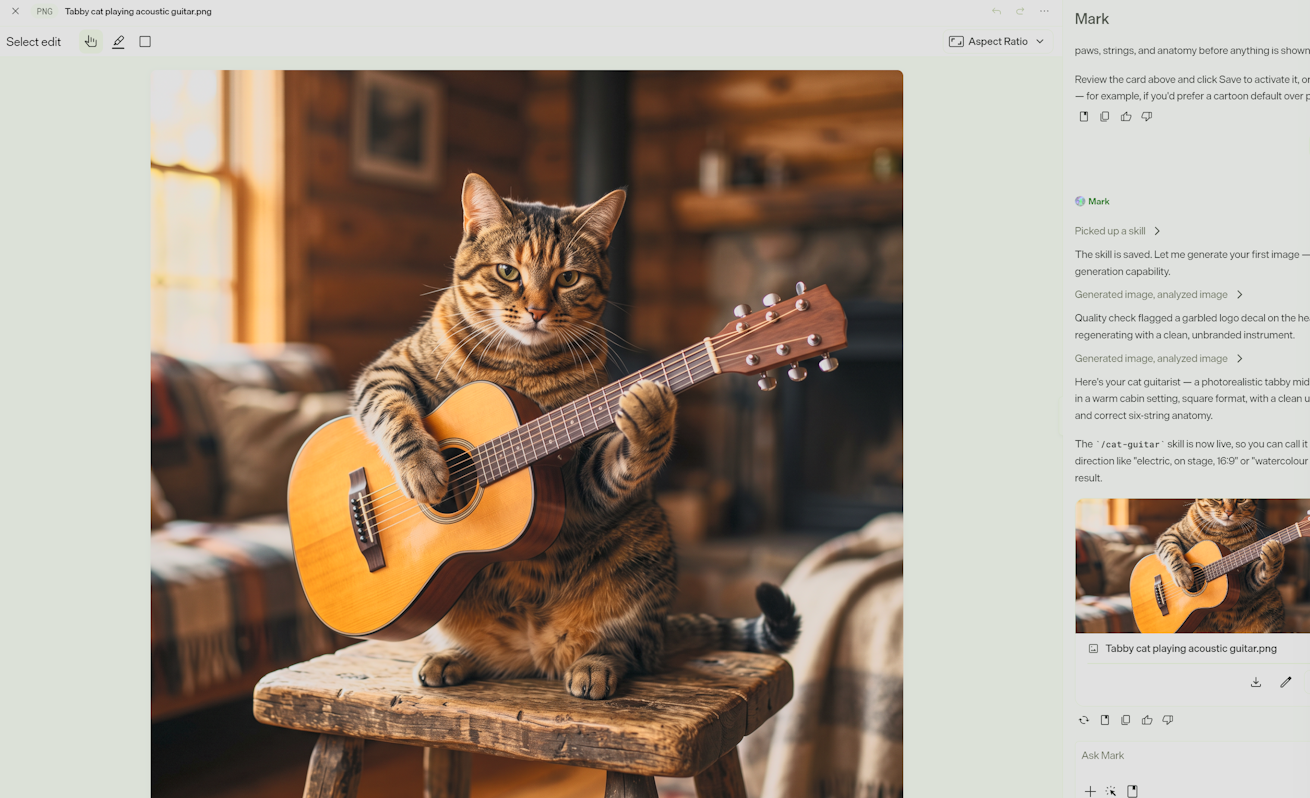
- The image editor (June) offers element detection and selection, brush transforms, batch edits and smart aspect ratios. (below)
- Limitless 1:1 Personalization (June) generates landing pages per target account or segment, which is the capability I covered from the keynote last month.
11. Administration, data residency and credits
Administration essentials
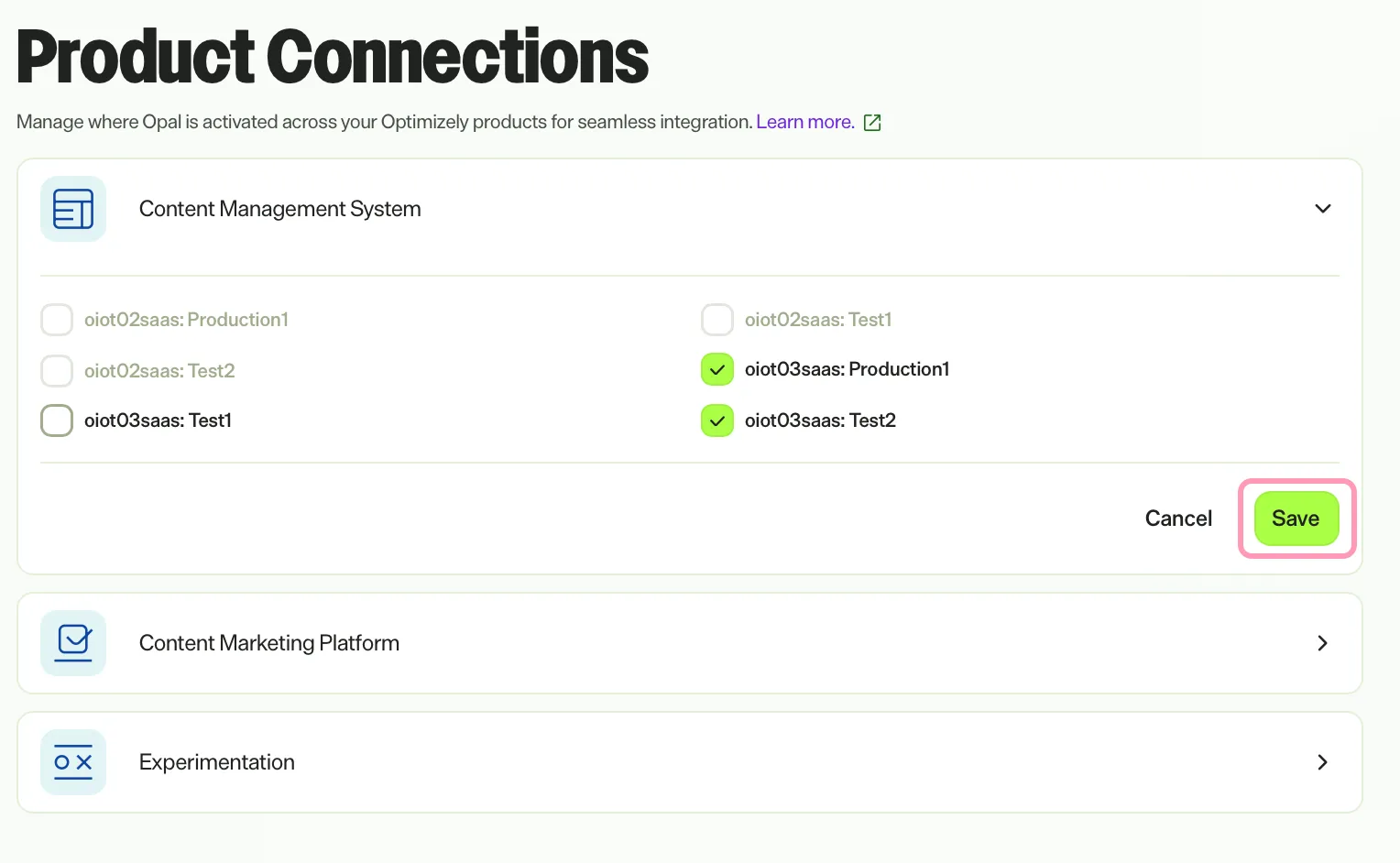
The setup order has not changed: connect your product instances first under Settings → Product Connections. If an instance is not connected, it cannot use the platform's features.
 Source: Optimizely Agent Platform documentation
Other settings to know about are the default model provider and inference level, RAG in chat, Advanced URL safety, and the email domain used for outbound email. Be careful with the email domain: it is a single subdomain prefix per instance, and it cannot be changed once set. Users without Opti ID can also be enabled (see "Enable Opal for non-Opti ID users" in the docs).
Data residency
The platform is hosted in the US and the EU, with the region chosen on your order form. Everyone uses the same URL, and routing to your region happens behind the scenes. Customer inputs and outputs are stored long-term in North America or the EU (Belgium), with no per-country selection. However, prompt processing goes through global model endpoints for availability and performance, so a prompt may be processed in any region, although the LLM does not retain it and the output returns to your region. EU app hosting arrived on 4 June and EU RAG on 24 June. If a client has strict residency requirements, that processing nuance is the one to raise early.
Credits and cost
- Credits are pooled across all eligible Optimizely products.
- Since 1 March 2026, usage falls into fixed complexity bands for predictability.
- Every instance gets 200 complimentary credits per month from 1 October 2025 until 31 December 2026. This is worth noting for 2027 budgeting.
- There are no per-user credit limits. You control spend by controlling who has access.
- Usage is visible in the Opti ID Usage and billing dashboards, with monthly notifications, and in the redesigned Opal Agent Usage dashboard (30 June), which shows executions, credits, top agents and users, and weekly active users.
| Complexity band | Average credits per invocation |
|---|---|
| Chat and basic agents | 2 |
| XS | 10 |
| S | 30 |
| M | 70 |
| L | 130 |
| XL | 200 |
To give a sense of scale from the published per-agent figures: SEO Metadata Implementation for CMS 13 averages 120–200 credits, GEO Schema Optimization 40–60, Content Model Creation 30–80 and the Conductor AEO Gap Finder 180–200.
Who pays depends on the trigger: for chat and in-product invocations it is the invoking user, but for schedule, webhook and email triggers it is the user who created the trigger. Keep that in mind when you design shared automations. In practice, you probably want a dedicated owner (or, increasingly, a Virtual Teammate) owning scheduled workflows, so usage reporting stays meaningful.
12. 2026 at a glance
| Month | Headline releases |
|---|---|
| Jan | Specialised agent versioning; prompt template shortcuts; Graph tools; CMS SaaS content tools; Experimentation and Personalization system tools; PIM chat; tools disabled by default |
| Feb | Agent Builder role and custom roles; Slack Marketplace app; canvas downloads; example shots; Visual Editor, CMP and Analytics tool sets |
| Mar | Claude models join (15 March); fixed-band credits (1 March); Commerce Connect product connection; personal skills; user-level auth for connectors; first remote MCP connectors; credit usage in logs |
| Apr | Agent JSON import/export; message queuing; nested parameter schemas for custom tools; CMS 13 Opal Chat NuGet; Idea Builder |
| May | Instructions → Skills; memory; Artifacts page; notifications; chat modes, action cards and chat pills; RAG for CMP and Graph; CMS 13 content tools; more remote MCP servers |
| Jun | Quality tab; EU hosting and EU RAG; model provider selection; skill import/export; PPTX/DOCX generation; image editor; Agent Library; agent sharing and visibility; Limitless 1:1 Personalization; Teams and Outlook tools |
| Jul | Agent Builder and Skill Builder in chat; input guardrails; Safe URL Browsing; conversation compaction; nested workflows; workflow version history; bring-your-own remote MCP; CMS 13 display template and media tools |
| Aug | Virtual Teammates; Team Messages; Brands; Directory auto-update; Graph synonyms and pinned results; CMS 13 Page Builder and Content Analysis agents |
| Sep | Rename to Agent Platform and Mark; Mark-1, Mark-IQ and Mark-Bench announced; sub-agents; RAG for artifacts; workflow Code step, parallel loops and trigger priority; personal files; LinkedIn and OpenAI Ads connectors; Braze and Fullstory MCP |
For context, at the start of the 2025 release notes Opal was essentially a chat assistant embedded in individual products. The platform pieces, namely specialised agents, workflow agents, the Agent Directory, system tools and custom tools, only arrived on 9 September 2025. Everything in the table above has been built in the thirteen months since.
13. What this means for solution architects
Pulling this together, these are the points I would take into any design conversation right now:
- Upgrade the foundations first. Opti ID (identity for humans and teammates), Graph (retrieval, search tuning and agent access to content) and product connections are the prerequisites for nearly everything above. This is the practical reason the CMS 13 and Commerce 15 upgrade is a strategic decision, not just a version bump.
- Treat skills as code. With import/export, versioning, watchers and a selection model that only reads When to use, a skills library deserves the same discipline as any shared configuration: naming conventions, scoped activation criteria with explicit exclusions, review, and promotion between instances.
- Decide your integration pattern deliberately. For each external system, the choice is now between an existing connector, a vendor's remote MCP server, your own remote MCP server, or a custom tool (on OCP or self-hosted). User-level auth on MCP and connectors gives better attribution; custom tools currently authenticate with Opti ID only.
- Put deterministic logic in deterministic places. Use workflow Code steps and static parameters for anything that does not need an LLM, and keep specialised agents small and single-purpose.
- Design for cost visibility. Choose the inference level per agent rather than defaulting everything to Pro, expect sub-agent rows in logs, and be deliberate about who owns scheduled and webhook triggers, since they pay.
- Layer governance before autonomy. Input guardrails, Output Evaluation, then Execution Guardrails, and only then let Virtual Teammates act without approval, scoping their Opti ID roles and CMS access rights to exactly what their jobs need.
- Use the docs carefully. They are excellent but moving fast: naming is mid-migration, workflow agents are still flagged as private GA, release notes can be superseded by reference pages (as with the inference mapping), and at least one SDK package ID is inconsistent. When it matters, verify in your own instance.
Summary
Twelve months ago, Opal was a promising chat assistant with a brand-new agent builder. Today the Optimizely Agent Platform has a multi-model runtime with managed sub-agent delegation, a layered context system (skills, brands, memory, files and RAG), an open tool ecosystem built around MCP, low-code workflows with real code execution, autonomous Virtual Teammates with their own identities, and a governance stack to keep it all in check. Mark is the friendly face on top, and Mark's own post-trained models are next.
For those of us designing solutions on Optimizely, the platform is no longer an add-on to CMS or Commerce. It is becoming the operational layer that sits across them, and the quality of what it can do depends directly on how well the underlying platform is connected through Opti ID, Graph and the product connections.
If you would like help shaping your agent platform strategy, building custom tools and MCP integrations, or getting onto CMS 13 and Commerce 15 so you can use all of this, get in touch with us at Niteco: https://niteco.com/contact-us/
Key references
- Agent Platform documentation: https://docs.optimizely.com/agent-platform/docs
- 2026 release notes: https://docs.optimizely.com/agent-platform/release-notes
- 2025 release notes: https://docs.optimizely.com/agent-platform/release-notes/2025-agent-platform-release-notes
- Inference level and model mapping: https://docs.optimizely.com/agent-platform/docs/inference-level
- Sub-agents overview: https://docs.optimizely.com/agent-platform/docs/sub-agents-overview
- Skills overview: https://docs.optimizely.com/agent-platform/docs/skills-overview
- Tools overview: https://docs.optimizely.com/agent-platform/docs/tools-overview
- Create custom tools (SDKs): https://docs.optimizely.com/agent-platform/docs/create-custom-tools
- Virtual Teammates overview: https://docs.optimizely.com/agent-platform/docs/virtual-teammates-overview
- Quality tab overview: https://docs.optimizely.com/agent-platform/docs/quality-tab-overview
- Credits: https://docs.optimizely.com/agent-platform/docs/agent-platform-credits
- Administrator guide: https://docs.optimizely.com/agent-platform/docs/get-started-with-agent-platform-for-administrators
- Mark models and Mark-Bench press release (1 September 2026): https://www.prnewswire.com/news-releases/optimizely-introduces-purpose-built-ai-models-for-marketing-that-deliver-frontier-level-quality-at-a-fraction-of-the-cost-302865074.html
- My Opticon New York write-up: https://world.optimizely.com/blogs/scott-reed/dates/2026/9/opticon-new-york--the-strategy-on-upgrading-to-cms-13-/
⭐️⭐️⭐️⭐️⭐️
This is an outstanding roundup, Scott! You’ve managed to cut through the noise and provide a crystal-clear view of where the Optimizely Agent Platform stands today.
Cheers,
HP