
EPiServer.Forms create custom Action for Field Dependency
Feature dependency for fields is available from version 4.15 which lets you configure dependencies among fields in a form. You can create rules for field elements on a new Dependencies tab in the element properties. There are two buit-in actions Show and Hide by default.
In this post, I'm going to implement a simple custom action that can make the fields change its background color based on value of other field(s).
- Create class name RedBackgroundColorAction inherit from IDependencyAction
using EPiServer.Forms.Core.Internal.Dependency;
using EPiServer.ServiceLocation;

namespace CustomFieldDependency
{
    /// <summary>
    /// New Action for form field dependency. Set the background color to form element.
    /// </summary>
    [ServiceConfiguration(typeof(IDependencyAction))]
    public class RedBackgroundColorAction : IDependencyAction
    {
        /// <summary>
        ///    Display name of the action, show to Editor
        /// </summary>
        public string DisplayName => "In red background";

        /// <summary>
        ///   Order in which the action will be listed in the dropdown for Editor
        /// </summary>
        public int Order => 3;

        /// <summary>
        ///   Name of the action. This should be unique among others
        /// </summary>
        public string Name => GetType().FullName;

        /// <summary>
        ///   Name of the method at clientside (Javascript), which will be called when dependency state changes
        /// </summary>
        public string ClientsideAction => "RedBackgroundColorAction";
    }
}
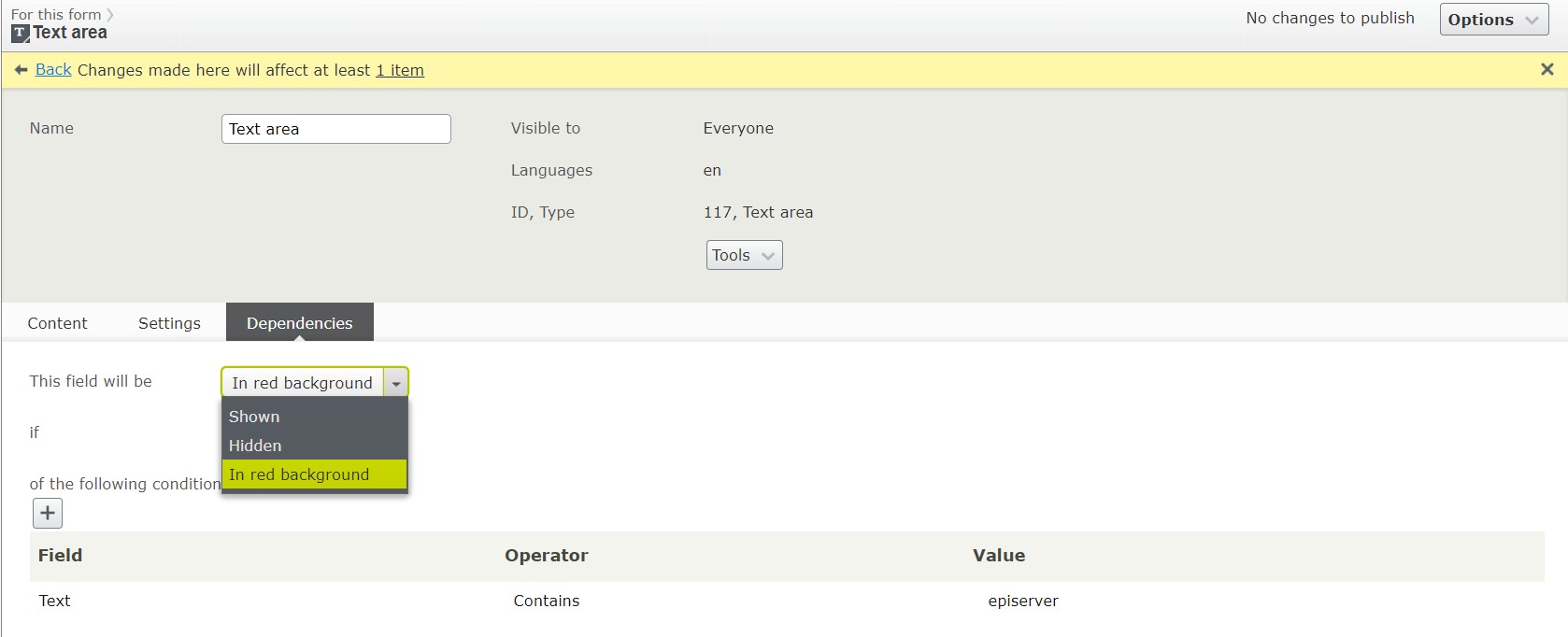
Let's rebuild your project, create a form with two fields: Text and Textarea. On Dependencies tab of Textarea element, the new action is listed. Select the newly created In Red Background action. The background color of Textarea element will be changed to red if the value of Text element contains episerver
2. We need to implement the action RedBackgroundColorAction on clide side. Create a file name FormFieldDependency.js and put it under ~/ClientResources/Scripts folder
(function ($) {

    $.extend(true, epi.EPiServer.Forms.Dependency.Actions, {
        //extending Actions for Form Field Dependency
        RedBackgroundColorAction: function ( /*epi.EPiServer.Forms.Dependency.DependantController*/ controller) {

            var elementName = controller.dependantInfo.fieldName;
            var $wrapperElement = $('[data-f-element-name="' + elementName + '"]', controller.workingFormInfo.$workingForm);
            var $inputElement = $('[data-f-datainput]', $wrapperElement); // or simply controller.$domElement

            var dependencyInfo = getDependencyInfo(controller.workingFormInfo, controller.dependantInfo.fieldName); // or simply controller.dependantInfo

            if (!dependencyInfo) {
                return;
            }

            if (controller.isSatisfied) {
                $inputElement.addClass('bg-red');
            } else {
                $inputElement.removeClass('bg-red');
            }
        }
    });

    // get dependency infor of a field
    function getDependencyInfo(workingFormInfo, fieldName) {
        var dependencies = workingFormInfo.DependenciesInfo;
        if (!dependencies || dependencies.length === 0) {
            return null;
        }

        for (var i = 0; i < dependencies.length; i++) {
            if (dependencies[i].fieldName === fieldName) {
                return dependencies[i];
            }
        }

        return null;
    }

})($$epiforms || $);
3. Create FormFieldDependency.css file to write cutom style for elements and put it under ~/ClientResources/Styles folder
.bg-red {
    background-color:red !important;
}
4. Register external client resources to EPiServer.Forms.
using System;
using System.Collections.Generic;
using EPiServer.Forms.Implementation;
using EPiServer.ServiceLocation;

namespace CustomFieldDependency
{
    /// <summary>
    /// Register client resources for EPiServer.Forms
    /// </summary>
    [ServiceConfiguration(ServiceType = typeof(IViewModeExternalResources))]
    public class ViewModeExternalResources : IViewModeExternalResources
    {
        public virtual IEnumerable<Tuple<string, string>> Resources
        {
            get
            {
                var arrRes = new List<Tuple<string, string>>();

                arrRes.Add(new Tuple<string, string>("script", "/ClientResources/Scripts/FormFieldDependency.js"));
                arrRes.Add(new Tuple<string, string>("css", "/ClientResources/Styles/FormFieldDependency.css"));

                return arrRes;
            }
        }
    }
}
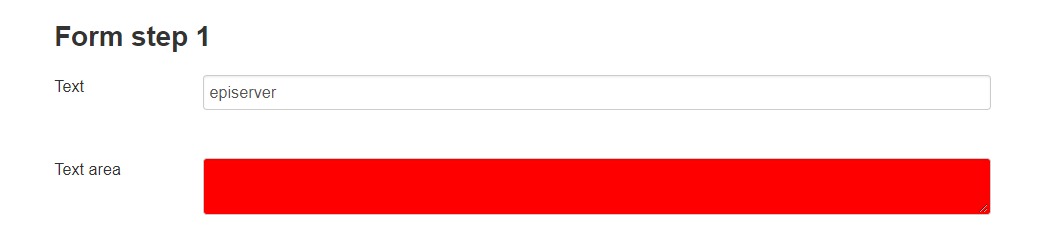
Let's view the form in Viewmode, enter episerver in Text element and see the result.
Hope this help.

Comments