


Supercharging Optimizely Forms: Introducing Dynamic Email Routing & Conditional Submissions
Supercharging Optimizely Forms: Introducing Dynamic Email Routing & Conditional Submissions
Optimizely Forms is a powerhouse for gathering user data, but as implementations grow in complexity, we often run into a common limitation with the built-in "Send email after form submission" actor: it's a bit static.
In a typical enterprise scenario, you don't just want one email going to one place. You might need to route a lead to the "Sales" team if they select a specific department, or perhaps you only want an email sent if the user ticks a "Request Callback" box.
To solve this, I’ve released an open-source package: ScottReed.Optimizely.Forms.DynamicEmailRouting. It’s a custom post-submission actor for CMS 12 that brings dynamic routing and complex conditional logic directly into the Forms UI.
The Problem: The "One-Size-Fits-All" Email
The default email actor is great for simple notifications. However, once you need logic like "If Department is 'Support', send to support@company.com" or "Only send this internal alert if 'Priority' is 'Critical'", you're usually forced to write custom code for every specific form or clutter the CMS with multiple overlapping actors.
The Solution: Dynamic Email Routing
This package extends the core functionality of the built-in email actor but adds two powerful layers: Email Routing and Conditional Logic.
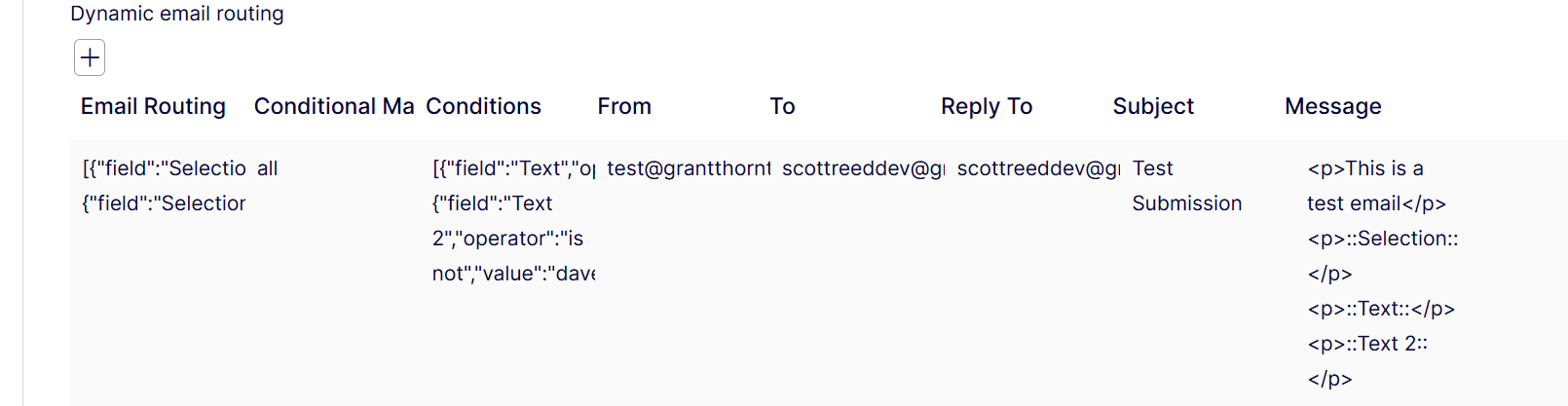
1. Dynamic Email Routing
Instead of a single hardcoded "To" address, you can now define a mapping table. You select a form field, define a value to match, and specify the recipient. If no match is found, it gracefully falls back to the primary "To" address.

2. Conditional Logic (AND/OR)
Sometimes you don't want an email sent at all unless specific criteria are met. The actor allows you to add multiple conditions using "is" and "is not" operators. You can toggle between "Match ALL" (AND) or "Match ANY" (OR) logic.

Technical Implementation: Under the Hood
For the developers curious about how this is built, the package leverages several Optimizely extension points to ensure a "native" feel.
The Actor & Model
The core logic resides in DynamicEmailRoutingActor, which inherits from SendEmailAfterSubmissionActor. This is crucial because it allows us to reuse the existing EmailTemplateActorModel features—like the rich text editor, the "Insert Placeholder" dropdown, and the standard From/Subject fields—without reinventing the wheel.
The UI (Dojo & Protected Modules)
To provide a seamless editor experience, the package uses the Protected Module pattern. On build, the client-side resources (Dojo editors and language files) are zipped into a protected module folder.
I’ve implemented three custom Dojo editors:
-
EmailRoutingEditor.js: Handles the dynamic table for routing. -
ConditionMatchEditor.js: A simple dropdown for logic selection. -
ConditionsEditor.js: Manages the conditional rules.
Localization
All labels and the actor name are localized via XML files embedded within the module, ensuring it fits perfectly into the Optimizely UI language settings.
Getting Started
Installation is a standard NuGet affair. Because it uses an IConfigurableModule for auto-registration, there's zero configuration required in your Startup.cs.
Install via NuGet:
https://nuget.optimizely.com/packages/scottreed.optimizely.forms.dynamicemailrouting/
dotnet add package ScottReed.Optimizely.Forms.DynamicEmailRouting
Configuration:
-
Ensure your SMTP is configured in
appsettings.json(the actor uses the standard Optimizely SMTP client). -
In the CMS, add the Dynamic email routing actor to your Form Container.
-
Define your routes and conditions.
[Image Placeholder: Selecting the Dynamic Email Routing actor in the Form Settings tab]
Extensibility
The project is built with extensibility in mind. If you need more complex operators (like "contains" or "starts with"), you can easily extend the EvaluateConditions logic in the actor or contribute to the repository!
Wrap Up
By moving this logic into the CMS UI, we empower editors to manage complex workflows themselves without needing a deployment for every routing change.
You can find the full source code, documentation, and a test Alloy site on GitHub: 👉 scottreed/Optimizely-Dynamic-Form-Submission
I’d love to hear your feedback or see your PRs!
Nice one Scott - the timing of the release of your package was almost perfect 👍
Let me know if there's any issues. FYI I have a few new features coming shortly
Should come shortly!
All these features are now released on to the 1.1.0. version on the nuget feed. Also a checkbox on the conditions allowing a master toggle has been added